Tabularia API
For whoever connects another system to Tabularia: a scheduler such as Airflow, a
CI job, a department script. Everything the interface does goes through this
API; the complete, always-current reference is the OpenAPI page the gateway
serves itself, at https://<your host>/api/docs (http://localhost:8000/docs in
development). This guide covers the part an integration needs and promises to
keep stable. The other integrations are listed in Integrations.
Signing in: API tokens
A script authenticates with a token in the Authorization header:
curl -H "Authorization: Bearer tab_…" https://tabularia.example.com/api/auth/me
Tokens start with tab_. They come in two kinds:
- Personal tokens, which anyone creates in Settings → API tokens for their
own scripts. They act with that person's permissions. An administrator can turn
them off for the whole installation (
AUTH__PERSONAL_TOKENS=false): from then on, personal tokens already given out stop working too, while service account tokens keep working. Observer accounts (such as a shared demo guest) have no personal tokens: an account made an observer loses the ones it had, and a personal token never works for an account that is only an observer, however it became one (for example by losing its administrator role). - Service account tokens, created by an administrator in Administration → Service accounts. A service account is an integration rather than a person: it has no password and cannot sign in through SSO. It gets permissions like anyone else, from the groups it belongs to and from the folders it is granted. Use one per integration, so that revoking one integration's access does not affect the others.
Every token has:
- An access level. Read only refuses every request that changes something
(any method other than GET/HEAD/OPTIONS) with
403; the POSTs that only read,POST /tasks/export(withPOST /tasks/exports),POST /tasks/preview,POST /reports/{id}/render,POST /dashboards/{id}/dataandPOST /dashboards/{id}/render, are allowed. Read and write can do whatever its account can do. A token never adds permissions: it is at most as powerful as its account. - An expiry of at most
AUTH__API_TOKEN_MAX_DAYSdays, one year by default. - A secret that is shown once, at creation. Tabularia keeps only its SHA-256 fingerprint and its first characters, so you can recognise it in a list.
Tokens are revoked from the same screens: the owner revokes their own, an
administrator revokes any token from Administration → Service accounts → All API
tokens. A revoked or expired token gets 401 on the next request, and so does
any token of a deleted account. Deactivating an account or setting a new password
for it revokes its tokens along with its sessions; reactivating the account does
not bring them back. Every action records in the audit log the name of the token
that did it, never the token itself. Tokens travel only in the header; one placed
in a cookie is ignored.
A token cannot create other tokens, create users, set passwords, reactivate an account, or make an account an administrator or an observer (by its flag, a group's flag or joining such a group). So revoking a leaked token is enough to close the door: it cannot have left behind another way in. What it did with its permissions stays done, as with any account: after revoking a leaked administrator token, look in the audit log for the actions carrying its name (a webhook it created, a schedule it changed).
Example: a token for a scheduler
An external scheduler (Airflow, a CI job) runs the sample flow «Top 20 Products by Revenue» every night. As an administrator:
- Administration → Service accounts, name
Airflow production, Create account. The account gets an address of its own (airflow-production@service.invalid) and no password. - Give it what the job needs, as to a person: RUN on
Sample / Flows, where the flow is, and EDIT onSample / Private tables, where its Output writes (in each folder's Folder settings, or through a group). Without EDIT there the run starts and then fails with «Missing 'edit' permission on folder …». - Open the account, name the token
nightly runs, Access Read and write, Expires 90 days, Create token. Copy the secret now: it is shown once.
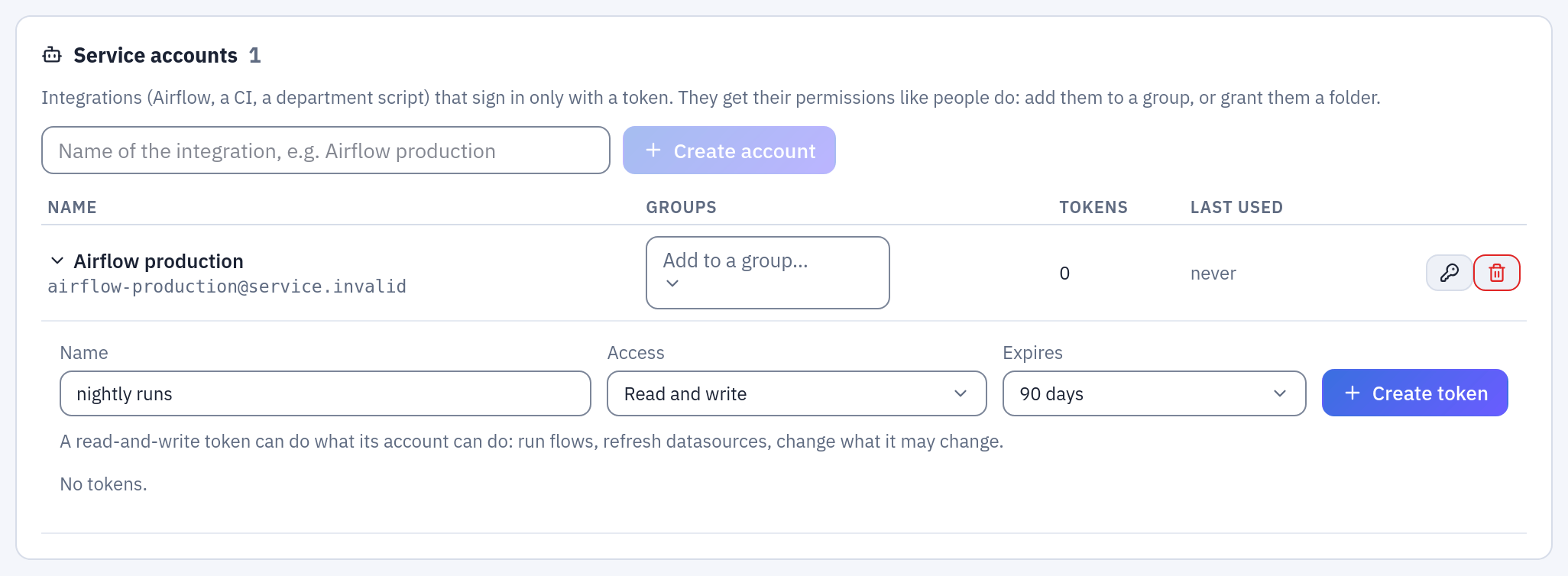
A token is created on the account it acts as; its access and its expiry are chosen here.
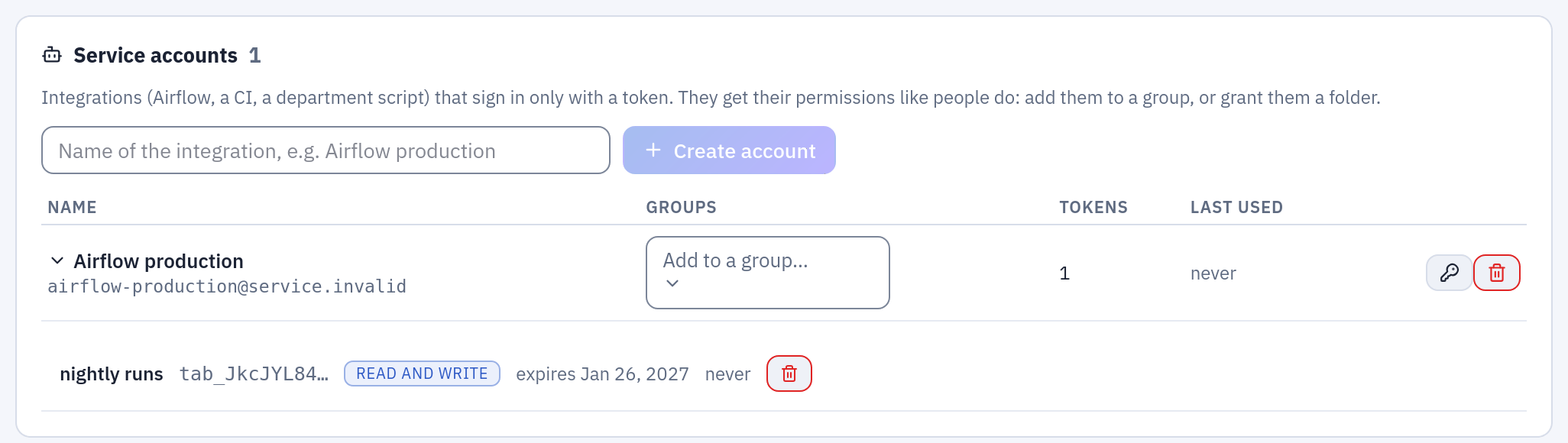
After Create token the list keeps only the first characters of the token, to recognise it, and when it was last used.
Then, from the scheduler (the flow's id is in its editor address, /editor?flow=6):
curl -X POST -H "Authorization: Bearer tab_…" \
  https://tabularia.example.com/api/flows/6/run-now
# 202 {"status": "started", "flow_id": 6, "run_id": 1318}

curl -H "Authorization: Bearer tab_…" https://tabularia.example.com/api/runs/1318
# {"id": 1318, "status": "SUCCESS", "flow_id": 6, "launched_by": 206, …}
The run appears in Runs started by Airflow production, and the audit log names the
token. To cut the job off, revoke the token: the next call gets 401.
Stable endpoints
The paths below are a contract: within a major version they keep their meaning
and their fields. New fields can appear, so ignore the ones you do not know.
Anything else in /docs may change between minor versions. Breaking changes are
announced in CHANGELOG.md one minor release in advance.
| What | Request | Notes |
|---|---|---|
| Who am I | GET /auth/me | the account behind the token |
| Folders | GET /projects | those you can see |
| Flows | GET /flows, GET /flows/{id} | |
| Run a flow | POST /flows/{id}/run-now | 202 with {"run_id": …}; 409 if it is already running. ?mode=production uses the flow's production engine, as a schedule would |
| A run | GET /runs/{id} | status: PENDING, STARTED, SUCCESS, FAILURE; error when it failed |
| Runs | GET /runs?q=…&status=…&limit=…&offset=… | a page: {"items": […], "total": n} |
| Datasources | GET /datasources | each with bucket and key, which the export needs; GET /datasources/{id}/runs for its refreshes |
| Refresh a datasource | POST /datasources/{id}/refresh | 202 with the run; database datasources only |
| Export | POST /tasks/export | CSV (streamed) or Excel; see below |
| Download a report | GET /reports/{id}/render?format=pdf&<parameter>=<value> | the file, waited for; see Download a report |
| Reports | GET /reports, GET /reports/search?q=…&sort=trending, GET /reports/{id}/parameters | those you can see (all, or a page searched and ordered as the Reports tab: trending, name, updated); a report's parameters with their defaults and choices |
| Dashboards | GET /dashboards, GET /dashboards/search?q=…&sort=trending, GET /dashboards/{id}, GET /dashboards/{id}/parameters | those you can see, and as the Dashboards tab; see Dashboards |
| A dashboard's numbers | POST /dashboards/{id}/data | the numbers of its tiles, ready to draw |
| Download a dashboard | GET /dashboards/{id}/render?format=pdf&<parameter>=<value>&click.<tile>=<value> | the file, waited for |
| Lineage | GET /lineage | the graph of flows, datasources, connections, scripts, SQL scripts, notebooks and flow groups; ?type=flow|datasource|connection|script|sql|notebook|group&id=… centres it |
All paths are relative to the gateway: https://<host>/api behind the reference
ingress or compose file, http://localhost:8000 in development.
Recipes
Run a flow and wait for the result:
import time, requests

API = "https://tabularia.example.com/api"
H = {"Authorization": "Bearer tab_…"}

run_id = requests.post(f"{API}/flows/42/run-now", headers=H).json()["run_id"]
while True:
    run = requests.get(f"{API}/runs/{run_id}", headers=H).json()
    if run["status"] in ("SUCCESS", "FAILURE"):
        break
    time.sleep(5)
if run["status"] == "FAILURE":
    raise SystemExit(run["error"])
Polling is fine for a script. For anything long-lived, have Tabularia call you instead (webhooks, below).
Refresh a database datasource:
curl -X POST -H "Authorization: Bearer tab_…" https://tabularia.example.com/api/datasources/7/refresh
# 202 {"id": 1234, "status": "PENDING", …}: then GET /runs/1234 as above
Download a datasource as CSV:
ds = next(d for d in requests.get(f"{API}/datasources", headers=H).json() if d["id"] == 7)
body = {"bucket": ds["bucket"], "input_key": ds["key"], "operations": [], "format": "csv", "filename": f"{ds['name']}.csv"}
with requests.post(f"{API}/tasks/export", headers=H, json=body, stream=True) as r:
    r.raise_for_status()
    with open(body["filename"], "wb") as f:
        for chunk in r.iter_content(1 << 20):
            f.write(chunk)
CSV exports stop at EXPORT__MAX_ROWS (5,000,000 rows by default) and Excel
exports at 1,048,575 rows; the response says so instead of cutting silently.
A person, or a service account, has at most EXPORT__MAX_RUNNING_PER_PERSON (3 by
default) exports and documents being prepared at once. A request with an API token past
it does not fail: it waits for one of them to finish, up to REPORTS__API_WAIT_SECONDS
(POST /tasks/export as long as it waits for a worker), and answers 429 only when none
did. A script that sends ten reports by email, one after the other or a few at a time,
gets them all.
A worker writes the file, and POST /tasks/export keeps the request open until it
has. For a long export, start it and come back for it instead, as the web app does:
POST /tasks/exports with the same body answers {"task_id": …};
GET /tasks/exports/{task_id} says running, ready or failed (with detail);
once ready, GET /tasks/exports/{task_id}/file sends the file, once: it is deleted
as soon as it has been sent, and one never taken is deleted after an hour. Only the
account that started an export can see it.
Errors
| Code | Meaning |
|---|---|
401 | no token, unknown token, expired or revoked token, deactivated account |
403 | the account lacks the permission, or the token is read only |
404 | not found, or not visible to this account |
409 | conflict: the flow is already running, the datasource is already refreshing |
422 | the request is malformed: the body says which field |
503 | the engine or the database is not answering: try again in a moment |
Error bodies are JSON with a detail field. Its language follows the
Accept-Language header where a translation exists.
Download a report
A pixel-perfect report (a page designed in the report designer, kept in a folder) can be downloaded from any script, with its parameters, as the web app renders it:
GET /reports/{id}/render?format=pdf®ion=North&since=2026-09-01
format:pdf(the default),xlsx(the report's tables, groups and subtotals as rows) orhtml(the summary an email carries, as an.mhtmlfile: the HTML with its charts as images).- The parameters go in the query string by name. A parameter that takes several values
repeats its name:
?region=North®ion=South. One left out, or empty, takes the report's default;{none}says no value for an optional one, whatever its default (region=%7Bnone%7D), and the viewer's links do the same. A value is text, as typed in the report's form: a number with a dot for decimals (1234.5), a date asyyyy-mm-dd,trueorfalse. A date may also be a placeholder, resolved in the report's time zone when it is rendered:since={start_of_month-1m}is the first day of last month. Encode the values: in a query string+is a space, so{today+7}is written%7Btoday%2B7%7D(requests'paramsand curl's--data-urlencodedo it for you). A value repeated for a parameter that takes several counts once. - An AI comment in the report: a token that may write makes
the call it needs, on its account; a read only one causes none, and gets what is kept, or a line
in its place.
xlsxhas no place for one. - The token: read only is enough. The report reads with the rights of the token's account: it needs VIEW on the report's folder, and every dataset the report reads must be one that account may read (the datasources, the views, the SQL scripts, and CONNECT on a database connection).
- The answer is the file, with its name in
Content-Disposition(Monthly sales.pdf; a name with accents comes twice, as written and without them, socurl -OJkeeps it). The request stays open while a worker renders it, up toREPORTS__API_WAIT_SECONDS(120 seconds by default); past that the render is stopped, and so it is when the script stops waiting first (its own timeout): a script that tries again does not pile renders up. Every download is in the audit log (report.render, fromapi).
The report's id is in its address (/report?id=12), and Copy API link in the
report's toolbar gives the address with the values on screen. GET /reports lists the
reports the account sees; GET /reports/{id}/parameters lists a report's parameters, with
their types, their defaults as they read today and their choices.
Example: last month's PDF, every month
A script run on the first of each month downloads the PDF of the month before for one
region. As an administrator, create a service account (see
Example: a token for a scheduler) with VIEW on the
report's folder and on the data it reads, and give it a token with access Read only.
The report here has the parameters region (text) and since and until (dates):
import datetime as dt
import os

import requests

API = "https://tabularia.example.com/api"
TOKEN = os.environ["TABULARIA_TOKEN"]  # never in the script itself
REPORT_ID = 12

first_of_this_month = dt.date.today().replace(day=1)
last_day = first_of_this_month - dt.timedelta(days=1)
first_day = last_day.replace(day=1)

response = requests.get(
    f"{API}/reports/{REPORT_ID}/render",
    params={"format": "pdf", "region": "North", "since": first_day.isoformat(), "until": last_day.isoformat()},
    headers={"Authorization": f"Bearer {TOKEN}"},
    timeout=180,  # longer than REPORTS__API_WAIT_SECONDS
)
if response.status_code == 400:
    detail = response.json()["detail"]
    raise SystemExit(f"{detail['parameter']}: {detail['message']}")
response.raise_for_status()
with open(f"sales_north_{first_day:%Y-%m}.pdf", "wb") as f:
    f.write(response.content)
The same with curl, two regions in Excel; -G with --data-urlencode puts the values in
the query string, encoded:
curl -fG -H "Authorization: Bearer $TABULARIA_TOKEN" -o sales.xlsx \
  --data-urlencode format=xlsx --data-urlencode region=North --data-urlencode region=South \
  --data-urlencode "since={start_of_month-1m}" \
  https://tabularia.example.com/api/reports/12/render
When it fails
| Code | Meaning |
|---|---|
400 | a value does not fit a parameter: {"detail": {"message": "Parameter «since»: '2026-02-30' is not a date: write it as yyyy-mm-dd", "parameter": "since"}}. The same for a required parameter without a value, a value outside its choices, a name the report does not have |
404 | no report with that id, or one in a folder the account cannot see |
422 | the report cannot be rendered: a dataset the account may not read, said with its name as one that does not exist (The dataset «orders»: there is no datasource «Salaries» you can read), a dataset over the row limit (REPORTS__MAX_ROWS, 3,000,000 by default: aggregate in SQL, or filter), too many pages |
502 | the engine could not render it (the chart service down, for a report with charts) |
503 | the engine is not answering (restarting, its node drained): try again in a moment |
504 | not ready within REPORTS__API_WAIT_SECONDS: the render was stopped |
To send a report by email instead, on a schedule and right after the data is refreshed,
put it in the Pushmail cell of a flow group. In a marimo notebook,
tabularia.report() does the same as this API.
Dashboards
A dashboard answers scripts with its numbers and with its files.
A token that may only read is enough for all of this. The reads are with the rights of the
token's account: VIEW on the dashboard's folder, and the datasets it reads must be ones that
account may read. A tile on a dataset it may not read says so in its place, and the others answer.
The examples read «Sales overview» of the sample data;
its id is in its address (/dashboard?id=12).
Its parameters
GET /dashboards/12/parameters?area=Nord-Ovest
The parameters as the form shows them: types, defaults as they read today, choices. The values
in the query string are those the other lists follow: with area=Nord-Ovest, agent has 13
choices instead of 90.
Its numbers
curl -s -H "Authorization: Bearer $TABULARIA_TOKEN" -H "Content-Type: application/json" \
  -d '{"params": {"area": "Nord-Ovest"}, "tiles": ["revenue"]}' \
  https://tabularia.example.com/api/dashboards/12/data
{"tiles": {"revenue": {"type": "kpi", "label": "Revenue", "value": 2818062.7190681,
                       "text": "€ 2,818,063", "change": null, "spark": null, "title": "Revenue",
                       "computed_at": "2026-11-01T20:03:24.145747+00:00", "cached": false}},
 "truncated": {"agents": false}}
| In the request | |
|---|---|
params | the parameters' values, by name, as text |
clicks | what is chosen on a tile: [{"tile": "by_area", "values": ["Centro"]}], and "on": "columns" for a matrix's columns. A tile's id and values, never an expression: the expression is the saved one |
tiles | only these tiles; none, every one |
page | a table's page, from 0: {"table": 1}; 50 rows a page |
state | a table's sort and closed groups, as on the screen: {"items": {"table": {"sort": {"column": 1, "dir": "asc"}, "collapsed": [["Centro"]]}}} |
refresh | true reads the source again, at most once every 10 seconds per dashboard, for everyone: past that it answers with what is kept, without an error |
| In the answer | |
|---|---|
tiles | by tile id. The numbers: type, title, what the type draws (value and text; data; rows), computed_at (when the rows were read from their source) and cached (this answer did not read it). A tile clicked adds chosen, what stayed of its values. A tile that cannot answer: only {"error": "a sentence", "code": …} |
truncated | by dataset read, whether it is past DASHBOARDS__MAX_ROWS. Of a dataset you may not read, nothing |
code | Means |
|---|---|
no_access | it reads a dataset the account may not read |
truncated | it reads a dataset past DASHBOARDS__MAX_ROWS: the sentence says how to aggregate. No number on part of the rows |
dataset | its dataset cannot be read for another reason (no data yet, a parameter its SQL needs) |
error | anything else in this tile |
A value of a click is the raw one the tile gave in keys (or path and key in a table): the
number or the date, not the text on the screen; null for an empty group; a list for several levels,
["Nord", 2023].
Its files
curl -fG -H "Authorization: Bearer $TABULARIA_TOKEN" -o sales.pdf \
  --data-urlencode format=pdf --data-urlencode area=Nord-Est --data-urlencode click.by_area=Nord-Est \
  https://tabularia.example.com/api/dashboards/12/render
format:pdf(the default) orpng, the same document on one long page.- The parameters go in the query string by name, as for a report: one left
out takes the default,
{none}says no value. - The clicks are written as in the viewer's address:
click.by_area=Nord-Est, repeated for several values;click.cross.columns=…for the columns of a matrixcross;{none}for an empty group;\before a text that would read as something else; JSON for several levels. - The answer is the file, with its name in
Content-Disposition, as a report's, and the same wait (REPORTS__API_WAIT_SECONDS). Every download is in the audit log (dashboard.render, fromapi).
POST /dashboards/{id}/render, with {"format": "pdf", "params": {…}, "clicks": […], "state": {…}}, is what
the viewer's button does: it answers {"task_id", "filename"} at once, followed at
GET /tasks/exports/{task_id} until status is ready, and taken at GET /tasks/exports/{task_id}/file.
| Status | Means |
|---|---|
400 | a value does not fit a parameter: {"detail": {"message": "Parameter «area»: 'Atlantis' is not one of its choices", "parameter": "area"}}. The same for a name the dashboard does not have |
404 | no dashboard with that id, or one in a folder the account cannot see |
422 | a click that cannot be: The dashboard has no tile «nope», The tile «revenue» cannot filter the others, The click on «by_area» has 101 values: at most 100; an unknown format; a file that cannot be made, saying why |
A link to the viewer with a click on a tile that is gone opens without it; the API says 422. To send a
dashboard by email, on a schedule, put it in the Pushmail cell of a flow group.
Webhooks
Instead of polling, an administrator can have Tabularia call an address when something finishes (Administration → Webhooks).
Events
| Event | When |
|---|---|
flow.run.succeeded / flow.run.failed | a flow execution finished: from a schedule, from Run in the interface, from run-now, or inside a flow group (the group itself sends no event). A run closed because its process died, because the gateway shut down, or because it waited in the queue too long is a flow.run.failed too |
datasource.refresh.succeeded / datasource.refresh.failed | the refresh of a database datasource finished |
ping | the Send a test call button |
A webhook can be limited to one folder and its subfolders.
The call
A POST with a JSON body:
{
  "id": "5f0c1c8e-8a2e-4b8f-9a55-2a8f4b1d2c3e",
  "event": "flow.run.failed",
  "created_at": "2026-10-12T08:30:12.401Z",
  "data": {
    "run": {
      "id": 2212, "kind": "orchestration", "status": "FAILURE", "trigger": "schedule",
      "started_at": "2026-10-12T08:29:50.112Z", "finished_at": "2026-10-12T08:30:11.700Z",
      "duration_seconds": 21.6, "rows_written": null, "error": "ClickHouse: no response from …"
    },
    "flow": {"id": 14, "name": "Margin by Category and Month"},
    "folder": {"id": 3, "name": "Reports"}
  }
}
For datasource events, data carries datasource in place of flow. Headers:
| Header | |
|---|---|
X-Tabularia-Event | the event |
X-Tabularia-Delivery | the delivery id, the same as id in the body |
X-Tabularia-Signature | t=<unix seconds>,v1=<hex HMAC-SHA256> |
Verifying the signature
Each webhook has a secret (whsec_…), shown when it is created or regenerated.
v1 is the HMAC-SHA256 of "<t>.<raw body>" keyed with that secret. Check it
against the raw body, before parsing it, and reject old timestamps:
import hashlib, hmac, time

def verify(secret: str, raw_body: bytes, header: str, tolerance: int = 300) -> bool:
    parts = dict(p.split("=", 1) for p in header.split(","))
    t, v1 = parts.get("t", ""), parts.get("v1", "")
    expected = hmac.new(secret.encode(), f"{t}.".encode() + raw_body, hashlib.sha256).hexdigest()
    return hmac.compare_digest(expected, v1) and abs(time.time() - int(t)) <= tolerance
Regenerating the secret takes effect at once, including for calls already queued.
Delivery
- Any 2xx answer counts as delivered. Anything else, or no answer within
WEBHOOKS__TIMEOUT_SECONDS(10), is retried after 30 s, 2 min, 10 min, 1 h and 6 h; after the sixth attempt the delivery is marked failed. Redirects are not followed, and only the first few kilobytes of the answer are read. - At least once. A call can, rarely, arrive twice: deduplicate on
X-Tabularia-Delivery. A delivery sent again by hand from the history gets a new id. - Order is not guaranteed across events: use
created_atand the run'sfinished_at. - One slow receiver does not hold up the others. Each Tabularia process keeps up to 16 calls in flight, at most 2 of them to the same webhook, and starts the next as soon as one finishes. A webhook whose receiver is down retries on its own schedule while the others go out as usual.
- HTTPS. The certificate is checked against the name in the URL. Tabularia
trusts the usual public certificate authorities; for a receiver with a
certificate from your company's own authority, give the gateway its bundle with
SSL_CERT_FILE(orSSL_CERT_DIR). - Allowed addresses. Only
http/https. Never loopback, link-local (including the cloud metadata address 169.254.169.254), multicast or reserved addresses, nor the other clouds' metadata addresses (100.100.100.200, 168.63.129.16, fd00:ec2::254). The name is resolved on every call, checked, and the connection goes to the address that was checked, so a name cannot resolve to something else in between. Private networks are allowed, since an integration on the same network is the normal case. A forbidden address fails at once and is not retried; a name that does not resolve is retried like any other failure. An address that cannot be read (http://0177.0.0.1/, an empty label, a port above 65535) is refused when the webhook is saved. - The history of every call (status, attempts, HTTP code, error, the body
sent) is kept for
WEBHOOKS__RETENTION_DAYS(30) and shown under each webhook, where a call can be sent again.