The Container node
For whoever runs Tabularia on Kubernetes, and whoever writes flows that run images.
The Container node is a step of a flow that runs an image of yours: a model packaged in an image, a Spark or dbt job your data team already ships, a company tool that has run in a container for years. Tabularia runs it as a Kubernetes Job and orchestrates it with the rest of the flow (order, schedule, retries, log, outcome); the code and the image stay yours.
It is not the Script node: there Tabularia builds the image from an environment an administrator defines, and you write the code in the editor. Here the image comes ready from a registry.
Before you start
- The installation runs on Kubernetes with
containers.enabled: truein the chart (Container registries). - An administrator has defined the registry, with the repositories whose images may run, and has given you (or one of your groups) access to it. The editor shows only the registries and the images you may use.
- The cluster's nodes can download from the registry: Try in the cluster, in the registry's page, checks it.
- For a node with an input or an output, the scripts bucket is configured
(Administration → Scripting environments): the data travels through it. When its
address is private, it is listed in
networkPolicy.userCodePrivateCIDRs.
The palette offers Container, under Control, when at least one registry is granted to you.
The node
| Field | |
|---|---|
| Registry | one of those granted to you |
| Image | a repository of the registry, team/forecast. The exact names allowed are suggested; a pattern (team/*) allows any name under it |
| Tag | v3, or a digest (sha256:…). Empty means latest. The ↻ button, or the field itself, reads the tags from the registry |
| Command | the program to run, one item per line. Empty: the image's own entrypoint |
| Arguments | one per line. Empty: the image's own arguments |
| Variables | names in capitals, digits and _, with a value |
| CPU, Memory | what the container gets: 500m, 2; 512Mi, 4Gi. Both its request and its limit, within the installation's maximum |
| Timeout, Retries, Wait between | as on the Script node |
Command and arguments are passed to the container as they are, one item per line: there
is no shell, so no quotes, no $VARIABLE expansion, no &&. Write
sh / -c / your command line when you want a shell, if the image has one.
What the image does. Once the image and the tag are chosen, the panel reads the image's own configuration from the registry and shows it: what it runs by default (its entrypoint and its command), the platforms it is built for, when it was built and its size, its title, description and version when it declares them. Copy these into the command and the arguments starts from what the image runs (the entrypoint becomes the command, the image's command the arguments), to change it. The variables the image declares are offered with their default value: one click adds one to the node's variables.
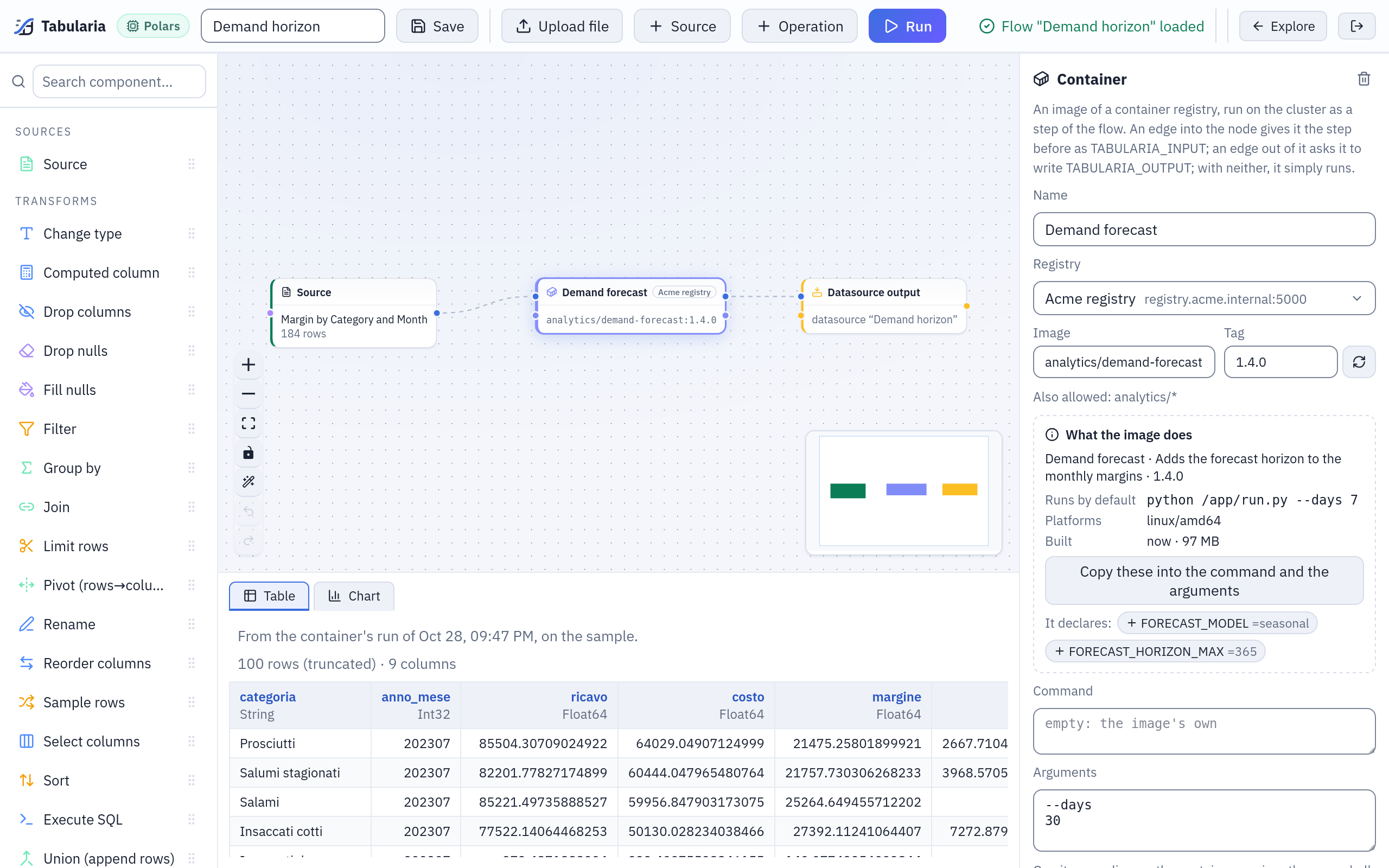
A Container node between a Source and an Output. Its panel names the registry, the image and the tag, reads from the registry what the image runs by default (python /app/run.py --days 7), its platform, size and the variables it declares, and takes --days and 30 as arguments.
In a flow group
A flow group can run an image as a step of its own: Container (an image) in the group's catalog, or in the picker of an empty cell. The cell opens the same panel, without a flow's «Run»: registry, image, tag, command, arguments, variables, resources, timeout and retries. The cell has no data in and none out; its failure stops the group. Whoever has no access to the registry or the image cannot open the group, as for a flow with a Container node. A change of a cell's image, command or variables by someone else switches off the group's schedule, set by another person.
What the container finds
| Variable | |
|---|---|
TABULARIA_INPUT | an s3:// address of a parquet file with the step before the node, when an edge enters it; empty otherwise |
TABULARIA_OUTPUT | where to write a parquet file the nodes after it read, when an edge leaves it; empty otherwise |
TABULARIA_RUN_ID, TABULARIA_FLOW_ID, TABULARIA_FLOW_NAME, TABULARIA_NODE_ID, TABULARIA_STEP_ID, TABULARIA_ATTEMPT | which run, flow, node and attempt this is |
AWS_ACCESS_KEY_ID, AWS_SECRET_ACCESS_KEY, AWS_REGION, AWS_ENDPOINT_URL | the scripts bucket's credentials, only when the node has an input or an output |
| the registry's variables | set by the administrators on the registry; secret ones through a Kubernetes Secret, never written in the Job |
| the node's variables | as written in the node |
A node may not redefine one of the registry's variables, nor use a name starting with
TABULARIA_ or AWS_.
The AWS_* variables are the ones most libraries read on their own (Polars, pandas
with s3fs, DuckDB, boto3, the AWS CLI), so reading and writing is usually one line.
Input and output
They are optional, and come from the node's edges, as on the Script node:
- an edge into the node: Tabularia runs the chain before it and writes the result
to the scripts bucket, as parquet, at
TABULARIA_INPUT; - an edge out of the node: the container must write a parquet file at
TABULARIA_OUTPUT; Tabularia copies it into its storage and the nodes after it read it. A container that writes nothing there fails the node; - neither: the node is a step that runs something elsewhere (a training, a load into another system, a report). The container gets no bucket credentials at all.
The step's files are deleted from the bucket when the node ends, whatever happened.
An image that does it, with Polars:
# run.py
import os
import sys

import polars as pl

source, target = os.environ.get("TABULARIA_INPUT"), os.environ.get("TABULARIA_OUTPUT")
days = int(sys.argv[sys.argv.index("--days") + 1]) if "--days" in sys.argv else 7
if source:
    df = pl.scan_parquet(source).with_columns(pl.lit(days).alias("horizon_days"))
    if target:
        df.sink_parquet(target)
FROM python:3.12-slim
RUN pip install --no-cache-dir polars
COPY run.py /app/run.py
ENTRYPOINT ["python", "/app/run.py"]
With that image, the node's Arguments --days and 30 run
python /app/run.py --days 30.
Example: a forecast step in a flow
The image above, used in a flow that reads the sample «Margin by Category and Month» (Sample / Private tables).
- Build the image and push it to your company's registry:
docker build -t registry.acme.internal:5000/analytics/demand-forecast:1.4.0 . docker push registry.acme.internal:5000/analytics/demand-forecast:1.4.0 - An administrator defines the registry, allows
analytics/*and gives your group access to it (the example in Container registries). - In a flow, select the Source node and choose «Margin by Category and Month» as a catalog datasource. Drag Container from the palette's Control group next to it and connect the Source to it.
- In the node's panel: Registry «Acme registry»; Image
analytics/demand-forecast, which the field suggests; Tag1.4.0, from the list the ↻ button reads. What the image does appears: it runspython /app/run.pyby default, for the platforms it was built for. - Arguments, one per line:
--days, then30. Leave Command empty: the image's entrypoint runs. CPU1, Memory1Gi. - Drag Output (datasource / database) after the node, connect it, name the datasource «Demand horizon» in your folder, and Save.
- Run in the node's panel: a node of the cluster pulls the image and runs it on the
sources' sample. The panel says «Last run from here now: SUCCESS · 184 rows», Log
shows what the container printed, and the preview under the canvas has the input's
columns and
horizon_days= 30. - Run in the toolbar runs the whole flow. In Runs, the node's run shows the registry and the image with its digest, the command, the attempts, the exit code and the log.
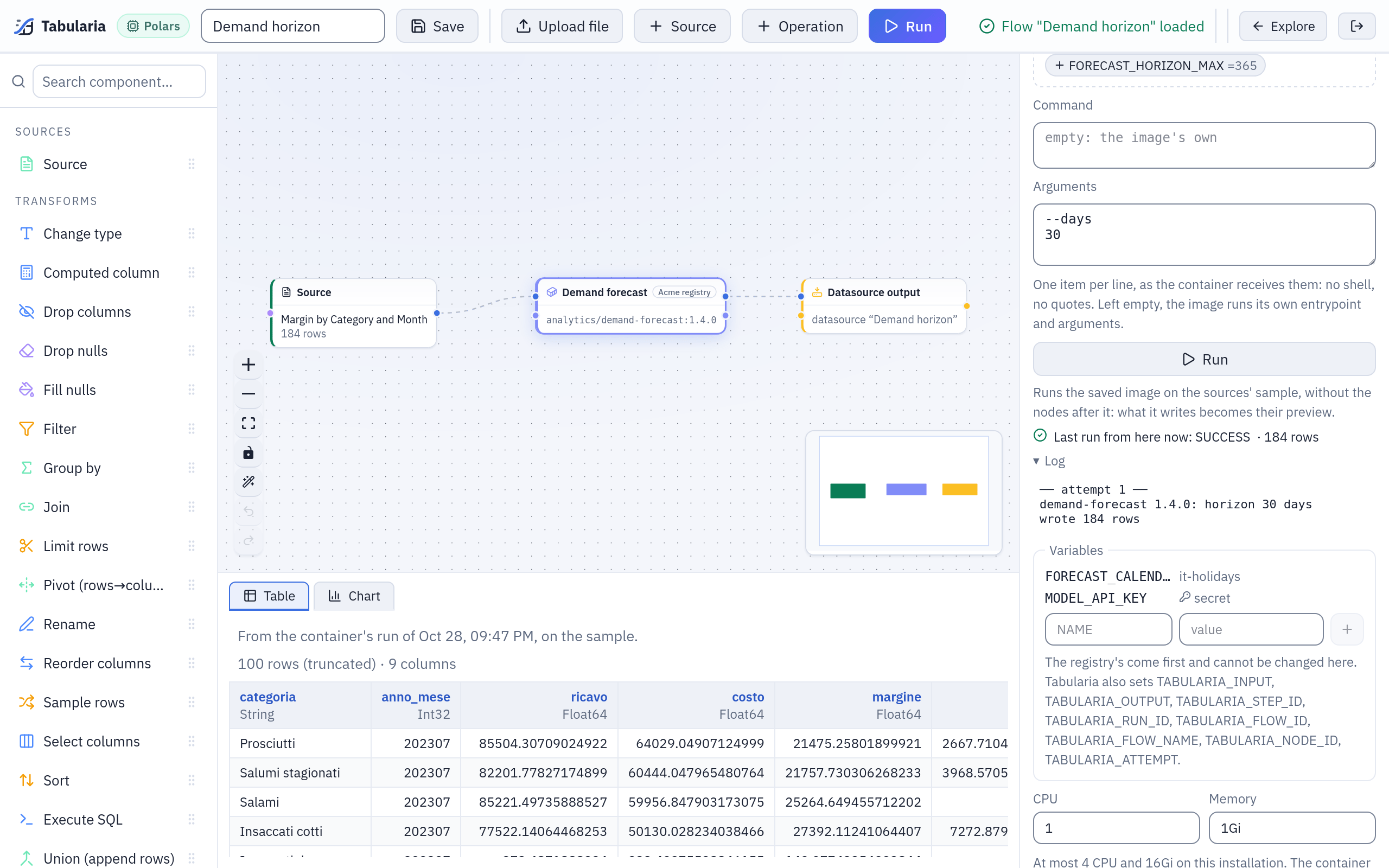
Step 7: Run in the node's panel has run the image in the cluster. The panel says it succeeded with 184 rows, Log shows what the container printed, and the data view has the rows it wrote (scroll right for horizon_days).
A run
- The image. The tag is resolved to its digest when the run starts, and the Pod names the digest: every attempt runs the same image, and the run page shows which. Whoever the run belongs to must still be allowed the registry and the image (for a schedule: the person who set it).
- The pull Secret. A registry with credentials has its pull Secret written in the containers' namespace right before the Pod needs it.
- The Job, in the containers' namespace. A failed attempt is run again as a new Job, as many times as Retries says, after Wait between.
- The outcome. A failure stops the flow, as a failed Script node does: the steps after it would read nothing, or stale data. A download the node cannot make (a certificate it does not trust, credentials refused, an image gone) fails within about twenty seconds, saying why. A container that goes over its Memory is stopped by the cluster, and the run says so (exit code 137).
The run is a child of the flow's run, shown in Runs with the node's name: the
registry and the image with its digest, the command, the attempts, the exit code, the
resources, the variables it was given (the secret ones by name only) and the end of its
log. The log is read when the Job ends (the last 256 KB, CONTAINERS__LOG_MAX_BYTES)
and kept in Tabularia's database, not in the cluster: the Job goes once it is read.
After 30 days (ORCHESTRATOR__LOG_RETENTION_DAYS; 0 keeps them) it is emptied, and the
run stays.
Run, in the node's panel, runs the node of the saved flow (saving it first) on the sources' development sample, without the nodes after it, in the trials' namespace. What it writes becomes the preview of the nodes after it, until the node changes.
The Lineage page draws the image (registry and repository) with the flows and
flow groups that run it. With OpenLineage on, a run of the node is a
child job of the flow's run (a cell's, of the group's run), reading the datasources
whose data reaches it, with the image — registry, repository, tag and digest — in the
tabularia_container job facet. An editor's Run is not reported.
Where it runs
| namespace | containers.namespace for the flows' runs, containers.trialNamespace for the editor's Run, under a ResourceQuota |
| Pod Security | baseline: the container may run as root, as most existing images do; privileged containers, host paths, host network and added capabilities are refused |
| service account | none: the Pod gets no token of the cluster's API |
| privileges | allowPrivilegeEscalation: false (no sudo inside) |
| network | the internet and the other namespaces of the cluster, never the pods of Tabularia's namespace nor the cloud metadata addresses; private networks outside the cluster only when listed in networkPolicy.userCodePrivateCIDRs; nothing reaches into the container (containers.blockTabularia, on by default). The details, and what to list, in Python and R in flows |
Who may do what
- An administrator decides which registries exist, which repositories of each may run, and who may use them (Container registries).
- Someone with access may add a Container node, with an image granted to them, to a flow they may edit, and run it.
- Someone without access to a flow's registry or image cannot open the flow: it is listed greyed out, with the reason.
- A schedule runs with the authority of whoever set it: if another person changes the node's image, command, arguments or variables, the schedule is switched off, as for any change that widens what a schedule does.
Limits
- The dbt export cannot carry a Container node: an output that reads what one writes refuses the export; a node no exported output reads from is left out, with a note.
- Architectures. The image must exist for the nodes' architecture (amd64, arm64):
a multi-architecture image works everywhere; an amd64-only image on an arm64 node
ends with
exec format errorin its log. - Registries with short-lived tokens (ECR) and the cluster's own identity are not supported yet: a registry needs a user and a password or token, or none.
Settings
| Variable | Chart value | Default | |
|---|---|---|---|
CONTAINERS__MAX_CPU | containers.limits.cpu | 4 | the most CPU a node may ask for |
CONTAINERS__MAX_MEMORY | containers.limits.memory | 16Gi | the most memory |
CONTAINERS__MAX_TIMEOUT_SECONDS | containers.limits.timeoutSeconds | 86400 | the longest timeout |
CONTAINERS__LOG_MAX_BYTES | 262144 | the end of the log a run keeps |
All of them in the configuration reference.