Flow and SQL script results
A flow, a SQL script or a saved Python or R script can write its result into a datasource of the catalog, where other flows, saved views, scripts, the Viewer and the AI assistant read it like any other. The first write creates the datasource; every later write replaces its data and keeps its id, so whatever reads it keeps working. This is how cleaned, joined and aggregated tables are shared.
At a glance
| Writer | Where it is set | When it writes | Overwrites an existing datasource |
|---|---|---|---|
| Flow, Output node | Output node, destination Tabularia Datasource: name, folder, description, «Overwrite if it already exists», «Order by» | At every run: Run in the editor, «Run now with the production engine» in the Flows page, the flow's schedule, a flow group | Only with «Overwrite if it already exists» ticked |
| Flow without Output nodes | Run → Publish the output as a datasource: name, folder, description | That run | Never: an existing name is refused |
| SQL script | The Datasource card beside the editor: name and folder | Refresh now, the script's schedule, a flow group | Always |
| Saved Python or R script | Also publish it as a datasource on the script's page | At every run of the script | As chosen: «Replace it at every run» |
Written datasources carry the tag «flow» in the Datasources page. They have no refresh button: they change when their writer runs.
How it works
The Output node «Tabularia Datasource»
An Output node at the end of a chain, with destination Tabularia Datasource, has:
| Field | Meaning |
|---|---|
| Datasource name | The name in the catalog. Unique in its folder. |
| Folder | Where the datasource lives, and so who can read it. |
| Description (optional) | Written on the datasource at every run. |
| Overwrite if it already exists | Ticked: a datasource with this name in the folder gets the new data, keeping its id and name. Not ticked: a run finding the name taken is refused before it starts («There is already a datasource … in this folder»). |
| Order by | Columns, in order: the result is sorted before it is written, and the datasource keeps them as its sort keys. |
| Also copy the file to external S3 | A copy of the same Parquet file to an S3 connection, at a fixed key or one with placeholders. If the copy fails the run still succeeds, and the error is in the run's history. |
The flow must be saved: Output nodes run through the run history. Run launches one run per Output node; the run reads the flow's sources, computes the chain on a worker and writes a new Parquet file. When the flow has no Output node, Run offers Publish the output as a datasource for the result of its last step instead.
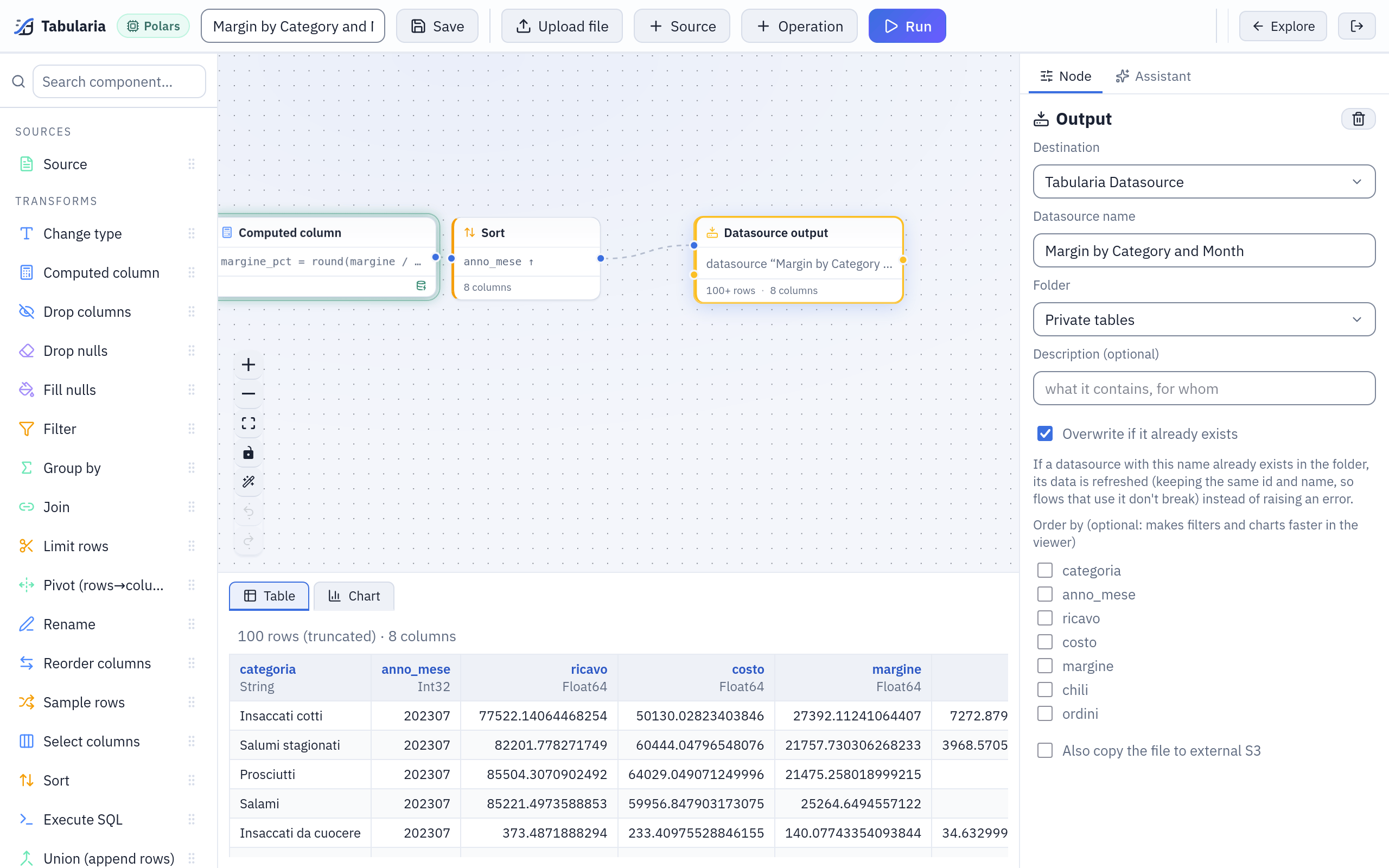
The Output node of the sample flow «Margin by Category and Month»: it publishes the datasource of the same name in Sample / Private tables, overwriting it at every run.
What an overwrite does
At the end of a successful run the datasource is pointed at the new file in one step:
- its id and name stay, so flows, saved views, SQL scripts and saved Python or R scripts that read it keep working;
- its rows, columns, description and sort keys are those of this run;
- its field descriptions stay, for the columns that are still there;
- the previous file is deleted after a grace period, since a run that started earlier may still be reading it.
The data contract is checked first. When the datasource has a contract, the worker evaluates it on the new data before anything is replaced; a failing rule of severity error refuses the data, the datasource keeps the last good snapshot and the run says which rule failed. See Data contracts.
The later read wins. When two runs write the same datasource and overlap, the one that started later wins, even if the other finishes after it: a run that read older data never replaces newer data.
Who may overwrite what
Only datasources that a flow or a script wrote can be overwritten. A datasource imported from a database, a file folder, SharePoint or an API is never replaced by a flow or a script: the run is refused before it starts («… is a datasource of kind «database»: a flow cannot overwrite it, choose another name»). An import keeps its own refresh, its schedule and its connection.
Between writers there is no such barrier: a flow can overwrite a datasource a SQL script wrote, and the other way round. Give each written datasource one writer.
When the name is free at launch but another run takes it before this one ends, the datasource is created as «name (xxxxxxxx)», with the start of the task's id.
SQL scripts
A SQL script keeps its whole result in a datasource: in the Datasource card give it a name and a folder, Save, then Refresh now. The saved version is written, not the text in the editor. The script's engine computes it on the catalog, or the database computes it when the script runs on a connection. The card shows the last write: when, how many rows, who started it, and why it failed.
A script always overwrites its datasource, under the same rules as a flow: the contract first, the id kept, never an imported datasource. Each write sets the datasource's description to «Written by the SQL script «name»» and clears its sort keys. Schedule writes it on a cron with the rights of whoever set it; in a flow group the script is a cell that writes in its step. The details are in Writing the result into a datasource.
Python and R scripts
A saved script writes a Parquet file at TABULARIA_OUTPUT; with Also publish it as a
datasource it becomes a datasource in the folder you choose, replaced at every run or
not. Its description says «Written by the saved script «name»». Scripting runs on
Kubernetes installations with scripting environments turned on: see
Python and R.
Examples
A flow that publishes revenue by channel, every morning
With the sample datasources orders and order_rows (folder Sample / Private tables):
- New → New flow in
Sample / Flows. Add two sources,order_rowsandorders, join them on the order id, keep the orders whosestatois notannullato. - Compute
ricavo_netto = quantita * prezzo_unitario * (1 - sconto_pct / 100), then group bycanaleand the month ofdata_ordine, summingricavo_netto. - Add an Output node: Tabularia Datasource, name
revenue_by_channel_month, folderSample / Public tables, description Net revenue by sales channel and month, cancelled orders excluded, Overwrite if it already exists ticked, Order by the month column. - Save, Run.
revenue_by_channel_monthappears inSample / Public tables. - Schedule the flow (
0 6 * * *), or put it in a flow group after a step that refreshesordersandorder_rows, so it always reads the morning's data.
People with VIEW on Sample / Public tables read the result without seeing the order
lines it comes from.
A SQL script that keeps the cancelled orders by depot
New → SQL script in Sample / Flows, on the catalog:
SELECT deposito, canale, count(*) AS ordini_annullati
FROM "orders"
WHERE stato = 'annullato'
GROUP BY deposito, canale
ORDER BY ordini_annullati DESC
In the Datasource card: name cancelled_orders_by_depot, folder
Sample / Public tables. Save, then Refresh now. Schedule 30 6 * * *
writes it again every morning, after the orders are refreshed.
Calling it from outside
A scheduler of your own can run the flow and so rewrite its datasource, with a token of an account that has RUN on the flow's folder and EDIT on the datasource's:
curl -X POST -H "Authorization: Bearer tab_…" \
  https://tabularia.example.com/api/flows/42/run-now
# 202 {"run_id": 1234}: then GET /runs/1234
See API.
Permissions
| To | You need |
|---|---|
| Write a datasource from a flow | RUN on the flow's folder and EDIT on the datasource's folder (and VIEW on what the flow reads) |
| Write it from a SQL script | RUN on the script's folder and EDIT on the datasource's folder; the datasources the SQL names readable, or CONNECT on the script's connection |
| Choose the folder of a SQL script's datasource | EDIT on that folder |
| Read the result | VIEW on the datasource's folder only: not on the flow, the script or their sources |
| Rename, describe, move, delete the datasource | EDIT on its folder |
Scheduled runs and writes act with the rights of whoever set the schedule, checked again
every time. Every write of a SQL script is in the audit log (sql_script.publish), with
its SQL; every flow run is in the run history.
Limits and good to know
- Settings live on the writer. The description and the sort keys of a written datasource are set again at every write, from the Output node (or, for a SQL script, to the fixed description and no sort keys). Change them on the node; a description edited in the Datasources page lasts until the next write. Field descriptions are kept.
- A scheduled flow needs «Overwrite if it already exists»: without it, the first run creates the datasource and every later run is refused because the name is taken.
- No refresh from the Datasources page: refresh, schedule and «Datasources to refresh» in a flow group are for imported datasources. A written one is updated by running its writer.
- Deleting the flow keeps the datasources it published: they stay as they were, and nothing updates them any more.
- One file per write: the whole result is written again each time; a write never appends to the previous data.
- A datasource used by saved views cannot be deleted until the views are.
Related
- All sources: snapshots, descriptions, contracts, permissions.
- Low-code flows: sources, operations, Output nodes.
- SQL scripts and Python and R.
- Scheduling and Data contracts.
- Permissions.