marimo notebooks as apps
A notebook is a marimo notebook kept in a folder, like a flow or a saved script: written in marimo's own reactive editor, saved with its versions, found in Explore and in the search, and shared through the folder's permissions. Whoever can see it opens it as a web app, with its sliders, dropdowns, tables and charts, without seeing or touching the code. The notebook reads Tabularia's datasources when its code asks for them, with the rights of its author, and its pod runs only while somebody uses it.
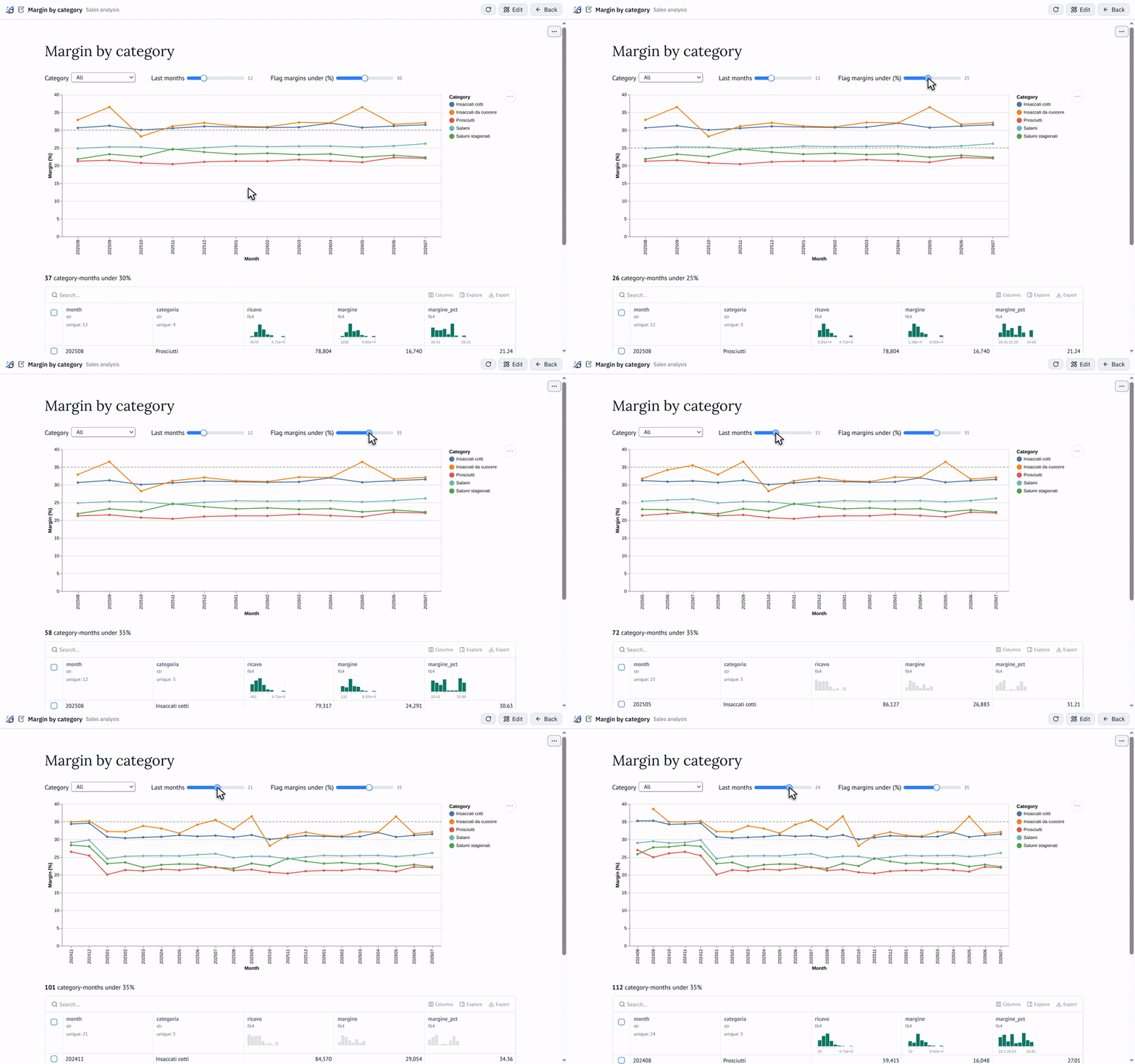
The app of the example below, as whoever can see the notebook opens it: each control recomputes only the cells that depend on it, and the code stays out of sight.
At a glance
| Where | Explore → New → Notebook (marimo), in a folder; the notebook has its own page, with Open app and Open editor |
| What it is | a marimo .py file, run in one of the Python scripting environments, whose image carries marimo |
| The app | opened by whoever can see the notebook, on a page of its own; it runs the version marked current |
| The editor | marimo's editor inside a Tabularia page, for whoever may edit the folder; one person at a time |
| Data | tabularia.read("Folder/Name") returns a polars DataFrame, read when the code asks, nothing copied; tabularia.report(…) a report's PDF or Excel |
| Whose rights | the app reads with the rights of whoever saved the version it runs; the editor with the editor's |
| When it runs | its pod starts when someone opens it (a few seconds) and stops after 15 minutes with nobody on it |
| Requires | Kubernetes, with the scripting environments (Python and R), and a host name of their own for the apps and editors (An address of their own) |
How it works
The object and its versions
New → Notebook (marimo) asks for a name, a Python environment you may use and a description, and writes a starting notebook. Every save that changes the code is a new version; the newest one is the one the app runs. Versions on the notebook's page lists them with who saved each one; View shows an older one and Restore makes it the newest again, as a new version.
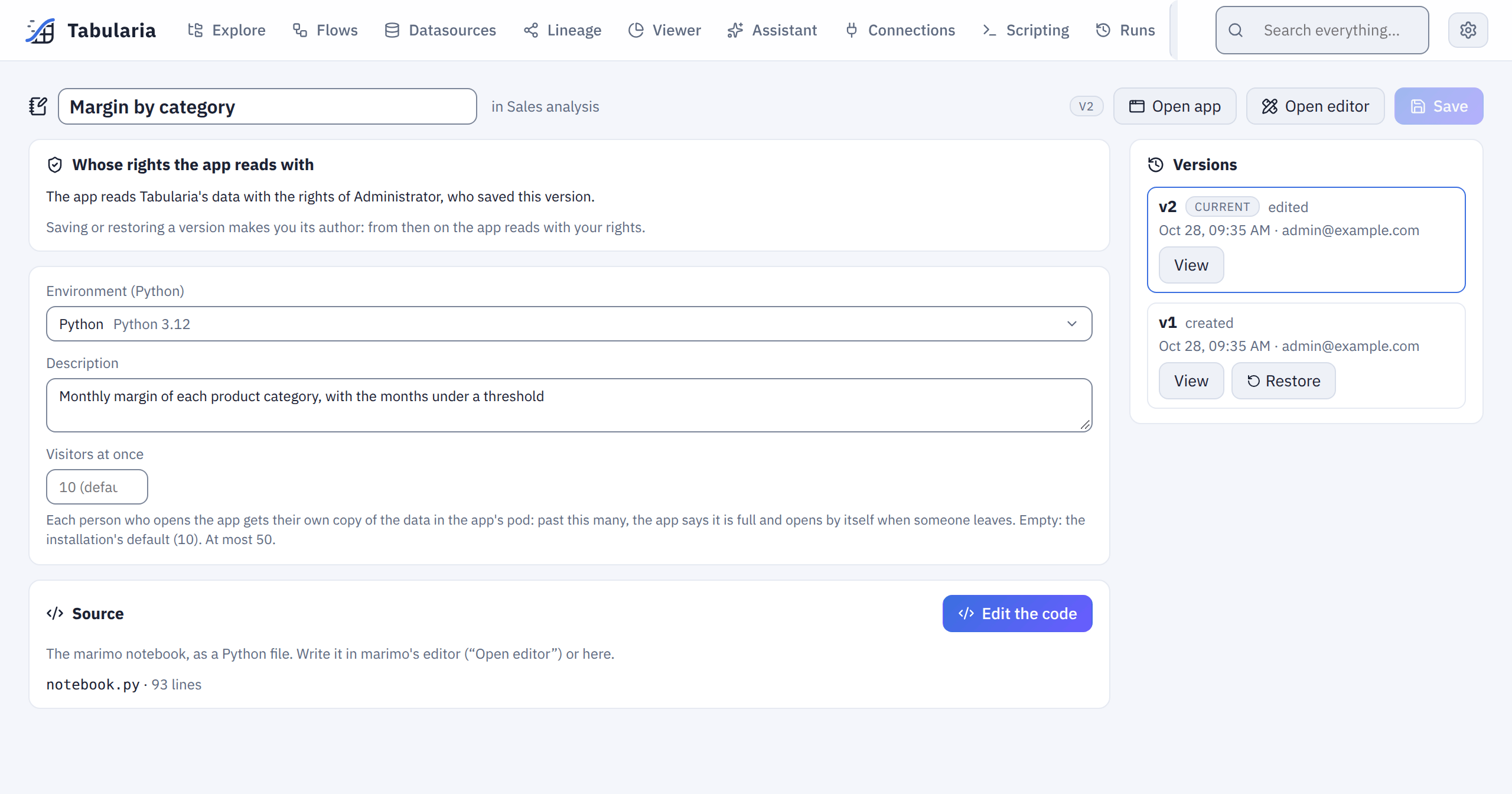
The notebook's page: Open app, Open editor, whose rights the app reads with, and the versions on the right.
The code can be changed in two places:
- marimo's editor (Open editor): the notebook runs live as you write it. marimo saves the file in its pod; Save version, in the bar above the editor, makes a Tabularia version of what marimo saved last, with an optional note. Close editor stops the editor.
- The notebook's page, as text, then Save.
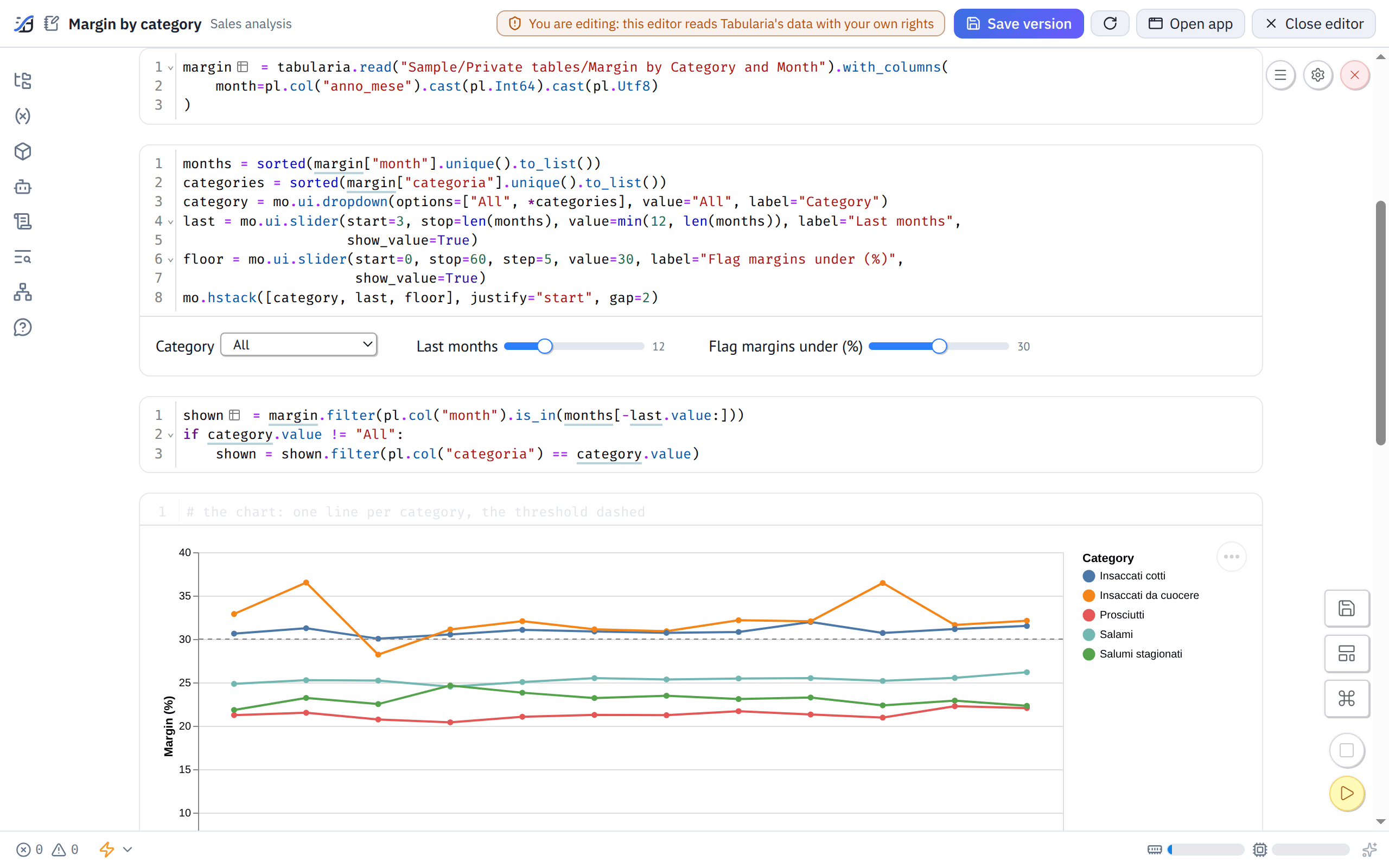
marimo's editor in its frame: each cell's code with its output under it. Save version turns what marimo saved into the version the app runs.
While marimo's editor is open on a notebook, the code changes only there. The page shows the source read-only, and Tabularia refuses a change of the source or a Restore from anywhere else, saying who has the editor open: «Sales app» is open in marimo's editor by ana@example.com: save or close it there first. Save version in the editor goes on as usual.
What the editor saved and is not a version yet is kept as the notebook's draft: when the editor is closed, when its pod stops for inactivity, and at every round of the idle check. The next time the editor opens it starts from the draft. The notebook's page says that there is one, with Load it and Discard.
The app
Open app opens the app in a new tab, on a page of its own. Behind it is marimo run:
the viewers see the outputs and the controls, never the code. Everyone who opens the app
shares the same pod; marimo keeps each open page's controls separate.
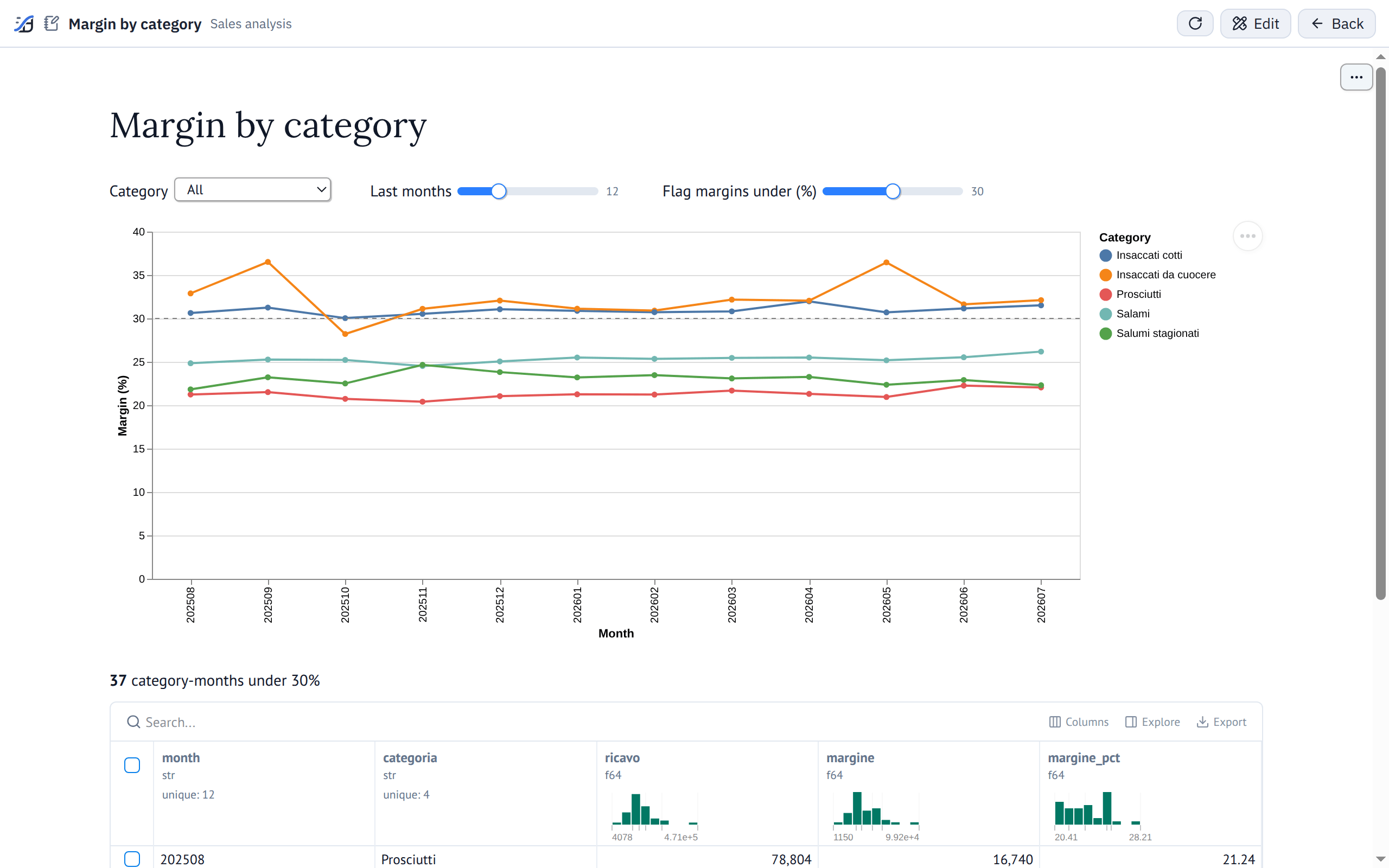
The app as its viewers see it: outputs and controls, no code. The bar above names the notebook and its folder.
When a new version becomes current, the pod that runs the old one is replaced the next time someone opens the app. Stop, on the notebook's page, stops the app for everyone; the next visit starts it again.
With whose rights
The app reads data with the rights of the person who saved the version it runs: the author of the current version, shown on the notebook's page («The app reads Tabularia's data with the rights of …, who saved this version»). Its reads never use anyone else's rights:
- Saving a version makes you its author. Whoever saves a version, from the editor or from the page, or restores an older one, becomes the person the app reads as, from that moment on. Restoring a version first written by someone else does not bring back their rights: the restored version is yours.
- An app is a report its author publishes. Everyone who can open it sees what the author's code shows, even data in folders they could not read themselves. Before you save a version, look at what it reads and at who can open the notebook.
- If you can read less than the previous author, the reads you are not allowed fail with a clear message; if you can read more, the app now shows what your rights allow.
- The author must still exist, be active and be able to open the notebook (its folder and its environment). Otherwise the app does not start, and says that someone who may edit the notebook must save or restore a version.
The editor reads with the editor's own rights: what you see while you write is what you may read.
What the code shows runs in the browser of whoever opens the app, HTML and JavaScript included; on the notebooks' address of their own it cannot use their Tabularia session.
Rights are checked again at every start of a pod and at every read: a permission
taken away stops the next tabularia.read, without restarting anything.
Reading the data
The tabularia module is in every notebook's pod, without rebuilding any image:
import tabularia

tabularia.datasources()   # what this notebook may read: id, name, folder, path, rows, columns
df = tabularia.read("Sample/Private tables/Margin by Category and Month")   # a polars DataFrame
df = tabularia.read(42, columns=["categoria", "margine"])                   # by id, some columns
A datasource is named by its id, by its path (folders and name, separated by /), or by
its name alone when only one datasource you may read has it. Errors arrive as
tabularia.TabulariaError, in words: not found, not allowed, the session ended.
Behind it, the pod asks the gateway for the datasource with a token of its own. The gateway checks the reader's rights and answers with a link to the datasource's parquet file, valid for ten minutes, which the pod downloads from the object storage. Nothing is copied, and the data is as fresh as the datasource: a refresh or a flow that publishes it again is visible at the next read. Every read is in the audit log («Datasource read by a notebook»).
The token lives only in the pod. It works only on the data endpoint, only from that pod's
address (a call carrying a forwarding header such as X-Forwarded-For is refused), and
only while the pod lives: a token the code prints in the app is useless anywhere else.
Behind a service mesh (Istio, Linkerd) the gateway sees the sidecar's address instead of
the pod's: there, set scripts.notebooks.podIpCheck: false (NOTEBOOKS__POD_IP_CHECK).
Lineage. The Lineage page draws a notebook as a reader of every datasource it has
read with tabularia.read; with OpenLineage on, each session of its
pod (app or editor) is a run of the job <folder>/<name> (notebook): START when the pod
starts, RUNNING at the first read of each datasource, COMPLETE with everything it read
when it stops.
Reports
A pixel-perfect report comes into the notebook as a file, rendered with the same rights as the reads, exactly as the API renders it:
import tabularia

tabularia.reports()   # the reports this notebook may render: id, name, folder, path, parameters
pdf = tabularia.report("Sales/Monthly sales", region="North", since="2026-09-01")   # the PDF, as bytes
xlsx = tabularia.report(12, format="xlsx", region=["North", "South"])              # by id, two regions, Excel
- The report is named as a datasource is: by its id, by its path, or by its name alone when only one report you may open has it.
format:pdf(the default),xlsx, orhtml(the email's summary, as MHTML).- The parameters are keyword arguments, by their names: a list for one that takes
several values, a date as a
datetime.dateor asyyyy-mm-dd, or a placeholder such assince="{start_of_month-1m}". One left out takes the report's default. - The answer is the file's bytes: save them (
open("sales.pdf", "wb").write(pdf)), offer them withmo.download(pdf, filename="sales.pdf"), or read the Excel withpolars.read_excel(io.BytesIO(xlsx)).
The call waits while a worker renders the report, up to REPORTS__API_WAIT_SECONDS (120
seconds by default). A value that does not fit, a report you cannot open, a dataset you
may not read or one over the row limit arrive as tabularia.TabulariaError with the
gateway's words (Parameter «since»: '2026-02-30' is not a date…). Every render is in the
audit log (report.render, from notebook, with the notebook's name).
Starting and stopping
There is no pod for a notebook nobody is using. The first request to the app, or to the editor, creates one in the scripts namespace, with the image and the resources (CPU and memory) of the notebook's environment. The page shows «Starting the app…» and opens the notebook when it answers, usually in a few seconds. The first start on a node can take a minute or two while the node downloads the environment's image.
A pod stops:
- after
NOTEBOOKS__IDLE_MINUTES(15 by default) with nobody using it; a page left open keeps it alive; - after
NOTEBOOKS__MAX_LIFETIME_HOURS(12 by default), used or not; the next visit starts a new one; - when someone who may edit the notebook stops it (Stop, Close editor).
At most NOTEBOOKS__MAX_LIVE pods (20 by default) run at once, apps and editors together;
past it, opening another notebook says so. A pod that cannot start says why, in words: no
node free, an image that could not be downloaded, marimo missing from the image.
Visitors at once, and memory
An app has one pod, but every person who opens it gets a kernel of their own inside that pod: marimo runs the notebook once per visitor, so that one person's sliders do not move another's. Each kernel holds its own copy of whatever the code read. An app that loads 1 GB of data, opened by ten people, holds ten copies; past the memory limit of the notebook's environment Kubernetes stops the pod, and the app closes for everyone at once.
So an app takes a limited number of visitors at once: 10 by default
(NOTEBOOKS__MAX_VISITORS_PER_APP). Whoever may edit the notebook sets its own number on
the notebook's page (Visitors at once; empty = the default), up to the most the
installation allows (NOTEBOOKS__MAX_VISITORS_CEILING, 50 by default). An administrator
changes both in Administration → Settings → Notebooks, or in the Helm values
(scripts.notebooks.maxVisitorsPerApp, maxVisitorsCeiling).
Past the limit, the next person sees «This app already has 10 people connected, the most it allows. It will open by itself as soon as someone leaves.»; the page checks again every ten seconds and opens the app as soon as a place is free. A visitor is a browser tab with the app open: closing the tab frees the place at once, and two tabs of the same person are two visitors. The count holds across all the gateway's replicas. The notebook's page shows how many people are connected next to the running app. The editor has no limit: one person at a time edits a notebook.
How to choose the number: the environment's memory limit (Administration → Scripting environments), less some room for marimo itself, divided by what one visitor's data takes. An environment with 4 GiB and an app whose cells hold about 300 MB of data takes ten visitors comfortably; a lighter app, more.
The way to fit more people is to read less. tabularia.read downloads the whole
datasource unless told otherwise: read only the columns the app uses, and filter or
aggregate early, so that what each kernel keeps is small.
sales = tabularia.read("Sales/Orders", columns=["region", "month", "amount"])
by_region = sales.group_by("region", "month").agg(pl.col("amount").sum())  # keep this, not the rows
A cell that returns only the small result lets the large frame go when the cell has run.
The environment
A notebook runs in a Python scripting environment, and every Python environment installs
marimo with polars and pyarrow. An image built before marimo joined those packages
does not have it: an administrator builds it again (Administration → Scripting
environments → Build again). Other packages a notebook needs, a charting library for
example, go in the environment's package list like any other.
The environment's variables reach the notebook as they reach
a script: the plain ones in its environment, the secret ones and those handed over from
Tabularia through a Kubernetes Secret. They never replace what the notebook needs itself
(HOME, PYTHONPATH, TABULARIA_URL, TABULARIA_NOTEBOOK_TOKEN).
The network
marimo answers without a password of its own, so a network policy lets only Tabularia's gateway and orchestrator into a notebook's pod: the gateway carries the browser's requests and the WebSocket to it, for the people allowed; the orchestrator reads the editor's file to keep the draft.
Out of the pod, the notebooks follow the scripts' policy (scripts.blockTabularia, see
Network policies), with one opening: the gateway's
pods, on their port, for the reads and the reports. The download goes straight to Tabularia's object
storage, at the address the engine uses: that address must be reachable from the scripts
namespace, as the scripts bucket is.
An address of their own
marimo shows whatever a notebook's code writes, HTML and JavaScript included (mo.Html,
mo.iframe, a widget): that is how a notebook draws its charts and controls, and that
code runs in the browser of whoever opens the app or the editor. Served from Tabularia's
own address, it would run with their Tabularia session: someone who may edit a notebook
could act as whoever opens it, an administrator included, and read or change whatever
they may.
So the apps and the editors are served from an address of their own,
NOTEBOOKS__ORIGIN, for example https://notebooks.example.com next to
https://tabularia.example.com:
- There the gateway answers only for the notebooks' apps and editors: none of Tabularia's API is on that address, and Tabularia's own address does not answer requests sent from it. A notebook's code finds nothing of Tabularia to call.
- Tabularia's page opens the notebook's frame with a ticket that works once, within a minute, for that person, that notebook and that mode (app or editor), with the same rights it takes to open them. The frame then holds with a cookie of its own, valid only for that notebook and only while the person's Tabularia session lasts: signing out closes the frames too. Tabularia's session cookie and API tokens are never accepted there.
- Only the Tabularia page that opened it may show the notebook in a frame.
Setting it up. A host name that reaches the same Ingress as Tabularia and, with TLS,
a certificate for it. A sibling of the interface's host is best (notebooks.example.com
with tabularia.example.com): the browser treats the frame's cookie as the site's own.
Another domain works too, because the cookie is partitioned: a third party's cookie
that Chrome, Edge and Firefox keep even when they block the others, for this one site.
With Helm:
scripts:
  notebooks:
    host: notebooks.example.com
The chart adds the host to the Ingress, towards the gateway alone under /api, with a
certificate when the Ingress has TLS (scripts.notebooks.tlsSecretName; cert-manager
makes it from the Ingress's annotations), and tells the gateway (NOTEBOOKS__ORIGIN) and
the frontend (NUXT_PUBLIC_NOTEBOOKS_ORIGIN, which lets Tabularia's pages frame it).
Without the chart, set both variables to the same address and send that host's /api to
the gateway with its Host header unchanged (the gateway tells the two addresses apart
by it; ingress controllers keep it). The address is https, or http only for localhost and its subdomains:
the guides for kind and minikube use
http://notebooks.localhost:8080, which a browser finds on its own computer without any
DNS. Never list it in APP__CORS_ORIGINS: the gateway refuses to start.
Without it the apps and the editors do not open, and their pages say: «Notebooks
need an address of their own (NOTEBOOKS__ORIGIN): an administrator must set it».
NOTEBOOKS__ALLOW_SAME_ORIGIN=true (scripts.notebooks.allowSameOrigin) serves them on
Tabularia's own address instead, as before: only to try notebooks alone on one machine,
never where other people sign in. The pages of the app and of the editor then show a
warning.
What remains. The notebooks share their one address. A notebook's code can therefore reach another notebook that the same person opened in the same browser within the hour: read that app as they see it and, while their editor of it is running, run code in it with their rights. It cannot start anyone's editor (only Tabularia's page does) and reaches nothing else of Tabularia. Give EDIT on folders with notebooks to people you would trust with what their colleagues can read.
Example: margin by category
The sample data ships a datasource «Margin by Category and Month», published by the
sample flow of the same name in Sample / Private tables: one row per product
category and month, with categoria, anno_mese (202510 for October 2025),
ricavo, costo, margine, chili, ordini and margine_pct. This notebook turns it
into an app where a sales manager picks a category and a period and sees the months that
earned too little.
- The chart uses
altair. In Administration → Scripting environments, addaltair==5.5.0to the packages of a Python environment and save: the environment builds a new version. - In Explore, open a folder you may edit, New → Notebook (marimo), name it «Margin by category», choose that environment.
- On the notebook's page, replace the starting source with the code below and Save: version 2, with you as its author.
- Open app. To change it, Open editor, work in marimo, then Save version.
- Give your colleagues VIEW on the folder, and the use of the environment: they open the app, and it reads with your rights.
import marimo

app = marimo.App(width="medium")


@app.cell
def _():
    import altair as alt
    import marimo as mo
    import polars as pl

    import tabularia
    return alt, mo, pl, tabularia


@app.cell
def _(mo):
    mo.md("# Margin by category")
    return


@app.cell
def _(pl, tabularia):
    margin = tabularia.read("Sample/Private tables/Margin by Category and Month").with_columns(
        month=pl.col("anno_mese").cast(pl.Int64).cast(pl.Utf8)
    )
    return (margin,)


@app.cell
def _(margin, mo):
    months = sorted(margin["month"].unique().to_list())
    categories = sorted(margin["categoria"].unique().to_list())
    category = mo.ui.dropdown(options=["All", *categories], value="All", label="Category")
    last = mo.ui.slider(start=3, stop=len(months), value=min(12, len(months)), label="Last months",
                        show_value=True)
    floor = mo.ui.slider(start=0, stop=60, step=5, value=30, label="Flag margins under (%)",
                         show_value=True)
    mo.hstack([category, last, floor], justify="start", gap=2)
    return category, floor, last, months


@app.cell
def _(category, last, margin, months, pl):
    shown = margin.filter(pl.col("month").is_in(months[-last.value:]))
    if category.value != "All":
        shown = shown.filter(pl.col("categoria") == category.value)
    return (shown,)


@app.cell
def _(alt, floor, shown):
    lines = alt.Chart(shown).mark_line(point=True).encode(
        x=alt.X("month:O", title="Month"),
        y=alt.Y("margine_pct:Q", title="Margin (%)"),
        color=alt.Color("categoria:N", title="Category"),
        tooltip=["categoria", "month", "ricavo", "margine", "margine_pct"],
    )
    threshold = alt.Chart(shown).mark_rule(strokeDash=[4, 4], color="gray").encode(y=alt.datum(floor.value))
    (lines + threshold).properties(height=320)
    return


@app.cell
def _(floor, mo, pl, shown):
    under = (shown.filter(pl.col("margine_pct") < floor.value)
             .select("month", "categoria", pl.col("ricavo", "margine").round(0), "margine_pct")
             .sort("month", "categoria"))
    mo.vstack([mo.md(f"**{under.height}** category-months under {floor.value}%"), mo.ui.table(under)])
    return


if __name__ == "__main__":
    app.run()
Moving the slider or changing the category recomputes only the cells that depend on them: the data is read once, when the page opens. The months of the sample data show their seasons; with the threshold at 30%, the table lists the months to look into.
What you see, with the sample data (the pictures at the top of this page):
- The app opens on All categories and the last 12 months: one line per category, and the dashed threshold at 30%. Insaccati cotti and Insaccati da cuocere run around or above it; Salami, Salumi stagionati and Prosciutti run below, so the table under the chart holds their months.
- Move Flag margins under (%) to 25: the dashed line drops, and the count above the table falls to the months of the two lowest categories and a few of Salami.
- Move Last months to 24: the chart shows two years, and you can compare each month with the same month of the year before.
- Choose Prosciutti in Category: one line, and the table holds only its months.
In marimo's editor (Open editor) the same cells show their code with their output under it; change the threshold's default to 25, Save version, and the app opens on 25% for whoever opens it next.
A second notebook can start from the catalogue instead of a known name, for example a
cell that shows mo.ui.table(tabularia.datasources()) and a dropdown built from its
path column.
Permissions
| To | You need |
|---|---|
| see the notebook in Explore and in the search, open its page and the app | VIEW on its folder, and the use of its environment (being in one of the environment's groups) |
| open the editor, Save version, change the source on the page, Restore, discard the draft | EDIT on its folder |
| stop the app, or someone else's editor | EDIT on its folder |
| set how many people may have the app open at once | EDIT on its folder |
| create, rename, duplicate, delete | EDIT on the folder |
| move | EDIT on both folders |
| what the app reads | what the author of the current version may read (VIEW), checked at every read |
| what the editor reads | what the editor may read, checked at every read |
Whoever lacks the folder's VIEW or the environment's use does not find the notebook, as for a saved script. Administrators see every notebook and use every environment. A duplicate is a new notebook whose first version is by whoever made it.
A folder that holds a notebook, and an environment a notebook uses, cannot be deleted. Every create, change, restore, start, stop, save from the editor and read is in the audit log.
Limits and good to know
- Kubernetes only. On Docker Compose there are no notebooks: New does not offer them.
- Python only: an R environment is refused.
- One editor at a time. Whoever opens the editor while someone else has it sees «Being edited by …»; the app stays open to everyone meanwhile.
- On demand only. There is no «always on»: the first visit after a pause waits for the pod to start.
- The app runs the current version, never the draft: work in the editor reaches the viewers only with Save version.
- A notebook reads datasources; it does not write them. To publish data, use a saved script or a flow.
- What the code downloads is held in the pod's memory and its
/tmp, once per visitor: the environment's memory limit applies, as for a script, and an app takes a limited number of visitors at once (see Visitors at once, and memory).columns=reads only the columns you need. - The settings are in the configuration reference:
NOTEBOOKS__ORIGIN,NOTEBOOKS__ALLOW_SAME_ORIGIN,NOTEBOOKS__IDLE_MINUTES,NOTEBOOKS__MAX_LIFETIME_HOURS,NOTEBOOKS__MAX_LIVE,NOTEBOOKS__MAX_VISITORS_PER_APP,NOTEBOOKS__MAX_VISITORS_CEILING,NOTEBOOKS__START_TIMEOUT_SECONDS. With Helm they arescripts.notebooks.host(withoriginandtlsSecretName),allowSameOrigin,idleMinutes,maxLifetimeHours,maxLive,maxVisitorsPerApp,maxVisitorsCeilingandstartTimeoutSeconds; the chart also sets the address the pods call (NOTEBOOKS__GATEWAY_URL). The two about visitors are also in Administration → Settings; the address is set only at installation, since the Ingress and the frontend need it too. - marimo is open-source software under the Apache-2.0 licence; its name is used here only to describe the feature.
Related
- Python and R: environments, packages, variables, network policies
- SQL scripts, for questions a query answers
- Preview and analysis, the same data in the Viewer
- Permissions
- Kubernetes