SQL scripts
A SQL script is SQL kept in a folder, like a flow or a saved view: written in an editor, run with one key, saved with its versions and shared through the folder's permissions. It reads the datasources of the catalog on the engine you choose, or a database through one of its connections. Every installation has it, Docker Compose included. The design is in the spec.
Writing one
Explore → New → SQL script in a folder. The page has the editor, the result under it, and on the side the datasources you can read with their columns: a click on a name writes it where the cursor is, the arrow shows the columns, a click on a column writes it too. The editor also completes names and columns as you type.
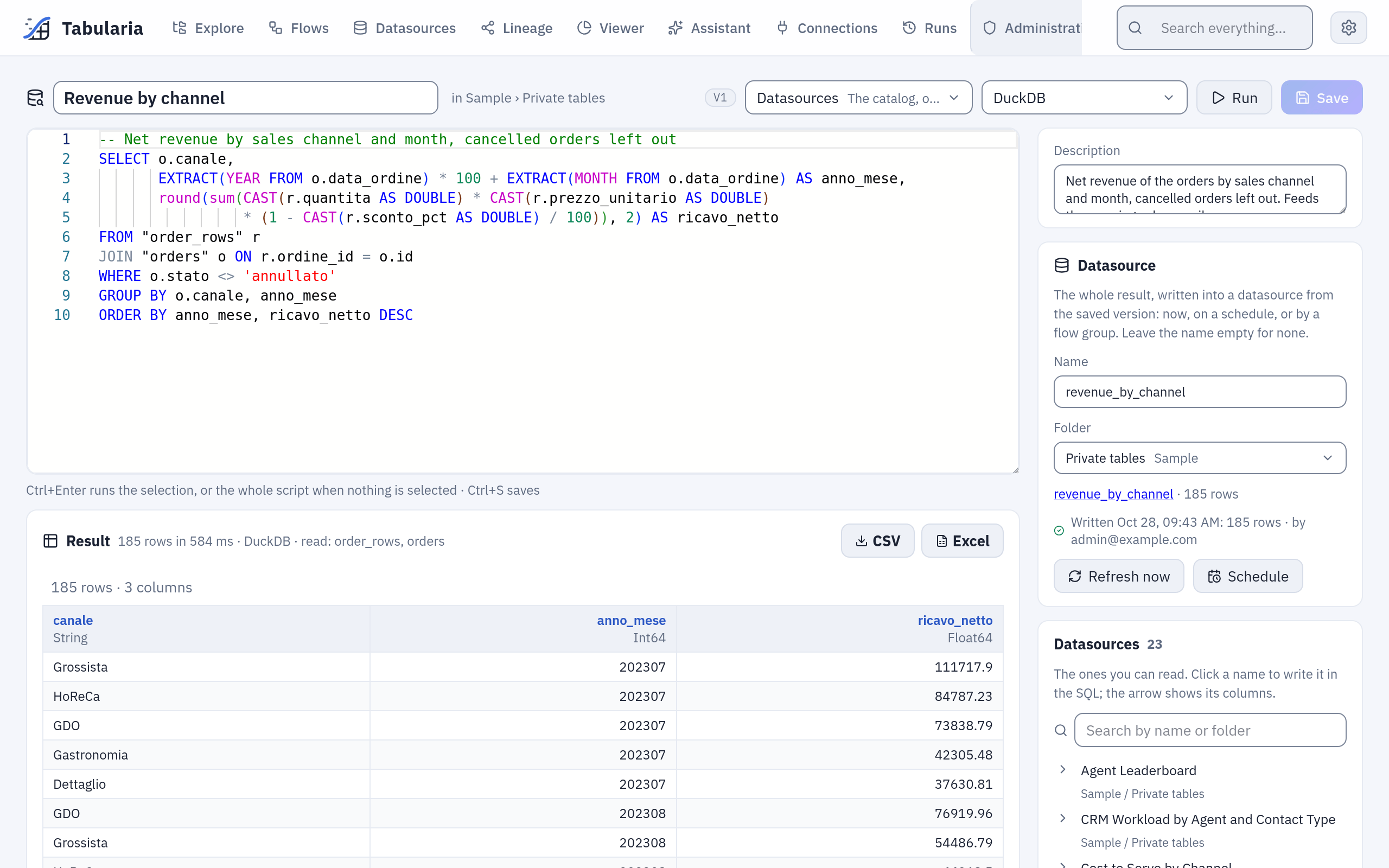
The script of the example below: the SQL, the result with its time and the datasources it read, and on the side the Datasource card and the catalog.
A datasource is a table by its name. A name with spaces or capitals goes in double quotes; unquoted names match regardless of case:
SELECT c.canale, count(*) AS ordini
FROM "orders" o
JOIN "customers" c ON o.cliente_id = c.id
GROUP BY c.canale
ORDER BY ordini DESC
A name is unique only in its folder. When two datasources you can read share it, write the
folder's name in front, "Marketing"."Clienti": the error says so and lists the folders.
When the two folders have the same name too (Vendite / Dati and Acquisti / Dati), the
folder's name does not tell them apart: the error says so, and one of the folders or of the
datasources needs another name. Renaming a datasource breaks the scripts that name it, as
it would any SQL.
The dialect is the engine's: Polars SQL, DuckDB, ClickHouse or BigQuery, chosen at the top
of the page (the administrator decides which engines may be chosen). On BigQuery a name is
quoted in backticks, `Importo totale` (in double quotes it is a text): the list
beside the editor writes it so. -- and /* */ comments are fine.
On a database connection
Where the SQL runs, at the top of the page, is either Datasources (the catalog) or one of the database connections you may use: PostgreSQL, MySQL, MariaDB, ClickHouse, Trino, Oracle or SQL Server. On a connection:
- the SQL goes to the database as it is, in the database's own dialect, and the database's own message comes back when it refuses it;
- the side lists the connection's tables; the arrow reads a table's columns and their
types, and a click writes the name in the database's quoting
(
catalogo.prodotti,`Orders 2024`,[dbo].[Orders]); - there is no engine to choose: the database computes.
SELECT p.categoria, count(*) AS prodotti
FROM catalogo.prodotti p
GROUP BY p.categoria
ORDER BY prodotti DESC
Running SQL on a connection needs the CONNECT permission on the connection's folder, as importing from it does. A script is shared with its folder as any other, but a person with VIEW on the folder and no CONNECT on the connection reads its SQL and cannot run it; choosing a connection for a script needs CONNECT on it too.
The SQL runs inside SELECT * FROM (…), as a SQL datasource's, so a statement that is not
a query fails; on PostgreSQL, MySQL and MariaDB it also runs in a read-only transaction, so
a function it calls cannot write either. That is not the barrier: the barrier is a
read-only database user on the connection, as for database datasources. Give that user a time limit on the database
too (PostgreSQL: ALTER ROLE lettore SET statement_timeout = '60s'; MySQL:
max_execution_time; ClickHouse: a settings profile with max_execution_time). Tabularia
stops waiting after the preview time limit (PREVIEW_TIMEOUT_SECONDS) and asks the
database for no more rows than it shows, but a query the database is still computing ends
only by the database's own limit.
Running
Run, or Ctrl+Enter in the editor, runs the selection when there is one, otherwise
the whole script, and shows the first 200 rows with the time taken and the datasources
read (or the connection). On the catalog only one query that reads data runs: a SELECT
(a WITH before it too). It reads the datasources you name and nothing else: the engine
checks every table against the ones the gateway resolved, as for the SQL step of a flow.
A new run of the same script stops the one still running.
A run reads with your permissions, whoever wrote the script: a datasource you cannot
read gives the same error as one that does not exist. Every run is in the audit log
(sql_script.run) with its SQL and the datasources it read, or the connection.
Exporting the whole result
The run shows the first 200 rows; CSV and Excel, beside the result, download all
of them. The export runs what Run runs (the selection, or the whole script), with the
same checks: the datasources you may read, CONNECT on the connection. A worker writes the
file, as for the Viewer's export, and the browser saves it when it is ready, named after
the script. Every export is in the audit log (sql_script.export) with its SQL.
The caps are the Viewer's: a CSV holds at most EXPORT__MAX_ROWS rows (5 million by
default), an Excel file the format's ~1 million. Over the cap the export stops and says
so; on a connection the database is asked for no more rows than the cap and one. A result
larger than that belongs in a datasource.
Writing the result into a datasource
A script can keep its whole result in a datasource, for flows, saved views and the other scripts to read. In the Datasource card beside the editor give it a name and a folder, then Save: the name and the folder are part of the script, and of its versions. Choosing the folder needs Edit on it; a datasource already there under that name is overwritten only when a flow or a script wrote it, never a database's or a file's.
Refresh now writes the whole result of the saved version (save first: unsaved changes are not written). The first write creates the datasource; every write after replaces its data and keeps its id, so whatever reads it keeps working. The datasource changes only when a write succeeds, and its data contract, when it has one, is checked before. A description written on the datasource stays across the writes (the first one says which script writes it). On the catalog the script's engine writes it; on a connection the database's whole result is read, as for a SQL datasource. The card shows the last write: when, how many rows, who started it, and why it failed.
Writing needs Run on the script's folder and Edit on the datasource's, and what
a run needs: the datasources the SQL names readable by whoever writes, CONNECT on the
connection. One write at a time: a second one waits for the first to end. Every write is
in the audit log (sql_script.publish) with its SQL.
On a schedule
Schedule sets a cron (scheduling): the scheduler writes the datasource from the saved version, with the rights of whoever set it, checked again every time. A write that those rights no longer allow is not started: it shows as a failed write with its reason, and the schedule stays, to write again once the rights are back. When someone else changes the script's SQL, its connection or the datasource's folder, or moves the script, the schedule switches itself off (the audit log says why), because it would run their SQL with the author's rights; the author's own changes keep it.
In a flow group
A script that writes a datasource goes in a flow group as a cell (SQL scripts in the panel on the right): the cell writes the datasource in its step, after the steps before it, and the next step reads the new data. Its failure stops the group as any cell's. Use a group when the script reads what flows produce: the group runs them first, then the script, on one schedule. A script in a group cannot be deleted, nor lose its datasource, until it is taken out.
Lineage
The Lineage page draws a SQL script with the datasources its SQL names (or the
connection it runs on), the datasource it writes and the flow groups that run it.
With OpenLineage on, every write is a run of the job
<folder>/<name> (SQL script): the datasources the write read (on a connection, the
tables of the SQL), the datasource it wrote, the SQL in the sql facet.
Example: the revenue by channel, every morning
On the sample data (the «Sample» folder): the net revenue of the orders by sales channel and month, kept as a datasource that the other flows, the Viewer and the assistant can read.
- In Explore, open
Sample / Private tables, then New → SQL script. At the top, Where the SQL runs stays on Datasources; choose the engine DuckDB. - Write the SQL (a click on
order_rowsorordersin the side list writes the name):-- Net revenue by sales channel and month, cancelled orders left out SELECT o.canale, EXTRACT(YEAR FROM o.data_ordine) * 100 + EXTRACT(MONTH FROM o.data_ordine) AS anno_mese, round(sum(CAST(r.quantita AS DOUBLE) * CAST(r.prezzo_unitario AS DOUBLE) * (1 - CAST(r.sconto_pct AS DOUBLE) / 100)), 2) AS ricavo_netto FROM "order_rows" r JOIN "orders" o ON r.ordine_id = o.id WHERE o.stato <> 'annullato' GROUP BY o.canale, anno_mese ORDER BY anno_mese, ricavo_netto DESC - Ctrl+Enter. The result says «185 rows in 584 ms · DuckDB · read: order_rows, orders»: one row per channel and month, the biggest channel of each month first.
- Create, with the name
Revenue by channel. In the Datasource card write the namerevenue_by_channel, keep the folderSample / Private tables, Save. - Refresh now. The card shows «Written …: 185 rows · by» you, and
revenue_by_channelis in the catalog. - Schedule →
0 6 * * 1-5→ Save: every working day at six the datasource is written again from the saved SQL. When it must wait for fresh orders, put it in a flow group after the refreshes instead.
Saving and sharing
Create the first time, then Save (Ctrl+S): a save that changes the SQL, the
engine, the connection or the datasource is a new version. Versions on the side lists them; View
shows an older one read-only, Restore makes it the newest. Old versions beyond
ORCHESTRATOR__VERSIONS_KEPT are pruned, the current one never.
| On the script's folder | You can |
|---|---|
| View | open it, read its SQL, run it (on a connection: with CONNECT on it), try changes without saving them |
| Run | write its datasource now, schedule it |
| Edit | save, rename, move, duplicate, delete it |
Administrators see every script. SQL scripts show in Explore and in the search. A folder that holds one cannot be deleted until it is moved or deleted.