Connections
A connection holds the address and the credentials of a system outside Tabularia — a database, a bucket, a mail server, an SFTP server, a SharePoint site, an HTTP API, a Google account for spreadsheets — so that datasources, flows, SQL scripts and flow groups can read from it or write to it without anyone typing a password twice. It lives in a folder, it is used by whoever has the CONNECT permission there, and its secret is encrypted and never shown again. This page maps every type and the rules they share; each type has its own page.
Every type at a glance
| Type (as in the form) | Reads into Tabularia | Writes or sends out | Default port | Authentication | Page |
|---|---|---|---|---|---|
| PostgreSQL | a datasource from a table or a SQL query; SQL scripts | Output node «Database table» | 5432 | user and password | Databases |
| MySQL, MariaDB | as PostgreSQL | as PostgreSQL | 3306 | user and password | Databases |
| ClickHouse | as PostgreSQL | as PostgreSQL | 8123 (HTTP); 8443 for HTTPS | user and password | Databases |
| Trino | as PostgreSQL | as PostgreSQL | 8080 | user; with a password, HTTPS and basic authentication | Databases |
| Oracle | as PostgreSQL | as PostgreSQL | 1521 | user and password | Databases |
| Microsoft SQL Server | as PostgreSQL, once the driver is added | as PostgreSQL, once the driver is added | 1433 | user and password | Databases |
| S3 / object storage | a datasource «S3 folder» | Output node «File on S3 / object storage»; the copy of a datasource Output to S3 | the endpoint URL's | access key ID and secret access key | S3 |
| SMTP / email | — | Output node «Email with attachment»; Pushmail cells of flow groups; failure notices of scheduled flows; data contract notifications | 587 | user and password, optional | SMTP |
| SFTP (files) | a datasource «SFTP folder» | Output node «SFTP server (file)» | 22 | password or private key, and the server's host key | SFTP |
| SharePoint | a datasource from Excel files of a document library | — | HTTPS (Microsoft Graph) | an app registered in Entra ID: client ID and secret | SharePoint |
| Google Sheets | a datasource from one tab of a spreadsheet | — | HTTPS (Google APIs) | a service account's JSON key, read-only | Google Sheets |
| HTTP API (REST/JSON) | a datasource «API call» | — | the base URL's | none, API key, bearer token, basic, OAuth2 client credentials | HTTP APIs |
All the destinations of an Output node, with an example each, are on Writing data out. The sources, connection-based or not (uploaded files, datasources published by flows), are on Sources.
Container registries are not connections. The registries the Container node pulls images from are defined by an administrator in Administration → Container registries, granted to groups and users rather than living in a folder, tested from the gateway, and their images are downloaded by the cluster's nodes. See Container registries.
How it works
Where a connection lives
A connection is created from a folder in Explore: New → New connection, shown only where you have CONNECT. The form asks for a Name (unique in the folder), the Connection type, the fields of that type and an optional Description. The (i) beside the type, «Example of the fields», shows every field of the type filled with made-up values and a tip; nothing is copied into the form.
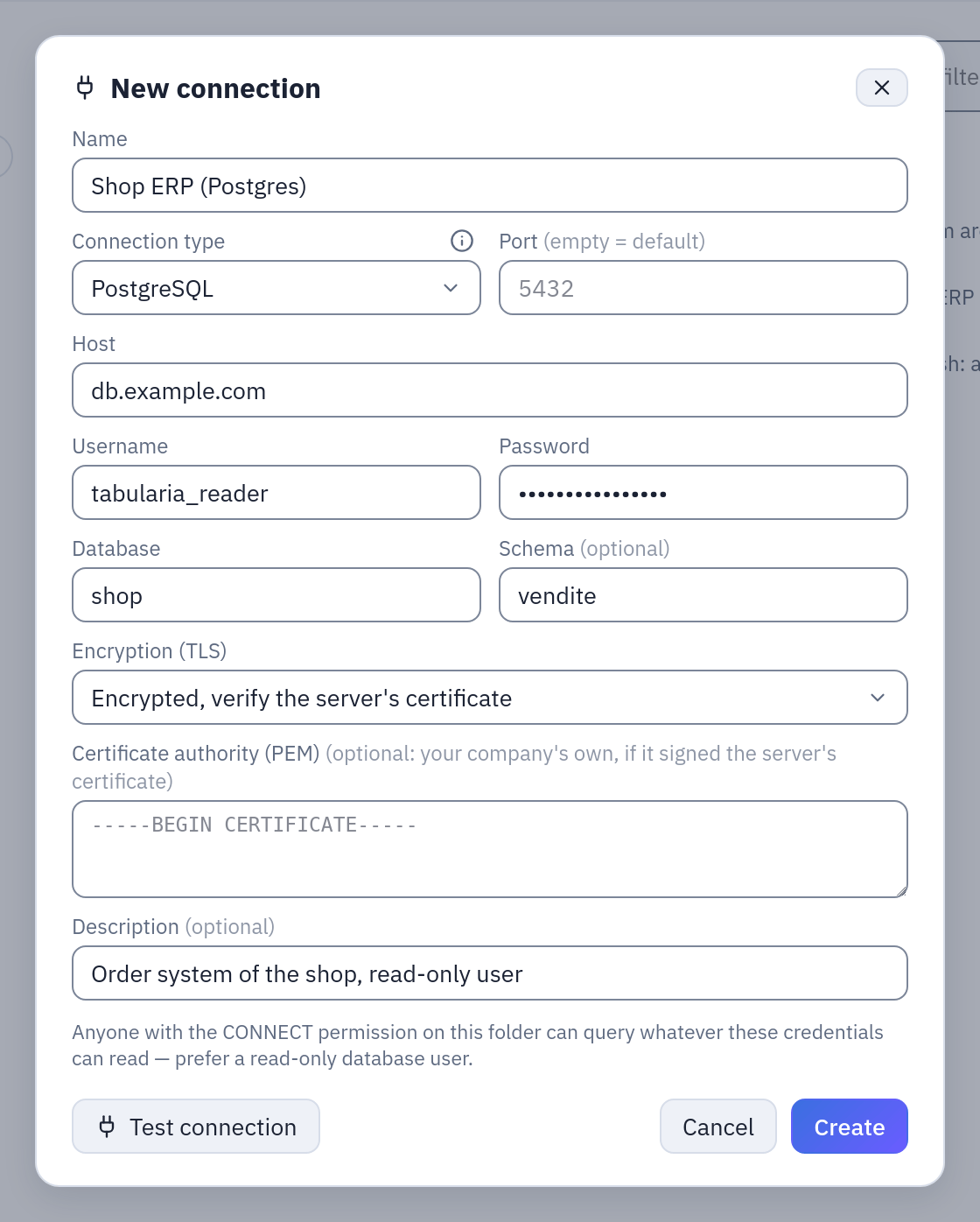
New → New connection: the name, the type, the type's fields. A secret is shown as dots and never comes back from the server.
The Connections page of the main menu lists every connection you may use, from every folder, with a search over name, host and database; from there a connection is tested, edited or deleted. A connection is moved to another folder like any object of Explore, and duplicated there as «name (1)»: the copy keeps the stored secret.
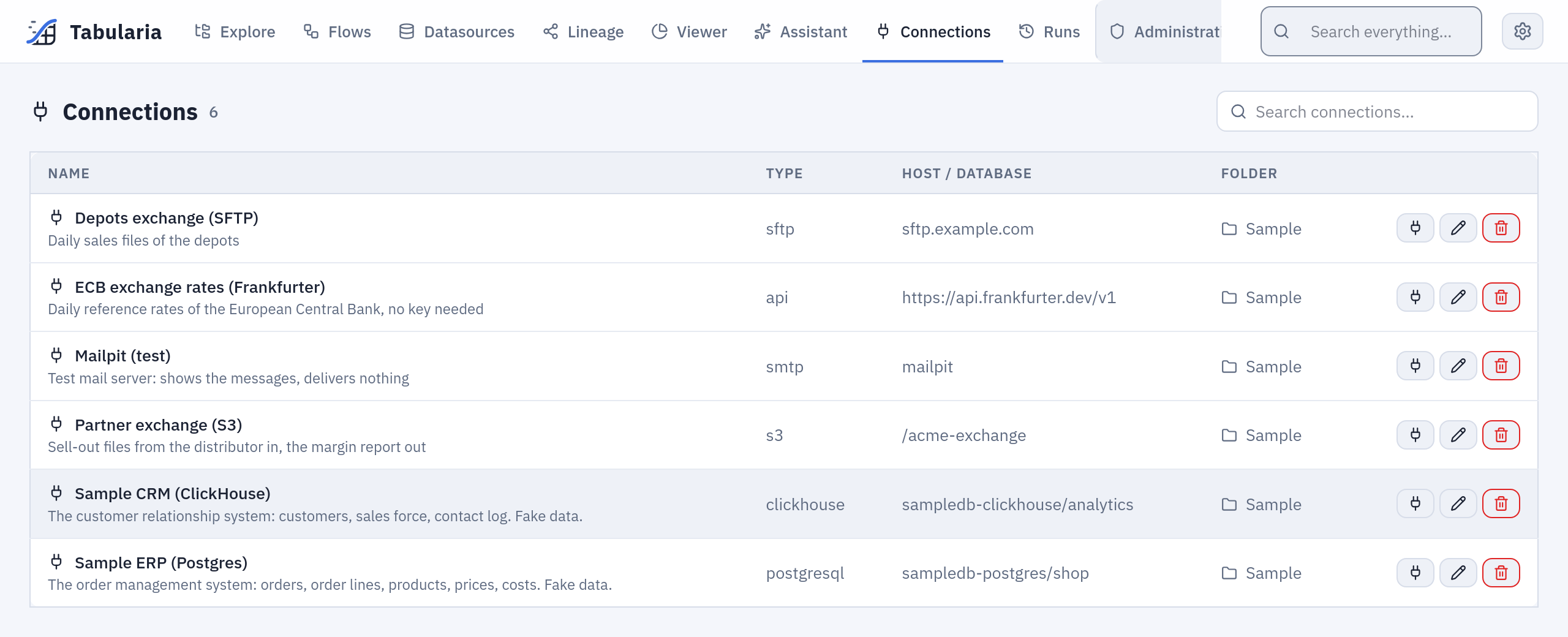
The Connections page: every connection you may use, from every folder, with a search.
The CONNECT permission
A connection can point at any host the workers reach, so CONNECT is given on purpose, by an administrator or by whoever has MANAGE on the folder. A person's personal folder does not include it.
CONNECT is a permission of its own, beside VIEW < RUN < EDIT < MANAGE: EDIT does not include it, MANAGE does. Like every permission it is given on a folder and holds for the folders below it; administrators have it everywhere. With CONNECT on a connection's folder you can:
- see the connection in Explore and on the Connections page (without it, it is invisible);
- create, test, edit, move, duplicate and delete the connections of that folder;
- choose it where a connection is chosen: a datasource from a database, an Output node, a SQL script, a Pushmail cell, the failure notice of a schedule, the notifications of a data contract;
- run what uses it: refreshing its datasources, a flow whose Output writes through it, a SQL script on it.
What CONNECT does not do: it never shows the secret. And what does not need it: reading a datasource imported through a connection is a matter of VIEW on the datasource's folder, like any datasource.
The rights are checked again when something runs on its own. A scheduled refresh whose author lost CONNECT is switched off, saying why; a scheduled flow or flow group is checked the same way when it fires, and does not start without it. Use is use: whoever can use a connection reads (or writes) everything its credentials allow. Give the connection a database user, a bucket key or a mail account with the least rights the job needs, and give CONNECT to the people who may move data through it.
See Permissions for the whole model.
Secrets
The password, secret key, client secret, API token, SFTP private key (with its
passphrase) or Google service account key is encrypted with Fernet under SECURITY__FERNET_KEY the moment it is saved.
The API never returns it: a connection says only has_password (and has_private_key
for SFTP). It reaches the engine still encrypted, and the worker decrypts it only to
open the connection. When you edit a connection, an empty password field keeps the
stored secret. Moving an SFTP connection to another host, port or user, or an HTTP API
connection to another host, needs the secret typed again: a stored secret never follows a
connection to another server.
Keep SECURITY__FERNET_KEY with your backups and never change it once connections are
saved: without it they cannot be decrypted. See Configuration.
«Test connection»
The form's Test connection tries the connection before it is saved, with the secret typed in the form, and stores nothing. On the Connections page it tests a saved connection. What it does:
| Type | The test |
|---|---|
| Databases | opens a connection and runs SELECT 1 (Oracle: SELECT 1 FROM DUAL) |
| S3 | lists one object of the default bucket, or the buckets when there is no default |
| SMTP | connects, encrypts as chosen and signs in; it sends nothing |
| SFTP | reads the server's host key and, once the key is accepted, signs in (SFTP) |
| SharePoint | gets a token from Entra ID, then finds the site and its document library |
| Google Sheets | gets a token with the service account's key, checks that the Google Sheets API is enabled, and counts the spreadsheets shared with the account (Google Sheets) |
| HTTP API | a GET of the base URL, or of the test path when one is set, with the credentials (HTTP APIs) |
A failure shows the server's own message (refused, wrong password, unknown database, certificate not trusted).
Deleting and moving
A connection cannot be deleted while a datasource reads from it, nor while a flow sends its failure notices through it: the refusal says which. Nothing else is checked: a flow whose Output node writes through it, a SQL script on it, a Pushmail cell or a data contract's notifications stop working at their next run, which is refused because the connection is missing.
Moving a connection to another folder needs CONNECT on both. Its datasources and the flows that use it keep referring to it; what changes is who can use it. A schedule whose author has no CONNECT on the new folder stops at its next firing, as above.
Network
Tabularia's engine opens every connection, never the browser and never the gateway: the engine API for tests and table lists, the workers for imports, outputs, emails and SQL scripts. These pods must reach the host and port of every connection.
- Docker Compose: the services share the
dataprep-networknetwork. A host name is resolved from inside the containers, solocalhostis the container itself: use the database's name on that network, or an address the containers can reach. - Kubernetes with the chart's network policy: with
networkPolicy.egressCIDRsornetworkPolicy.egressNamespacesset, the engine, the workers and beat may reach only what is listed there (plus DNS, their own namespace and the namespaces of the broker, the storage and ClickHouse when those are cluster Services). Every database, bucket, mail server, SFTP server and API your connections use must then be in one of the two lists; the cloud metadata address is always carved out. With both lists empty there is no egress policy and the workers reach anything.
# values.yaml
networkPolicy:
  enabled: true
  egressCIDRs:
    - 10.20.0.0/16        # the company's databases and SFTP server
    - 203.0.113.25/32     # the mail relay
  egressNamespaces:
    - databases           # a PostgreSQL running in this cluster
Container registries are the exception: their Test runs from the gateway, and their images are downloaded by the cluster's nodes. See Deploying on Kubernetes.
Audit
Creating, changing and deleting a connection is in Audit (connection.create,
connection.update, connection.delete), with who did it and, at creation, the type and
the host; accepting an SFTP host key is connection.host_key_accept, with the fingerprint.
Secrets never appear there, nor in error messages or the run history.
Example: the sample connections
The sample data of the Docker Compose stack (the samples profile) creates two
connections in the folder Sample, both reachable on the stack's network:
| Name | Type | Host | Port | Username | Database | Schema |
|---|---|---|---|---|---|---|
| Sample ERP (Postgres) | PostgreSQL | sampledb-postgres | 5432 | shop | shop | vendite |
| Sample CRM (ClickHouse) | ClickHouse | sampledb-clickhouse | 8123 | analytics | analytics |
Eleven datasources of Sample / Private tables and Sample / Public tables are
imported through them (vendite.ordini as orders, clienti as customers, …). To let
a colleague build flows on those datasources, VIEW on Sample is enough; to let them
refresh the datasources or query the ERP from a SQL script, give them CONNECT on
Sample as well.
Permissions
| To | You need |
|---|---|
| see, create, test, edit, duplicate or delete a connection | CONNECT on its folder |
| move it | CONNECT on both folders |
| create or refresh a datasource through it | CONNECT on the connection's folder, and EDIT (to create) or RUN (to refresh) on the datasource's folder |
| run a flow whose Output writes through it | RUN on the flow, CONNECT on the connection |
| read a datasource imported through it | VIEW on the datasource's folder |
| manage container registries | an administrator |
Limits and good to know
- Any host is allowed: Tabularia does not filter the addresses a connection may reach. CONNECT, the credentials' own rights and, on Kubernetes, the network policy are the barriers.
- A connection's name is unique within its folder, not across folders: pickers show the folder of each connection.
- The secret is never shown again. To change it, type a new one; to remove it, clear it and save.