Uploaded files
A file from your computer — a CSV export, an Excel workbook, a Parquet or JSON file — is uploaded in the flow editor and becomes the source of a flow at once. Tabularia reads the CSV's separator, encoding and decimal mark from the file itself, lets you pick the sheets of a workbook, and converts everything to Parquet. To share the data with other people and flows, publish it as a datasource from that flow.
At a glance
| Where | Flow editor, toolbar: Upload file. The file fills the selected Source node (or the first one). |
| Formats | .csv .txt (CSV), .tsv, .json (an array of objects), .ndjson .jsonl, .xlsx .xls, .parquet |
| Size | Up to UPLOAD__MAX_BYTES (1 GiB by default). Up to 50 MB the file is ready when the upload ends; above, it is converted in the background. |
| Permissions | EDIT on at least one folder to upload. A fresh upload is readable only by you. |
| Refresh | None: a file is a fixed copy. Upload the new version to replace it. |
| In the catalog | Through a flow: an Output node «Tabularia Datasource», or Run → Publish the output as a datasource. |
For files that arrive by themselves every day, read them where they land instead: an SFTP folder, an S3 folder or Excel on SharePoint are datasources that refresh on a schedule.
How it works
The upload streams to the engine; nothing is held in memory whole. The original file is
kept in the installation's object storage (raw/), and a Parquet copy (datasets/) is
what flows, previews and the Viewer read. Files up to 50 MB are converted while you wait
and the source shows its rows when the upload ends; larger ones go to a worker and the
status bar says «Converting (task …)» until they are ready.
CSV: what is read from the file
The editor sends the file alone, so a CSV is read the way it was written:
- Encoding: UTF-8 when the whole file is valid UTF-8, otherwise Windows-1252 (the encoding of Excel's CSV export in Western European languages). Either way the data is stored as UTF-8: «Città» stays «Città».
- Separator: among
;,tab and|, the one that splits the first 50 lines into the same number of columns, outside quotes;,when none does. - Decimal comma: with a separator other than
,, numbers written16,125are read as decimals. With;— the separator Excel uses where the comma is the decimal mark — a value such as1.234,50is read as 1234.5 and1.500as 1500. A column becomes numeric only when every value in it is such a number; one that is not (a code such as00144, a note) keeps the column as text. - Header: the first row. Spaces around column names are removed.
- Types: guessed from the first 10,000 rows; if a later row does not fit (whole
numbers for 20,000 rows, then a decimal), the types are guessed again on the whole
file. ISO dates (
2026-03-31) become dates.
.tsv files are always tab-separated. A file that cannot be read as CSV is refused with
the reader's message: «The file could not be read as CSV: …».
Excel: the sheets
An .xlsx or .xls workbook is read from its first visible sheet: a hidden first
sheet of lookups or settings is skipped. When the workbook has more than one sheet, the
dialog Sheets to import lists them all, the hidden ones marked, and every sheet you
tick becomes a source of its own on the canvas, read from the same file. Keep «…»
only leaves the one already read.
Excel files are read whole in memory (as JSON arrays are); CSV, NDJSON and Parquet are converted in streaming.
Parquet, JSON, NDJSON
A Parquet file is copied as it is, with its types. NDJSON (one JSON object per line) is
converted in streaming. A .json file must be an array of objects, one per row; nested
objects stay nested.
Example: a price list from the sales office
The sales office keeps the price list of the cured meats in an Excel workbook,
listino_2026.xlsx, with two sheets: Listino (the prices) and Note (hidden). They
also export the March orders of one depot from their ERP as ordini_modena_marzo.csv,
written by an Italian Excel:
numero;data_ordine;canale;deposito;importo
ORD-004101;2026-03-02;HoReCa;Modena;1.234,50
ORD-004102;2026-03-02;GDO;Modena;18.760,00
ORD-004103;2026-03-03;Gastronomia;Modena;412,80
- In Explore, open the folder
Sales office, choose New → New flow and an engine. - In the toolbar, Upload file and pick
ordini_modena_marzo.csv. The source shows three rows and five columns;importois a number (1234.5, 18760, 412.8), not text, because the separator;and the decimal comma were read from the file.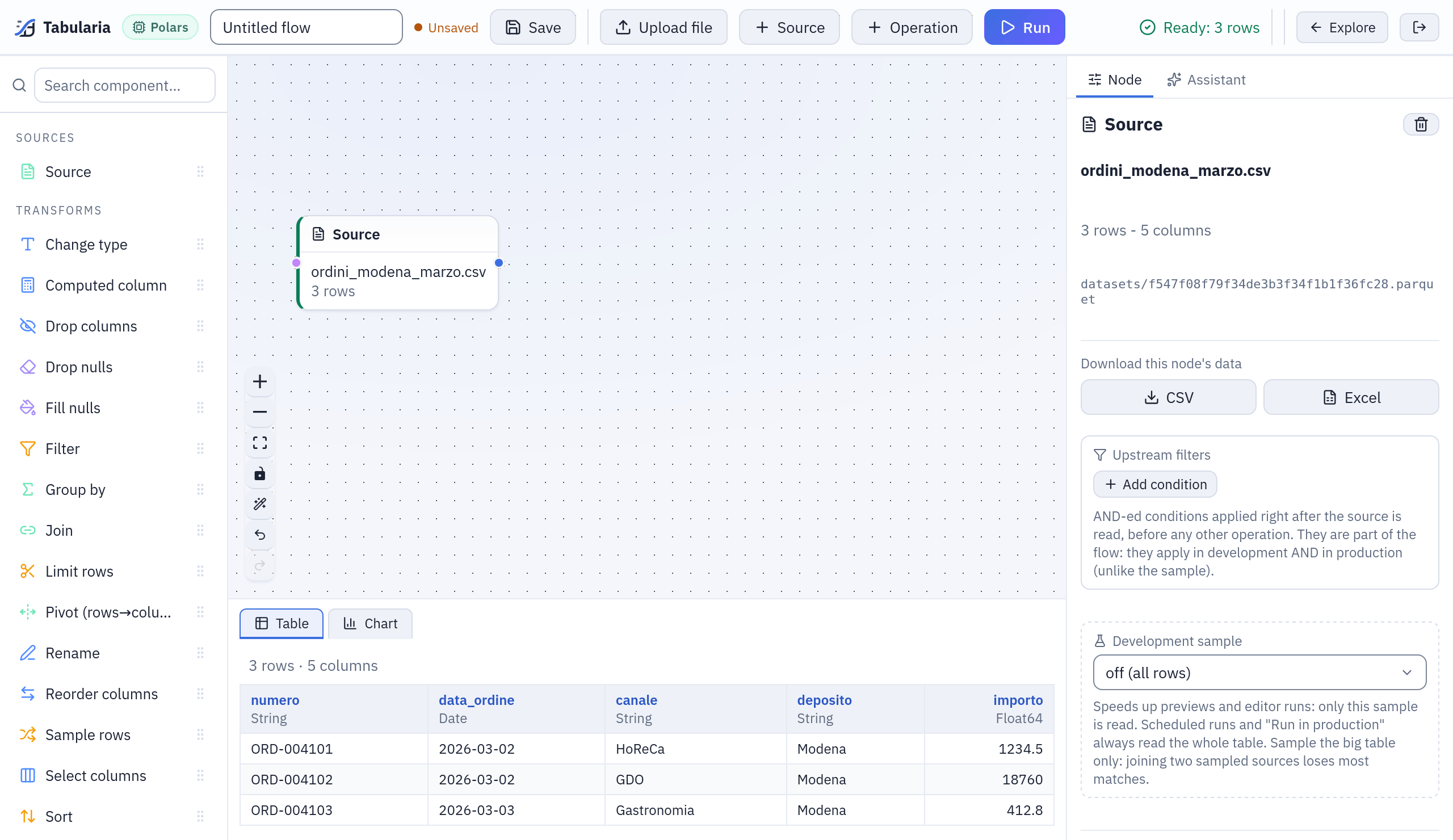
ordini_modena_marzo.csvright after the upload:data_ordineis a date,importoa number (Float64), read from an Italian-style file. - Add a second source (Source) and, with it selected, upload
listino_2026.xlsx.Listinois read; the dialog Sheets to import showsNoteas hidden. Leave it. - Build the flow: filter, join, compute. Then add an Output node, destination
Tabularia Datasource, name
ordini_modena_2026_03, folderSales office. - Save the flow (Ctrl+S) and Run. When the run ends,
ordini_modena_2026_03is in the catalog: other flows, saved views, SQL scripts and the AI assistant can read it.
Next month, upload the April file into the same source and run again: with Overwrite if it already exists ticked on the Output node, the datasource keeps its id and name and its readers keep working. See Flow and SQL script results.
Permissions
| To | You need |
|---|---|
| Upload a file | EDIT on at least one folder (an account that can only view has nowhere to put it) |
| Read an uploaded file | Being the person who uploaded it; once a saved flow references it, VIEW on that flow's folder |
| Publish it as a datasource | RUN on the flow's folder and EDIT on the datasource's folder |
Sharing a flow shares the files its sources reference: whoever can open the flow can read them.
Limits and good to know
- Size:
UPLOAD__MAX_BYTES(1 GiB by default, 0 = no ceiling), also in Administration → Settings as «Largest file uploaded». The gateway refuses a larger file before it reaches the engine. The file is spooled on the engine's disk and converted there, so keep the engine's temporary space above that size. - Conversion time: a background conversion is bounded by
CELERY__TASK_TIME_LIMIT(one hour by default), and the editor waits for it up to an hour. - Memory: Excel and JSON arrays are read whole; a very large workbook needs a worker with the memory for it. Prefer CSV or Parquet for large tables.
- No refresh: an uploaded file never changes. Data that is updated elsewhere belongs in a datasource that reads it there (databases, SFTP, S3, SharePoint, APIs).
- Not offered by the file picker:
.xlsmand.pq. Save the workbook as.xlsx, or rename the Parquet file to.parquet. The SFTP, S3 and SharePoint datasources do read.xlsm. - The CSV options (separator, encoding, header) are not asked for: they are read from the file. A file without a header row is read with its first row as the header.
Related
- All sources: snapshots, refreshes, descriptions and permissions common to every datasource.
- Flow and SQL script results: publishing what a flow computes.
- Low-code flows: sources, operations and Output nodes.
- Configuration:
UPLOAD__MAX_BYTESand the worker limits.