Database connections
A database connection lets Tabularia read a table, a view or a SQL query of PostgreSQL, MySQL, MariaDB, ClickHouse, Trino, Oracle or Microsoft SQL Server into a datasource, run SQL scripts on the database itself, and write a flow's result into a table. This page covers what the seven types share and then each one: its fields, its port, how it is encrypted, its driver, what it can do, and an example.
At a glance
| PostgreSQL | MySQL, MariaDB | ClickHouse | Trino | Oracle | SQL Server | |
|---|---|---|---|---|---|---|
| Default port | 5432 | 3306 | 8123; 8443 encrypted | 8080; 8443 encrypted | 1521; 2484 encrypted | 1433 |
| Encryption (TLS) | verify, trust or none | verify, trust or none | verify, trust or none (HTTPS) | verify, trust or none (HTTPS) | verify, trust or none (TCPS) | verify, trust or none |
| Driver | ADBC (libpq) | PyMySQL | clickhouse-connect (HTTP) | Trino's Python client | python-oracledb, Thin mode | mssql-python, added by you |
| Datasource from a table or SQL | yes | yes | yes | yes | yes | yes |
| SQL scripts on the connection | yes | yes | yes | yes | yes | yes |
| Output node «Database table» | yes | yes | yes | yes | yes | yes, with the driver |
Where: a folder in Explore, New → New connection, type as in the table. Permissions: CONNECT on the connection's folder (see Connections).
How it works
The fields
| Field | Meaning |
|---|---|
| Host | Host name or IP address, as the engine's workers resolve it. |
| Port | Empty = the type's default above. |
| Username, Password | The database account. When editing, an empty password keeps the stored one. |
| Database | The database to open. Trino calls it Catalog, Oracle Service name. |
| Schema | Optional. Put in front of a table name written without one, so ordini reads as vendite.ordini. Oracle: the owner of the tables. |
| Encryption (TLS) | Verify the server's certificate (the default), trust it, or no encryption: see Encryption. |
| Certificate authority (PEM) | Optional, with verify: the certificate of your company's own authority, when it signed the database's certificate. |
The form's Test connection opens a connection and runs SELECT 1. The MySQL,
MariaDB, ClickHouse, Oracle and SQL Server drivers give up connecting after 10 seconds.
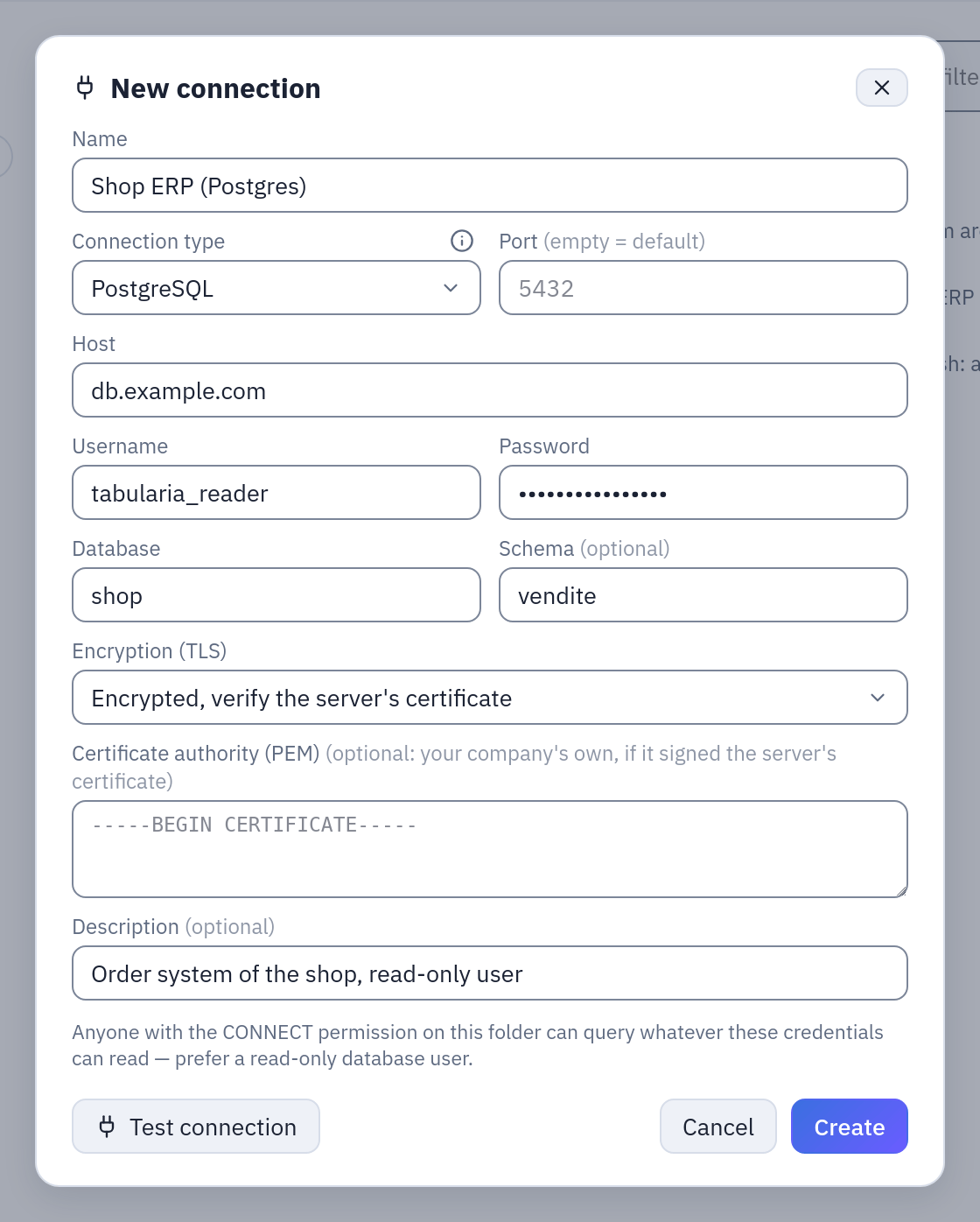
A PostgreSQL connection as in the table below: a read-only user, the schema in front of unqualified tables, and Encryption (TLS) on verify. The Certificate authority (PEM) stays empty when a public authority signed the server's certificate.
Encryption (TLS)
Every type has the same choice, Encryption (TLS), used by everything that opens the connection: the test, the table list, imports and refreshes, SQL scripts and the Output node.
| Option | What happens |
|---|---|
| Encrypted, verify the server's certificate | The default for a new connection. The connection is encrypted, and the server's certificate must be signed by an authority Tabularia trusts and issued for the name in Host; otherwise the connection stops before the password is sent. |
| Encrypted, trust the server's certificate (self-signed) | Encrypted, and the certificate is taken as it is. For a server with a self-signed certificate inside your network: it keeps out whoever listens, not whoever pretends to be the server. |
| Not encrypted (not recommended) | Password and data travel in clear. A server that accepts only encrypted connections refuses it. |
With verify, Tabularia trusts the public authorities of the engine's image. When your
company's own authority signed the database's certificate, paste that authority's
certificate in Certificate authority (PEM), from -----BEGIN CERTIFICATE----- to
-----END CERTIFICATE----- (an intermediate and its root together are fine): Tabularia
then trusts that authority, and only that one, for this connection. It is not a secret,
so anyone who can open the connection sees it; a private key pasted by mistake is
refused. The engine hands it to the driver in memory, or, for the drivers that read it
only from a file (libpq, Trino's client), as a file of the worker's own that is deleted
when the connection closes. SQL Server is the exception: Microsoft's driver reads only
the system's authorities, so a company authority goes into the backend image, as the
driver does (SQL Server).
Encrypted, an empty port is the encrypted protocol's where it has its own: 8443 for ClickHouse and Trino (HTTPS), 2484 for Oracle (TCPS). PostgreSQL, MySQL, MariaDB and SQL Server encrypt on their usual port.
Connections saved before the option existed (Tabularia 1.2.2 and earlier) have none and keep working exactly as they did. The form shows what they do as As before, until someone picks an option:
| Database | As before |
|---|---|
| PostgreSQL, MySQL, MariaDB | encrypted when the server offers it, the certificate not verified |
| ClickHouse | HTTPS with the certificate verified on ports 8443 and 443, plain HTTP on the others |
| Trino | HTTPS with the certificate verified when there is a password, plain HTTP without |
| Oracle | not encrypted |
| SQL Server | verify: it had the option already |
The same holds for a connection created through the API without the option; to choose,
send it in extra, as {"tls": "verify", "ca_cert": "-----BEGIN CERTIFICATE-----…"}.
When the certificate does not pass, the test says why and what to choose:
PostgreSQL: the TLS certificate of pg.corp.example:5432 cannot be verified (certificate
verify failed). If your company's own authority signed it, paste that authority's
certificate in the connection; if it is self-signed, choose «trust the server's certificate».
The other answers name a certificate issued for another name (an IP address in Host while the certificate names the server), a server that does not offer encryption, and one that accepts only encrypted connections.
Example. The DBA hands you corp-root-ca.pem, the authority that signed the
certificate of pg.corp.example. New connection, PostgreSQL, host pg.corp.example,
Encrypted, verify the server's certificate, the content of corp-root-ca.pem in
Certificate authority (PEM), then Test connection. With host 10.0.4.12 instead
the test fails: the certificate names pg.corp.example, not the address.
The dbt export carries the choice into the native profile
(sslmode for dbt-postgres, secure and verify for dbt-clickhouse), with the authority
as certs/ca.pem.
Reading: a datasource from a database
From a folder: New → Datasource from a database, then the connection and either
Table (picked from the list the connection returns, or typed as schema.table) or
SQL query. The optional Order by writes the snapshot sorted by those columns,
which speeds up the viewer's filters. Create & import reads the result in batches and
writes it as a Parquet snapshot in Tabularia's storage; the database is not touched again
until the next refresh, by hand or on a schedule. While a refresh runs, the previous
snapshot stays readable, and it is swapped for the new one only at success.
A SQL query is sent wrapped as SELECT * FROM (<your query>) AS _q, so anything but a
query fails. The wrapper is not a security barrier: the barrier is the database user
(see A user for Tabularia). More on database sources in
Database sources.
SQL scripts on the connection
A SQL script can run on a connection instead of the catalog: the SQL goes to the database as it is, in its own dialect, the side lists the connection's tables and their columns, and the database's own message comes back when it refuses. The result can be exported whole as CSV or Excel, or written into a datasource.
Writing into a table
An Output node with destination Database table writes the flow's result into a table of any of the seven types:
| Field | Meaning |
|---|---|
| Connection | A database connection you have CONNECT on. |
| Destination table | table or schema.table; without a schema, the connection's. |
| Write mode | Append (INSERT) adds the rows; Replace (empty + INSERT) empties the table first. |
| Post-insert SQL | Optional statements run after the insert on the same connection, separated by ;. |
At every run:
- the table is created if it does not exist, with types mapped from the flow's columns (below);
- with Replace, the old rows are removed;
- the rows are inserted in batches, columns matched by name: a column the table lacks
stops the write, a column of the table the flow lacks takes its default, and the values
take the table's own types, as an
INSERTwould convert them; - the post-insert statements run.
How each database makes this safe:
| Database | Replace | If something fails half way |
|---|---|---|
| PostgreSQL | TRUNCATE, bulk load with COPY (ADBC) into a temporary table of the session, one INSERT … SELECT by column name, post-SQL, one commit | nothing is changed: one transaction |
| MySQL, MariaDB | DELETE (not TRUNCATE, which commits on its own), multi-row inserts of 5,000 rows, post-SQL, one commit | nothing is changed: one transaction (a DDL in the post-SQL, such as CREATE INDEX, commits the rows before it runs) |
| ClickHouse | the rows go to a staging copy of the table, then EXCHANGE TABLES swaps it in one step; append ends with one INSERT … SELECT from the staging | the table is untouched until the swap or the final insert; a failing post-SQL leaves the rows written, and the error says so and whether running again is safe |
| Trino | DELETE, inserts of 500 rows, post-SQL, one commit | all or nothing only where the connector supports transactions (Iceberg, Delta Lake); not on plain Hive |
| Oracle | DELETE (not TRUNCATE, which commits on its own), array inserts of 10,000 rows, post-SQL, one commit | nothing is changed: one transaction (a table created by this write stays, empty: Oracle commits DDL on its own). A DDL in the post-SQL (CREATE INDEX, GRANT, DBMS_STATS) commits the rows before it runs: if the post-SQL fails after it, the error says the rows are written |
| SQL Server | DELETE, array inserts of 10,000 rows, post-SQL, one commit | nothing is changed: one transaction, the table created by this write included |
The types of a table created by Tabularia:
| Flow column | PostgreSQL | MySQL, MariaDB | ClickHouse | Trino | Oracle | SQL Server |
|---|---|---|---|---|---|---|
| integer | INTEGER / BIGINT | INTEGER / BIGINT | Nullable(Int32) / Nullable(Int64) | INTEGER / BIGINT | NUMBER(10) / NUMBER(19) | INT / BIGINT |
| decimal number | DOUBLE PRECISION | DOUBLE | Nullable(Float64) | DOUBLE | BINARY_DOUBLE | FLOAT |
| fixed decimal | DECIMAL(p, s) | DECIMAL(p, s) | Nullable(Decimal(p, s)) | DECIMAL(p, s) | NUMBER(p, s) | DECIMAL(p, s) |
| boolean | BOOLEAN | BOOLEAN | Nullable(Bool) | BOOLEAN | NUMBER(1) | BIT |
| date | DATE | DATE | Nullable(Date32) | DATE | DATE | DATE |
| date and time (UTC) | TIMESTAMP | DATETIME(6) | Nullable(DateTime64(6, 'UTC')) | TIMESTAMP(6) | TIMESTAMP(6) | DATETIME2(6) |
| text and anything else | TEXT | TEXT | Nullable(String) | VARCHAR | VARCHAR2(4000) | NVARCHAR(MAX) |
A date and time with a time zone is written as its UTC instant, as every date and time in
Tabularia; a time of day goes into the text column (13:45:30); bytes go into a
VARBINARY(MAX) column on SQL Server.
A ClickHouse table created by Tabularia is a MergeTree with ORDER BY tuple(). To
choose the engine, the sort key or the partitions, create the table yourself first:
Tabularia keeps its definition and only writes the rows.
The run's history records what was written: connection, table, mode and rows.
A user for Tabularia
Whoever has CONNECT on the connection reads everything its user can read, from a
datasource or a SQL script. Give each connection the least rights it needs, and two
connections when you both read and write: a read-only one for the sources and the scripts,
and one that may write only into the schema the flows fill. Give the read-only user a
time limit on the database as well: Tabularia stops waiting for a SQL script after
PREVIEW_TIMEOUT_SECONDS, but only the database can stop a query it is still computing.
PostgreSQL
| Field | Example |
|---|---|
| Host, Port | db.example.com, empty (5432) |
| Username | tabularia_reader |
| Database | shop |
| Schema | vendite (optional) |
- Driver: ADBC's PostgreSQL driver, built on libpq, which streams Arrow batches from
the server; the destination loads with
COPY. - TLS: verify is libpq's
sslmode=verify-full(the system's authorities throughsslrootcert=system, or your company's), trust isrequire, none isdisable. A server withhostssllines only inpg_hba.confrefuses the unencrypted option. - Types:
numericarrives as a decimal number (Float64), so amounts add up. - Table list: the tables and views of every schema except
pg_catalogandinformation_schema.
A read-only user and a writer for one schema:
CREATE ROLE tabularia_reader LOGIN PASSWORD 'change-me';
GRANT CONNECT ON DATABASE shop TO tabularia_reader;
GRANT USAGE ON SCHEMA vendite, catalogo TO tabularia_reader;
GRANT SELECT ON ALL TABLES IN SCHEMA vendite, catalogo TO tabularia_reader;
ALTER DEFAULT PRIVILEGES IN SCHEMA vendite, catalogo GRANT SELECT ON TABLES TO tabularia_reader;
ALTER ROLE tabularia_reader SET statement_timeout = '60s';

CREATE SCHEMA reporting;
CREATE ROLE tabularia_writer LOGIN PASSWORD 'change-me-too';
GRANT CONNECT ON DATABASE shop TO tabularia_writer;
GRANT USAGE, CREATE ON SCHEMA reporting TO tabularia_writer;
The writer owns the tables it creates, so Replace may truncate them; on a table
someone else owns, grant it TRUNCATE besides INSERT. The rows reach the table through
a temporary table of the writer's own session, which needs the TEMPORARY privilege on
the database (every role has it unless the DBA revoked it from PUBLIC). The writer's
session is in UTC, so a timestamptz column stores the instant the flow computed; the
post-insert SQL runs in UTC too (now()::date is the UTC date).
Example, on the sample data. The connection Sample ERP (Postgres) of the samples
(host sampledb-postgres, database shop, schema vendite) reads the order lines. A
datasource with SQL query:
SELECT o.data_ordine, o.canale, o.deposito, r.prodotto_id, r.quantita,
       r.prezzo_unitario * (1 - r.sconto_pct / 100) AS prezzo_netto
FROM vendite.ordini o
JOIN vendite.righe_ordine r ON r.ordine_id = o.id
WHERE o.stato = 'evaso'
Going the other way, add to the sample flow Margin by Category and Month a second
Output node with destination Database table, a connection with the writer above,
destination table
reporting.margine_mensile, Replace, and post-insert SQL ANALYZE reporting.margine_mensile. The first run creates the table with the flow's columns
(categoria, anno_mese, ricavo, costo, margine, chili, ordini,
margine_pct); every run after replaces its rows in one transaction.
MySQL and MariaDB
Two types with the same driver and the same behaviour; choose the one you run.
| Field | Example |
|---|---|
| Host, Port | mysql.example.com, empty (3306) |
| Username | reporting |
| Database | shop |
| Schema | empty: in MySQL and MariaDB a schema is a database |
- Driver: PyMySQL with an unbuffered cursor (the server streams the rows), character
set
utf8mb4. Writes set the session's time zone to UTC, so aTIMESTAMPcolumn stores the instant the flow computed. - TLS: with verify or trust PyMySQL requires encryption, so a server without it is
refused rather than read in clear; none switches it off. A server with
require_secure_transport=ONrefuses the unencrypted option. - Table list: the tables of the connection's database.
CREATE USER 'tabularia_reader'@'%' IDENTIFIED BY 'change-me';
GRANT SELECT ON shop.* TO 'tabularia_reader'@'%';
-- a time limit: MySQL has it per server (milliseconds, SELECT only)…
SET GLOBAL max_execution_time = 60000;
-- …MariaDB per user (seconds)
ALTER USER 'tabularia_reader'@'%' WITH MAX_STATEMENT_TIME 60;
For writing, a user with SELECT, INSERT, DELETE, CREATE on the target database only
(GRANT SELECT, INSERT, DELETE, CREATE ON reporting.* TO 'tabularia_writer'@'%').
Example. A datasource Table orders on the database shop, with Order byorder_date, refreshed every night: the snapshot is sorted, so the viewer filters a
month quickly. An Output node writing a cleaned customer list into
reporting.customers_clean with Append and post-insert SQL
DELETE FROM reporting.customers_clean WHERE loaded_at < NOW() - INTERVAL 30 DAY
keeps the last thirty days.
ClickHouse
| Field | Example |
|---|---|
| Host, Port | clickhouse.example.com, 8443 |
| Username | reader (empty = default) |
| Database | analytics (empty = default) |
- Driver: clickhouse-connect over ClickHouse's HTTP interface, not the native protocol: port 8443 for HTTPS, 8123 for plain HTTP. Port 9000 does not work. ClickHouse Cloud and most managed services use 8443.
- TLS: verify and trust speak HTTPS (8443 when the port is empty), none plain HTTP (8123). A connection without the option chooses by the port, as before.
- Time: ClickHouse may sort a whole table before sending the first row: an import or
a write waits up to
INGEST__DB_READ_TIMEOUT_SECONDS(3000 s by default) while the server says nothing. Date and time columns keep their types. - Table list: the tables of the connection's database.
- Writing: see the staging and
EXCHANGE TABLESabove. On a table you created, the columns are matched by name before anything is written, and a missing one is named in the error. Materialized views attached to the target see appended rows, not a replace.
CREATE USER tabularia_reader IDENTIFIED WITH sha256_password BY 'change-me'
  SETTINGS readonly = 2, max_execution_time = 60;
GRANT SELECT ON analytics.* TO tabularia_reader;
readonly = 2 allows reads only, and lets the driver set the settings of its own
queries.
Example, on the sample data. The connection Sample CRM (ClickHouse) (host
sampledb-clickhouse, port 8123, database analytics) holds the CRM's contact log. A
datasource with SQL query brings in a monthly summary instead of every contact, so
the database does the heavy part:
SELECT agente_id, toStartOfMonth(data) AS mese, tipo, esito,
       count() AS contatti, sum(durata_min) AS minuti
FROM attivita_crm
GROUP BY agente_id, mese, tipo, esito
The same query in a SQL script on the connection answers a question on the spot, without making a datasource.
Trino
| Field | Example |
|---|---|
| Host, Port | trino.example.com, 8443 |
| Username | analyst (empty = tabularia) |
| Password | empty for a cluster without authentication |
| Catalog | hive, iceberg, postgresql…: the connector Trino reads through |
| Schema | sales (empty = default) |
- Driver: Trino's Python client, which pages the results.
- TLS and authentication: verify and trust speak HTTPS (8443 when the port is empty), none plain HTTP. A password goes with basic authentication, and only over HTTPS, as Trino requires: none with a password is refused. A connection without the option uses HTTPS only when it has a password, as before.
- Table list: the tables of the connection's schema.
- Writing: possible, but slow by nature (Trino is not built for loading rows: every
500 rows are one
INSERTquery), and atomic only on connectors with transactions. For large outputs prefer S3 with Parquet and a table of the catalog on top.
Example. A connection on catalog iceberg, schema sales, and a datasource Tableorders_2026 refreshed every morning; a SQL script on the same connection joins it with
another catalog (postgresql.public.customers), since Trino reads across its catalogs.
Oracle
| Field | Example |
|---|---|
| Host, Port | oracle.example.com, empty (1521) |
| Username | REPORTING |
| Service name | ORCLPDB1, FREEPDB1: the service name, not the SID. Required. |
| Schema | HR: the owner of the tables (empty = the user's own) |
- Driver: python-oracledb in Thin mode: pure Python, no Oracle Instant Client to install, results fetched in Arrow blocks.
- TLS: verify and trust connect with TCPS (2484 when the port is empty); verify checks that the certificate names the host. No wallet is needed: a company authority goes in the connection. None, and a connection without the option, is plain TCP.
- Names: Oracle's rule applies. Without quotes a name reads in upper case
(
hr.employeesisHR.EMPLOYEES); in quotes it stays as written (HR."accounts 2024"). The table list gives the names in the form that reads back. - Types:
NUMBERwith scale 0 and up to 18 digits arrives as an integer, other numbers as decimal numbers;DATEandTIMESTAMPas date and time;TIMESTAMP WITH (LOCAL) TIME ZONEis converted to UTC on the server.INTERVAL, object types,XMLTYPE,BFILEand cursors are refused, naming the columns: convert them in a SQL query (TO_CHAR(col)). Two columns with the same name need distinct aliases. - Table list: tables and views of the schemas that are not Oracle's own (Oracle 12c and later).
- Writing: a new table takes Oracle's naming rule too: the flow's
regionebecomes the columnREGIONE, soSELECT regione FROM …works as on a table made by hand; an existing table's columns are matched by name ignoring case. Text columns of a new table areVARCHAR2(4000): for longer values create the table yourself with aCLOB. Oracle stores an empty text as NULL. The user needsINSERT(andDELETEfor Replace) on the table, andCREATE TABLEonly if Tabularia is to create it. - Post-insert SQL: statements separated by
;, or one PL/SQL block run whole (BEGIN DBMS_STATS.GATHER_TABLE_STATS('REPORTING', 'REVENUE_BY_REGION'); END;, without the/of SQL*Plus); a procedure also runs withCALL, without a block.
CREATE USER reporting IDENTIFIED BY "change-me";
GRANT CREATE SESSION TO reporting;
GRANT SELECT ON hr.employees TO reporting;
GRANT SELECT ON hr.departments TO reporting;
Example. A datasource SQL query on service ORCLPDB1:
SELECT e.employee_id, e.last_name, d.department_name, e.salary, e.hire_date
FROM hr.employees e JOIN hr.departments d ON d.department_id = e.department_id
Example, writing back. A flow ends in an Output node Database table on a second
connection, user TABULARIA_WRITER, table reporting.revenue_by_region, mode
Replace. The table already exists, made by the DBA with its own defaults:
CREATE TABLE reporting.revenue_by_region (
  region     VARCHAR2(40),
  revenue    NUMBER(14, 2),
  loaded_at  TIMESTAMP DEFAULT SYSTIMESTAMP
);
GRANT SELECT, INSERT, DELETE ON reporting.revenue_by_region TO tabularia_writer;
At every run the old rows are deleted and the flow's region and revenue land in
REGION and REVENUE in one transaction; LOADED_AT takes its default. A failure half
way leaves yesterday's rows in place.
SQL Server
| Field | Example |
|---|---|
| Host, Port | sql.example.com, empty (1433); a named instance as sql.example.com\SQLEXPRESS with the port empty |
| Username | reporting (SQL Server authentication) |
| Database | Sales |
| Schema | dbo (optional) |
| Encryption (TLS) | Encrypted, verify the server's certificate (default), Encrypted, trust the server's certificate (self-signed), or Not encrypted. No certificate authority field: the driver reads the system's, so a company authority goes into the backend image |
- Driver: mssql-python, Microsoft's driver, with Microsoft's ODBC driver inside. It is not in the published images, for licensing reasons: you add it to your backend image. Until then the type is marked not installed here, a connection can be saved but not tested or imported. See SQL Server.
- SQL: a SQL query is sent as written, CTEs and
ORDER BYincluded, but it must be one query that reads: a batch with a; DELETE …or aSELECT … INTOis refused before it reaches the server. - Types: integer decimals up to 18 digits arrive as integers, other decimals and
moneyas decimal numbers,datetimeoffsetin UTC. - Writing: the rows go straight into the target as array inserts of 10,000 rows, in
one transaction on one connection. Not through the driver's bulk copy: it runs on a
connection of its own and could only load a global temporary table (
##…), which every login of the server can read and fill while it exists. The user needsSELECT,INSERT(andDELETEfor Replace) on the table, andCREATE TABLEonly if Tabularia is to create it.
CREATE LOGIN tabularia_reader WITH PASSWORD = 'Change-me-1';
USE Sales;
CREATE USER tabularia_reader FOR LOGIN tabularia_reader;
ALTER ROLE db_datareader ADD MEMBER tabularia_reader;
Example. A datasource Table [dbo].[Orders] on database Sales, encryption
verified, refreshed hourly; a SQL script on the same connection checks today's orders
with SELECT COUNT(*) FROM dbo.Orders WHERE OrderDate >= CAST(GETDATE() AS date).
Example, writing back. A flow publishes the daily margin into [reporting].[DailyMargin]
with Replace, through a login that may only write that table:
CREATE LOGIN tabularia_writer WITH PASSWORD = 'Change-me-2';
USE Sales;
CREATE USER tabularia_writer FOR LOGIN tabularia_writer;
GRANT SELECT, INSERT, DELETE ON reporting.DailyMargin TO tabularia_writer;
The rows travel as array inserts, about 15,000 to 20,000 a second (500,000 rows in half
a minute); the target changes in one transaction, and the post-insert SQL (EXEC reporting.RefreshMarginSummary, say) runs inside it.
Permissions
| To | You need |
|---|---|
| create, test, edit or delete the connection | CONNECT on its folder |
| create a datasource from it | CONNECT on the connection's folder and EDIT on the datasource's |
| refresh that datasource, by hand or on a schedule | CONNECT on the connection's folder and RUN on the datasource's |
| run a SQL script on it | CONNECT on the connection's folder (VIEW on the script's folder to open it) |
| write to it from an Output node | RUN on the flow and CONNECT on the connection's folder |
| read the datasource once imported | VIEW on its folder |
Limits and good to know
- A connection saved before the encryption option keeps its old behaviour, which for Oracle is no encryption and for PostgreSQL, MySQL and MariaDB no certificate check: open it and choose verify (see Encryption).
- The post-insert SQL is split on every
;, including one inside a quoted string: keep semicolons out of literals there. - A datasource is a snapshot: what changes in the database shows in Tabularia at the next refresh. Schedule the refresh, or add a refresh step to the flow.
- Rows are read in batches and written to disk on the worker before they reach the
storage: memory stays small, the worker's
/tmpholds the file. - The engine's workers open the connection: on Kubernetes with the network policy, the database's address must be allowed (Network).