Engines: where the work runs
Tabularia computes flows, previews and the Viewer on one of five engines: Polars, DuckDB and chDB inside the workers, or an external ClickHouse server and Google BigQuery outside them. The flow does not change from one to the other, because it is stored as a list of operations and each engine translates them; the engine is a setting of the flow, and a flow can use one engine while you design it and another in production. An administrator decides which engines may be chosen.
At a glance
| Engine | id | Where the compute runs | What it needs | Choose it when |
|---|---|---|---|---|
| Polars (default) | polars | In the worker process, streaming | Nothing | Day-to-day work, anything that fits the worker's memory |
| DuckDB | duckdb | In the worker process, spilling to disk | Nothing | Very large joins and aggregations on one machine |
| chDB | chdb | In the worker process (embedded ClickHouse) | An image built with chDB | Trying the ClickHouse dialect without a server |
| ClickHouse (external) | clickhouse | On a managed or self-hosted ClickHouse server | CLICKHOUSE_EXTERNAL__HOST and a server the workers can reach | Big tables, a ClickHouse you already run |
| BigQuery | bigquery | On Google BigQuery, serverless | BIGQUERY__PROJECT, a service account, and Google Cloud Storage as the object storage | Data already on Google Cloud, no servers to run |
Polars and DuckDB run every operation. chDB, ClickHouse and BigQuery run all of them but the Foreach loop, and BigQuery has no median inside a pivot. An engine that cannot run an operation fails with a message that names it; it never hands the work to another engine without saying so.
How it works
Each engine reads the same parquet files
Datasources, cached steps and results are parquet files in one bucket. The in-process
engines read them in the worker, DuckDB and chDB reading only the columns and row groups
a query needs. The external ClickHouse engine, with the s3 transport (the default),
has the server read and write the files on the storage itself, so nothing passes
through the workers; with push, the worker loads the source into a staging table and
streams the result back, for a server that cannot see the bucket. BigQuery reads each
file as a temporary external table of the query, so nothing is loaded into a dataset.
Which engines exist on an installation
- Polars and DuckDB are always there.
- chDB is only in images built with
WITH_CHDB=true. The published images are built without it; the development Docker Compose stack builds its images with it. Where it is missing, the engine picker shows it as «not configured». - ClickHouse (external) appears once
CLICKHOUSE_EXTERNAL__HOSTis set, with the connection settings in Configuration, or once an administrator sets the server in Administration → Settings → ClickHouse connection, with a connection test (guide). - BigQuery appears once
BIGQUERY__PROJECTand the service account's key are set; the object storage must be Google Cloud Storage (Configuration).
Choosing the engine of a flow
Every flow carries two engines:
- The development engine, chosen when the flow is created: Explore → New → New flow, or New flow in the Flows tab, opens the Execution engine list, where your Preferred engine is marked «preferred». The editor uses it for previews, charts, downloads and the Run button. The editor's toolbar shows it beside the brand, followed by the production engine when that is another one («Polars → ClickHouse»).
- The production engine, optional: in the Flows tab, open the flow's card and set Engine (production). Scheduled runs, flow groups and Run in production use it; «same as development» leaves them on the development engine.
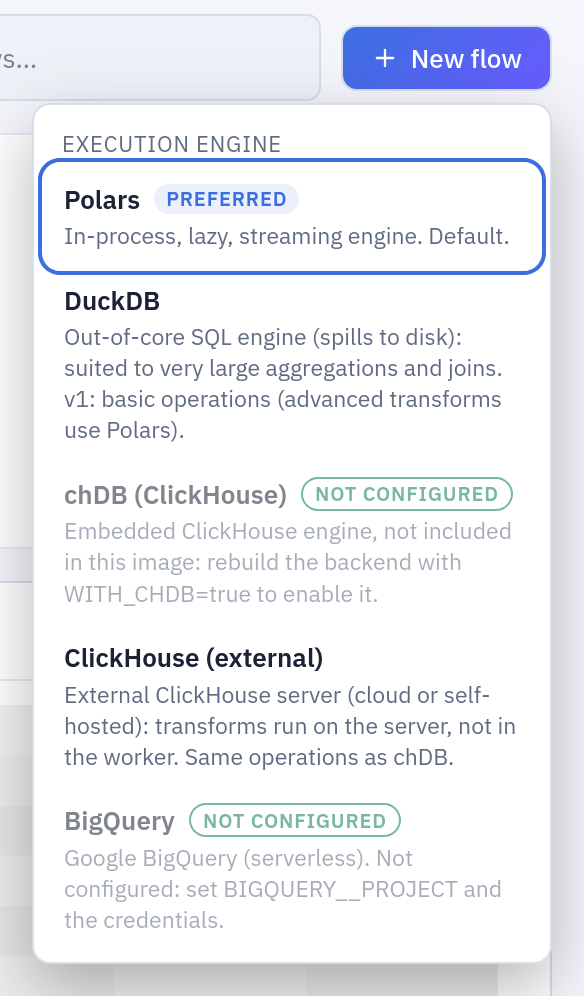
New flow asks for the development engine first; your preferred one is marked.

A flow's card in the Flows tab: Engine (production), the engine of its schedules and of Run in production.
So a flow can be designed on Polars, with a development sample on its sources, and run
every night on ClickHouse or BigQuery on the whole table. Every run records the engine it
actually ran on (the engine field of the run in the API), which is the first thing to
check when a production number differs from what the editor showed.
The engine is chosen in three more places, each for itself: the Viewer (engine, at the top), a SQL script on the catalogue, and the Preferred engine in Settings, which is only the default the Viewer and new flows start from.
The engines the administrator allows
Administration → Engines lists each engine with Flows still using it. Turning one
off («Stop new flows from choosing it») removes it from every picker: it can no longer be
chosen for a new flow, as a development or production engine of an existing one, or in
the Viewer. It does not stop the flows that already use it: their schedules keep
running, and the count beside the engine is the list of flows to move. At least one
engine always stays allowed. The pickers tell «not allowed here» apart from «not
configured», so nobody looks for a missing variable when the reason is a policy.
Allowing and disallowing are in the audit log (engine.allow, engine.disallow).
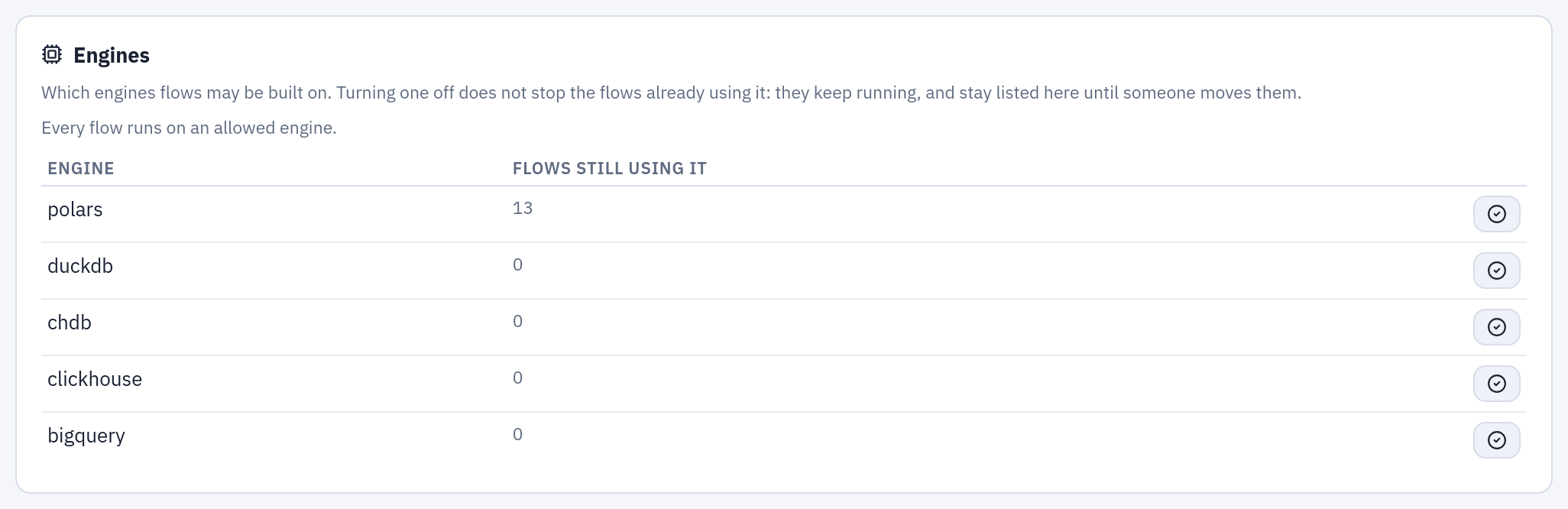
Administration → Engines: each engine, the flows still using it, and the switch that allows or stops it.
One semantics, documented differences
The engines follow one data standard, the semantics of SQL: comparisons with null are
false, aggregates ignore nulls, a failed cast gives null, sorting puts nulls last, a null
join key never matches, datetimes are UTC instants. An oracle test suite runs the same
hand-computed expectations on all five engines. What still differs (rounding of a .5,
the modulo of negative numbers, how text is cast to dates, the SQL dialect of
Computed column and Execute SQL) is listed in
Engine differences: read it before giving a flow a
production engine other than its development one.
Example: design on Polars, run on ClickHouse
A team designs on Polars and wants the nightly run on the company's ClickHouse.
- The administrator enables the engine. With Helm, in the values:
externalServices:
  clickhouse:
    host: clickhouse.example.com
    port: 8443
    secure: true
    username: tabularia
    database: tabularia
    transport: s3
    s3Endpoint: https://s3.example.com
    s3NamedCollection: tabularia_bucket
secrets:
  clickhousePassword: "…"
With Docker Compose, the same settings are theCLICKHOUSE_EXTERNAL__*variables ininfrastructure/.env. After the restart, ClickHouse (external) appears in the pickers. - The analyst keeps designing on Polars. The flow «Revenue by Region and Channel»
(the flows example)
stays on Polars; its
order_rowssource gets a Development sample of the first 100,000 rows, so previews stay fast. - The production engine is set. In the Flows tab, on the flow's card,
Engine (production) → ClickHouse (external). The same change through the API:
curl -X PATCH https://tabularia.example.com/api/flows/42 \ -H "Authorization: Bearer tab_…" -H "Content-Type: application/json" \ -d '{"production_engine": "clickhouse"}' - A trial run. The card's run button («Run now with the production engine») runs the flow on ClickHouse, on every row: the development sample is never applied in production. Compare the result with the editor's; if a number differs, check the operations listed in Engine differences.
- The schedule. Put the flow on a schedule (Scheduling): every scheduled run uses ClickHouse, and records it.
On BigQuery the steps are the same, with BIGQUERY__MAXIMUM_BYTES_BILLED (20 GiB by
default) as the ceiling every query is checked against before it runs.
Measured numbers
From the measurements published with the project:
- External ClickHouse,
s3transport: an aggregation over 25 million rows answers in 0.6 s instead of 18 s, because the parquet files are written with large row groups (INGEST__PARQUET_ROW_GROUP_ROWS, one million by default) that the server can skip. - BigQuery, on a table of 25 million rows and 50 columns with a development sample of 100,000 rows: 0.6–1.1 s per click in the editor with the step cache, 1.1–2.9 s without. BigQuery bills the columns a query touches: on that table an aggregation read 100 MB–1 GB, a sort of whole rows about 19 GB.
Permissions
| To | You need |
|---|---|
| Choose the development engine of a new flow | EDIT on the folder, and the engine allowed |
| Change a flow's development or production engine | EDIT on the flow's folder, and the engine allowed |
| Run in production | RUN on the flow's folder |
| Allow or disallow an engine | Administrator; observers see the panel read-only |
Limits and good to know
- The development engine can be changed after creation only through the API
(
PATCH /flows/{id}withengine); the interface changes the production engine. - A duplicate keeps both engines of the original; if one of them is no longer allowed, the copy is refused.
- Multi-replica ClickHouse services are not handled yet: cancelling a query and the Performance page talk to one replica.
- DuckDB spills to the worker's temporary disk; on Kubernetes it uses at most half of
TMP_SIZE_LIMIT. chDB has its own memory and spill limits (CHDB_MAX_*). - Engine limits that can change while everything runs are in Administration → Settings (Settings from the panel).
Related
- Engine differences: the contract between engines
- The ClickHouse user for the assistant
- Flows and Preview and analysis
- Configuration: every engine variable