Placeholders: dates that move by themselves, in and out
A datasource that reads «yesterday's file» or «the last 30 days», and an Output that writes «today's file», cannot hold fixed dates. Their names hold placeholders, resolved at every refresh or run in a time zone of their own. One language, parsed and never evaluated, with the same messages everywhere:
| Where | What holds placeholders |
|---|---|
| Datasource «API call» | path, query, headers, JSON body (api-datasource.md) |
| Datasource «SFTP folder» | folder and files (sftp.md) |
| Datasource «S3 folder» | folder and files (s3-datasource.md) |
| SharePoint datasource | the path with its glob |
| Output «SFTP server» | folder and file name |
| Output «S3» (and the S3 copy of a published datasource) | the object key, or the prefix of a partitioned dataset |
| Output «Email» | subject and attachment name (the body is sent as written) |
A database destination's table name is not a template: a table named by date would break the catalogue and the dbt export.
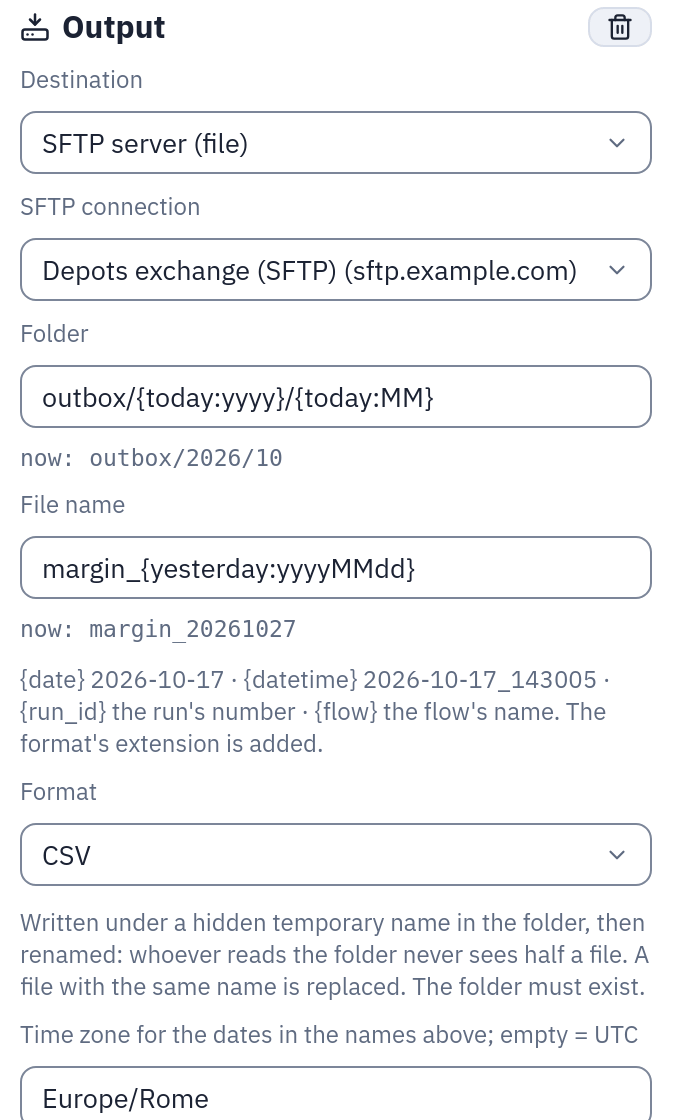
An SFTP Output with dated folder and file name: under each field, «now:» shows what a run would write today (28 October 2026, Rome time).
The language
| Placeholder | Value |
|---|---|
{today}, {yesterday} | a date: 2026-10-17 |
{now} | a date-time: 2026-10-17T14:30:05+02:00 |
{start_of_month}, {start_of_week} (Monday), {start_of_year} | a date |
{last_refresh} | inputs only: when the last successful refresh of the datasource started; on the first refresh the datasource's initial value (today-365, 2024-01-01) |
{today-1} {today-7d} {today+1d} {today-2w} {today-1m} {today-1y} | offsets: a bare number is days; m months, clamped to the end of the month (31 March − 1m = 28 February) |
{now-2h} {now-30min} {now+15s} | hours, minutes, seconds: on date-times only |
{today:yyyyMMdd} {today:dd/MM/yyyy} {now:yyyy-MM-dd'T'HH:mm} | a readable format: yyyy yy MM dd HH mm ss, text in 'quotes'. mm is the minutes right after the hours or right before the seconds, the month otherwise (Excel's rule): ddmmyyyy is a date |
{today:MMMM yyyy} {today:EEE dd MMM} | the names: MMMM MMM the month (October, Oct), EEEE EEE the day of the week (Saturday, Sat). In the language of a Pushmail cell's subject and file names (ottobre 2026) and of a report, in English everywhere else |
{today:%Y%m%d} | a strftime format (a % outside quotes makes it one); %s is refused, use :epoch |
{now:epoch} {now:epoch_ms} {now:iso} | seconds or milliseconds since 1970; ISO 8601 |
{symbol} | a list variable of the datasource (no offset, no format) |
{day}, {day_end} | a range variable and the end of its window (offsets and formats allowed) |
{{, }} | a literal brace |
On an Output there are four more, and no {last_refresh}:
| Placeholder | Value |
|---|---|
{run_id} | the run's number, the one in the run history |
{flow} | the flow's name; in a file name, a folder or a key anything but letters, digits, ., - and _ becomes _ (in a subject it stays as it is) |
{date} | {today}: 2026-10-17 |
{datetime} | {now} written 2026-10-17_143005 |
{date}, {datetime}, {run_id} and {flow} are the four names the SFTP Output had
before this language: a file name that uses them is written with the same bytes
as before (the Output's zone is UTC unless set).
The time zone
Every datasource and every Output node has one (an IANA name such as Europe/Rome;
empty = UTC). It decides what «today» is: at 00:30 in Rome {today} is already the
18th, while in UTC it is still the 17th. Date-times carry the zone's offset; :epoch
is the same instant in every zone.
Names that cannot escape their folder
What a placeholder resolves to cannot take a name out of its place:
- a file name (SFTP, email attachment) cannot get a
/or\from a value ({today:yyyy/MM}in a file name is refused: put the folders in the folder field); - a folder or an S3 key may get levels from a value (
exports/{today:yyyy/MM}/is fine) but no segment may be..or.; {flow}is always made safe in names, folders and keys.
A dated SFTP folder of an Output (/outbox/{today:yyyy}/{today:MM}) is created
when it does not exist yet; a folder without placeholders must exist, as before (a
typo is an error, not a new folder).
Variables
A datasource (API call, SFTP, SharePoint, S3) may have up to 10 variables, one per line in its form:
branch = MI, RM, TO
day = today-7 .. today step 1d
- a list (
name = value1, value2) gives its values one by one; - a range (
name = start .. end step N<unit>) gives every value from the start (included) to the end (excluded) by the step:1d,7d,1w,1m,1y,1h,30min. Start and end are written without braces —today-7,now-2h,start_of_month,last_refresh,2026-01-01. Withoutstepthe forms take1d.
day = today-7 .. today step 1d is the seven days before today (today excluded).
To include today write .. today+1. A range whose start and end are dates and that
steps by days, weeks, months or years gives dates ({day} = 2026-10-11); any
other gives date-times in the datasource's zone, values and window ends alike (so
{x_end} has the same type on every window): a date bound is its local midnight, an
ISO date-time without an offset (2026-10-10T06:00) is read on the zone's clock.
hour = 2026-03-29 .. 2026-03-30 step 1h in Rome gives the 23 hours of that day
(local 00, 01, 03 … 23), the autumn change 25. Month steps are counted from the start,
so 31 January by months is 28 February, then 31 March.
{day_end} is the end of each value's window: the next value, or the range's end
for the last one. The windows are half-open and never overlap — what an API taking
from and to wants:
from={day}&to={day_end} → from=2026-10-11&to=2026-10-12, … , from=2026-10-17&to=2026-10-18
Several variables make every combination of their values. Every row says the values
it came from in _param_<name> (one column per variable, not for _end).
The number of values is capped: a range may give at most PLACEHOLDERS__MAX_VALUES
values (engine setting, default 1000), and the combinations of a file datasource's
variables at most as many — each one is a listing of the folder. An API call is also
bounded by API__MAX_CALLS (500). The cap is checked when the datasource is saved and
at every refresh: a range that grew past it (one starting at last_refresh after a
long pause) fails the refresh, naming it.
Files: one expansion per value
On a file datasource the folder and the glob are expanded once per combination, and
every file any expansion matches is read — once, even when two values match it (the
values of the first one go in its _param_ columns). With a dated folder (in/{day})
_file is the path below the folder's fixed part (2026-10-14/a.csv), so the day is
not lost.
A value without its file is skipped and listed: the refresh succeeds, and the run says which values had no file («1 value without a file: day=2026-10-15 (in/sales_20261015.csv)»), in the run history and the datasource's imports. If no value finds any file, the refresh fails: an empty range is a broken feed, not an empty table. A datasource without placeholders behaves as before.
Check the files in the forms lists what every expansion takes and the values without a file, before saving.
Refreshing: snapshot or append by key
Every file datasource (SFTP, SharePoint, S3), like the API call, refreshes as a
snapshot (the table is rebuilt from what was read) or appended by key: the rows
read are merged into the current table, the rows whose key columns come again are
replaced, new keys are added: rows read again never pile up on the old ones. On a
file datasource a key is a group of rows: keyed by _file (or _param_day), a
file read again replaces all the old rows of that file with all its new ones.
So rows of one refresh that share a key are all kept — wanted for _file, and
maybe not for a key meant to identify one row: when the key does not hold _file the
run says how many keys came on more than one new row («3 keys on several rows»), to
check that the key really is one. (The API call keeps the last row of a key repeated
in one refresh: there a key is one record.) The classic incremental import:
day = today-3 .. today step 1d        folder: in        files: sales_{day:yyyyMMdd}.csv
mode: append, keys: _param_day, id
Every night it re-reads the last three days (a late correction replaces the old rows of its day) and keeps everything read before.
Braces written before
Braces now always mean a placeholder in these fields. The definitions stored before
this language keep their meaning: the gateway's migration 0013 writes their literal
braces as {{ }} — in the email subject and attachment name, the S3 key and the
copy's key, the SFTP Output's folder, the folder and pattern of the SFTP datasources
and the path of the SharePoint ones — so Sales {North} is still sent as Sales {North} — every brace, adjacent ones too (a {{ written before was two braces, and
stays two). The SFTP Output's file name keeps its {date}, {datetime}, {run_id} and
{flow} exactly where the code of before found them; any other brace there is escaped
too. From then on, a literal brace is
written {{ (a {1} typed in a form is refused as an unknown placeholder, with the
message, when the datasource is saved or before the run).
Lengths
A file name (SFTP, attachment) resolved from placeholders, and every level of a resolved folder or key, may hold 255 bytes, a resolved S3 key 1024 bytes in all; longer is refused, before writing anything. A name written without braces is used as before. No resolved value may hold a control character (a line break, a tab), and a subject no line break; a flow's name cannot hold one either when it is created or renamed (it reaches {flow}).
Checked before saving, previewed while typing
The engine's checker runs when a datasource is saved (an unknown placeholder, a variable not used anywhere, an empty range, a range over the cap, append mode without keys: refused with the message the refresh would give) and before every run of a flow (the Output's templates: refused before anything is queued). Every form shows the resolved value while you type — «now: export_20261018.csv», or «7 values: sales_20261011.csv … sales_20261017.csv» — or the message of what is wrong.
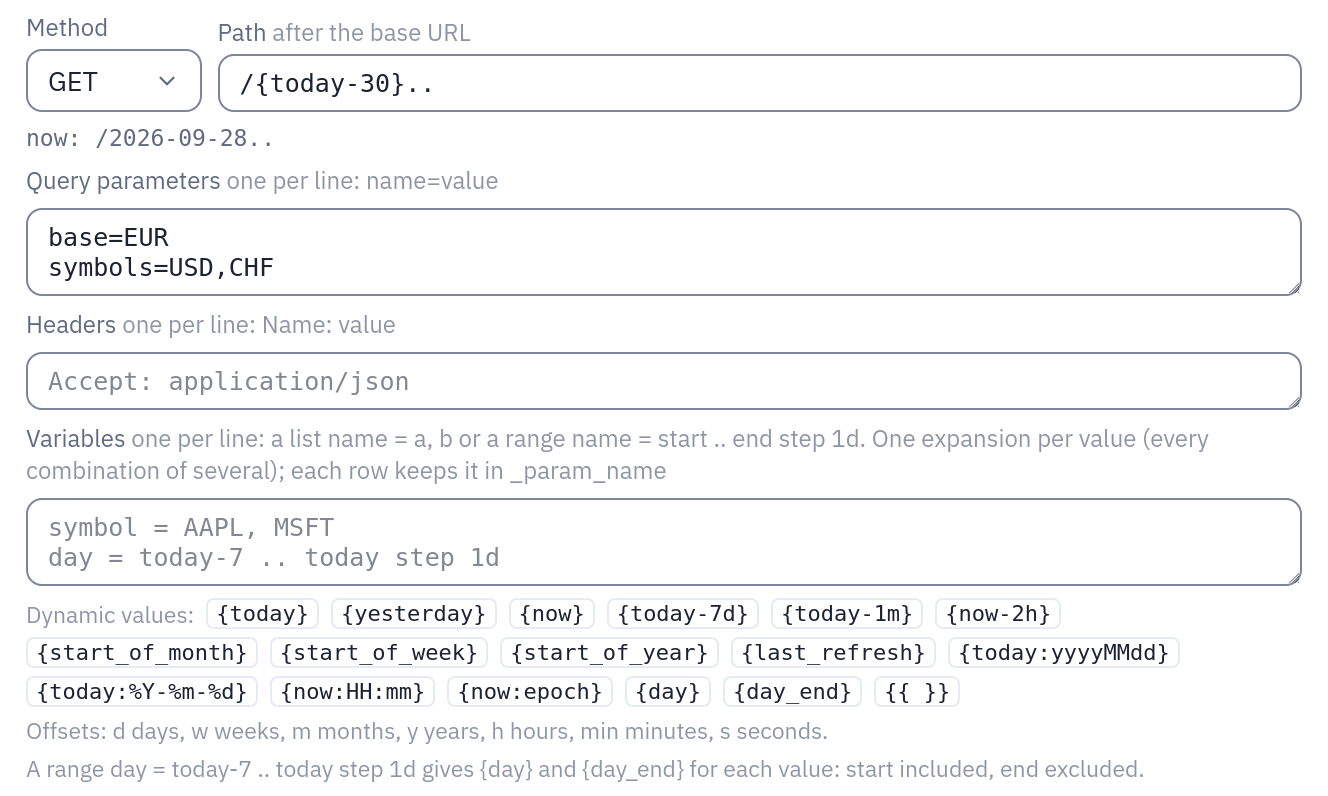
An «API call» datasource: under the path, «now:» shows what {today-30} resolves to today; under the fields, the dynamic values the form accepts.
Proofs
backend/tests/test_placeholders.py (the language, outputs, ranges),
test_api_placeholders.py, test_file_ranges.py (SFTP and SharePoint expansions,
missing values, append), test_s3_source.py, the outputs in test_sftp.py,
test_s3_destination.py, test_email_destination.py; the gateway's part in
gateway/tests/test_placeholders_gateway.py. Against real servers (throwaway MinIO,
OpenSSH and SMTP containers) and through the dev stack: e2e/placeholders/.
Related
- Capabilities: where placeholders fit among the other features
- Flows: the Output nodes whose names hold placeholders
- Sources: the datasources that read files and APIs by date