Flows: low-code data preparation
A flow is a data pipeline drawn on a canvas: sources on the left, transformations in the middle, outputs on the right, each step a node you configure in a form instead of writing code. Every node shows the data it produces as soon as you click it, computed on the whole table by the engine the flow runs on. A saved flow keeps its versions, runs by hand or on a schedule, and publishes its result as a datasource, a database table, a file or an email.
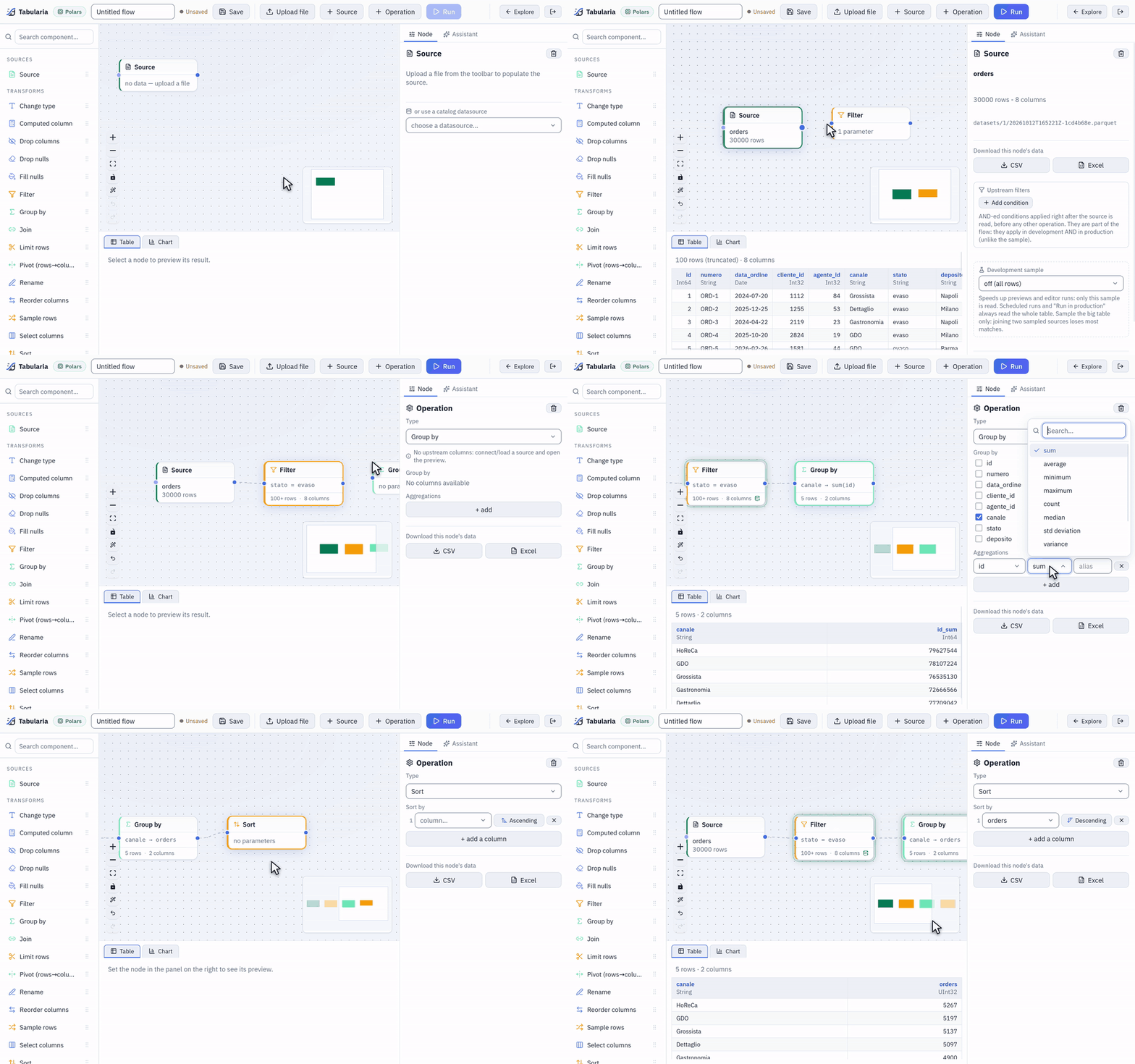
A flow built on the sample orders: the source, a Filter on stato, a Group by on canale with a count, a Sort. Each node shows its rows as soon as it is set.
At a glance
| Where | Explore → a folder → New → New flow, or the Flows tab → New flow. Both ask for the Execution engine first. |
| What a flow holds | Source nodes, transformations (19 operations plus the Foreach loop), Script and Container nodes, Output nodes, notes |
| What you see | The selected node's first 100 rows as a table, or a chart computed on all its rows |
| Engines | Polars, DuckDB, chDB, ClickHouse (external), BigQuery: one for the editor, optionally another for production (Engines) |
| Permissions | VIEW to open, EDIT to save, RUN to run; publishing and connections need more (Permissions) |
The editor
The editor has five areas:
- The palette, on the left, with a search box. Its groups are Sources, Transforms, Control (the Foreach loop, Script and Container), Output and Notes. Drag an item onto the canvas to create the node.
- The canvas, where you connect nodes by dragging from the handle on a node's right to the handle on the next one's left. A connection is removed with a click on it or from the keyboard. Arrange the flow lays the nodes out, Undo (Ctrl+Z) and Redo (Ctrl+Shift+Z) step through your changes, and a minimap helps on large flows.
- The panel, on the right, with the selected node's settings. Column pickers list the columns that reach the node, so a filter or a group-by is chosen, not typed. When an AI model is configured, a second tab, Assistant, builds the flow with you (AI in Tabularia).
- The data view, at the bottom, with a Table tab and a Chart tab for the selected node (Preview and analysis).
- The toolbar: the flow's name and folder, Save (Ctrl+S, with an Unsaved marker while there are changes), Upload file, Source, Operation and Run.
Nodes that need a second input, Join and Union (append rows), have two handles on their left: the top one takes the previous step (the left table), the bottom one the branch to join or append (the right table). The right branch can be transformed before it arrives, like any chain.
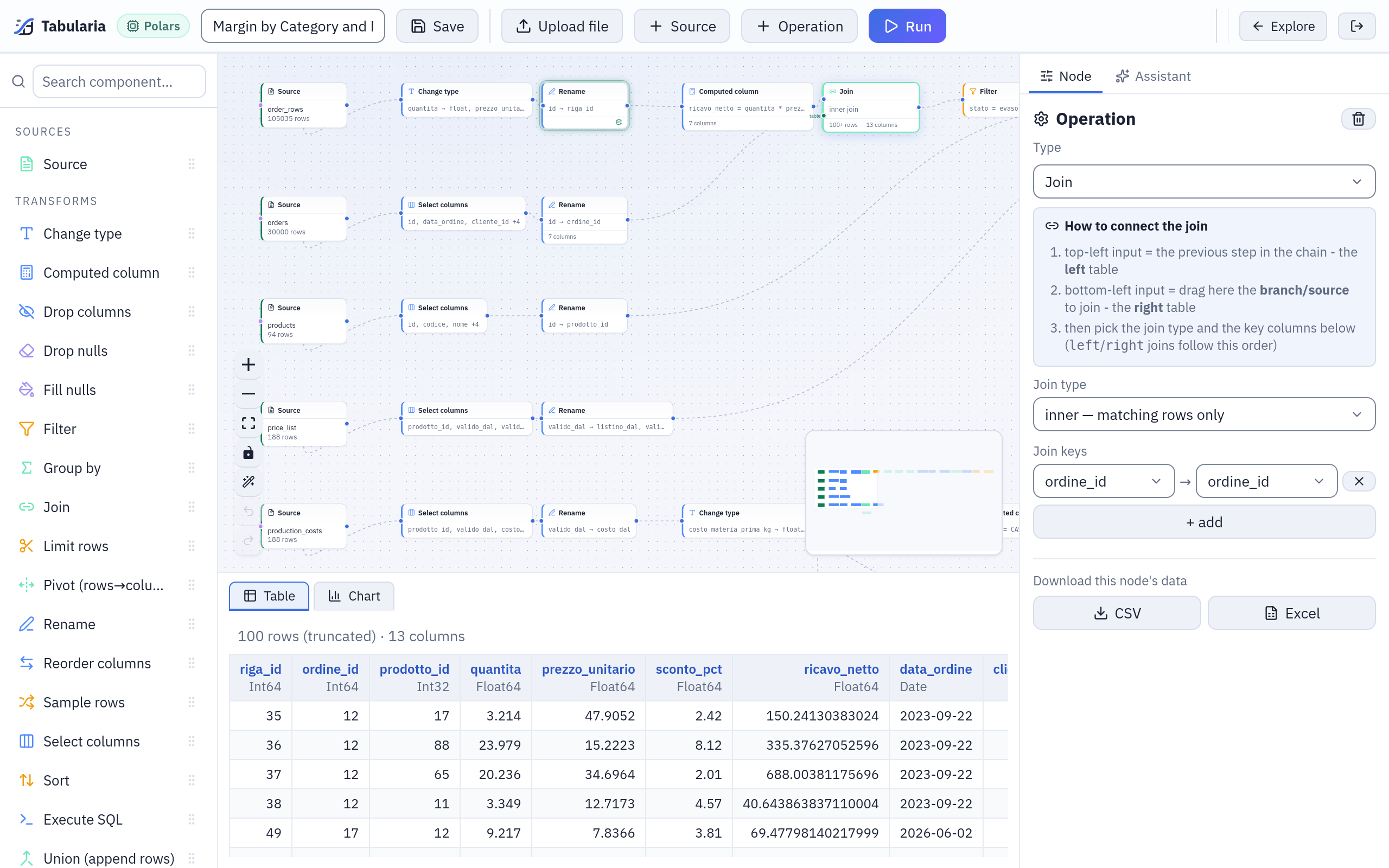
The sample flow «Margin by Category and Month» in the editor: the palette, the canvas with five source chains, the selected Join's settings in the panel and its first rows in the data view.
The node catalogue
Every transformation below is part of the flow's declarative definition and runs on every engine, with the exceptions listed in Engine differences.
Sources and outputs
| Node | What it does |
|---|---|
| Source | Reads a datasource of the catalogue (an uploaded file, a database table or query, an SFTP or S3 folder, a SharePoint file, an HTTP API call: see Sources), or a file uploaded from the toolbar. It can carry Upstream filters, AND-ed conditions applied right after the read in development and in production, and a Development sample (first N rows or random %) that only previews and editor runs use. |
| Output (datasource / database) | Writes the result of the chain. Destination: Tabularia Datasource, Database table (append or replace, optional post-insert SQL), File on S3 / object storage, SFTP server (file) or Email with attachment. See Destinations. |
| Note | An annotation on the canvas. It is not part of the flow and never runs. |
Columns
| Node | What it does |
|---|---|
| Select columns | Keeps the listed columns, in that order. |
| Reorder columns | Puts the listed columns first, in the order you drag them; the others follow. |
| Drop columns | Removes the listed columns. |
| Rename | Renames columns. |
| Change type | Converts columns to integer, decimal, text, boolean, date or datetime. A value that cannot be converted becomes null, never an error; a number converted to an integer is truncated. |
| Computed column | Adds or overwrites columns from SQL expressions in the engine's dialect (quantita * prezzo_unitario, CASE WHEN … END, window functions with OVER). The columns are computed in order, so one can use the previous ones. |
| Execute SQL | A whole SELECT over the node's input, named self (or input). It may read its input and nothing else: any other table, table function or file is refused before it runs. Its preview starts only when you press Preview. |
Rows
| Node | What it does |
|---|---|
| Filter | Keeps the rows that match one condition: equals, not equal to, greater/less (or equal) than, is one of, is not one of, between, contains, starts with, ends with, is null, is not null. Dates get a calendar; is one of offers the column's distinct values. |
| Sort | Sorts on one or more columns, each ascending or descending; nulls always go last. |
| Limit rows | Keeps the first N rows. |
| Unique rows | Removes duplicates, on all columns or on the ones you list, keeping one row per group. Put a Sort before it when it matters which one. |
| Sample rows | Keeps a fraction of the rows, chosen by a hash of their content: the same rows at every preview. |
| Fill nulls | Replaces nulls with a value, column by column. |
| Drop nulls | Removes the rows with a null in any column, or in the ones you list. |
Combining and reshaping
| Node | What it does |
|---|---|
| Group by | Groups on columns and computes aggregations: sum, average, minimum, maximum, count, median, std deviation, variance, first, last, distinct count. Nulls are ignored, as in SQL. |
| Join | Joins the right branch: inner, left, right, full, semi, anti or cross. Keys with the same name on both sides become one column; a non-key column present on both sides gets the _right suffix. A cross join that would exceed ENGINE_MAX_CROSS_JOIN_ROWS (50 million by default) is refused. |
| Union (append rows) | Appends the right branch's rows: align by name (missing columns become null) or require identical schemas. Chain several unions to append more sources. |
| Pivot (rows→columns) | Turns the values of a column into columns, aggregated with one function. Column names are the values as text; at most 500 new columns. |
| Unpivot (columns→rows) | Turns columns into a label column and a value column. |
Control
| Node | What it does |
|---|---|
| Foreach loop | Runs the operations placed inside it once per row of a driver table (or per item of a static list), with {{column}} placeholders in their parameters, and appends the results. At most 1,000 iterations per loop and 100,000 in all. Not available on chDB, ClickHouse and BigQuery. |
| Script | Runs Python or R code as a Kubernetes Job in an environment an administrator defines (Python and R). |
| Container | Runs an image from a registry an administrator grants (Docker images in flows). |
Script and Container need Kubernetes: on a Docker Compose installation they appear greyed out with the reason. Flows saved before flow groups existed may still hold Refresh datasource and Run flow nodes: they keep running, but are no longer offered; ordering refreshes and flows is the job of a flow group.
How it works
The definition is declarative
A flow is stored as JSON: the nodes and the edges of the canvas. To preview a node or
run an output, the chain that leads to it is turned into a list of typed operations,
each a type and its params; the right branch of a join becomes a sub-flow (a source
plus its own operations). Nothing in that list is code to evaluate: each engine
translates the same operations into its own plan, which is why a flow designed on one
engine can run on another. The same list is what the API accepts on
POST /tasks/preview, and what the dbt export turns into models.
Previews, cache and runs
Clicking a node previews it: the chain up to that node runs on the whole input (or on the development sample, if the source has one) and the first 100 rows come back with the schema. The node then shows the rows and columns of that preview («100+ rows» when there are more). Repeated previews reuse a per-step cache, and clicking quickly through the nodes cancels the previews you left behind: see Preview and analysis.
Run works on the whole data:
- with Output nodes, it starts one run per output, each recorded in the run history with its engine, its rows and its outcome (the flow must be saved first);
- without Output nodes, it opens Run flow, where Publish the output as a datasource names a datasource and a folder for the result of the last node.
Scheduled runs and Run in production (the run button on the flow's card in the Flows tab, «Run now with the production engine») use the flow's production engine, never the development sample. See Scheduling.
Versions, copies and names
Every save that changes the canvas records a version, with who saved it. In the
Flows tab, a flow's card lists its Versions; Promote makes an old one the
current definition again, recorded as a new version («promoted from vN»). The latest
ORCHESTRATOR__VERSIONS_KEPT versions are kept per flow (50 by default); the current
one always stays.
In Explore, Rename and Duplicate act on a flow like on any object. A duplicate is created in the same folder as «name (1)», without the schedule; its Output nodes still write where the original writes, so give them a new name and path before running it.
Someone else has it open
When another person has the same flow open, the editor says so above the canvas: «Also open by …, the last one to save overwrites the other». There is no merge: agree who saves.
Example: revenue by region and channel, on the sample data
The sample databases of the Compose stack (a cured-meats company: orders on Postgres, customers on ClickHouse) are imported into Sample / Private tables. This flow computes the net revenue of fulfilled orders by region and sales channel, joining the order system with the CRM. An administrator grants you EDIT on the folder you work in and VIEW on Sample first: the sample folder starts with no permissions.
- New flow, engine Polars. Drag a Source and choose
order_rows(one row per order line:ordine_id,prodotto_id,quantita,prezzo_unitario,sconto_pct). Its preview shows the first 100 rows. - Change type:
quantita,prezzo_unitarioandsconto_pctto decimal (the quantities and prices are stored as text). - Computed column: name
ricavo_netto, expressionquantita * prezzo_unitario * (1 - sconto_pct / 100). - A second Source,
orders, then Select columnsid,cliente_id,canale,stato, then Renameid→ordine_id. - Join: the computed column into the top handle, the renamed orders into the bottom
one; type inner, key
ordine_idon both sides. - Filter:
statoequalsevaso(fulfilled). - A third Source,
customers(from the CRM), then Select columnsid,regione, then Renameid→cliente_id, into a second Join oncliente_id. - Group by
regione,canale: sum ofricavo_nettoasricavo, distinct count ofordine_idasordini. - Sort on
ricavo, descending. - Output, destination Tabularia Datasource, name
Revenue by Region and Channel, a folder you can edit. Save, then Run.
Each step can be checked as you go: click the Join to see the order lines with their order attached, the Group by to see one row per region and channel. The run publishes the datasource; the Viewer and the other flows read it from then on.
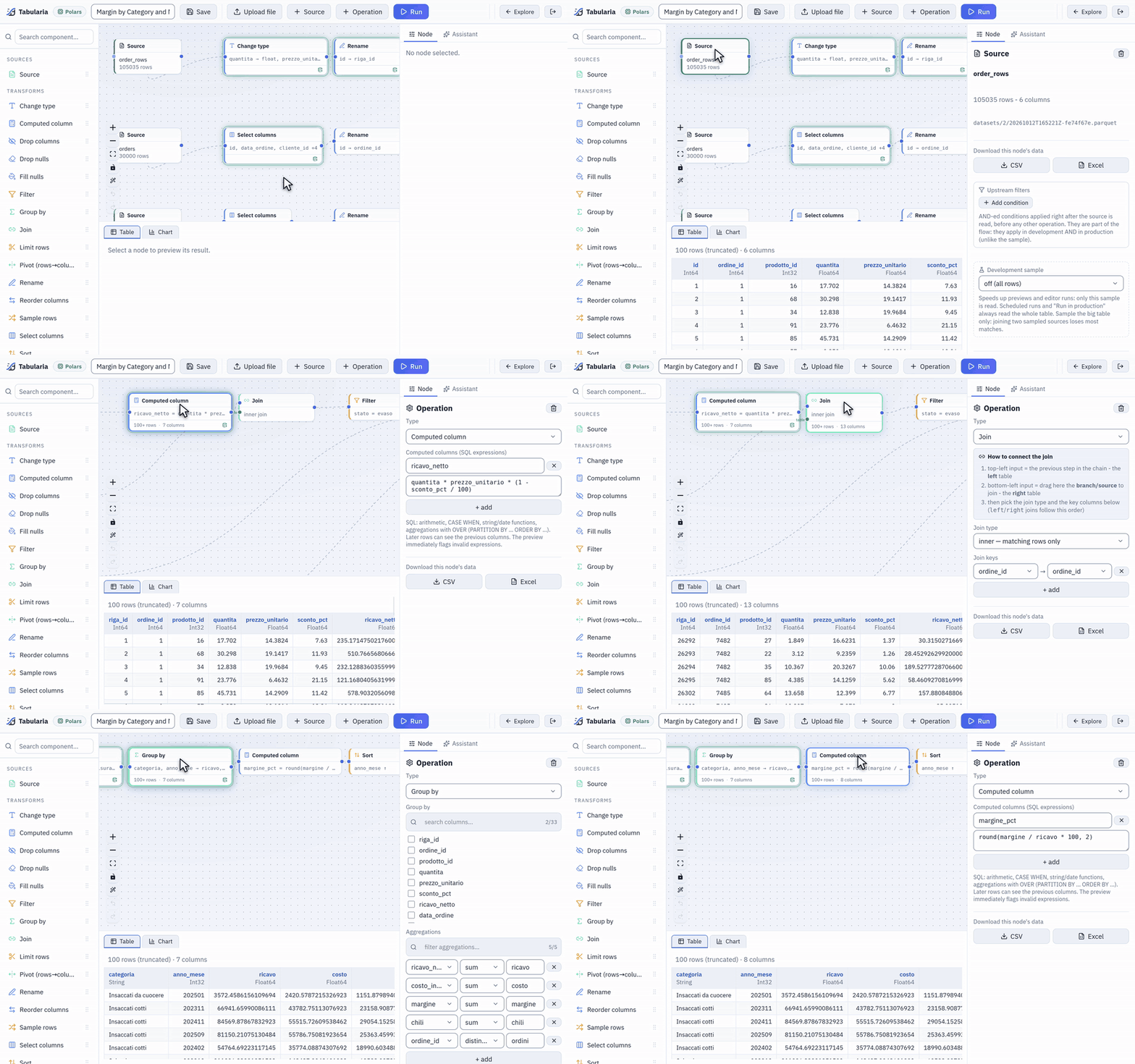
Click a node, see its data: the raw order lines, the computed ricavo_netto, the join with the orders, then the margin per category and month.
The Sample / Flows folder holds the complete version of this analysis, «Margin by Category and Month»: five sources, six joins, an Execute SQL step that picks the list price and the production cost in force on the day of each order, and the margin per category.
What the engine receives
The chain up to the Group by of step 8, as the editor sends it to POST /tasks/preview
(the storage keys are examples, and the preview slot is left out):
{
  "bucket": "data-prep",
  "input_key": "datasets/5/20261027T050000Z-3f9a1c2e.parquet",
  "engine": "polars",
  "limit": 100,
  "operations": [
    {"type": "cast", "params": {"columns": {"quantita": "float", "prezzo_unitario": "float", "sconto_pct": "float"}}},
    {"type": "compute", "params": {"columns": [{"name": "ricavo_netto", "expr": "quantita * prezzo_unitario * (1 - sconto_pct / 100)"}]}},
    {"type": "join", "params": {"how": "inner", "on": ["ordine_id"], "right": {
      "source": {"bucket": "data-prep", "key": "datasets/4/20261027T050000Z-8b1d0e77.parquet"},
      "operations": [
        {"type": "select", "params": {"columns": ["id", "cliente_id", "canale", "stato"]}},
        {"type": "rename", "params": {"mapping": {"id": "ordine_id"}}}
      ]}}},
    {"type": "filter", "params": {"column": "stato", "operator": "eq", "value": "evaso"}},
    {"type": "join", "params": {"how": "inner", "on": ["cliente_id"], "right": {
      "source": {"bucket": "data-prep", "key": "datasets/7/20261027T050000Z-c42f9a10.parquet"},
      "operations": [
        {"type": "select", "params": {"columns": ["id", "regione"]}},
        {"type": "rename", "params": {"mapping": {"id": "cliente_id"}}}
      ]}}},
    {"type": "group_by", "params": {"by": ["regione", "canale"], "aggregations": [
      {"column": "ricavo_netto", "func": "sum", "alias": "ricavo"},
      {"column": "ordine_id", "func": "n_unique", "alias": "ordini"}]}}
  ]
}
The gateway checks that you may read every storage key in the request before the engine sees it.
Permissions
Permissions are those of the flow's folder (Permissions):
| To | You need |
|---|---|
| Open a flow, see its versions | VIEW on its folder, and read access to the datasources its previews read |
| Create, save, rename, duplicate, move, delete, promote a version | EDIT on its folder (and on the destination folder, to move it) |
| Run it, by hand or in production | RUN on its folder |
| Publish a datasource | EDIT on the destination folder |
| Write to a database, S3, SFTP, or send an email | CONNECT on the connection's folder |
| Open a flow with a Script or Container node | The node's environment or registry granted to you by an administrator; otherwise the flow is listed greyed out and does not open |
An observer account sees the editor read-only: it can preview and add transformations to explore, but not save, run, or add sources and outputs. Every save, run, promotion and deletion is in the audit log.
Limits and good to know
- The editor shows 100 rows per node; downloads (Download this node's data, CSV or Excel) and runs read everything.
- A development sample never reaches production: scheduled runs and Run in production read the whole table. Sample the big table only: joining two sampled sources loses most matches.
- A step's result is cached only up to
CACHE__MAX_STEP_ROWSrows (1 million by default); larger steps are recomputed at every preview, and the node says so. - Previews wait at most
PREVIEW_TIMEOUT_SECONDS(120 by default). - Execute SQL and Computed column use the engine's SQL dialect: an expression written for one engine may fail, or round differently, on another. See Engine differences.
- Two people saving the same flow: the last save wins.
Related
- Preview and analysis: the data view, the Viewer, saved views
- Engines: where a flow runs, development and production engines
- Scheduling and Flow groups: running flows unattended and in order
- Dynamic dates: file and table names that change with the date
- Export to dbt: a flow as a dbt project