Database tables and queries
A database datasource keeps a copy of a table, a view or the result of a SQL query from one of your databases: PostgreSQL, MySQL, MariaDB, ClickHouse, Trino, Oracle or Microsoft SQL Server. The rows are streamed into a Parquet snapshot that flows, the Viewer, SQL scripts and the AI assistant read without touching the database again, and the snapshot is refreshed by hand, on a schedule or in a flow group.
At a glance
| Where | Explore, in a folder: New → Datasource from a database, then a database connection |
| What it reads | Table: a table or a view, picked from a list or typed as schema.table. SQL query: any read query in the database's own dialect. |
| Databases | PostgreSQL, MySQL, MariaDB, ClickHouse, Trino, Oracle, SQL Server (the SQL Server driver is added to your own image, see SQL Server) |
| Updated | Refresh snapshot now, a cron schedule, or a flow group step |
| Permissions | EDIT on the destination folder and CONNECT on the connection's folder to create; RUN and CONNECT to refresh |
| Order | Optional sort keys: the import adds an ORDER BY and the snapshot is written sorted |
The connection itself — host, port, user, TLS, what each field means for each database — is described in Databases: PostgreSQL, MySQL and MariaDB, ClickHouse, Trino, Oracle, SQL Server.
How it works
Table or query
The dialog New datasource from database asks for a name, the connection and then:
- Table: the list shows the tables and views the connection can see (below); pick
one, or type its name when the list cannot be read. A name without a schema takes the
connection's schema when it has one. The import runs
SELECT * FROMthat table, with every part of the name quoted in the database's way, so a name is read exactly as written. - SQL query: the text runs on the database as it is, in its own dialect, with the
connection's credentials, as a view would. Tabularia wraps it in
SELECT * FROM (…) AS _q(on Oracle withoutAS), which refuses anything that is not a query; a trailing;is removed. On SQL Server the query is sent as written, because T-SQL does not allow a CTE or anORDER BYinside a derived table: it is checked instead to be a singleSELECT(aWITH … SELECTis fine), andSELECT … INTOis refused.
The wrapper is not a security barrier. The barrier is who has CONNECT on the connection's folder, and a read-only database user on the connection.
Create & import saves the datasource and starts the first import at once. If the engine refuses to start it, nothing is saved.
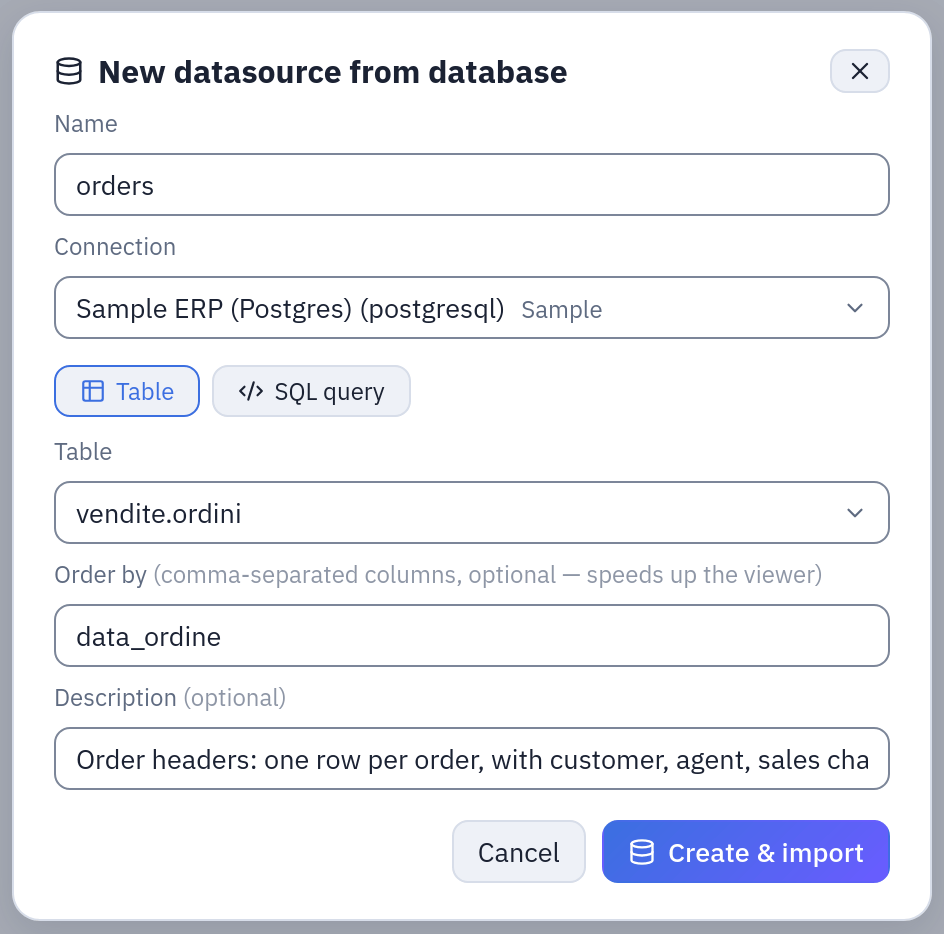
The dialog filled in as in the first example below: a whole table, vendite.ordini, read through the sample ERP connection.
What the table list shows
| Database | Listed |
|---|---|
| PostgreSQL | Tables and views of every schema except pg_catalog and information_schema, as schema.table |
| MySQL, MariaDB | Tables and views of the connection's database |
| ClickHouse | Tables and views of the connection's database |
| Trino | Tables and views of the current schema |
| Oracle | Tables and views of every schema that is not Oracle's own, as OWNER.TABLE; a name that is not plain uppercase is quoted |
| SQL Server | Tables and views of the connection's database, except sys and INFORMATION_SCHEMA, as schema.table; a name with special characters in square brackets |
On Oracle a name without quotes reads in uppercase, as in SQL Developer: sales.orders
is SALES.ORDERS, SALES."orders 2024" keeps its case.
The import
The worker opens the connection with the database's own driver and streams the rows as
Arrow batches straight into a Parquet file on its disk, so memory does not grow with the
table: PostgreSQL through ADBC, ClickHouse through its HTTP interface (port 8123 by
default), MySQL and MariaDB with an unbuffered cursor, Trino through its client, Oracle
through python-oracledb in Thin mode (no Oracle client to install), SQL Server through
Microsoft's mssql-python. Rows are grouped into Parquet row groups of
INGEST__PARQUET_ROW_GROUP_ROWS (one million by default), so the engines can later read
only the columns a query needs.
While it runs the Datasources page shows where it is: «the database is preparing the
data» until the first row arrives (connecting, computing, sorting), then «n rows
received», then «checking the contract» when the datasource has one, and «saving». When
the database refuses something, the error is the database's own message, prefixed by its
name (PostgreSQL: relation "vendite.ordine" does not exist).
At success the snapshot is swapped in: readers move from the old data to the new at once, never in between. A failed import changes nothing. See the snapshot.
Sort keys
Order by (comma-separated column names of the result) makes the import end with
ORDER BY on those columns, quoted in the database's way, and the Parquet comes out
sorted. Filters and charts on those columns in the Viewer, and on the ClickHouse engine,
then read fewer row groups. Choose columns the database has an index on, or the sort
costs the database time before the first row arrives. They can be changed later from
the Datasources page (Order); a change applies from the next refresh. An ORDER BY
written inside a SQL query is not guaranteed to survive the wrapper: use the sort keys.
Refreshing
A refresh runs the same table or query again and replaces the snapshot. Refresh snapshot now in the Datasources page; Schedule automatic refresh (cron) for a five-field cron in the installation's time zone; or a step of a flow group (Datasources to refresh), so that the flows of the next step read fresh data. One refresh of a datasource at a time. The common rules are in All sources.
A database query holds no placeholders: to read a moving window, write it in the
database's SQL (WHERE data_ordine >= current_date - 30), which the database evaluates
at every refresh.
Examples
The sample databases of the Docker Compose stack (the «Sample» folder) have a PostgreSQL
order system, connection Sample ERP (Postgres), and a ClickHouse CRM, connection
Sample CRM (ClickHouse).
A whole table, refreshed every morning
- In Explore open
Sample / Private tablesand choose New → Datasource from a database. - Name
orders, connectionSample ERP (Postgres), Table, pickvendite.ordinifrom the list. - Order by
data_ordine: the Viewer filters orders by date. - Description: Order headers: one row per order, with customer, agent, sales channel and dispatching depot. Create & import.
- In the Datasources page, on
orders, Schedule automatic refresh (cron):0 6 * * *. The table is read again every day at six.
The import runs, on PostgreSQL:
SELECT * FROM "vendite"."ordini" ORDER BY "data_ordine"
A query: last quarter's order lines with their revenue
Same dialog, SQL query this time, name order_lines_last_90_days:
SELECT o.numero,
       o.data_ordine,
       o.canale,
       o.deposito,
       r.prodotto_id,
       r.quantita,
       r.quantita * r.prezzo_unitario * (1 - r.sconto_pct / 100) AS ricavo_netto
FROM vendite.ordini o
JOIN vendite.righe_ordine r ON r.ordine_id = o.id
WHERE o.stato <> 'annullato'
  AND o.data_ordine >= current_date - 90
Order by data_ordine, deposito. The database computes the join and the filter;
the snapshot holds only the result. Every refresh moves the 90-day window.
From ClickHouse: the CRM customers
Connection Sample CRM (ClickHouse), Table, clienti, name customers. A query on
the big activity table is just as direct, and ClickHouse computes the aggregate before a
single row is sent:
SELECT agente_id, tipo, toStartOfMonth(data) AS mese, count() AS attivita
FROM attivita_crm
GROUP BY agente_id, tipo, mese
Through the API
A refresh can be started by a script, with a token of an account that has RUN on the datasource's folder and CONNECT on the connection's:
curl -X POST -H "Authorization: Bearer tab_…" \
  https://tabularia.example.com/api/datasources/7/refresh
# 202 {"id": 1234, "status": "PENDING", …}: then GET /runs/1234
See API.
Permissions
| To | You need |
|---|---|
| See the connection in the dialog and list its tables | CONNECT on the connection's folder |
| Create the datasource | EDIT on the destination folder and CONNECT on the connection's folder |
| Refresh it, set or clear its schedule | RUN on its folder and CONNECT on the connection's folder |
| Rename, describe, change its sort keys, delete | EDIT on its folder |
| Read it in flows, views, scripts, the Viewer | VIEW on its folder (no CONNECT: the snapshot is read, not the database) |
A schedule runs with the rights of whoever set it, checked again at every firing: if they lose RUN or CONNECT, the schedule switches itself off. CONNECT is a strong right — it lets someone run any query the connection's database user may run — so give it to the people who may read that database, and give the connection a database user that can only read what they may.
Limits and good to know
- The source is fixed: the table or the query cannot be changed once the datasource exists. To read something else, create another datasource.
- Time: an import is a worker task, stopped at
CELERY__TASK_TIME_LIMIT(one hour by default; told to stop atCELERY__TASK_SOFT_TIME_LIMIT). From ClickHouse, the import also stops afterINGEST__DB_READ_TIMEOUT_SECONDS(50 minutes by default) in which the server sends nothing, since it may sort a whole table before the first row. Give the database user a time limit of its own too (PostgreSQLstatement_timeout, MySQLmax_execution_time, a ClickHouse settings profile): a query the database is still computing ends only by the database's limit. - Memory: the rows are streamed, but one row group is held in memory before it is
written: about 570 MB per million rows of a 50-column table. Lower
INGEST__PARQUET_ROW_GROUP_ROWS, or raise the worker memory, for very wide tables. - Disk: the Parquet is written to the worker's temporary disk before it is uploaded to the object storage.
- SQL Server needs Microsoft's driver, which the published images do not contain: without it, the import says so and points to SQL Server.
- Whole reads: a refresh reads the whole table or query again; database datasources
have no incremental mode (the file and API datasources have an
append-by-key mode). Keep the
read small with a
WHEREon the rows you need. - Every creation (with its table or query) and every refresh is in the audit log.
Related
- All sources: snapshots, descriptions, contracts, permissions.
- Databases: setting up each database connection.
- SQL Server: adding the driver.
- SQL scripts: exploring a database before importing from it.
- Scheduling and Data contracts.