Pushmail: datasources, reports and dashboards by email from a flow group
For whoever sets up flow groups that send data to people.
A Pushmail cell of a flow group sends one email through an SMTP connection, with
one .xlsx file per datasource, one PDF or Excel file per report and one PDF or
image per dashboard, and can put a report's summary in the message itself. It runs as a step of the group like any other
cell: after the steps before it (a refresh, the flows that publish the datasources), on
the group's schedule, and its failure stops the group. It is the only way a report or a dashboard is
sent by email: neither has a schedule of its own, so it leaves right after the data it
shows is refreshed.
Before you start
- An SMTP connection exists and you have CONNECT on its folder (the same right the email of an Output node needs). Its allowed domains limit who may receive the email.
- You can read the datasources you attach (VIEW on their folders).
- For a report or a dashboard: VIEW on its folder, and the right to read every dataset it reads.
The group's catalog offers Pushmail when at least one SMTP connection is available to you; so does the picker of an empty cell.
The cell
| Field | |
|---|---|
| Name | what the cell shows in the grid |
| SMTP connection | one you may send through |
| To, Cc | addresses separated by commas; at least one in To |
| Subject | text with the date placeholders, Sales {today:yyyy-MM-dd}; {flow} is the group's name |
| Message | plain text, or HTML when ticked (sent with a plain-text alternative) |
| Datasources | one file each, up to 20: the datasource, the file name (a template, .xlsx added) and the rows at most (1 to 1,000,000; 10,000 by default) |
| Reports | one file each, up to 5: the report, PDF or Excel, the file name (a template, the extension added), the values of its parameters, and Summary in the email body (see Reports) |
| Dashboards | one file each, up to 5: the dashboard, PDF or Image, the file name, the values of its parameters (see Dashboards) |
A cell needs at least one datasource, one report or one dashboard: a cell with dashboards only is fine.
The placeholders are those of the Outputs (placeholders): {today},
{today-1:yyyyMMdd}, {now:HHmm}, {run_id}, {flow}; {today:MMMM yyyy} writes the
month's name in the language of whoever runs the group (ottobre 2026). The panel shows
what each name gives now.
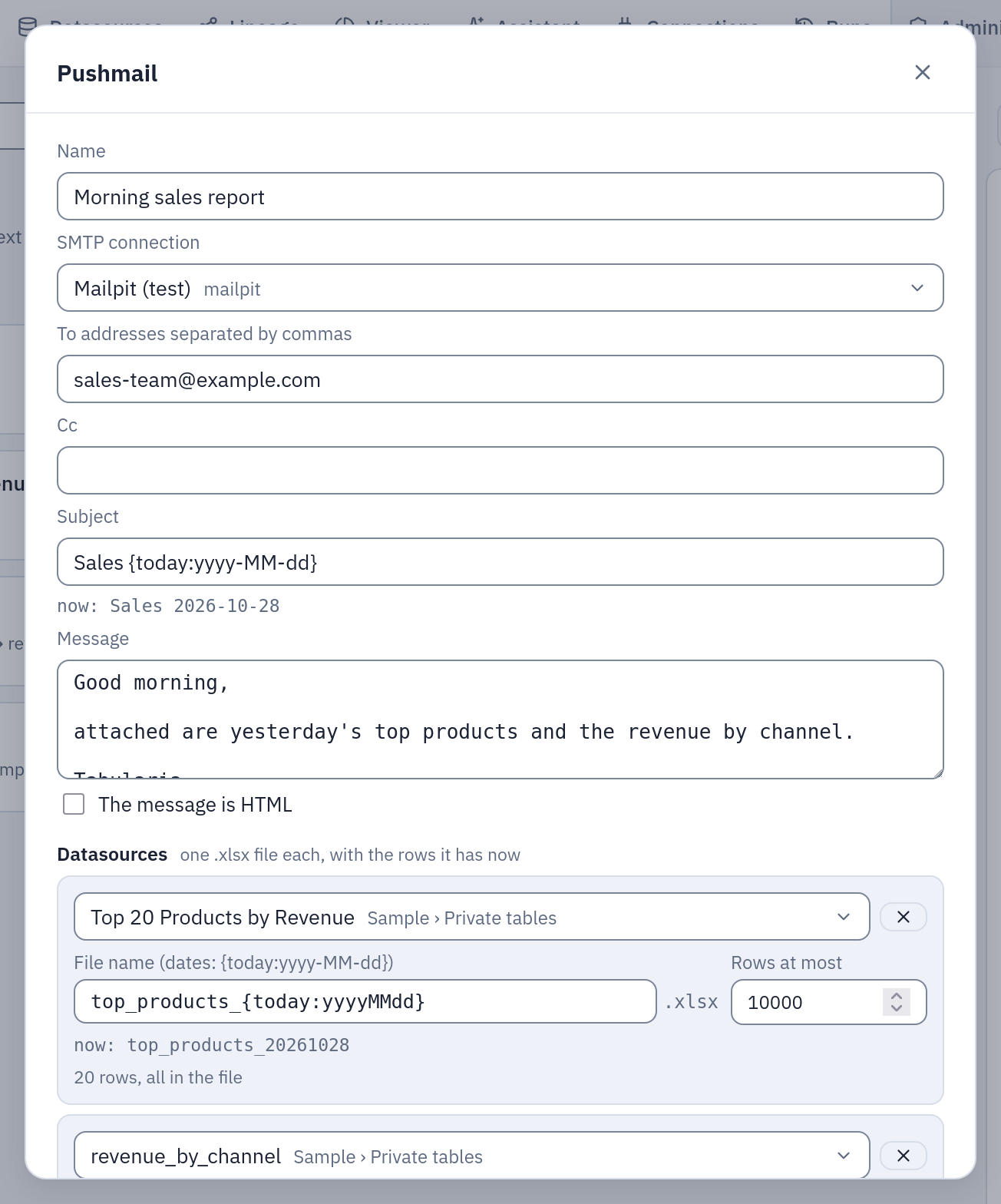
The cell of the morning sales example: two datasources, each with its file name; under each name, what it gives today.
Rows at most. A datasource with more rows sends its first ones, and the email says so at the end of the message, in the language of whoever runs the group:
Not every row is attached:
sales: the first 10,000 rows of 48,210.
Size. With more than one datasource, or one sending more than 50,000 rows, the panel warns that the email may be large. Every SMTP relay limits the size of a message (often 10–25 MB, attachments included, and base64 makes them a third larger): ask the administrators what yours allows. Tabularia never sends more than 15 MB of files in one email: over it the cell fails, saying so, and nothing is sent.
Reports
A report in the cell is rendered when the email leaves, by the worker that writes it, from the report's current version: a change saved in the designer goes out with the next email.
- Format. PDF is the report as designed, page by page; Excel has its tables, groups and subtotals as rows, one sheet per table, and a sheet with the parameters.
- Parameters. The panel shows the report's parameters as its form does, two to a line:
a list for those with choices, a text field for the others. A value left empty takes
the report's default when the email leaves (
{today-30}is thirty days before the send, not before the save). A date may also be a placeholder, resolved then, in the report's time zone:{start_of_month-1m}is the first day of last month,{today-1}yesterday.{none}in a text field gives an optional parameter no value, whatever its default. A parameter marked*needs a value, given here or by the report's default. - Summary in the email body. One report per cell can put its summary in the message, under the cell's text: its texts, its KPIs, its charts as images, and every table and matrix as its totals (see the email), in an HTML message 640 pixels wide that Outlook and Gmail draw, with the same summary as plain text for a mail client that shows no HTML. The detail stays in the attached file. With a plain-text message, the text goes on top; with an HTML one, the summary goes at the end of its body.
- Limits. A report reads at most
REPORTS__MAX_ROWSrows per dataset (3,000,000 by default) and renders at mostREPORTS__MAX_PAGESpages: past them the cell fails, naming the report and the dataset, and nothing is sent. The files of the reports count towards the 15 MB of an email.
The rights are those of every schedule: the report reads with the rights of whoever runs the group (the author of the schedule, for a scheduled run), never the report's author's. A dataset they may not read stops the cell with its name, before anything is sent:
«Morning sales report»: the report «Monthly sales»: The dataset «orders»: there is no datasource «Salaries» you can read
A report that a flow group sends cannot be deleted: the delete says which groups send
it (409). Take it out of their Pushmail cells first.
Because a scheduled group sends with its author's rights, someone else who changes what
the report reads — a dataset added, or one that reads other SQL, another datasource,
view or filters (a SQL script or a saved view it reads changed by someone else too), a new
default for a parameter the cell gives no value of its own ({today-3650} where it was
{today-30}) — switches the schedules of the groups that send it off, as a change to a
SQL script does: the author's rights are not spent on another person's choice. The Audit
page records it (flow_group.schedule, with the reason); the author schedules the group
again after looking. A change of the layout alone, or one by the schedule's own author,
keeps it.
Dashboards
A dashboard in the cell is made into a file when the email leaves, by the worker that writes it, from the dashboard's current version.
- Format. PDF is the document the viewer's PDF button gives, its tables over as many
pages as they need. Image is the same on one long page, PNG; past
REPORTS__RENDER_MEMORY_MBit stops the cell, saying so: choose the PDF. They count in the 15 MB of files of one email. - Parameters. As a report's: the panel shows the form, a value left empty is the dashboard's default when the email leaves, a date may be a placeholder. A click is not something a cell chooses: to send one area, give it the parameter.
- It reads the source. Not what the screen keeps: what the steps before it refreshed is what the email says.
- Nobody looks at it before it leaves. On a screen a tile that cannot say its numbers says
so and the others work; here a dataset the group's author may not read, a dataset past
DASHBOARDS__MAX_ROWSor any tile with an error stops the cell, with its name, and nothing is sent.
The rules of a schedule are a report's. A dashboard that a flow group sends cannot be deleted:
the delete says which groups send it (409). Someone else who changes what the dashboard
reads (a dataset that reads something else, a SQL script or a saved view it reads, a new
default for a parameter the cell gives no value) switches the schedules of the groups that send
it off, and the audit log says why; a change of its tiles or their places keeps them.
Every dashboard the cell carries is a dashboard.render in the audit log, from flow_group,
with its format and its parameters.
AI comments
A report or a dashboard with an AI comment carries it in the email: in the attached PDF or image, and in the summary in the body.
- On the numbers it sends. The comment and the file read the same rows, once from the source, when the email leaves.
- On the bill of whoever runs the group, the author of its schedule for a scheduled run,
under the daily ceilings, as
ai.commentin the audit log. The same numbers every ten minutes are one call, for a day (AI__COMMENT_KEEP_SECONDS). - A comment never stops the cell. The cell waits for it at most
AI__COMMENT_WAIT_SECONDS, holding no database connection. With the provider down, a wrong key, a ceiling reached orAI__METADATA_ONLYon, the email goes out, with one line in its place. A tile in error stops it; a comment does not. - It is written by the orchestrator, where the group runs, not by the gateway: its network must reach the provider, as it must a webhook's receiver. Where it cannot, the comment is not available.
- A report as Excel has no place for one, and asks nothing: with its summary in the body, the summary has the comment and the workbook does not.
- Someone else who adds an AI comment to what the cell sends, or changes what one reads or is asked, switches the schedules off, as for what it reads: it spends the author's budget.
What is checked, and when
When the group is saved, a Pushmail cell that is new or changed is checked with the rights of whoever saves it: the connection is SMTP and they have CONNECT on it, every address is an address and within the connection's allowed domains, every datasource exists and they can read it, none twice; every report exists and they can see it, its values fit its parameters, and they may read every dataset it reads; the same for every dashboard. A report or a dashboard in a folder they cannot see is «not found», as a datasource.
When the group runs, all of it is checked again with the rights of whoever runs it (the author of the schedule, for a scheduled run), and a scheduled group whose author lost a right does not start at all. A datasource with no data yet (never imported or published) fails the cell before anything is sent; so does a report or a dashboard whose values no longer fit, or whose data they may no longer read.
A change to a Pushmail cell made by someone other than the author of the group's schedule switches the schedule off, as for any cell added by someone else: the schedule would otherwise send data to recipients its author never chose.
Every email is written to the audit log (email.send) when it leaves: who, through
which connection, to whom, which datasources, reports and dashboards. Every report it carries is a
report.render too, from flow_group, with its format, its parameters' values, the
group and the cell's run, and the outcome.
Example: the morning sales email
The flow group example ends with this cell. Tried with Mailpit as the SMTP connection:
- In the group, Add step, then in its first cell choose Pushmail (datasources by email).
- Name
Morning sales report, the SMTP connection, Tosales-team@example.com, SubjectSales {today:yyyy-MM-dd}, the message «Good morning, attached are yesterday's top products and the revenue by channel.», time zoneEurope/Rome. - Datasources: «Top 20 Products by Revenue» as
top_products_{today:yyyyMMdd}, andrevenue_by_channelasrevenue_by_channel, 10,000 rows at most each. - Save, Run now. When the cell turns green, the email is in Mailpit: subject
«Sales 2026-10-28», from the connection's sender, with
top_products_20261028.xlsxandrevenue_by_channel.xlsx.
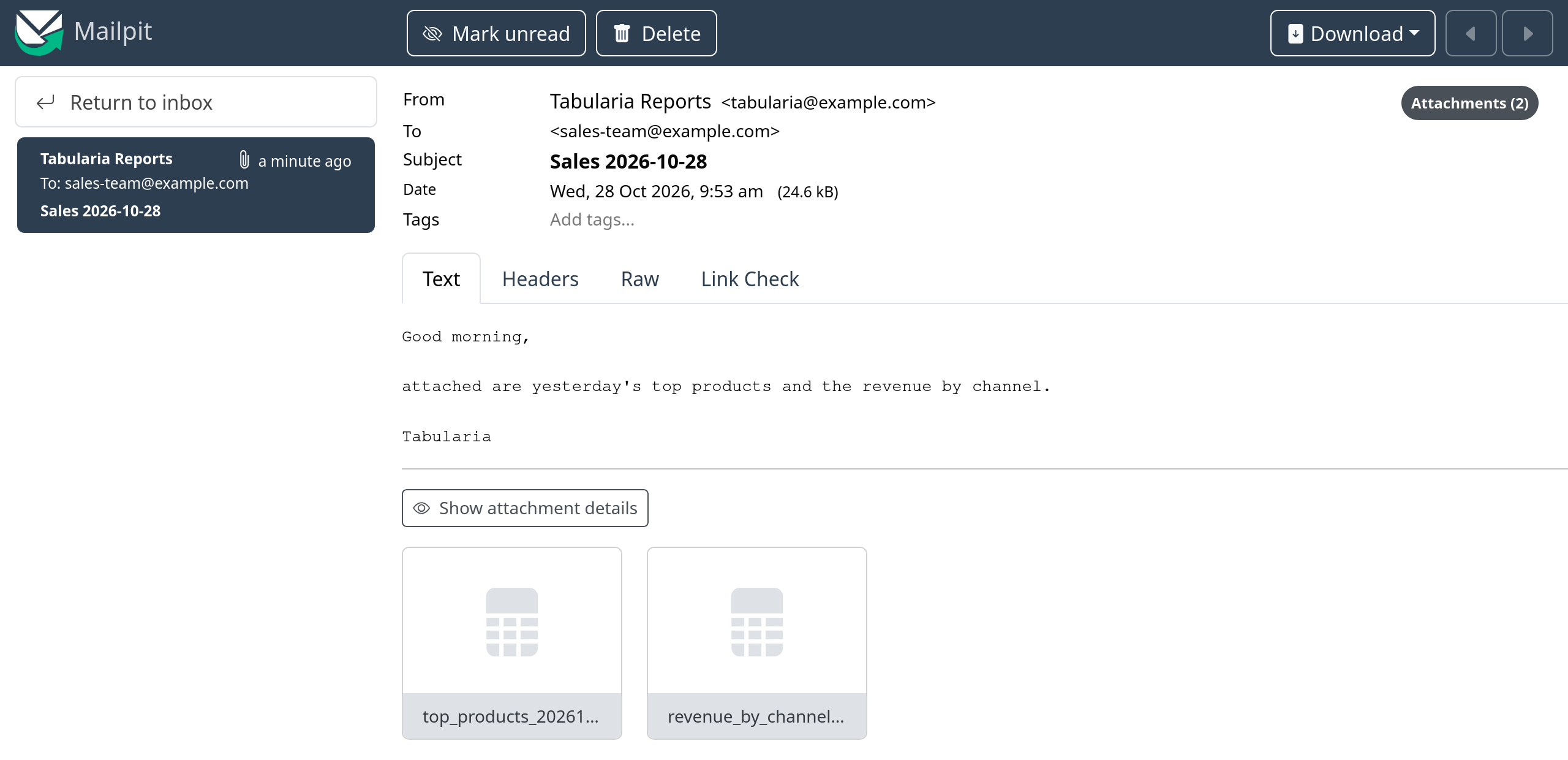
What the recipients get: the message as written, one Excel file per datasource.
The run
Each send is a run of its own under the group's run (pushmail), with the outcome: the
recipients, the subject, the files and their sizes, the reports and their formats, the
rows sent and the ones cut. The
cell in the grid shows its state and, when it failed, why (the relay refused the
message, the files were over the size cap, a recipient outside the allowed domains).
The Lineage page draws the cell's email with the datasources it attaches. With
OpenLineage on, the send is a child job of the group's run, reading
the datasources it attaches and those its reports read, and writing the email as a
dataset smtp://<host>:<port> + /<folder>/<group>/<cell>: never the recipients'
addresses.