HTTP APIs as datasources
An HTTP API connection reaches any REST/JSON API — a financial data broker, a CRM, an internal service, a public open-data endpoint. A datasource «API call» makes one or more requests to it at each refresh, turns the records of the answers into one table and keeps it as a snapshot, refreshed by hand or on a schedule like every other database datasource. It is input only: flows read it, nothing is sent back to the API. It is created from a folder in Explore with New → Datasource from a database, choosing the API connection; the other sources are listed in Sources.
Like the other connections it lives in a folder and needs CONNECT on that folder
to be created, tested and used. Any address is allowed — public, private,
localhost — as for databases and SFTP: CONNECT is the barrier, so give it to the
people who may make the workers call those addresses.
The connection
| Field | Meaning |
|---|---|
| Base URL | https://api.example.com/v1: scheme, host, optional port and path. No user or password in it, no query string, no fragment: they belong to the authentication and to the datasource. |
| Authentication | None; API key, sent in a header or in a query parameter whose name you choose (X-API-Key, apikey…); Bearer token; User and password (HTTP basic); OAuth2 client credentials (token URL, client id, client secret, optional scope; the client sent in the form body or as basic authentication). |
| Default headers | Sent with every request to the API's host, one Name: value per line (Accept: application/json). They are not secret: the API returns them to whoever can see the connection. Put credentials in the authentication. |
| Test path | What «Test connection» calls, below the base URL (/status); empty = the base URL itself. The test fails on any HTTP status from 400 up, showing it with the start of the answer. |
The secret — API key, token, password or client secret — is encrypted at rest with
the same Fernet key as every other connection secret (SECURITY__FERNET_KEY), travels
encrypted to the worker and is decrypted only to be sent. The API never returns it
(has_password says whether one is stored). An OAuth2 token is asked to the token
URL, kept in the worker until it expires (30 seconds early), and asked again once
when the API answers 401 — a second 401 fails the refresh.
Credentials stay on the API's host
A request carries the credentials and the headers of the connection and of the
call only when it goes to the origin of the base URL — the same scheme, host and port.
A redirect, or a «next page» link, to another origin is followed with none of them
(a CDN serving a file does not need them, and an API that redirects elsewhere must not
hand them over); an API key in the query is not added there either. Many servers copy
the request into the new address (return 301 https://other$request_uri): on any hop
to another origin, the query pairs named like the API key or holding a secret are
removed, and an address that still holds the secret anywhere (its path, encoded or
not) is not followed, with an API: error that says why. HTTPS certificates are
verified. A ~/.netrc on the worker is never read.
Editing a connection: a new host (or a new OAuth2 token URL, where the client secret goes) needs the secret typed again — a stored secret never follows a connection to another server. Another path on the same host keeps it.
The secret never appears in a message a person can read: errors, run history (the
error and its traceback), the «Try the call» answer, the logs, the audit log and the
OpenLineage events all show *** in its place, also when the API echoes it back.
Datasource «API call»
| Part | Meaning |
|---|---|
| Method, path | GET or POST, and the path after the base URL (/v1/quote/{symbol}). Only a path: the query goes in its own section. Values put in the path by placeholders are URL-encoded (A/B → A%2FB). |
| Query parameters | One name=value per line. A repeated name is sent twice. |
| Headers | One Name: value per line; they override the connection's defaults with the same name. |
| JSON body | POST only. Placeholders go inside JSON strings: {"since": "{last_refresh}"}. A string made only of {…:epoch} or {…:epoch_ms} is sent as a number. |
| Variables | One per line (up to 10): a list name = value1, value2 (1000 values each), or a range day = today-7 .. today step 1d — see placeholders.md. |
| Time zone | An IANA name (Europe/Rome); it defines «today». Default UTC. |
| Initial last refresh | The value of {last_refresh} on the first refresh (today-365, 2024-01-01). |
Dynamic values
A tiny grammar of our own, parsed and never evaluated — the same language as the file datasources and the Outputs (placeholders.md):
| Placeholder | Value (in the datasource's time zone) |
|---|---|
{today}, {yesterday} | a date: 2026-10-17 |
{now} | a date-time: 2026-10-17T14:30:05+02:00 |
{start_of_month}, {start_of_week} (Monday), {start_of_year} | a date |
{last_refresh} | when the last successful refresh of this datasource started (so what changed while it ran is asked again, not lost); on the first refresh, the initial value |
{today-1} {today-7d} {today+1d} {today-2w} {today-1m} {today-1y} | offsets: a number alone is days; m months, clamped to the end of the month (31 March − 1m = 28 February) |
{now-2h} {now-30min} {now+15s} {last_refresh-1h} | hours, minutes, seconds: on {now} and {last_refresh} only |
{today:yyyy-MM-dd} {today:ddMMyyyy} {today-1:dd/MM/yy} {now:yyyy-MM-dd'T'HH:mm:ss} | a readable format: yyyy yy MM dd HH mm ss, text in 'quotes' ('' is an apostrophe). mm is the minutes right after the hours or right before the seconds, the month otherwise (Excel's rule), so ddmmyyyy is a date. HH is 00-23 and hh is refused («use HH»); any other letter is refused («put letters in quotes: 'T'»), and so are a token written twice in a row (MMMM) and a format with no date or time part |
{today:%Y%m%d} {now:%Y-%m-%dT%H:%M:%SZ} | a strftime format (a % outside quotes makes it one). %s is refused: use :epoch; %z and %Z only on {now} and {last_refresh} (on a date they are empty) |
{now:epoch} {now:epoch_ms} | seconds or milliseconds since 1970 (a date is its midnight in the time zone) |
{symbol} | a list variable of the datasource (no offset, no format) |
{day} {day_end} {day:yyyyMMdd} | a range variable and the end of its window (offsets and formats allowed) |
{{ }} | a literal brace |
An unknown name, a bad offset or format, a variable that is defined but not used, or
{last_refresh} without an initial value is refused when the datasource is saved,
with the reason.
Variables: lists and ranges
symbol = AAPL, MSFT, ENI.MI makes one call per value (each with its own
pagination); several variables make every combination. Every row keeps the values in
_param_<name> columns (_param_symbol), the last columns of the table. The number of
calls is checked before the first one: over the limit (see below), the datasource is
refused.
A range day = today-7 .. today step 1d makes one call per value too — here the
seven days before today (the end is excluded) — and {day_end} is the end of each
window, so an API that takes a period gets consecutive windows that never overlap:
from={day}&to={day_end}. With append mode keyed on _param_day (and the record's own
key) this is the incremental import that re-reads the last days every night. Steps
1d, 7d, 1w, 1m, 1y, 1h, 30min; at most PLACEHOLDERS__MAX_VALUES (1000)
values. See placeholders.md.
The response
| Option | Meaning |
|---|---|
| Format | JSON (default), NDJSON (one object per line) or CSV (with its separator). |
| JMESPath | An optional JMESPath expression applied to the whole JSON answer first, for odd shapes (results[].quote). |
| Records path | A dot path to the records (data.items; a number is a list index). Empty = the answer itself. A path missing from the first page is an error that lists what the answer has; on a later page it means «no more records». |
| Keyed records | The records are an object whose keys are rows — typical of financial time series: {"2024-01-02": {"USD": 1.1}, "2024-01-03": {…}}. One row per key, the key in _key (the first column); a scalar value goes in value. A record with a field named _key itself is refused (it would overwrite the key). |
| List to explode | One field holding a list becomes one row per element (an object's fields as field.sub); an empty list keeps the row with nulls. |
Flattening: nested objects become columns a.b.c; lists (other than the exploded
one) become a JSON-text column. Two fields that make the same column name are an error.
Types are inferred over all the pages and calls: integers, decimals, booleans, text.
ISO dates stay text — cast them in the flow, where the format is yours to say. A
column that appears on a later page or call is added, NULL before. A column whose
types disagree becomes text (an integer and a decimal make a decimal column, not a
conflict): an API that writes "N/A" in a number field must neither fail the refresh
nor lose the value. The import reports such columns (type_changes) and the worker
logs them.
Pagination
| Type | How the next page is asked | When it stops |
|---|---|---|
| None | one request | — |
| Page number | the page parameter (page), from the first page (default 1) | on a page with no records |
| Offset and limit | the offset parameter (from 0, advanced by the rows received) and the limit parameter with the page size | on a page with no records — not on a short one: an API that caps the page size below the one asked returns short pages that are not the last (one request more, no rows lost) |
| Cursor | the cursor parameter with the value at a JSON path of the answer (meta.next_cursor); the first request without it | when the cursor is missing or empty |
| Next link | the URL in the Link: <…>; rel="next" header, or at a JSON path (links.next), relative or absolute | when there is none |
A cursor or a next link that leads back to a page already read in this call (a self link, two pages pointing at each other) fails the refresh: following it would repeat rows. A next link to another host is followed without credentials (see above).
Each refresh: snapshot or append
- Snapshot (default): every refresh rebuilds the table from the answers.
- Append with key columns (
_key, _param_symbol, ordate, symbol): the new rows are merged into the current snapshot — rows of the snapshot whose key comes again are replaced, new keys are added, nothing is duplicated (the same key twice in one refresh: the last one received wins). The types of the snapshot and of the new rows are reconciled with the same rule. A refresh that receives no record keeps the table.
In snapshot mode a refresh that receives no record at all fails and the previous snapshot stays. Every refresh writes a new parquet and the datasource switches to it only on success, as for every database datasource; a refresh in append mode reads the snapshot it extends, and only one refresh of a datasource runs at a time.
While it runs, the import says where it is: call 2 of 3 · 7 pages · 700 rows · 12s.
«Try the call»
Before saving, the datasource form makes the first page of the first call with
the connection's credentials and shows the request as sent (placeholders resolved,
secrets as *** — in the rows and the excerpt too, when the API echoes a credential,
JSON-escaped or not), the HTTP status, the number of calls a refresh will make, the next
page it would ask, an excerpt of the raw answer and the first 20 rows of the table it
makes. An answer that cannot become rows (HTTP 404, not JSON, a wrong records path)
is still shown, with what is wrong. It needs CONNECT on the connection's folder. A
trial makes no retries and no wait.
The call of a saved datasource cannot be edited yet: create a new datasource (and delete the old one) to change it.
Examples: three free APIs, field by field
Three public APIs that need no key, each showing one part of the datasource. The field names are the ones the forms show.
ECB exchange rates (Frankfurter): moving dates, records keyed by date, append
Connection (type HTTP API)
| Field | Value |
|---|---|
| Base URL | https://api.frankfurter.dev/v1 |
| Authentication | None |
| Default headers | — |
| Test path | /latest |
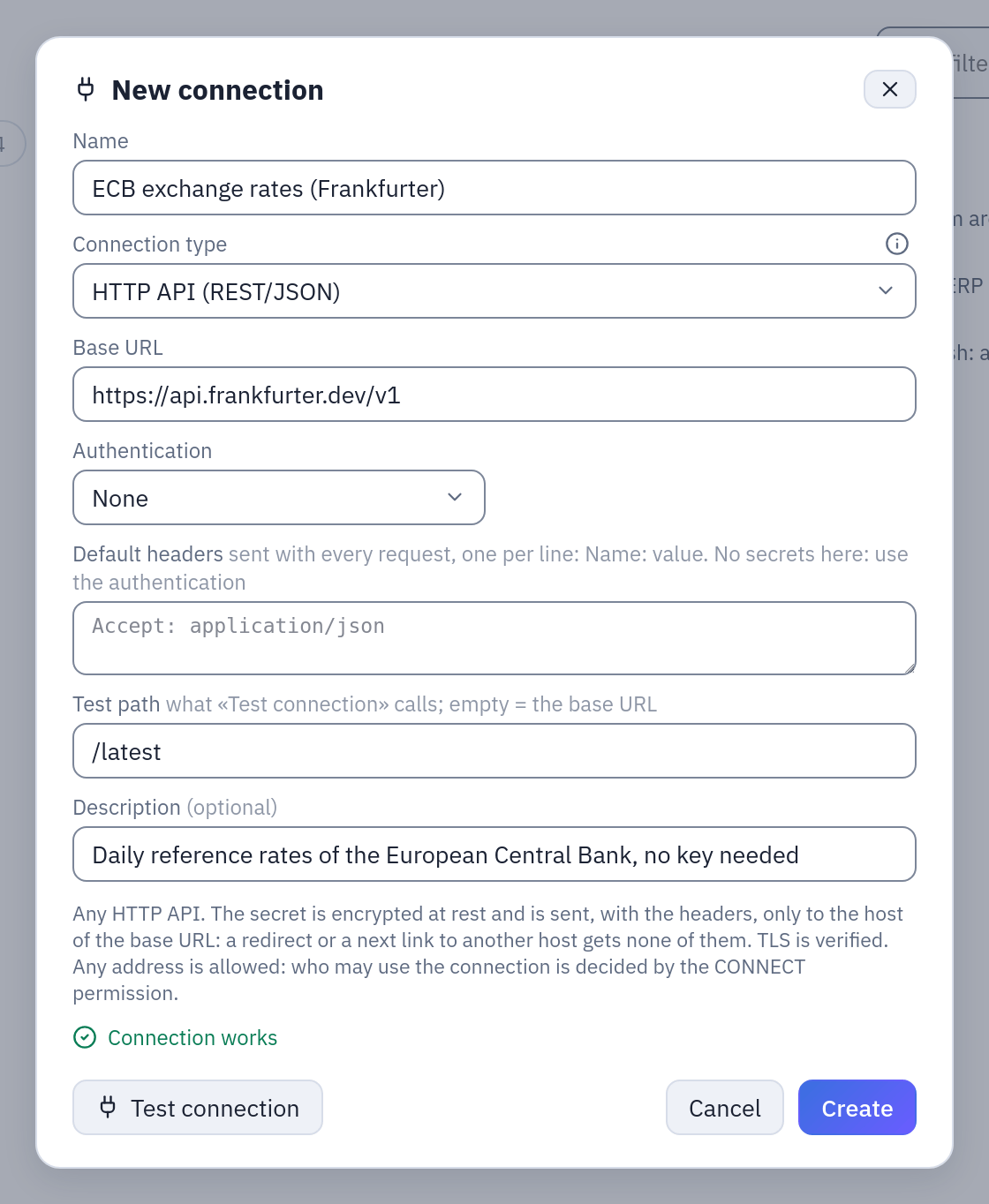
The connection after Test connection: no key, the test calls /latest.
Datasource «API call»
| Field | Value |
|---|---|
| Method | GET |
| Path | /{today-30}.. |
| Query parameters | base=EUR and symbols=USD,CHF, one per line |
| Time zone | Europe/Rome (it decides what «today» is) |
| Format | JSON |
| Records path | rates |
| The records are an object keyed by row | on: one row per date, the date in _key |
| Pagination | None: one request |
| Each refresh | adds the new rows, replacing those with the same key |
| Key columns | _key |
«Try the call» shows GET https://api.frankfurter.dev/v1/2026-09-17..?base=EUR&symbols=USD,CHF,
HTTP 200 and rows with the columns _key, CHF, USD. The first refresh writes about
22 rows (business days only); a second one replaces the same dates, so each date stays
once.
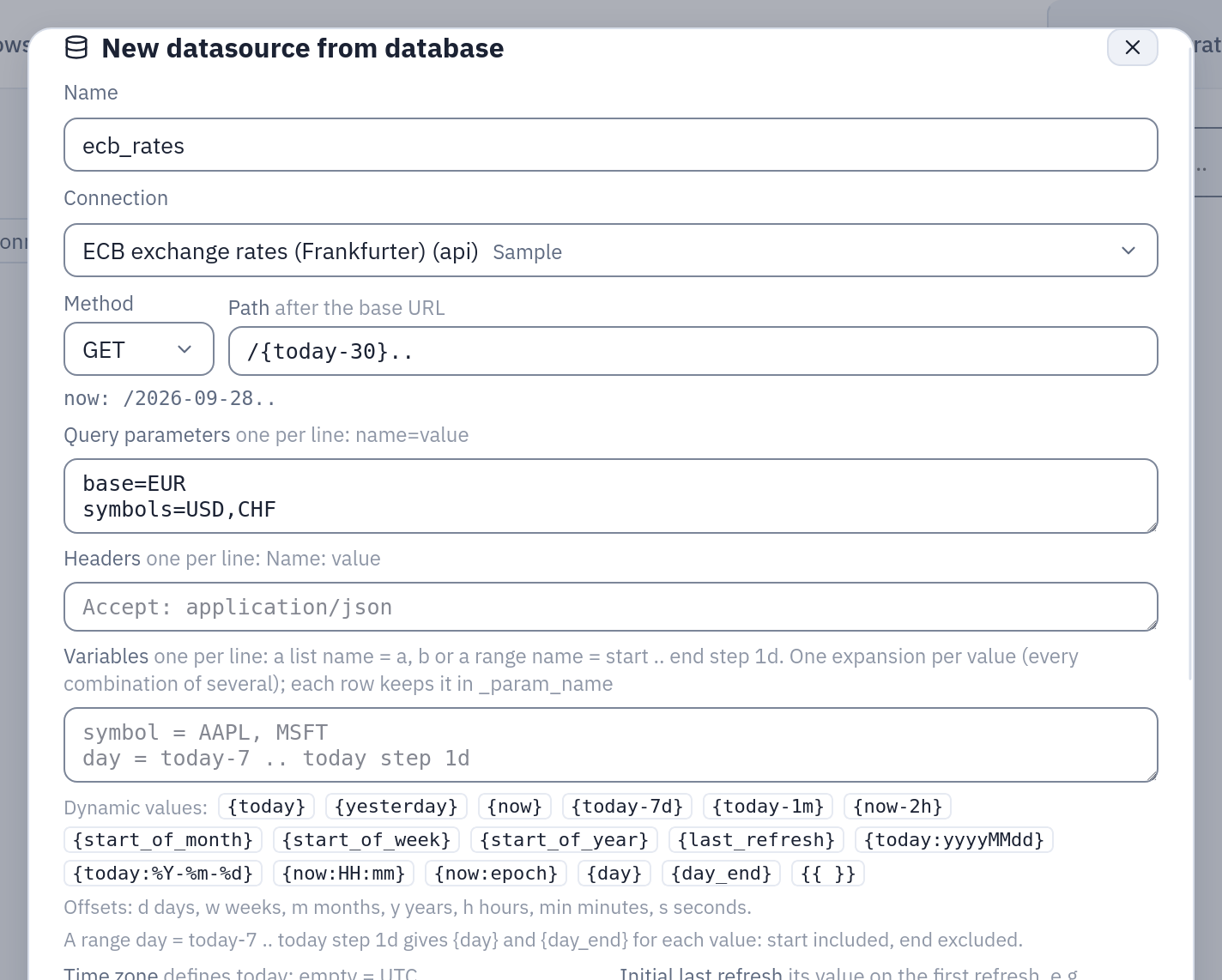
The datasource ecb_rates: the path with a moving date, the two query parameters, and the time zone that decides what «today» is.
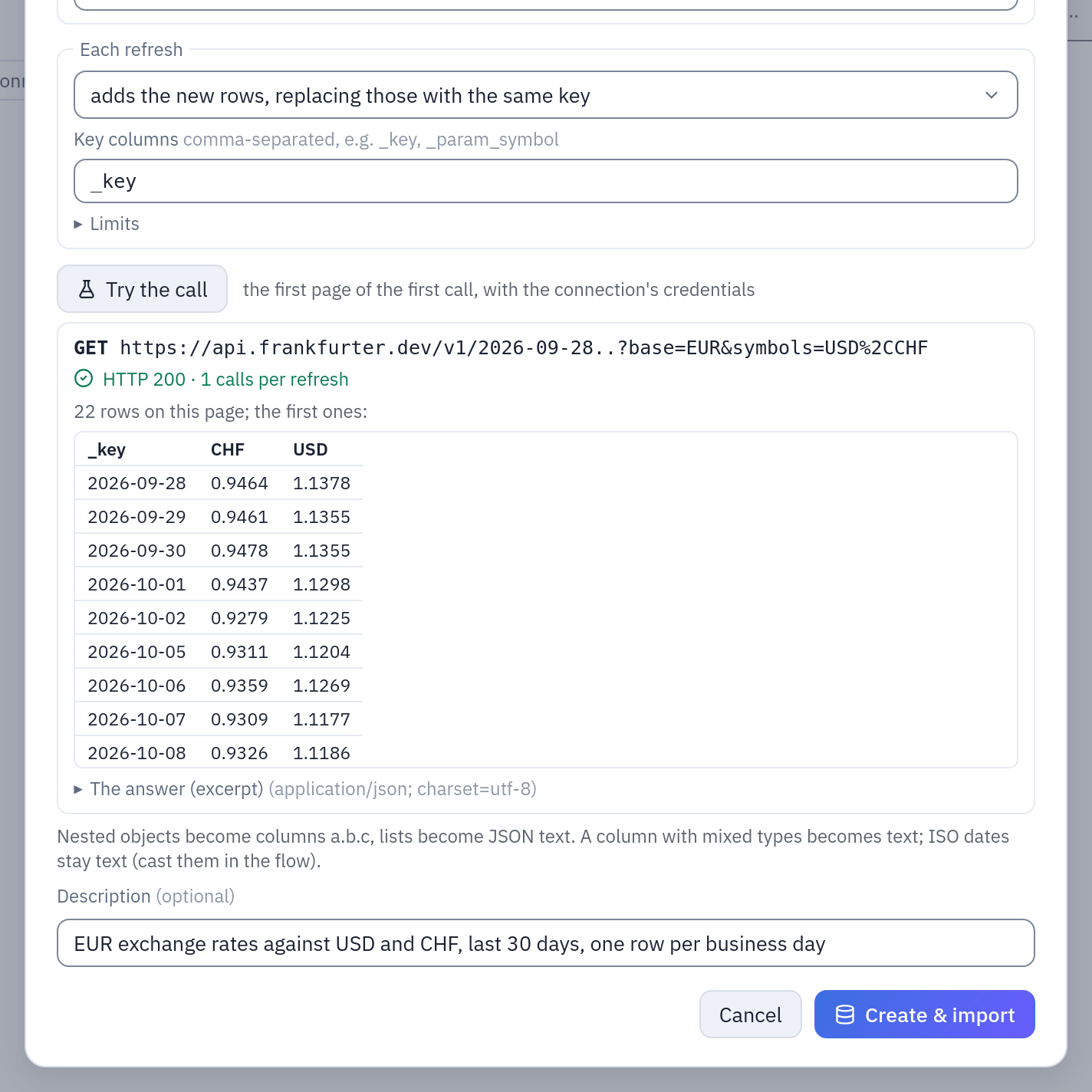
Further down the same form: the records path rates keyed by date, append by key on _key, and Try the call with the request as sent and its first rows. Taken on 28 October 2026, so the path starts on 28 September.
To ask only for what is new, write the path /{last_refresh:yyyy-MM-dd}.. and set
Initial last refresh to today-30: the first refresh reads 30 days, each later one
starts where the previous successful refresh started.
JSONPlaceholder posts: pagination
Connection: Base URL https://jsonplaceholder.typicode.com, Authentication None,
Test path /posts/1.
| Field | Value |
|---|---|
| Path | /posts |
| Query parameters | _limit=10 |
| Records path | empty (the answer is already a list) |
| The records are an object keyed by row | off |
| Pagination | Page number, until an empty page — Page parameter _page, First page 1 |
| Each refresh | rebuilds the whole table |
100 rows (userId, id, title, body) in 10 pages, plus the empty one that ends
it. The same API also sends a Link header when the first page is asked for
explicitly: add _page=1 to the query parameters and choose Next link (Link header or
the response) with an empty Next URL — the same 100 rows in 10 requests, without the
extra empty one.
JSONPlaceholder users: nested objects
The same connection, Path /users, Pagination None: 10 rows, with the nested objects
flattened into columns such as address.city, address.geo.lat and company.name.
A list variable
To read one call per value, add a variable and use it in the call: with
symbol = USD, CHF, GBP in Variables and the query parameter symbols={symbol},
Frankfurter is called three times and every row says which call it came from in
_param_symbol (with the key columns _key, _param_symbol in append mode).
Limits and manners
Engine settings (backend and workers). A datasource can lower the pages, calls and rows limits for itself and ask for a longer interval between requests, never raise a limit above these. Going over a limit fails the refresh with a message that names it: the data is never cut silently.
| Variable | Default | Meaning |
|---|---|---|
API__TIMEOUT_SECONDS | 30 | Connection and read timeout of one request (the token request too). |
API__MAX_PAGES | 1000 | Pages of one call: a pagination that never ends stops here. |
API__MAX_CALLS | 500 | Calls of one refresh (the combinations of the variables), checked before the first. |
API__MAX_ROWS | 2000000 | Rows received by one refresh, before an append merges them. |
API__MAX_RESPONSE_BYTES | 104857600 (100 MB) | One answer, decompressed: it is held in memory to be parsed. A declared Content-Length over it is refused before reading. |
API__MAX_TOTAL_BYTES | 1073741824 (1 GB) | All the answers of one refresh. |
API__MAX_RETRIES | 4 | Retries of a request that failed with 429, 500, 502, 503, 504 or a network error: after Retry-After when the API sends it, else 1, 2, 4, 8… seconds. A POST is sent again only when it cannot have been acted upon: a 429, or a network error before it was sent (connection refused, connect timeout) — never after a 5xx or a broken answer. |
API__MAX_RETRY_WAIT_SECONDS | 120 | A Retry-After longer than this fails the refresh instead of holding a worker. |
API__MAX_REQUEST_SECONDS | 300 | Wall-clock time of one request, from sending it to the last byte of its answer (the timeout above bounds each wait on the network; this one a server that drips its answer). |
API__MAX_REDIRECTS | 5 | Redirects followed by one request. A 303 (and a 301/302 after a POST) continues as GET without the body. |
API__MIN_INTERVAL_SECONDS | 0 | The minimum pause between two requests of one refresh. |
The workers make the calls: if your network limits their egress, open it to the APIs.
Every message for the user starts with API:.
Lineage, dbt
OpenLineage: a refresh reads one dataset, namespace = the origin of the base URL
(https://api.frankfurter.dev), name = the base path and the call's path as
written, placeholders included (/v1/{today-30}..), so it is the same dataset at
every refresh. Never the query string: it can hold a key. The Lineage page shows the
connection feeding the datasource. The dbt export turns an API datasource into a
seed (like SharePoint and SFTP: dbt has no database to read it from).
Not supported (yet)
XML answers; OAuth2 flows other than client credentials; secret headers other than the one of the authentication (put a second, non-secret identifier in the default headers); editing the call of a saved datasource; sort keys (the rows keep the order of the answers).
Proofs
backend/tests/test_api_placeholders.py (the grammar), backend/tests/test_http_api.py
and test_http_api_route.py run against an HTTP server inside the test process
(backend/tests/fake_api.py), the gateway's part is in gateway/tests/test_api_*.py.
Against the real dev stack: e2e/api/fake_api_server.py (a throwaway API served under
two host names, zzapi-a and zzapi-b, to prove that a redirect to another host gets
no credential), e2e/api/api_proofs.py (every authentication, every pagination, 429,
5xx, redirects, the response cap, list variables, append, placeholders in a time zone,
{last_refresh}, no secret anywhere; and the public Frankfurter API of ECB rates,
keyed by date, in append mode) and e2e/api/browser_forms.py (the two forms in
Firefox, English and Italian).