Export a flow as a dbt project
A flow designed in Tabularia can leave as a dbt project: a zip with one model per
output, the shared steps as their own models, sources.yml, schema.yml with the
columns, their descriptions and the data contract as dbt tests, seeds for the files
the flow reads, and a README that says how to run it. Put it in a repository, run it
in your CI, read it in your catalog: the flow is no longer locked in the tool.
It is an exporter, not a second engine: Tabularia keeps running the flow as it does; the dbt project is a faithful, versionable copy of the same transformations that you own from then on. The other integrations are listed in Integrations.
Three targets
| Target | Where the SQL runs | Needs | When |
|---|---|---|---|
| ClickHouse | In your ClickHouse — by default the one Tabularia computes on. Postgres, MySQL and MariaDB sources are read live through ClickHouse's PostgreSQL/MySQL table engines | pip install dbt-clickhouse; a ClickHouse user that can CREATE DATABASE, CREATE TABLE and DROP on the tab_src_* databases; ClickHouse must reach the source databases | The usual case: the ClickHouse engine, data in Postgres/MySQL (any number of connections), files as seeds |
| dbt-duckdb (federated) | In DuckDB, which attaches the source databases and reads their tables live | pip install dbt-duckdb; network access to the sources | Sources on PostgreSQL, MySQL or MariaDB, on any number of connections; any operation of the editor, pivot included |
| Native warehouse | Inside the source database itself: dbt-postgres or dbt-clickhouse | The adapter of that database | All sources on the same PostgreSQL or ClickHouse connection; the result lands in that database, next to the data. There is no native target on MySQL or MariaDB: the federated and the ClickHouse targets read them live |
The project gives the data Tabularia publishes. The first step of every model
casts the source columns to the types Tabularia read them with, so the project sees
the data as the flow does even where the warehouse types them differently (a column of
a type the export cannot write — an array, a uuid — passes through as the warehouse has
it, and the others are still cast). A Postgres timestamptz, which Tabularia reads as a
UTC instant, becomes that instant in UTC in the first step, whatever the time zone of
the session that runs dbt; the dbt-duckdb profile also pins the session to UTC, as
Tabularia's engine does.
The federated target runs every operation with the very SQL functions of
Tabularia's DuckDB engine (the cast that trims text and truncates numbers, the
predicates, the NULLS LAST of sorting, the join that fills the key of right/full
joins, the pivot labels) — imported, not copied. The native and ClickHouse targets
translate to the warehouse's dialect with sqlglot and replace what the dialect lacks
with portable forms that give Tabularia's values:
- casts guarded by the value, not by
TRY_CAST: a text is converted where both of Tabularia's in-process engines (Polars and DuckDB) convert it, with their value. A date is a real day (month lengths, 29 February in leap years) with a one- or two-digit month and day (2024-1-5) and a year of one to four digits (24-01-05is the year 24, as both engines read it, not 2024). An instant has aTor any white space before the time, hours, minutes and seconds of one or two digits (2024-01-05 1:3:5), a fraction cut at the microsecond, maybe a trailing., and after the seconds maybe aZor an offset (+02,+0200,+02:00,-05:30), which both engines drop:10:30:00+02is 10:30. A float takesinf,infinityandnanwith a sign, in any case, and a number beyond the double range is ±infinity or ±0 (1e400,1e-400) — it used to fail the whole Postgres model. A boolean takes DuckDB's wordstrue/t/1/yes/yandfalse/f/0/no/n(Polars cannot cast text to a boolean). Where the two engines disagree these targets give the DuckDB engine's value or NULL:2024/01/01and2024-01-01 10:00as a date,24:00:00,23:59:60, aZright after the minutes, a lowercasez, an offset after a space, and1_000.5as a float are NULL. Text → integer only within the 64-bit range, a float or a decimal → integer only within it (NaN and infinities give NULL). A bad value gives NULL, as in Tabularia — never a failed model on Postgres, never a made-up value on ClickHouse (2024-02-30used to become 1 March there). A float written as text keeps its.0(200.0), as the engines write it; boolean ↔ number casts andmin/maxof a boolean run on Postgres; aUInt64(a ClickHouse hash key, a MySQLBIGINT UNSIGNED) stays unsigned (numeric(20,0)on Postgres) and a value over 2^63 cast to integer is NULL; - text in byte order on Postgres, as Tabularia compares it: the first step gives the
source text columns
COLLATE "C", and sort keys, ranges,min/maxand the order offirst/lastadd it to text the flow makes. Equality, joins,GROUP BY,DISTINCTandORDER BYthen agree with Tabularia whatever the database's collation (also a case-insensitive one). ClickHouse already compares bytes; strpos/left/rightinstead ofcontains/starts_with/ends_with,EXISTSfor semi and anti joins, explicit column lists instead of DuckDB's* EXCLUDE/REPLACE/RENAMEand ofUNION BY NAME, an unpivot written asUNION ALLwith the engine's supertype for the value, a cast onROUNDfor PostgreSQL, DuckDB'syear(d),month(d),day(d),dayofweek(d),isodow(d),dayofyear(d),quarter(d),week(d),weekofyear(d),hour(t),minute(t),second(t)as anEXTRACTcast to an integer on PostgreSQL (as in DuckDB, a second without its fraction), the*UTF8string functions on ClickHouse (upperUTF8,substringUTF8…:upper('città')isCITTÀ, as in Tabularia), andpositionUTF8forstrpos,instrandposition, which count characters as DuckDB does (ClickHouse'spositioncounts bytes; so does the Polars engine, whose text is flagged for review anyway). On Postgres sqlglot's SQL is not run at export time, and the README of a native Postgres project says so: rundbt buildonce on a copy (ClickHouse models are read by ClickHouse's parser, see below);- aggregates with the engine's types: a sum of integers or booleans is a 64-bit
integer (a boolean sum counts the true values, also on Postgres), a sum of a decimal
keeps its scale; the mean, deviation and variance of an integer, a decimal or a
boolean are doubles (Postgres gave a
numeric), a boolean counting as 1 or 0 as in Polars (the DuckDB engine has no mean of a boolean); the mean and the median of dates or instants are a timestamp and run on Postgres and ClickHouse too — the mean over the microseconds since 1970, rounded to the microsecond, the median the midpoint of the two middle values;firstandlastfollow the sort before them on every target.
To know the columns and types at every step, the export builds each model's steps, one
at a time, as empty tables in an in-memory DuckDB, starting from empty tables typed
like the sources — no data, no file, no network — and reads each step's real column
names and types from it: a compute's type, a sql node's columns, an aggregate's type.
That is what the casts, the unpivot, the joins and the types recorded for models read by
other models use. Each step binds against the table of the step before it alone, so the
time grows with the number of steps, not faster. It stops (and the export goes on with
its own tracking) after a pivot and at a step that does not bind in DuckDB. A source
column of a type the export cannot name (a uuid, a bytea, an array) does not stop it:
the steps that do not read that column keep their types and casts, a sql node gets
DuckDB's names, and only a cast of a column made from it is refused
(cast_type_unknown).
Column names keep their case ("Città" stays "Città"). A sql node keeps its query,
its own WITH included: self and input point at the previous step; an expression
without an alias keeps the name DuckDB gives it ((i + 1), count_star()), so the
steps after it find it. A pivot has no portable SQL, so it is refused on the native
and ClickHouse targets; after a pivot, on the federated target, a join keeps every
pivot column (a right-side column with the name of a left-side one gets _right, as in
Tabularia; so does the index when the join reads it back with left_on/right_on:
<index>_right) and a compute replaces a pivot column in place or adds one. foreach
is refused everywhere (dbt has no runtime loop).
The text of a compute or of a sql node is read in the dialect of the flow's engine
(its production engine if it has one). DuckDB text is used as it is, except its escape
strings: an E'…' in a compute or a sql node is written as the standard string of the
same value ('…', its line breaks raw) wherever the export rewrites the text with
sqlglot — every native target, the ClickHouse target, and a sql node on the federated
target — so its bytes are the value DuckDB gives (before, E'a\\ b' lost its backslash on
native Postgres and in a federated sql node, and \q, \101, \x42 stayed as written
on ClickHouse instead of q, A, B). An escape DuckDB itself refuses (a byte outside
ASCII, \u) is left as written; a compute on the federated target keeps its text as
typed, which DuckDB reads the same way. ClickHouse and
BigQuery text is translated by sqlglot, and the model's header and the README list the
step as "Translated from ClickHouse SQL by sqlglot, review"; text the translation
cannot run is refused (toYear(d) on the federated target: use the ClickHouse target,
which runs ClickHouse text as the ClickHouse engine does). Polars text has no sqlglot
dialect: it is kept as it is and listed as "Written for the Polars engine, review" —
CAST of a decimal to an integer, ROUND of a .5, % of a negative number, window
frames with ties and the names of unaliased expressions can differ there.
Text typed in the flow is data, never Jinja. Values, literals, names, compute and
sql text, datasource queries, descriptions, contract rules and AI text reach the
warehouse as they were typed: a value {{ 7 * 7 }} stays that text, and
{{ env_var(…) }} or {% do run_query(…) %} in a flow neither reads a variable nor
runs anything. Each Jinja opener is written as an expression that prints it
({{ '{%' }}); a text without openers is written unchanged. No flow is refused for it.
A carriage return is written the same way, {{ '\r' }}: Jinja writes every line break
of a template as \n, and dbt turned 'a\r\nb' into 'a\nb'. So a text on several
lines — a value, a compute expression, a sql node's query, a column name — keeps its
exact bytes on every target; the model indents only the line breaks outside its string
literals, quoted names and comments. dbt also renders every YAML value as a template, and
Jinja drops a template's final line break, so a value that ends with one (a column named
like a spreadsheet header that ends with Alt+Enter, Total⏎) writes it as {{ '\n' }}:
the column keeps its name in schema.yml and in its tests (before, the not_null test of
Total⏎ failed with «Referenced column "Total" not found»). A name in config() (a
native output's real table and schema) that holds a quote or a backslash is written as
pieces joined with ~ (alias='t' ~ '\\' ~ 'x' for t\x): dbt's static parser, which
dbt uses for models by default, reads a string literal as written, escapes included,
and gave dbt another table. A plain name stays alias='orders'.
The ClickHouse target
The project names one ordinary ClickHouse database per (connection, schema),
tab_src_<connection>_<schema> (a schema that is not a plain lowercase name gets a
fingerprint, so Sales and sales, or two Cyrillic schemas, never share one), and in
it one table per source table the project reads — the tables of the sources and the
ones a datasource query reads — with the PostgreSQL or MySQL table engine.
sources.yml points at them, so the models use plain source() and the dbt docs show
the lineage. Their columns are what ClickHouse infers, with the types that would lose
values widened: a date is a Date32 (ClickHouse's Date turned a 1955 birth date into
2134), an instant a DateTime64(6) (its DateTime dropped the microseconds and wrapped
dates before 1970), a Postgres numeric without precision a Float64 as Tabularia
reads it (Decimal(38, 19) failed on a value over 10^19). From there on everything
runs in ClickHouse, with the native SQL translated to its dialect: every cast writes a
date as Date32, a timestamp as DateTime64(6), a time of day as text, as the
ClickHouse engine does.
The databases and tables are created by a macro in the project — once, and again when a source table changes its columns:
export CLICKHOUSE_USER=... CLICKHOUSE_PASSWORD=...   # dbt's own ClickHouse user
export TABULARIA_DB_1_PASSWORD=...                   # one per source connection
DBT_PROFILES_DIR=. dbt run-operation create_tabularia_sources --log-level-file none
The source passwords are part of the CREATE TABLE it runs, and dbt writes the SQL it
runs into logs/dbt.log at debug level: --log-level-file none keeps them out of it
(the oracle lifecycle.py checks both ways: with it the password is in no file, without it
it is in logs/dbt.log). ClickHouse keeps the password in
each table's definition — SHOW CREATE prints [HIDDEN] — so give it a read-only user
on the sources. A tab_src_* database an earlier export created with the PostgreSQL or
MySQL database engine is dropped and made again (it holds no data). CLICKHOUSE_HOST,
CLICKHOUSE_PORT and CLICKHOUSE_SECURE point the profile at another ClickHouse.
- A datasource defined by a SQL query is translated with sqlglot from the
source's dialect to ClickHouse, its tables read from the
tab_src_*databases; the README marks it "review". A Postgres query reads the names Postgres reads (unquoted names folded to lowercase, quoted ones kept), a typed date literal in a comparison is written as its text (ClickHouse 24 sentDATE '1970-01-01'to Postgres as a number of days), and the query gets the*UTF8functions and theDate32/DateTime64types as the models do. A query that does not translate is refused. - A ClickHouse connection is read directly if it is the ClickHouse the project runs on; another ClickHouse server is refused (use the native target there).
- The profile sets
join_use_nulls = 1(with ClickHouse's default the missing side of an outer join is 0 or''on a non-Nullable column instead of NULL) andmax_query_size = 16777216(ClickHouse's 256 KiB refused wide, long flows). A model bigger than that, counted with the ephemeral models dbt puts inside it, is refused with the reason: split the flow. - The SQL is read by a real ClickHouse parser before it is written. sqlglot rarely
fails: it translates constructs ClickHouse does not have (
SIMILAR TO,LATERAL,TABLESAMPLE) without a word, and the error would surface only atdbt run. Every ClickHouse model (this target and the native one on ClickHouse) goes throughEXPLAIN AST— no execution, no table needed — on chDB if the engine has it, otherwise on the engine's ClickHouse, which gets 10 seconds; if neither answers the check is skipped for the rest of the export and the README says so. A syntax error there is a model that does not translate: the export says so, or, with the AI option, asks the AI for a translation. It does not catch functions ClickHouse does not have — that would need the tables. - The names of the CTEs are unique across the whole project: an ephemeral model dbt
puts inside another never shadows one of its steps (ClickHouse 24 failed with
UNKNOWN_TABLE). pivotis refused, as in native.- A
tableorincrementalmodel with a column whose name holds a double quote is refused (column_name_unsupported): dbt-clickhouse writes a table's column list without escaping it, anddbt runfailed with a syntax error. Rename the column in the flow, or materialize the model as a view (a view builds). The same holds on the native ClickHouse target. - The result is in the ClickHouse database
dbt_tabularia; a database output of the flow becomes a model there, not a write into the source database.
On the native ClickHouse target the profile sets the same join_use_nulls and
max_query_size, and secure follows the connection's
encryption: on with verify or trust (trust
adds verify: false), off with none; a connection saved before the option keeps the rule
Tabularia's own client follows, TLS on ports 8443 and 443 and not on the others
(CLICKHOUSE_SECURE=true|false overrides it; the README says which). On the native
PostgreSQL target the profile's sslmode is the connection's: verify-full for verify
(with sslrootcert: system, the system's authorities), require for trust, disable for
none, nothing for a connection saved before the option. A company authority comes with
the project as certs/ca.pem: dbt-postgres names it in sslrootcert, dbt-clickhouse
reads it with SSL_CERT_FILE=certs/ca.pem. On the federated targets the profile names
host, port, database and user only: the README says how to encrypt an encrypted
connection there (PGSSLMODE for DuckDB's PostgreSQL, the ClickHouse server's own
settings for its table engines).
Download options
In the Flows page, Export → dbt opens a dialog that shapes the project for the data team's repository. The choices are remembered in the browser, per flow, as they were typed (an empty folder stays empty: its default follows the flow's name).
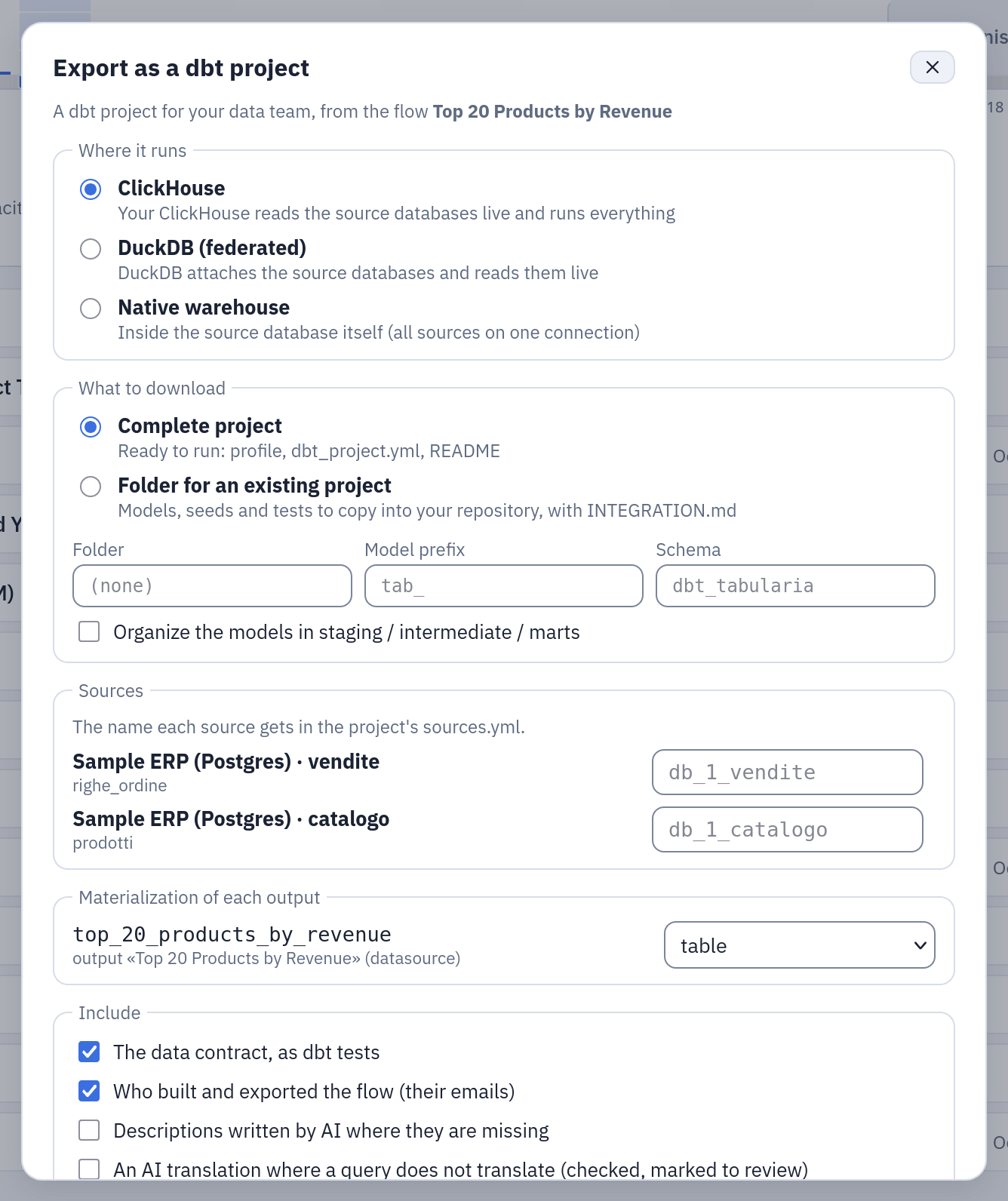
Export → dbt on the sample flow «Top 20 Products by Revenue»: its two sources on the sample ERP get a source name each, its output a materialization.
| Option | What it does |
|---|---|
| Where it runs | ClickHouse, DuckDB (federated) or native. A target that cannot work for the flow is disabled, with the reason: a pivot outside DuckDB, sources on several connections or on MySQL/MariaDB for native, an Oracle, SQL Server or Trino source, a seed over 50 000 rows, a step saved half done (a join without its right input or its keys, a filter without a column or a value, an aggregation without a column…), a source or output name with a character the target's dbt adapter cannot write (see Limits). ClickHouse with an Oracle, SQL Server or Trino table becomes available in Folder for an existing project: those sources are then ticked «already declared» and cannot be unticked (the team's project must declare them; type the source name it has there); in the complete project ClickHouse stays disabled with the reason |
| Complete project | Ready to run: profiles.yml, dbt_project.yml, README — as described above |
| Folder for an existing project | models/<folder>/, seeds/<folder>/, tests/<folder>/, macros/<folder>/ to copy into the team's repository, and an INTEGRATION.md that says what their profile needs (the DuckDB secrets and attachments and the UTC session, ClickHouse's custom_settings), which sources they must already declare, and how to run it: dbt build -s +tag:<flow>,tag:tabularia — the flow's models and everything they read, with their tests, but only what came from Tabularia, so a model of the team tagged like the flow is not built, nor what it reads. No generate_schema_name macro in a folder: it would rename the schemas of their whole project. The default folder is the flow's name as an ASCII slug (accents dropped, at most 40 characters, tabularia when nothing is left) |
| Folder, model prefix | Models and seeds named <prefix><name> (e.g. tab_), away from the team's own names; the name is the one the dialog shows, with the prefix in front |
| Layers | Query models in staging/, shared steps in intermediate/, outputs in marts/ |
| Schema | Complete project only (in a folder the team's profile decides it): where the models land, the profile's schema — dbt_tabularia by default on the native and ClickHouse targets, main on dbt-duckdb (the profile names no schema) |
| Sources | For each (connection, schema), the source name of the team's project. Two sources may share a name only if they have no table in common (dbt could not tell them apart). Folder only: already declared — no entry in our sources.yml (dbt rejects a source declared twice) and, on ClickHouse, no federated database for it; the complete project always declares every source |
| Materialization of each output | table or view; incremental too for an append output |
| Include | The data contract as dbt tests (off: the declared types stay in the descriptions); who built and exported the flow (off: the emails leave the metadata, the flow id and version stay) |
Each invalid field says the rule it breaks (first character, allowed characters,
length) next to itself, also to a screen reader. A source with no name typed shows the
name it will get, as the export gives it: when a typed name takes a source's default,
that source moves aside (_2, _3). Closing the dialog — Esc, ×, Cancel, outside — or
leaving the page while it prepares the zip cancels the download. The file keeps the
letters of the flow's name (accented, Greek, Cyrillic…): <flow>_dbt_<target>.zip, with
_folder for the folder package.
The oracle folder_package.py checks the folder package with a "team project" that has its
own model, tagged like the flow, and its own sources.yml already declaring the sales
source: the folder copied in, with the profile blocks INTEGRATION.md gives, must build
with the command it gives, give the data Tabularia publishes and leave their model
alone; without "already declared" dbt must reject the duplicate source.
AI (optional)
When the assistant is configured and the administrator has enabled a model, the dialog offers two more choices, both off by default:
- Descriptions written by AI where they are missing: a paragraph "what the flow
does" for every flow (in the README, and after the description of its outputs), and
a sentence for every column of the outputs, the source tables and the seeds that has
no description. In English, marked
(AI). The AI sees the structure of the flow — names, types, steps, the descriptions already written — and at most 3 short sample values per column, none with metadata-only mode on. Characters YAML cannot carry (control characters, DEL, U+FFFE/FFFF) are removed from what it writes before it is kept. - An AI translation where a query does not translate: when the engine cannot
translate a model or a datasource query to the target's SQL, the AI proposes one,
and the engine uses it only if it passes Tabularia's checks — one
SELECT, nothing that writes, noSETTINGS, no table function, no function that reads data or settings outside the model (dictGet,joinGet,file,url,s3,remote,getSetting;dblink,pg_*,lo_*,current_setting,set_config,nextval…), only the tables the model reads (on the native and ClickHouse targets, only that model's own sources; a table hidden behind a CTE that is not visible where it is read,IN db.table, or a qualified placeholder count as other tables), the same output columns in the same order, and, on ClickHouse, read by ClickHouse's own parser. A query over 20 000 characters is not sent (it would arrive cut): the export says so. If a proposal does not pass, the AI gets one more attempt with the reason in front of it (a model sometimes sends the query back unchanged); if that fails too, the export says why. A model so translated says it in its header and in itsmeta, and the README lists it.
What the AI writes is kept per version of the flow, "no description" included: items the AI leaves out, or answers with nothing, are asked once more in the same export, then kept without a description. Re-exporting the same version reuses what is kept, without a call — even with the AI switched off since — and gives the same zip; the README names the model(s) that wrote the texts, not the one configured now. Two exports of the same version at once (on any gateway replica) ask the AI once, and the other uses the same texts. A new version asks again. An empty translation is never kept, and a translation the engine's checks reject is forgotten (unless another export has stored a new one since), so the next export asks again.
The instructions the AI gets for both are editable in Administration → AI → Agent instructions (configuration); by default the descriptions are written in English.
With the AI switched off, the dialog still offers what the AI kept for the flow's current version: «Use the AI descriptions kept for this version» and «Use the AI translations kept for this version», each only when the version has such texts. Ticked, the export reuses them without any call and gives the same zip as before. The hint under the AI options names the model(s) that wrote the kept texts (with the AI on as well); for a kind nothing was kept for, it names the model configured now.
The calls go through the assistant's model, accounting and caps: every AI call of one
export shares a time budget, AI__DBT_EXPORT_TIMEOUT_SECONDS (180 s by default, under
the ingress' 300 s: raise both together), and each call has the assistant's per-turn
limits (AI__MAX_COST_PER_TURN_USD, with a model of no known price counted at an assumed
one, and AI__MAX_INPUT_TOKENS_PER_TURN). What a failed call cost is
recorded and counts against the daily caps too. A cap reached, the budget spent or a
provider that does not answer stops the export with the reason; the budget also stops
the engine's check of a new AI translation once it is spent.
The engine builds the project inside the download request. The gateway waits for it at
most ENGINE__DBT_EXPORT_TIMEOUT_SECONDS (100 s by default) per engine call — the first
one, and the one after each AI translation it checks. Past it the download stops with
«The engine did not build the dbt project within 100 s …» (HTTP 504); an engine that
cannot be reached is «The engine cannot be reached (…)» (HTTP 502). The ingress cuts the
request at 300 s: with the AI on, up to AI__DBT_EXPORT_TIMEOUT_SECONDS (180 s) go by
before the last engine call starts, so keep the two together under the ingress' proxy
read timeout, and raise them together.
Why a target is not available, and why a download was refused, is written in the language of the interface (English, Italian, German, Spanish, French). A flow definition the editor would never save (written through the API: a node without an id, text that is not JSON) is a reason in the plan and a refused download, never a server error.
The API: GET /flows/{id}/export/dbt/plan (what the dialog needs: targets and why
not, sources with their default names, outputs with the allowed materializations, the
default folder, the AI options (ai.available, ai.model, and ai.stored: whether
descriptions and translations are kept for the current version and the models that
wrote them), and for a target that works only in the folder package, requires (the
sources that must be already declared)), POST /flows/{id}/export/dbt with the options
as JSON, and
GET /flows/{id}/export/dbt?target=clickhouse|duckdb|native for the complete project
with the defaults. All three are for administrators only. Only administrators can export
(the personal flag or an admin group — give the data team a group): the project is
self-contained, so it carries the upstream flows, the text of SQL queries and, as
seeds, the data of sources that are not in a database, including those of folders
the person who views the flow cannot see. Observers and ordinary users see only the
OpenLineage export in the dialog. The download is in the audit log, with the AI models
that wrote what it carries.
What the project contains
dbt_project.yml          profile, paths; models materialized as table by default
profiles.yml             the connection(s): passwords via env_var, never in the file
models/
  sources.yml            one source per (connection, schema): tables, descriptions, columns
  schema.yml             every model: description, columns, descriptions, not_null tests
  <output>.sql           one model per output node of the flow
  int_<step>.sql         the steps shared by several outputs (ephemeral)
  src_<datasource>.sql   a datasource defined by a SQL query (ephemeral)
seeds/<name>.csv         the files the flow reads, as CSV (with seeds/schema.yml)
tests/<model>__<rule>.sql   the contract rules dbt has no faithful generic test for
macros/generate_schema_name.sql   native only: a model with a `schema` lands in that schema
macros/create_tabularia_sources.sql   ClickHouse only: the source databases and tables
README.md                what is in it, where it lands, how to run it, what to know
Names that YAML would read as something else — on, yes, null, true in any case,
or with YAML punctuation — are quoted; characters YAML does not allow raw (DEL, C1
controls, line and paragraph separators) are written as \uXXXX escapes and read back
exactly. A flow named dbt or dbt_<anything> gets the project name tabularia_<slug>
(dbt refuses a project named like one of its packages). Model names fit Postgres'
63-byte identifiers whatever the prefix: past 43 bytes (31 for an ephemeral model, which
dbt-postgres names __dbt__cte__<name>) a name keeps its start and ends in _<8 hex>
of the full name.
Models and materializations
| In the flow | In dbt |
|---|---|
| Output → datasource | table |
| Output → database table, replace | table. Native, on the connection dbt runs on: with the schema and alias of that table, so dbt writes the very table Tabularia writes (a one-part name is in the connection's schema, else public on Postgres — see below — or the connection's database on ClickHouse) |
| Output → database table, append | incremental, incremental_strategy='append' (native, on the connection dbt runs on: into that same table) |
| Output → database table on another connection (native) | an ordinary model in the project's schema, named like any other: dbt does not write into another database, and the README says that loading it there is the data team's job |
| Output → S3/GCS file | table (export it from the warehouse) |
| Output → email | no model: an email is not a dataset |
| Steps shared by several outputs | int_<step> model, ephemeral, referenced with ref() — one definition, as in the editor |
| Publish sort keys | an ORDER BY at the end of the model, as the app does |
On the connection dbt runs on, an output keeps its real table only when its model is
materialized the way Tabularia writes it: table for replace, incremental for
append. Another choice (a table or a view over an append, a view over a replace)
builds the model in the project's schema, and the README says why: dbt would rebuild
Tabularia's accumulated table with the last batch only, or drop it for a view. On
Postgres the alias and the schema are the first 63 bytes of the names, the table Postgres
created for Tabularia; a long name with accented letters that dbt-postgres cannot rebuild
as a table (it cuts the names of its __dbt_tmp and __dbt_backup tables by
characters, Postgres cuts names by bytes, and they collide) is built in the project's
schema with a README note, while an incremental keeps the real table.
A Postgres connection without a Schema: Tabularia reads and writes a one-part table name
through the search path of the database role (a schema named like the role when there is
one, then public), while the project names it in public. They are the same table
unless the role has a schema of its own or another search path; the README says so and
names the tables. Set the connection's Schema in Tabularia and export again to remove
the doubt.
A post-SQL on a database output is not carried over: the README tells you to add it
as a post-hook if you need it.
Sources
| Datasource | In dbt |
|---|---|
| A database table | {{ source('<connection>_<schema>', '<table>') }} in sources.yml, with the table's and columns' descriptions. A one-part table name is read from the connection's schema, else public (Postgres, see above for a role with another search path) or the connection's database |
| A SQL query on a database | src_<name>, an ephemeral model with the query. Federated: it runs in the source database through DuckDB's postgres_query/mysql_query; native: the query as written; ClickHouse: translated (see above) |
| The output of another flow | only the branch read comes in: the model of the Output that publishes the datasource (in the flow that last published it), with its own upstream steps, referenced with ref(). That flow's other outputs are not in the project, and an upstream model never writes into that flow's destination tables. Recursive, with a cycle check on outputs: two flows feeding each other through different outputs export fine. A datasource that two Outputs of the upstream flow publish is refused (which one wrote it last depends on the order they ran in): keep one Output per datasource |
| A file (uploaded in the editor, imported, SharePoint, an SFTP or S3 folder) or an HTTP API call | a seed: the data as CSV at export time, up to 50 000 rows (beyond that the plan disables every target: import the file into a database). Seeds are tagged tabularia too |
| A table or query on Oracle, SQL Server or Trino | not read by any target: DuckDB does not federate them, ClickHouse does not read them, and there is no native dbt target for them. The plan says so, with the connection's name, and suggests copying the data into a PostgreSQL or MySQL table. A table can still go, with the ClickHouse target, into an existing dbt project that already declares it as a source: the folder package with that source «already declared» (the plan offers it there). A SQL-query datasource on such a database is exported by no target |
dbt's seed loaders change some texts: dbt-duckdb reads "" as NULL; dbt-postgres and
dbt-clickhouse read '', null in any case and blank text as NULL and turn \r into
\n; ClickHouse cuts spaces and tabs at the ends and reads \N as NULL. Such a value is
written in the seed CSV as ~ plus the text, with ~, space, tab and \r written
~0, ~1, ~2, ~3 (a value that starts with ~ too), only in the columns that hold
one; the first step of every model that reads the seed gives the exact text back, and
the README names the seed and the columns. The seed table itself holds the written
form: read it through the models.
Reading a model
A model is one WITH list, one step per node, in the order of the flow. Each step
is named after what it does (source_orders, filter_canale, compute_netto,
aggregate_by_canale, left_join_customers) and opens with a comment in plain
words, so a reviewer reads the flow in the SQL without opening the app:
{{ config(materialized='table') }}

-- Exported from Tabularia: flow «Margin flow» (id 12, version 7 saved 2026-10-09 18:00 UTC), output «Margin» (datasource).
-- Built by anna@example.com. Re-exporting the same version gives this same file.

WITH
source_orders AS (
    -- source: orders, with the column types Tabularia reads
    SELECT
        CAST("id" AS BIGINT) AS "id",
        CAST("canale" AS VARCHAR) AS "canale",
        CAST("importo" AS DOUBLE) AS "importo"
    FROM {{ source('db_1_vendite', 'ordini') }}
),
filter_canale AS (
    -- keep rows where canale = 'web'
    SELECT *
    FROM source_orders
    WHERE "canale" = 'web'
),
compute_netto AS (
    -- netto = importo * 0.8
    SELECT *, (importo * 0.8) AS "netto"
    FROM filter_canale
),
aggregate_by_canale AS (
    -- aggregate by canale: sum(netto) as tot
    SELECT "canale", sum("netto") AS "tot"
    FROM compute_netto
    GROUP BY "canale"
)
SELECT *
FROM aggregate_by_canale
Where a model comes from
The header of every model says which flow it comes from (id, the version that was
exported and when that version was saved), which output, and who built the flow. The
same facts sit in schema.yml under config.meta.tabularia — flow, flow_id,
flow_version, version_saved_at, folder, owner, output, node (the output
node's id) — and so in the dbt docs and the manifest, where a catalog can read them.
Who exported the project is written in the README (or INTEGRATION.md) only, unless
the emails option is off.
The export is deterministic. The same version of a flow with the same options
gives the same zip, byte for byte — whenever, from whichever gateway or engine process:
no export time in the files, entries in order with a fixed date, nothing that depends
on the order of a Python set. Whoever exports it, the models, the YAML, the tests and
the seeds are the same bytes; only the README's "Exported by" line names the person who
exported it, and with the emails option off the whole zip is the same. Re-exporting into
the team's repository shows, in the diff, only what changed in the flow. Every model is
tagged tabularia and with the flow's name: dbt run -s tag:tabularia runs everything
that came from the app, dbt run -s tag:margin_flow one flow. A model made from a
datasource's SQL query names that datasource instead of a flow. The README lists the
flows the project was made from.
Descriptions and the data contract
The datasource an output publishes lends the model its columns and column
descriptions. If it has a data contract, every rule becomes a dbt test with the
rule's severity (warning → warn, error → error), written to give the verdict
Tabularia's contract check gives:
| Contract rule | dbt |
|---|---|
not_null | a generic test on the column in schema.yml, with quote: true (dbt's generic tests write the name as it is: Nome Cliente or select was a syntax error, and Postgres read Canale as canale). Two not_null rules on one column (a warning and an error) are one test with the stricter severity; on a column whose name holds a double quote it is a singular test |
unique (one column) | a singular test tests/<model>__unique_<column>.sql, a GROUP BY that counts NULLs: two NULLs are a duplicate, as in Tabularia (dbt's generic unique ignores them) |
accepted_values | a singular test tests/<model>__accepted_values_<column>.sql that compares as Tabularia does: a number column as numbers (3 = 3.0, unless a value is not a number: then as text), a boolean column as booleans (true, false, 1, 0; another value refuses the export), anything else by its text. Quotes and backslashes are escaped for each warehouse (Sant'Antonio, L'Aquila) |
pattern | a singular test: the whole value must match (^(?:regex)$), read as text as Tabularia reads it — a date 2024-01-05, a timestamp with six fraction digits, a boolean true, a decimal with all its scale digits, a whole float with .0. . does not match a newline, as in Tabularia |
unique (several columns), range, row_count, expression | a singular test in tests/, a query that selects the violations |
column (exists, type) | the column is listed, the declared type in its description |
freshness | a note in the README: dbt checks freshness on sources, not on models |
A singular test is named <model>__<kind>_<rule id> (<model>__<kind>_<column> for
the column rules above); two that would share a file name get _2, _3.
dbt test then fails or warns exactly where Tabularia's contract would (two not_null
rules of different severity on one column: the one test fails where the error rule
fails).
Run it
pip install dbt-duckdb          # or dbt-clickhouse, or dbt-postgres for the native target
export TABULARIA_DB_1_PASSWORD=...   # one per connection, named in profiles.yml
# ClickHouse target only: CLICKHOUSE_USER / CLICKHOUSE_PASSWORD, then once
# DBT_PROFILES_DIR=. dbt run-operation create_tabularia_sources --log-level-file none
DBT_PROFILES_DIR=. dbt seed     # only if the project has seeds
DBT_PROFILES_DIR=. dbt run
DBT_PROFILES_DIR=. dbt test
Federated: the result is in <project>.duckdb, next to the project, in the schema
main unless one was chosen (the README says which; the DuckDB postgres/mysql
extension is downloaded at first run). The source passwords go through DuckDB
secrets (secrets: in the profile, attach … secret:), never in the ATTACH
path: a wrong or rotated password, or a source that does not answer, fails with an
error that names no connection string (Unable to connect to Postgres at ""), and the
password is not on the console, in logs/ or in target/; passwords with spaces,
quotes and backslashes work. The folder package's INTEGRATION.md gives the same
secrets: and attach: blocks, and the UTC session, for the team's profile. Native: the
models are in the dbt_tabularia schema of the source database, and the database
outputs on that connection in their own tables. ClickHouse: in the dbt_tabularia
database.
How it is checked
End-to-end oracles run a real dbt (1.12: dbt-duckdb, dbt-postgres, dbt-clickhouse) against real databases and compare every model with what Tabularia publishes for the same flow: columns in order, the family of their types (integer, float and decimal apart; text, date, datetime, bool), rows (an empty text is not NULL, a text is compared as text), and order where the order is the point, with dbt running in a time zone other than UTC. They check:
- every operation of the editor with its variants (60 cases: every cast, every
filter operator, every join kind,
onandleft_on/right_on, both unions, every aggregation, compute that adds or replaces a column, unpivot, sql nodes with and without their ownWITH, names with spaces, accents, upper case and reserved words, NULLs everywhere) on the three targets, plus pivot — then a join, then a compute, then a join back on its index withleft_on/right_on— on the federated one; chains whose types the export must know (compute → cast, compute → unpivot, sort → first/last, sums and min/max of booleans, the mean, deviation, variance and median of an integer column, floats written as text); a text on several lines (LF, CRLF, a lone CR) in a compute, a filter value, a fill_null value, asqlnode and a column name; atimestamptz, an unboundednumericup to 10^20, dates before 1970 and after 2149, microseconds, empty texts; a file read as a seed with the texts dbt's loaders change. A case Tabularia refuses must fail in dbt too; - the data contract: for every rule, the dbt test must pass, warn or fail exactly when Tabularia's contract check does, with the same severity — whole-value patterns on text, integer and date columns, accepted values with apostrophes and numbers, unique with NULLs, not_null on awkward names;
- the dbt lifecycle:
parse,compile,docs generate; a table written in append doubles on the seconddbt run(as two Tabularia runs do) and--full-refreshstarts over — natively, in the flow's own destination table; the source passwords in no file dbt writes and not on the console, also when a connection fails; - Jinja typed in a flow — in a filter value, a compute expression, a column name and
the output table's name — reaches the warehouse as text: with dbt's static parser on,
the model's alias is the table typed in the flow,
dbt runwrites that very table with the texts as typed, and nothing that only running Jinja would print shows on the console, inlogs/or intarget/; a single quote in a native output's table name must be refused with the reason, by the plan before the download and by the download; - ClickHouse as native warehouse (NULL on the missing side of an outer join) and as the ClickHouse target, and every Sample flow in every target its export plan allows;
- the folder package copied into a team project with its own model and
sources.yml; determinism across exports, restarts and exporters; the dialog in a browser — its options and the zip they give, the download cancelled when the dialog closes or the page is left, the focus back on the Export button, each field's rule said to a screen reader, the source names the export will use, a target offered only into the team's project, the AI texts kept for the version; the AI with the real provider; - the refusals: every code the engine and the gateway raise has its sentence, with its parameters, in the five languages, and what the gateway mirrors of the engine to say it in the plan before the download (the parameters each step needs, the seed cap, the databases each target reads, the dialects, the characters refused in each kind of name) has not drifted apart — two checks that read the code and need no stack.
The oracles are in the repository, in e2e/dbt_export/:
python3 e2e/dbt_export/run_all.py all runs them against a running stack and says which
are green. Run them after any change to the exporter or to the engines it mirrors, and
before a release.
Limits
- After a
sqlnode the export reads its columns from DuckDB at export time. When it cannot (a query DuckDB does not bind), the following steps useSELECT *, and on the native targets the steps that need the column list (drop, rename, reorder, cast, fill null, union by name, join) are refused with a message. On the ClickHouse target with ClickHouse text, an expression without an alias is named by ClickHouse: alias it if a later step needs the list. A cast whose source type cannot be known at all is refused. - After a
pivotits columns are decided by the data. When the pivot is on the left of a join and one of its columns has the name of a right-side column, the model stops atdbt run("UNION (ALL) BY NAME … the name "X" occurs multiple times") instead of renaming it in silence: rename the right column before the join. A pivot label equal to another column but for its case is renamedB_1by DuckDB, as Tabularia's own DuckDB engine does. - On the federated target two columns whose names differ only by case (
Codice,codice) are refused: DuckDB reads them as one column. The native and ClickHouse targets keep both. - On native Postgres a name keeps only its first 63 bytes: one long column name is cut (the README says what it becomes), two names equal in their first 63 bytes are refused.
- Names a dbt adapter cannot write are refused with the reason (
name_not_quotable), never a project that fails atdbt run. The adapters write names unescaped into their own SQL: between double quotes on dbt-postgres and dbt-duckdb, between backticks on dbt-clickhouse (where a backslash starts an escape), and between single quotes in the queries that list a schema's tables and a table's columns. So: a double quote in any table or schema name on dbt-postgres and dbt-duckdb; a backtick or a backslash on dbt-clickhouse; a single quote in a table or schema dbt writes (a native output's real table, the project's schema) on dbt-postgres and dbt-clickhouse (on Postgres an incremental's second run anddbt docs generatefailed, on ClickHouse the firstdbt run), and in a source's schema or table on all three adapters (dbt reads a source throughsource()anddbt buildpasses, butdbt docs generatewrites source schemas and tables between single quotes in its catalog query:upper('o'tab')failed); and a backslash in a Postgres schema dbt writes (dbt-postgres compares schemas withILIKE, where a backslash escapes: the seconddbt rundid not find the table). A backslash in a Postgres source's schema or table, and a double quote in a ClickHouse source's table, are fine: real dbt built them twice and documented them. The plan says it before the download, except, for now, a single quote in a source's schema or table, which the download refuses when it builds the project. A column whose name holds a double quote cannot be in a dbt-clickhouse table (column_name_unsupported, see the ClickHouse target). - A PostgreSQL
numericcolumn is a number (a double) in Tabularia, and the first step of every model casts it the same way: exact decimals become doubles, as for a CSV. On the federated target DuckDB's Postgres scanner builds that double itself: some values differ from Tabularia's in the last digit (0.14285714285714288against…85), and aNaNin anumeric(p,s)becomes NULL. Totals rounded to cents agree; the native target converts inside Postgres and is exact. - A Postgres
char(n)keeps its trailing blanks in Tabularia ('ab '); the federated and native Postgres targets read it without them (the ClickHouse target keeps them), so group keys, equality filters and lengths can differ on such columns. - Casts on the native and ClickHouse targets, rare cases: on the ClickHouse target a
year outside 1900–2299 is NULL (
Date32andDateTime64hold no other; ClickHouse moved it to 1900 or 2299, a made-up value); ClickHouse's own float parsing (the ClickHouse engine's too) reads a subnormal (4.9e-324) as 0 and can differ in the last digit for some writings (123e-10,0.1e-5); on Postgres a numeric text longer than 1000 characters is NULL; a non-integer float between 10^15 and 10^16 written as text uses an exponent;'0000-01-01'is NULL (Polars and DuckDB read it differently). - On native Postgres a compute keeps the type Postgres gives its SQL:
ROUND(x, 2)is anumeric(Postgres rounds to decimals only a numeric, so the export castsxto one) and anEXTRACT(YEAR FROM d)written in the flow is anumeric, where Tabularia has a float and an integer (DuckDB'syear(d)and its kin are cast to an integer). The values are the same. - On native Postgres
stdandvarcan differ from Tabularia in the last digit (Postgres' own algorithm:0.5773502691896257against…58for 1, 1, 2); on the native and ClickHouse targets a mean or median of instants that falls between two microseconds may be rounded the other way (the Polars and DuckDB engines already disagree there). - The regex flavours of the
patternrule are not identical: Tabularia uses Rust's regex, DuckDB and ClickHouse RE2, Postgres its own. RE2 has no(?x); Postgres reads inline flags only at the very start (a leading(?i),(?s),(?x)is moved there); Rust's\dand\ware Unicode, RE2's ASCII, Postgres' depend on the locale. A float written as text differs from Tabularia's only for NaN (nan) and some exponents. - On the ClickHouse target: dates and instants cover 1900-01-01 … 2299-12-31, as in the
ClickHouse engine; a time of day is text; a seed table loaded by an older export keeps
its column types until
dbt seed --full-refresh; ClickHouse's PostgreSQL engine reads atimestamptzin the time zone of its Postgres session, so the user ClickHouse connects with needsALTER ROLE <user> SET timezone = 'UTC'(the README says so when the project reads one); a MySQL query must write column names with their exact case; two datasource queries that define a CTE of the same name, read by one model, collide on ClickHouse 24; planning a long chain of steps grows faster than the steps (150 columns × 40 steps: about 96 s on 24.8, under dbt-clickhouse's 300 s). foreachcannot be exported;pivotonly in the federated target.- A Script node (Python or R) is not dbt: an Output that reads what a script writes, however far down, cannot be exported, and the export says which. A Script node that feeds no exported Output is left out of the project, with a note: Tabularia keeps running it with the flow.
- ClickHouse and Trino cannot be federated (DuckDB has no scanner for them). A ClickHouse source exports natively (all sources on that connection) or with the ClickHouse target when it is the server the project runs on; Oracle, SQL Server and Trino sources have no dbt target of their own: their tables go, with the ClickHouse target, only into a team project that already declares them (see Sources).
- Seeds are snapshots: a flow that reads a file keeps reading the CSV exported that
day until you run
dbt seedwith a new one. - The native target writes with the user of the connection, in
dbt_tabularia(or the chosen schema) and in the schemas of the flow's outputs on that connection: that user needsCREATEthere.