Flow groups
A flow group runs several pieces of work in a set order, on one schedule: database refreshes, flows, Python or R scripts, images, SQL scripts and emails. It is a grid: each row is a step, run after the one above it; the cells of a step start together. Use one when a report depends on a chain of jobs (import, transform, publish, send) and you want the chain to stop as soon as one link breaks, instead of five schedules that run whether or not the data before them is ready.
At a glance
| Where | Explore → New → New flow group, in a folder; the group opens on its own page |
| What a cell runs | a flow, the refresh of a datasource, a saved Python or R script, an image (Container), a SQL script that writes a datasource, a Pushmail email |
| Order | steps one after the other; the cells of a step in parallel |
| Size | at most 50 steps and 20 columns |
| On failure | the step finishes, then the group stops: the later steps are skipped |
| Engines | the flows run on their production engine, as a scheduled run does |
| Permissions | VIEW to open it, EDIT to change it, RUN to run and schedule it, on the group's folder |
| Rights of a run | those of whoever pressed Run now, or of whoever set the schedule |
How it works
The grid
The page shows the grid on the left and, on the right, Add to the group: the objects you can put in a cell, with a search by name or folder. Drag one into a cell, or choose it from the picker of an empty cell («Drop here or choose»). Add step adds a row, the + above the grid adds a column; a step may leave columns empty. Save keeps the group; Run now runs the saved version, so it is greyed out while there are unsaved changes.
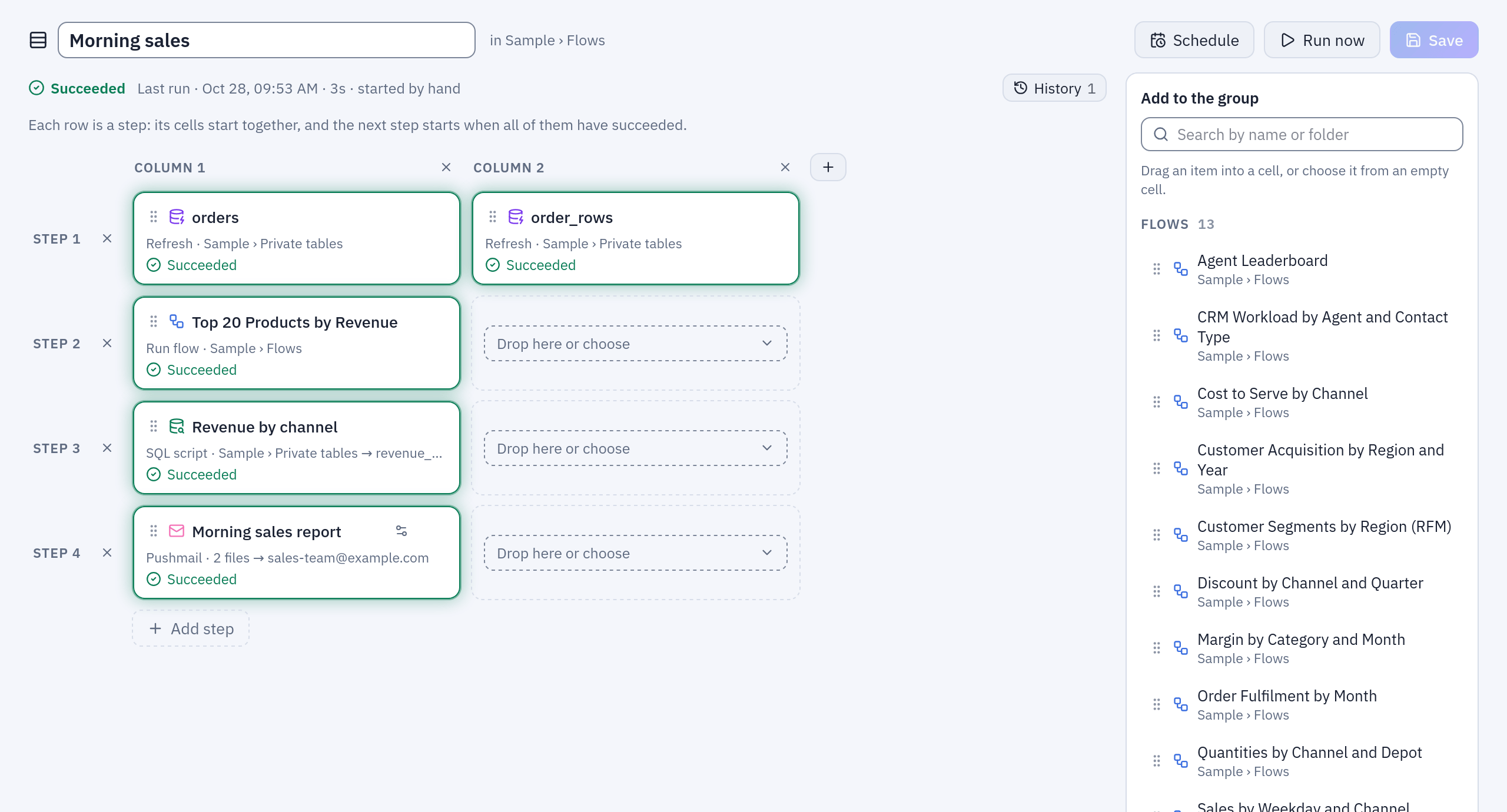
The group of the example below after a run: every cell green, the outcome and the time of the last run above the grid, Add to the group on the right.
| Cell | In the catalog | What it does |
|---|---|---|
| Flow | Flows | runs the flow on its production engine; label «Run flow» |
| Refresh | Datasources to refresh | imports again a datasource read from a connection: a database table or query, S3, SFTP, an API, SharePoint |
| Saved script | Saved scripts | runs the current version of a saved Python or R script (Python and R); Kubernetes only |
| Container | Container (an image) | runs an image of a registry granted to you, with no data in and none out (the Container node); Kubernetes only |
| SQL script | SQL scripts | writes the datasource of a SQL script from its current version, as Refresh now on its page (SQL scripts) |
| Pushmail | Pushmail (datasources by email) | sends one email with one .xlsx file per datasource through an SMTP connection (Pushmail) |
A datasource published by a flow cannot be refreshed: put its flow in the group instead. A SQL script goes in a group only once it writes a datasource. The same object twice in one step is refused; the same object in two different steps is allowed.
A run
A group run is queued and picked up by an orchestrator process, like a flow's run. For each step:
- Every cell of the step starts. Each cell's work is a run of its own (the flow's, the import's, the script's, the email's), linked to the group's run.
- The step ends when all its cells have ended.
- If any cell failed, the group stops: the cells of the later steps are marked
Skipped and the group run ends Failed, with an error such as
step 2: 1 of 2 cells failed. Each failed cell keeps its own error.
There is no retry at group level. A Container cell has its own Retries; for the others, run the group again once the cause is fixed.
When the same object is already running
A group never starts a second run of something that is already running.
- Flow and saved script: the cell waits for the run in progress. That run's outcome counts for the cell when it started after the previous step ended (in the first step, any run counts) and, for a flow, when it runs on the production engine. Otherwise it may have read data older than what the earlier steps produced, so the cell lets it finish and then runs the object itself. A cell that took over a run says «waited for the run in progress».
- Refresh: the cell waits for the import already going and takes its outcome.
The wait is bounded by
ORCHESTRATOR__REFRESH_WAIT_SECONDS(600 by default): past it the cell fails, even if the import goes on. - SQL script: as a flow: a write already going counts when it started after the previous step ended.
- While a group runs a flow, the flow's own schedule cannot start it a second time.
The group itself runs once at a time: Run now on a group already queued or running answers «The group is already queued or running», and a scheduled slot that comes while it still runs is skipped.
With whose rights
A run uses the rights of whoever started it: the person who pressed Run now, or the person who set the schedule. Every cell checks them again when it runs:
| Cell | Needs |
|---|---|
| Flow | RUN on the flow's folder, and what the flow itself needs: read access to its sources, EDIT where it publishes, CONNECT on the connections it writes to |
| Refresh | RUN on the datasource's folder and CONNECT on its connection |
| Saved script | to see the script (VIEW on its folder and the use of its environment), RUN on its folder, read access to its inputs, EDIT where it publishes |
| Container | the use of the registry and of the image's repository |
| SQL script | RUN on its folder, EDIT on the datasource's folder, read access to the datasources it names, CONNECT on its connection |
| Pushmail | CONNECT on the SMTP connection, read access to every datasource, recipients within the connection's allowed domains |
A scheduled run checks every cell before the first one starts: if the author of the schedule lacks anything, nothing runs, and the run is recorded as failed with the list of what is missing («Scheduled run not started: the schedule runs with the rights of …»). A schedule must not run half a group. A run started by hand checks each cell when it comes to it.
Adding a cell also needs those rights, with one more: putting an object in a group needs RUN on its folder, not only VIEW, because the group will run it. A cell already in the group stays when someone with fewer rights edits the group.
What switches the schedule off
The schedule carries its author's authority, so it switches itself off (and the audit log says why) when:
- someone other than its author adds a cell, or changes a Container or Pushmail cell (another image, other recipients, other datasources);
- someone other than its author moves the group to another folder;
- a saved script or a SQL script the group runs is changed by someone else so that it reads or writes more;
- the author loses RUN on the group's folder, is deactivated or deleted (at the next slot).
Removing a cell, or changes by the author, keep it. Set it again from Schedule, as someone who has the rights. See Scheduling.
State, halo and history
Above the grid, the run bar shows the run on screen: its state, when it started, how long it took, «started by hand» or «scheduled», its error, and Next run when the group is scheduled. History lists the latest 50 runs; choosing one shows its outcome on the grid.
Each cell of the run on screen carries its state in words and a halo of its colour:
| State | Means |
|---|---|
| Waiting | its step has not started yet, or the orchestrator has no free slot |
| Running | the halo breathes while the cell works |
| Succeeded | green halo |
| Failed | red halo, with the error under the name |
| Skipped | an earlier step failed |
| Interrupted | the run ended while the cell was still running (its process died) |
| Not run | the run ended (its process died) before the cell's step began |
The page follows a live run by itself and shows a message when it ends («Flow group "…" completed», or failed with the reason in short).
A cell whose object sits in a folder you cannot read shows «Not visible to you», and its error is hidden from you; a cell whose object was deleted shows «Deleted» and fails when the group runs.
Example: the morning sales email
With the sample data (the «Sample» folder): every weekday at 06:30, import the orders again, rebuild the top products, compute the revenue by channel and send both to the sales team.
| Step | Column 1 | Column 2 |
|---|---|---|
| 1 | Refresh orders (Sample ERP) | Refresh order_rows (Sample ERP) |
| 2 | Flow «Top 20 Products by Revenue» | |
| 3 | SQL script «Revenue by channel» | |
| 4 | Pushmail «Morning sales report» |
- The SQL script. In
Sample / Private tables, New → SQL script, engine DuckDB:SELECT o.canale, EXTRACT(YEAR FROM o.data_ordine) * 100 + EXTRACT(MONTH FROM o.data_ordine) AS anno_mese, round(sum(CAST(r.quantita AS DOUBLE) * CAST(r.prezzo_unitario AS DOUBLE) * (1 - CAST(r.sconto_pct AS DOUBLE) / 100)), 2) AS ricavo_netto FROM "order_rows" r JOIN "orders" o ON r.ordine_id = o.id WHERE o.stato <> 'annullato' GROUP BY o.canale, anno_mese ORDER BY anno_mese, ricavo_netto DESC
In the Datasource card give it the namerevenue_by_channeland the folderSample / Private tables, then Save. - The group. In
Sample / Flows, New → New flow group, name it «Morning sales». Dragordersandorder_rowsfrom Datasources to refresh into the two columns of step 1: they import at the same time. - Add step, and drag «Top 20 Products by Revenue» from Flows into step 2. It
reads
order_rowsonly after both imports have succeeded. - Add step, and drag «Revenue by channel» from SQL scripts into step 3.
- Add step, and choose Pushmail (datasources by email) in step 4: an SMTP
connection, To
sales-team@example.com, SubjectSales {today:yyyy-MM-dd}, and the datasources «Top 20 Products by Revenue» andrevenue_by_channel, each with its file name (top_products_{today:yyyyMMdd},revenue_by_channel). - Save, then Run now to try it. The cells light up step by step; the email
arrives with two
.xlsxfiles.
Run now: step 1 starts both refreshes at once; each step waits for the one above. - Schedule →
30 6 * * 1-5(Monday to Friday at 06:30, in the installation's time zone) → Save. The run bar shows Next run.
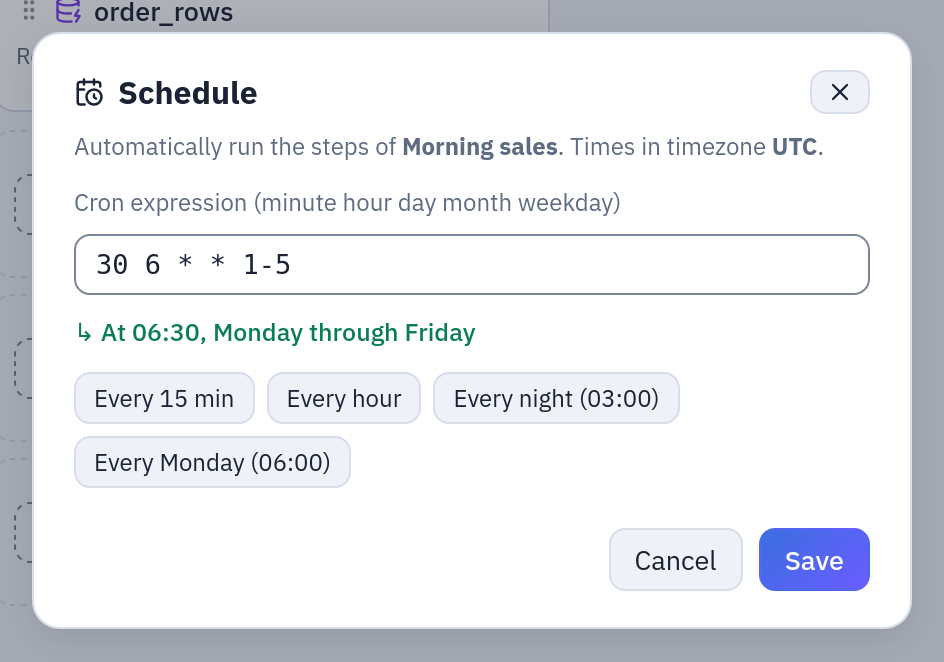
The group's schedule: the cron, its meaning in words and the time zone it is read in.
What happens when something breaks:
- The ERP database is down at 06:30: the
ordersrefresh fails,order_rowsfinishes its import, then the group stops. Steps 2 to 4 are Skipped and nobody receives yesterday's numbers as if they were today's. - Someone started «Top 20 Products by Revenue» by hand at 06:28, before the imports ended: step 2 waits for that run to end, then runs the flow again on the new data.
- The author of the schedule loses CONNECT on «Sample ERP (Postgres)»: the 06:30 run is not started, and its error lists what is missing.
What the schedule's author needs here: RUN on Sample / Flows (the group and the
flow), RUN on Sample / Private tables (the refreshes and the SQL script) and EDIT on
it (the flow and the script publish there), CONNECT on «Sample ERP (Postgres)» and on
the SMTP connection.
Permissions
| On the group's folder | You can |
|---|---|
| VIEW | open the group, see its grid, its runs and the cells' outcomes (except the objects you cannot read) |
| EDIT | create, change, rename, duplicate, move and delete it |
| RUN | Run now, Schedule |
Whoever has no access to the registry or the image of a Container cell cannot open the group, as for a flow with a Container node. A duplicate is checked with the rights of whoever makes it, and does not take the schedule. Administrators see every group.
Limits and good to know
- At most 50 steps and 20 columns. An empty group cannot be run or scheduled.
- Cells share the orchestrator's budget,
ORCHESTRATOR__MAX_CONCURRENT(20 by default per orchestrator process): past it, cells wait. How many really compute at once is then up to the workers and the queue. - A group cannot be deleted while it is queued or running. Deleting it removes its own runs; the runs of its cells stay with their flows and datasources.
- Flows and datasources can be deleted while a group names them (the cell then shows «Deleted»); saved scripts and SQL scripts cannot until they are taken out of the group.
- A group's own run sends no webhook event; the flows and refreshes inside it send theirs (webhooks). The email on failure of a schedule is a flow's setting, not a group's.
- The grid holds no data between steps: a step hands over through datasources (an import, a flow's Output, a SQL script's datasource), which the next step reads.
- The Lineage page draws a group with what it runs, the images of its Container cells and the emails of its Pushmail cells. With OpenLineage on, a group's run is the parent of its Container and Pushmail cells and carries what all its cells read and wrote; the flows, refreshes and scripts it runs keep their own jobs and name the group's run.
Related
- Scheduling: cron, time zone, rights of a schedule
- Flows
- Pushmail, SQL scripts, Python and R, the Container node
- Date placeholders, for the names and subjects of Pushmail