Python and R in flows
For whoever runs Tabularia on Kubernetes, and whoever writes the scripts.
- Administration → Scripting environments defines the Python and R environments user code runs in, outside Tabularia. Each is a language version and a list of packages, built once by the cluster into an image that is checked before use. Its variables are what the code finds in its environment.
- The Script node of the flow editor runs a step's code, one file or several, as a Kubernetes Job in one of those environments (the design).
- Saved scripts keep code in a folder, with its versions, its inputs and its output, run on their own, on a schedule, in flow groups and by Script nodes (below).
- The Scripting tab shows what you may use: your scripts, your environments with their packages and variables, your container registries.
- Notebooks run marimo in the Python environments, as web apps that read the datasources (marimo notebooks as apps).
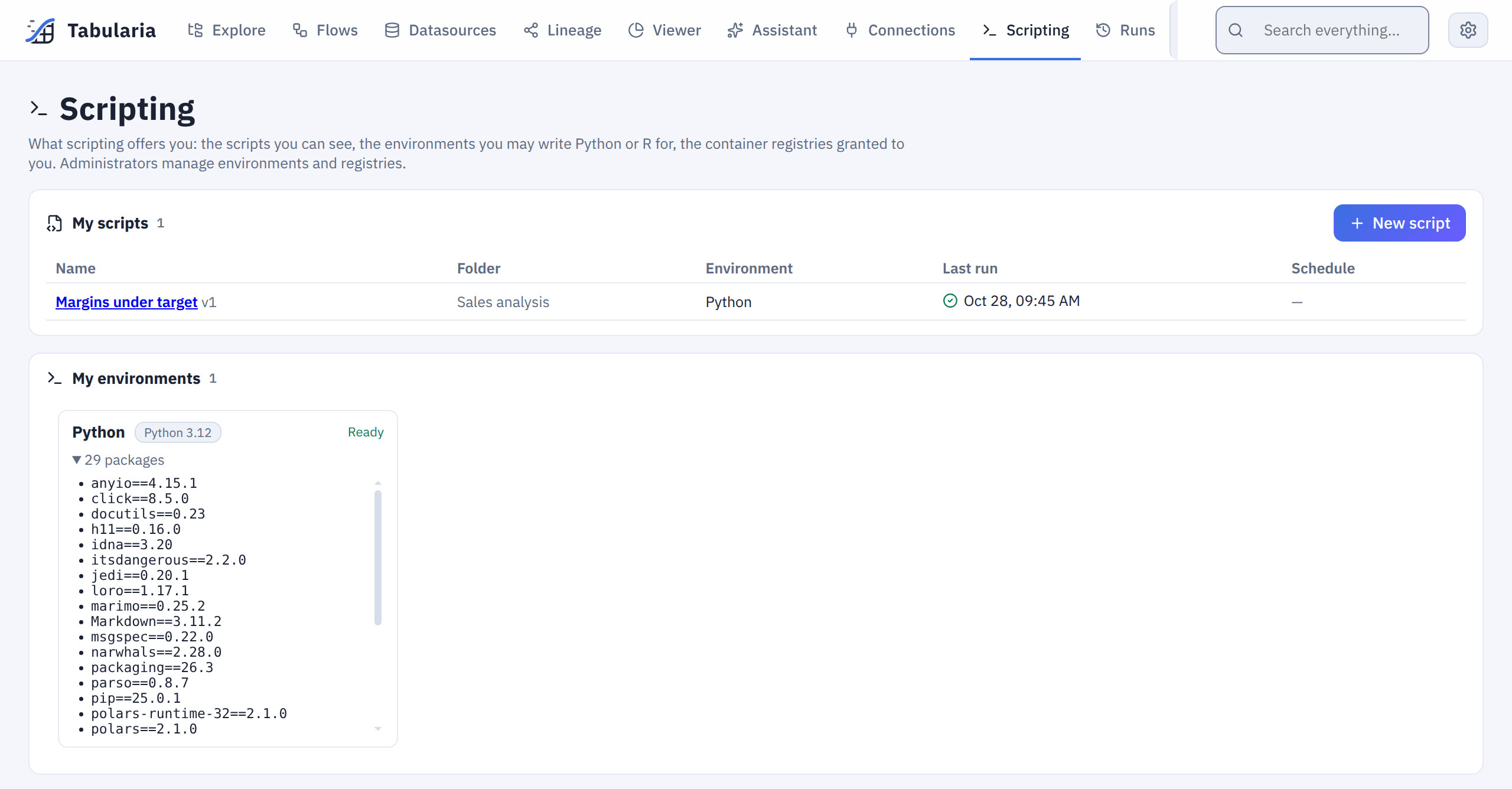
The Scripting tab, read-only: your saved scripts, and the environments you may write for with what is installed in them. Where Container nodes are on, the registries granted to you are listed too.
All of it needs Kubernetes. On Docker Compose, Scripting environments, the palette's Script and the Script nodes of a flow brought from a cluster are greyed out, with the reason.
The packages come from community indexes only: PyPI for Python, CRAN for R, or your mirrors of them.
What runs where
| where | what it may do | |
|---|---|---|
| the builds | the build namespace | rootless BuildKit builds the image and pushes it to your registry |
| the checks and the scripts | the scripts namespace | the image runs as user 10001, with a read-only root filesystem, no privilege and no capability |
| the editor's trials (Run) | the trials' namespace | the same as a script, within a ResourceQuota of its own: trials never take resources from the flows' runs |
| Tabularia | its own namespace | the orchestrator builds the images; the gateway and the orchestrator run the other Jobs, read their Pods and logs, and delete them, in the three namespaces above only |
The scripts never run in Tabularia's namespace and never see its keys. They reach data only through the scripts bucket below, with a key the administrators give for it.
Turning it on
In the chart's values:
scripts:
  enabled: true
  registry:
    repository: registry.example.com/tabularia   # the images: <repository>/tabularia-env-<id>:v<n>
    pushSecret: registry-push    # dockerconfigjson Secret in the build namespace
    pullSecret: registry-pull    # dockerconfigjson Secret in the scripts namespace
helm upgrade creates three namespaces next to the release's:
<release namespace>-scripts, at therestrictedPod Security level;<release namespace>-scripts-dev,restrictedtoo, for the editor's trials, with a ResourceQuota (scripts.trialQuota: 4 CPUs and 8 GiB requested, 8 CPUs and 16 GiB at most, 10 pods, all trials together). A trial that does not fit fails at once and says the quota is full;<release namespace>-script-builds, at theprivilegedlevel.
Rootless BuildKit needs a user namespace of its own, which needs seccomp and AppArmor
Unconfined, and only privileged admits that. Its pods still run as a user and are
not privileged containers.
To manage the namespaces yourself, set scripts.createNamespaces: false and name them
with scripts.namespace, scripts.trialNamespace and scripts.buildNamespace.
The Secrets hold the registry's credentials: the push one in the builds' namespace, the pull one in the scripts' and in the trials' namespaces:
kubectl -n <namespace>-script-builds create secret docker-registry registry-push \
  --docker-server=registry.example.com --docker-username=… --docker-password=…
kubectl -n <namespace>-scripts create secret docker-registry registry-pull \
  --docker-server=registry.example.com --docker-username=… --docker-password=…
kubectl -n <namespace>-scripts-dev create secret docker-registry registry-pull \
  --docker-server=registry.example.com --docker-username=… --docker-password=…
Give the push account write access to the repository path, and the pull account read access only. A registry that takes anonymous pulls needs no pull secret.
A registry with your company's certificate
Two programs talk to the registry, and both must trust its certificate:
- the builds push the images. When the certificate is signed by your company's
authority, give the chart that authority's certificate:
scripts:
  registry:
    caCert: |
      -----BEGIN CERTIFICATE-----
      …
      -----END CERTIFICATE-----
scripts.registry.insecure: trueinstead skips the verification, or allows plain HTTP: for a test registry only. - the nodes pull the images, as for any pod. Their container runtime must trust
the authority too: install it on the nodes the way your platform does it (a node
image, a DaemonSet that writes it to containerd's
certs.d). A registry in plain HTTP must likewise be allowed on the nodes. Tabularia cannot do this from a pod.
When either side refuses the registry, the environment's version fails at once and says which side and why. So does a run whose image a node cannot download: the credentials are refused, the nodes do not trust the certificate, the image is no longer there. It does not wait for its timeout.
Network policies
With networkPolicy.egressCIDRs set, the engine and the workers reach only the
addresses listed. The engine also writes each Script node's input to the scripts
bucket: include its address. A bucket, broker or ClickHouse that is a Service of the
cluster, in another namespace (minio.storage.svc.cluster.local), is allowed from its
host name; for other namespaces, list them in networkPolicy.egressNamespaces.
The scripts themselves, their trials and the image builds get a policy of their own
(scripts.blockTabularia, on by default): they reach the internet and the other
namespaces of the cluster (the scripts bucket, your services), but never the pods of
Tabularia's namespace (the gateway, the engine, the workers) nor the cloud metadata
addresses, and nothing reaches into them. Outside the cluster the private ranges are
closed too (10/8, 172.16/12, 192.168/16, 100.64/10, and fc00::/7 on IPv6): on most
network plugins they also hold the cluster's pods.
What the scripts must reach on a private address goes in
networkPolicy.userCodePrivateCIDRs: a company network, a database on 10.20.0.0/16
for example, and above all the registry the builds push to when it has a private
address, as company registries usually do (the nodes pull the images, so pulls do not
depend on it), and a scripts bucket on a private endpoint. Never list a range that
holds the cluster's pods or Services, nor Tabularia's database, broker or storage. A
node-local DNS cache on a link-local address (169.254.20.10/32) is listed the same way.
Tabularia's database, broker and storage are out of the scripts' reach when they are
outside the cluster on a private address that is not listed, or in the release's
namespace. In another namespace of the cluster the scripts can reach them: give
that namespace a policy that lets in Tabularia's namespace only, as
infrastructure/minikube/dependencies.yaml does for its database and queue.
Without a network plugin that enforces network policies the policy is written but has no effect. Some enforce only what comes into a pod: kind's own plugin (kindnet) blocks traffic into the dependencies above, but not what the scripts send out, which is why the kind guide installs Calico. Calico and Cilium enforce both.
Nodes of more than one architecture
A build runs on one node and the image is built for that node's architecture (amd64, arm64). Tabularia records it, and sends the check of the image and every run of its scripts to nodes of the same architecture. On a cluster with amd64 and arm64 nodes, the environment works on the nodes of the architecture its build landed on.
Policies on pods
The builds need the privileged Pod Security level for their namespace and
seccomp and AppArmor Unconfined (see above). A cluster whose admission policies
(Kyverno, Gatekeeper) forbid that for every namespace cannot build environments.
A cluster without internet access
The builds download the base image, BuildKit and the packages. Point all four at your mirrors:
scripts.builderImage;scripts.baseImages: the language versions offered and their images, which can also be pinned by digest here;scripts.pypiIndexUrl;scripts.cranUrl.
Every variable is in the configuration reference.
The scripts bucket
Create a bucket for the scripts only, and a key that works on that bucket and nothing else. Tabularia writes the input of each Script node there and deletes it when the run ends; the scripts read it, and write their output, with the same key. Tabularia's own storage never reaches a script.
Give the key the right to read, write and delete objects, and not the right to list the bucket. The scripts do not need to list it: they read and write files whose names they are given. Without that right, a script cannot find the files of another run in progress either.
AWS S3, an IAM user or role with:
{
  "Version": "2012-10-17",
  "Statement": [{
    "Effect": "Allow",
    "Action": ["s3:GetObject", "s3:PutObject", "s3:DeleteObject"],
    "Resource": "arn:aws:s3:::tabularia-scripts/*"
  }]
}
MinIO, the same policy:
mc mb local/tabularia-scripts
mc admin policy create local tabularia-scripts policy.json   # the JSON above
mc admin user add local tabularia-scripts '<secret key>'
mc admin policy attach local tabularia-scripts --user tabularia-scripts
On Scaleway, use an IAM application with a bucket policy that grants it those three
actions on tabularia-scripts/*. On Google Cloud Storage, use an HMAC key of a
service account whose role on the bucket holds only storage.objects.get,
storage.objects.create and storage.objects.delete.
Add a lifecycle rule that expires the bucket's objects after a day. It removes what a run that crashed left behind:
mc ilm rule add --expire-days 1 local/tabularia-scripts
In Administration → Scripting environments, fill in:
- the endpoint (empty for AWS);
- the bucket and the region;
- the access key and the secret key.
Test writes, reads and deletes a probe object from the engine, as the runs will. It also warns when the key can list the bucket. The secret key is encrypted and cannot be read back.
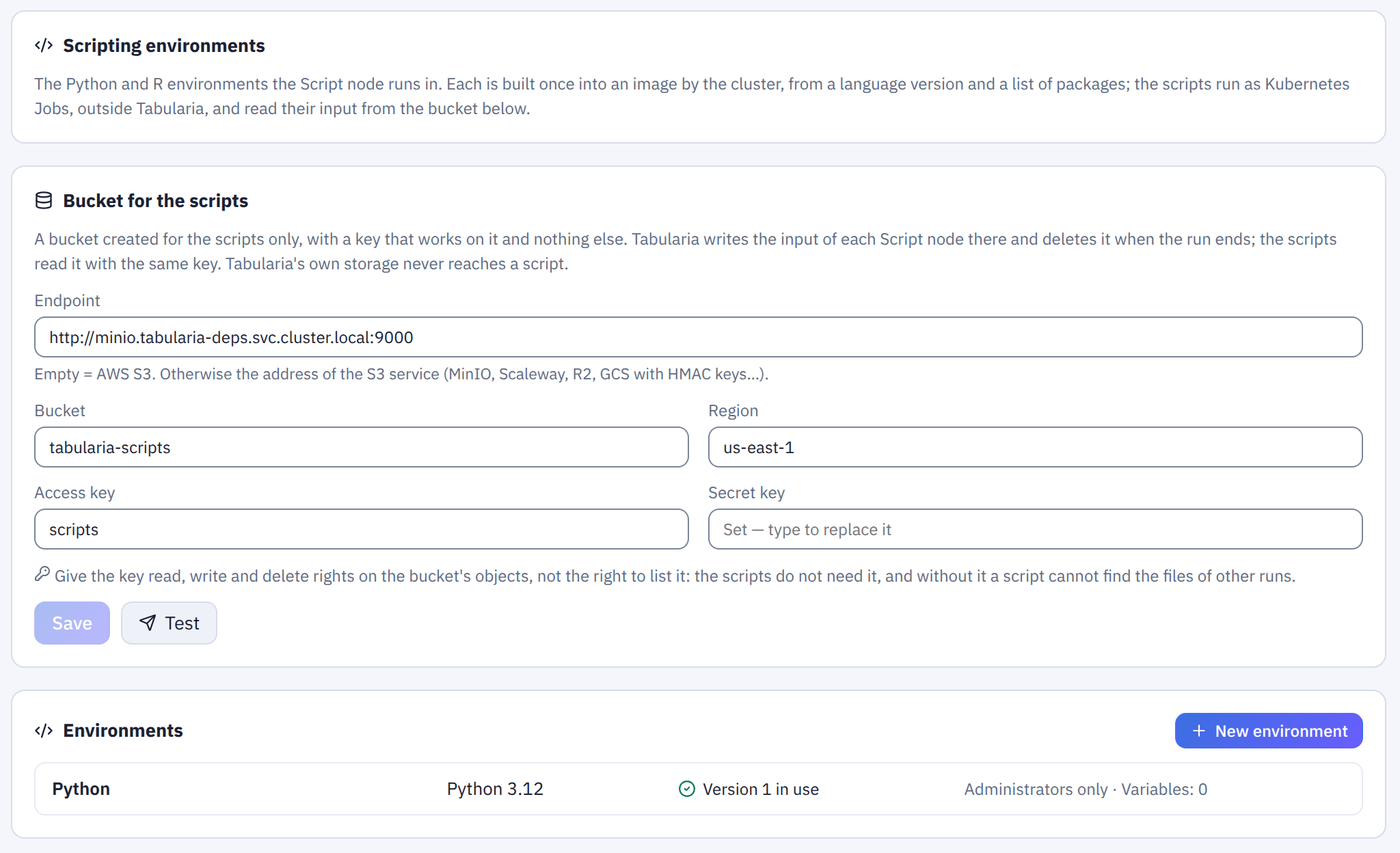
The scripts bucket and the environments, in Administration. The secret key is never shown again: the field only says it is set.
Environments
New environment asks for a name, a language and its version, and the packages. Packages go one per line:
- Python, as in
requirements.txt:scikit-learn==1.5.2.polars,pyarrowandmarimo(for the notebooks) are always installed. - R:
dplyr, ordata.table@1.16.0for a fixed version.arrow, with S3 support, is always installed. CRAN publishes sources, so R packages compile during the build: the images carry the system libraries the usual packages need, and a build witharrowtakes several minutes. It happens once per version.
A build gets its own CPU and memory, SCRIPTS__BUILD_CPU and SCRIPTS__BUILD_MEMORY
(2 cores and 4 GiB by default). The memory is requested whole, so a build lands only on
a node that has it. It runs one compiler per 1.5 GiB, at most one per core: a C++
compiler of arrow takes over 1 GB. A build that runs out of memory fails saying so;
on large nodes, raising both makes R builds faster.
Search PyPI / Search CRAN above the list finds a package by name in the index the builds use and lists its versions. For Python it marks the versions that have no wheel for the environment's Python: pip would compile those during the build, which often fails. Add to the list writes the line.
Pin the versions: a line without one takes whatever is newest when the image is built. Tabularia refuses a line that is not a package name and version, and says which line it is.
Saving builds version 1. It goes through these states:
- Waiting to build.
- Building: a Job in the build namespace builds the image and pushes it.
- Checking: a Job in the scripts namespace runs the new image, by digest, as a script would, loads the packages a script needs to read its input, and lists every installed package.
- Ready: the version is in use.
The list of installed packages, the end of the build log and the image reference stay with the version. A build that fails says why and keeps the version in use as it was.
Changing the version or the packages builds a new version. Changing anything else applies to the next run without a build:
- the description;
- the resources (CPU and memory requested and limited, the longest run);
- who can use the environment;
- the variables.
Build again makes a new version from the same packages: after a failure, or to start from a newer base image. Use this version puts an older version back; its image is still in the registry.
Who can use an environment
People in the environment's groups who can edit a flow can add Script nodes with it. Administrators can use every environment.
Someone outside those groups cannot open a flow with a Script node of the environment: its code is not theirs to read. The flow is still listed in Explore, in Flows and in the search, greyed out with a lock and the reason on hover; it is not a link and has no actions. Reached by its address, the editor says the same in place of the canvas. Its versions, a copy, a run, a schedule and adding it to a group of flows are refused the same way. An environment that no longer exists blocks nobody.
Variables
The variables are what the scripts find in their environment, and they are separate from Tabularia's. A secret variable is encrypted, never shown again, and given to the scripts like the others.
Names starting with TABULARIA_ or AWS_ are reserved for what Tabularia sets in
every Job: where the input and the output are, and the bucket's key.
From Tabularia is the exception. It hands the scripts the value of one of Tabularia's own variables, named in the field and read when each script starts. Everyone who writes scripts with that environment can read it. The panel says so, and the audit records who set it.
The Script node
In the flow editor, Script is in the Control group of the palette for whoever may use at least one environment. Choose its environment in the node panel, then Edit the code.
Input and output come from the edges
| the node has | the script gets |
|---|---|
| a data edge coming in | TABULARIA_INPUT: the step before it, one parquet file in the scripts bucket |
| a data edge going out | TABULARIA_OUTPUT: where it must write one parquet file; the nodes after it read that |
| neither | nothing to read or write: it runs as a step of the flow, for instance to start something outside Tabularia |
Polars, pyarrow and R's arrow read and write those s3:// addresses by themselves:
import os
import polars as pl

df = pl.scan_parquet(os.environ["TABULARIA_INPUT"])
df.with_columns(score=pl.col("amount") * 2).sink_parquet(os.environ["TABULARIA_OUTPUT"])
library(arrow)
df <- read_parquet(Sys.getenv("TABULARIA_INPUT"))
write_parquet(df, Sys.getenv("TABULARIA_OUTPUT"))
A script that has nodes after it and writes nothing fails.
Run, and the preview of the nodes after it
Run in the node panel runs the node on its own, as the flow is saved (with unsaved changes the button is Save and run):
- the chain before it runs on the sources' development sample;
- the nodes after it do not run, and nothing is written to an Output;
- it runs in the trials' namespace, within its quota, never among the flows' runs.
It takes a few seconds once the environment's image is on the cluster's nodes. Its log and its outcome show in the panel, and the run page lists it as a trial.
The nodes after a Script node preview what it wrote last: its latest trial or the latest run of the flow, whichever is newer. The preview says which, and when; if the saved code has changed since, it says so too. Before any of them, those nodes have no preview.
The code
The editor is Monaco, the editor of VS Code. On the left, the node's files: the one marked ▶ is the one that runs, the others sit next to it in the same folder.
- In Python,
lib/scoring.pyis imported asfrom lib import scoring. - In R,
source("R/helpers.R")readsR/helpers.R.
On the right, what the script finds in its environment: Tabularia's variables, the environment's variables (secret ones by name only), the installed packages. A click inserts one at the cursor.
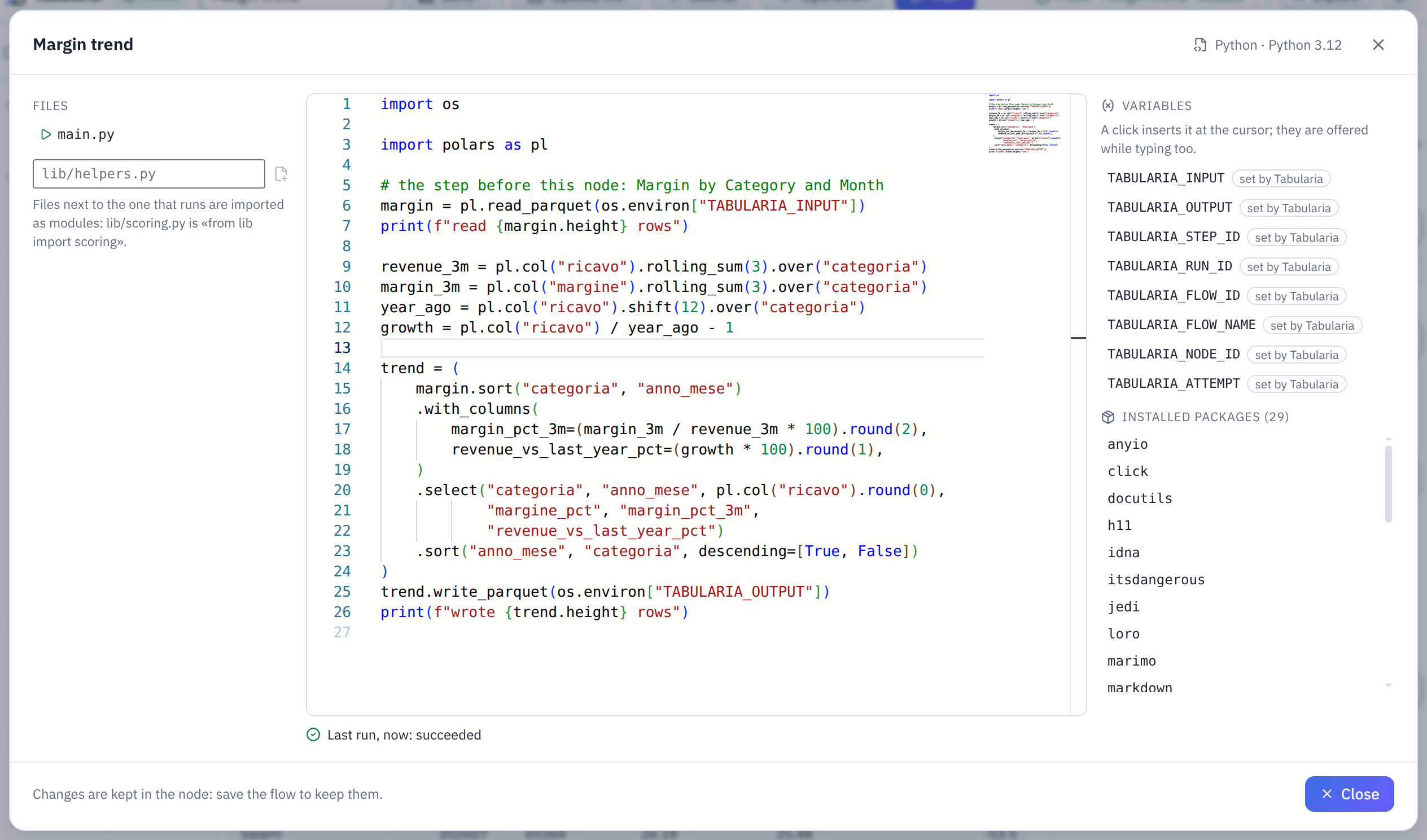
The code editor of the example below: files on the left, the variables and packages the script finds on the right, the outcome of the last run under the code.
While typing, the editor offers:
- the variables, inside
os.environ["…"],os.getenv("…")andSys.getenv("…"); - the installed modules after
importandlibrary(; - the public names of a module after its alias (
pl.afterimport polars as pl) or afterpkg::.
Problems, before running. Python code is checked by Ruff
in the gateway when typing pauses. It underlines names used and never defined or
imported, syntax errors, and imports or variables left unused; the list of files
counts each file's problems. An import of a module that is neither installed in
the environment (the list its build's check wrote), nor part of Python, nor one of
the node's files is underlined too. SCRIPTS__LINT=false turns the check off. R code
is not checked.
The last run. Under the code is the log of the node's last run. When it failed,
the editor marks the line it stopped at, in the file where it stopped, until that
file changes, and Go to opens it. For R, only a file read with source() that
does not parse gives a line.
| variable | |
|---|---|
TABULARIA_INPUT, TABULARIA_OUTPUT | the step's files, or empty |
TABULARIA_STEP_ID | the step's random id |
TABULARIA_RUN_ID | the flow's run |
TABULARIA_FLOW_ID, TABULARIA_FLOW_NAME, TABULARIA_NODE_ID | where the script is |
TABULARIA_ATTEMPT | 1, then 2… when the node retries |
AWS_* | the scripts bucket's key and endpoint, for the libraries |
The path check. The people who write scripts are trusted, and the scripts may
call any service. One thing is checked when the flow is saved: the code may not name
the scripts bucket, where the files of the other runs are. Read and write through
TABULARIA_INPUT and TABULARIA_OUTPUT.
The assistant
Where the installation has an AI assistant, Assistant in the editor's header puts it beside the code, in place of the environment's panel. Ask for a change, or a script that does something with the inputs: it answers and may propose files, whole, listed with what each change adds and removes. Apply writes them in the editor as one change (Ctrl+Z in a file takes it back); Discard leaves the code as it is. It never saves nor runs the script. After a failed run, Explain and fix the last error asks it why, with the error.
What reaches the model: the code, the environment's language, version and packages, the names of the variables the script finds, the names and types of its inputs' columns, and, for a failed run, only the error of its log (the Python traceback, the R error): never a row of data, nor anything else the script printed. Its conversations are saved as the other assistants', with the same daily caps. With metadata-only mode on, the error stays out too, since it may quote a value: the model gets the exit code, the editor says so, and Explain and fix the last error is not offered.
Example: the margin trend of each category
The sample datasource «Margin by Category and Month» (Sample / Private tables) has one
row per product category and month: categoria, anno_mese, ricavo, margine,
margine_pct and more. This Script node adds, for each row, the margin of the last three
months and the revenue against the same month a year before, which a flow's operations
would need several steps to compute.
- In Explore, open a folder you may edit (here «Sales analysis»), New → New flow, and name it «Margin trend».
- Select the Source node and, in its panel, or use a catalog datasource → «Margin by Category and Month».
- Drag Script from the palette's Control group next to it, and connect the Source to it. In its panel: name «Margin trend», Written here, environment «Python».
- Drag Output (datasource / database) after it, connect the Script node to it, and name the datasource «Margin trend by category» in your folder.
- Save. In the Script node's panel, Edit the code, replace
main.pywith the code below, Close, and Save again. - Run in the Script node's panel. In a few seconds the panel says «Last run from here now: SUCCESS · 184 rows»; Log shows what the script printed, and the preview under the canvas shows the rows it wrote, newest month first.
- Run in the toolbar runs the whole flow and publishes «Margin trend by category».
import os

import polars as pl

# the step before this node: Margin by Category and Month
margin = pl.read_parquet(os.environ["TABULARIA_INPUT"])
print(f"read {margin.height} rows")

revenue_3m = pl.col("ricavo").rolling_sum(3).over("categoria")
margin_3m = pl.col("margine").rolling_sum(3).over("categoria")
year_ago = pl.col("ricavo").shift(12).over("categoria")
growth = pl.col("ricavo") / year_ago - 1

trend = (
    margin.sort("categoria", "anno_mese")
    .with_columns(
        margin_pct_3m=(margin_3m / revenue_3m * 100).round(2),
        revenue_vs_last_year_pct=(growth * 100).round(1),
    )
    .select("categoria", "anno_mese", pl.col("ricavo").round(0),
            "margine_pct", "margin_pct_3m",
            "revenue_vs_last_year_pct")
    .sort("anno_mese", "categoria", descending=[True, False])
)
trend.write_parquet(os.environ["TABULARIA_OUTPUT"])
print(f"wrote {trend.height} rows")
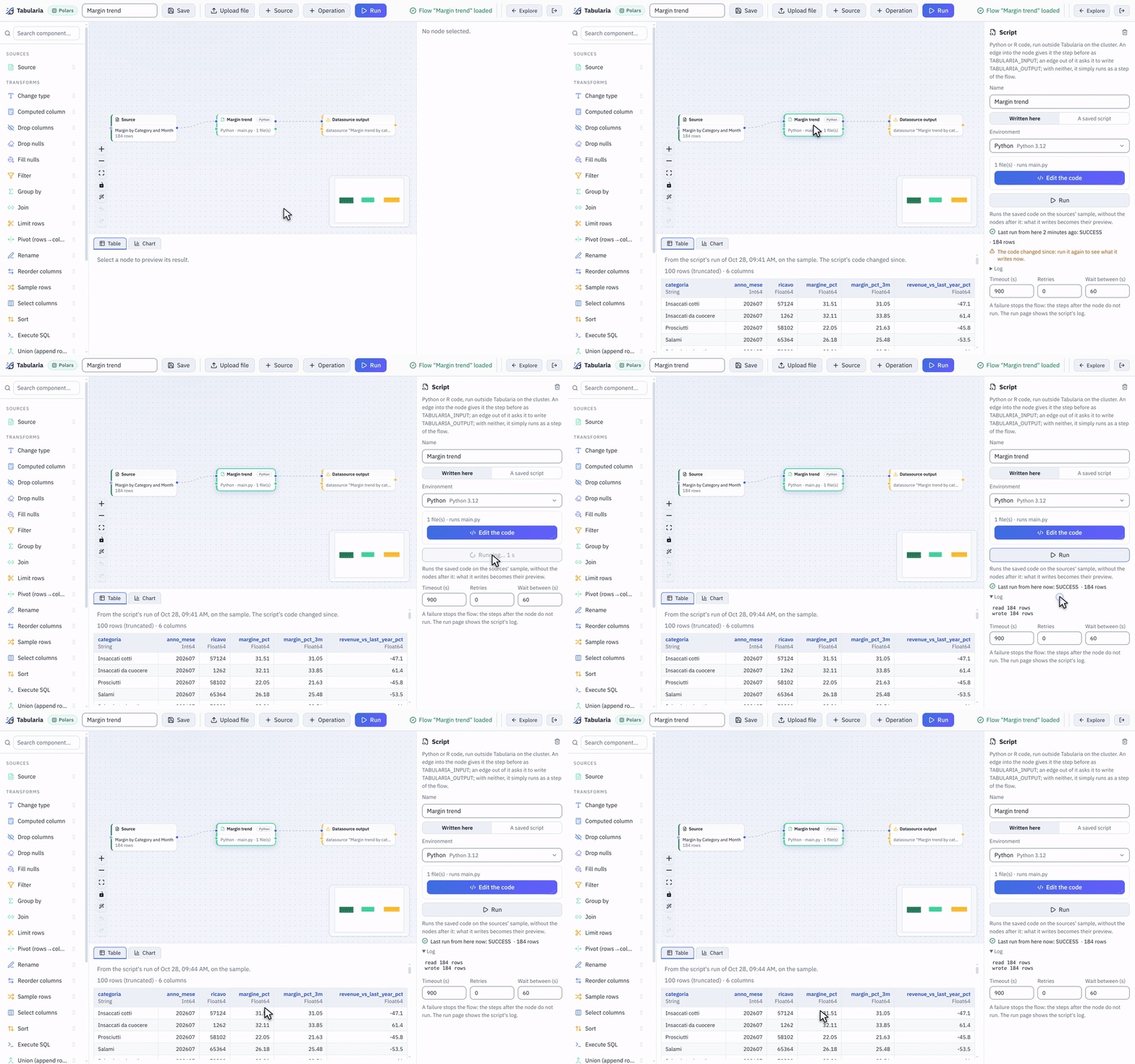
Run in the Script node's panel: the trial runs on the cluster, its log arrives in the panel, and what it wrote becomes the preview of the nodes after it.
The newest month can show a large drop against the year before: in the sample data it
holds only part of the month. The months of the first year have no
revenue_vs_last_year_pct, and the first two of each category no margin_pct_3m.
Running
A flow with a Script node runs as an orchestration, like one with a Container node.
- Order. The node runs after the steps it reads from and before the ones that read from it, with or without a sequence edge.
- Limits. Timeout stops it; Retries runs it again, as a new Job, after the delay.
- Failure. A failure stops the flow: the steps after it would read nothing. A script that goes over the environment's memory limit is stopped by the cluster; the run says so, with the limit (exit code 137: some clusters, kind among them, report it as a plain kill, and the run then says that the limit is the likeliest cause).
The run page lists the node as a run of its own. It shows the environment and its
version, the attempts, the exit code, the variables it was given (secret ones by
name only) and the end of its log: the last 256 KB (SCRIPTS__LOG_MAX_BYTES), read
when the Job ends and kept in Tabularia's database. After 30 days
(ORCHESTRATOR__LOG_RETENTION_DAYS, orchestrator.logRetentionDays in the chart; 0
keeps them) the log is emptied and the run stays, with its outcome, attempts and exit
code.
Whoever runs the flow, or the author of its schedule, must be allowed to use the environment. A schedule set by someone else is switched off when its code changes, as for any change that makes a flow reach further.
Saved scripts
A script can also live on its own, in a folder next to flows and views: Explore → New → Script (Python or R), or New script in the Scripting tab. It is written in the same editor as the Script node, in one of the environments you may use, and it keeps its versions: every save that changes it is one; an older one can be looked at and restored, and becomes the newest.
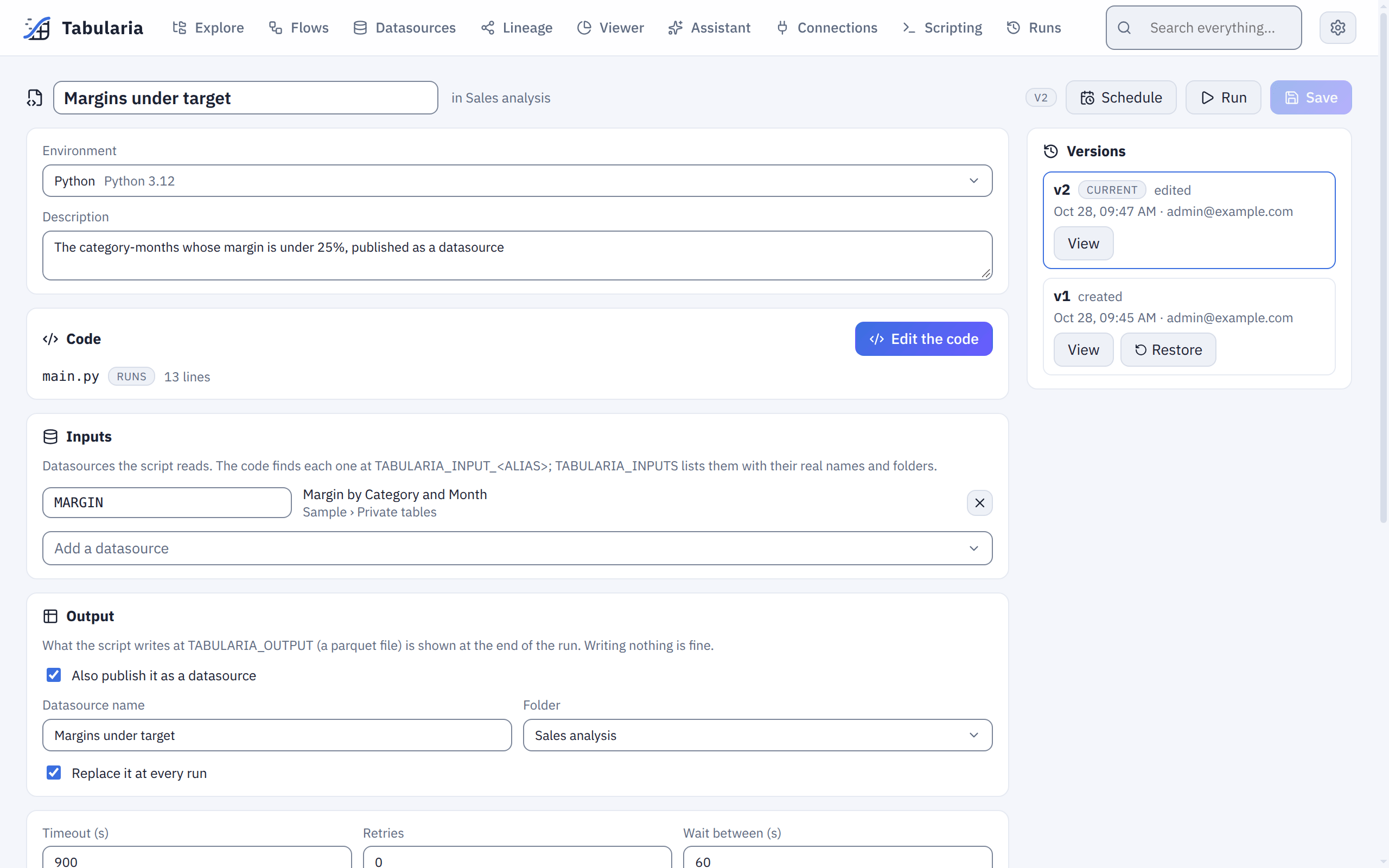
A saved script's page: its environment, its code, the datasources it reads under their aliases, and where its result goes.
Who sees it. VIEW on its folder and the use of its environment. Whoever lacks either does not see it at all: not in Explore, not in the search, not in the Scripting tab, not in the pickers of flows and groups. RUN on the folder runs and schedules it, EDIT changes, moves and deletes it. Administrators see every script.
Inputs
A saved script reads the datasources you declare on its page, each with an alias.
The alias is proposed from the datasource's name (Vendite Nord 2024 →
VENDITE_NORD_2024; for two datasources with the same name in two folders, the
folder's name is added) and can be changed: capitals, digits and _, unique in the
script. The script keeps the datasource itself, not its name or its file: renaming,
moving or refreshing the datasource changes nothing for the script, and every run reads
its data as it is at that moment.
| Variable | |
|---|---|
TABULARIA_INPUT_<ALIAS> | the s3:// address of that datasource's data, as parquet |
TABULARIA_INPUTS | every input as JSON, keyed by alias: its datasource's id, real name, folder, address and columns |
TABULARIA_OUTPUT | where the script may write its result, as parquet |
TABULARIA_SCRIPT_ID, TABULARIA_SCRIPT_NAME, TABULARIA_SCRIPT_VERSION, TABULARIA_RUN_ID, TABULARIA_STEP_ID, TABULARIA_ATTEMPT | which script, version, run and attempt this is |
import json
import os

import polars as pl

inputs = json.loads(os.environ["TABULARIA_INPUTS"])
sales = pl.scan_parquet(os.environ["TABULARIA_INPUT_VENDITE_NORD_2024"])
print("reading", inputs["VENDITE_NORD_2024"]["name"], "from", inputs["VENDITE_NORD_2024"]["folder"])
sales.group_by("region").agg(pl.col("amount").sum()).sink_parquet(os.environ["TABULARIA_OUTPUT"])
Every run checks again that whoever runs it (or the schedule's author) may still read each input: one they no longer may read, deleted, or still without data fails the run before anything starts, saying which.
Output
Optional. What the script writes at TABULARIA_OUTPUT is kept and shown at the end of
the run, on its page; with Also publish it as a datasource, it becomes a datasource
in the folder you choose (EDIT needed there), replaced at every run or not. When it
replaces one, the datasource's data contract, if it has one, is checked first: a broken
blocking rule leaves the datasource as it was and fails the run, and the refusal is in
the contract's history. A description written on the datasource stays across the runs
(the first one says which script writes it). A script that writes nothing (it sends
emails, it loads another system) only has its outcome and its log.
Running and scheduling
Run, on the script's page, runs the saved version on the whole data, in the scripts namespace, queued and carried out like a flow's run: one run of a script at a time. The page follows it and shows each run's log and the first rows of its output. Schedule runs it with a cron, with the authority of whoever set it; as for flows, a change by someone else that makes the script reach more (other code, other inputs, another publish folder, another environment, another folder) switches the schedule off, and the audit log says why.
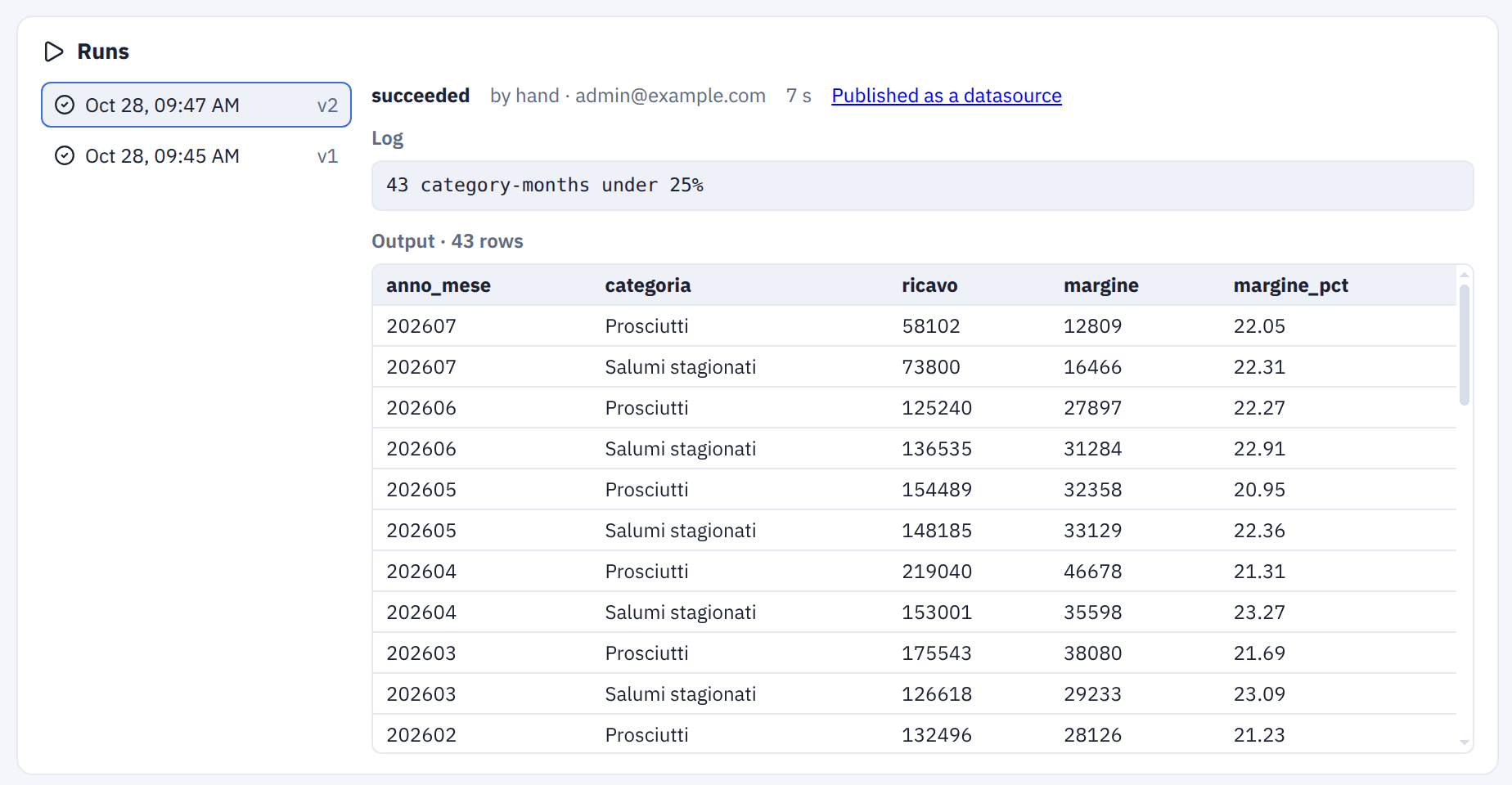
The script's page follows each run: its outcome, its log and the first rows of what it wrote.
Example: the months under target
A saved script that reads the sample «Margin by Category and Month» and publishes the category-months whose margin is under 25%:
- In Explore, open your folder (here «Sales analysis»), New → Script (Python or R), name it «Margins under target», environment «Python».
- Under Inputs, Add a datasource → «Margin by Category and Month», and change
the alias it proposes to
MARGIN. - Under Output, tick Also publish it as a datasource: name «Margins under target», folder «Sales analysis», Replace it at every run.
- Edit the code, write the code below, Save.
- Run: in a few seconds the run succeeds, its log says how many category-months are under 25%, and Published as a datasource opens the result.
- Schedule runs it every morning, for instance, so the datasource is fresh when people arrive.
import os

import polars as pl

margin = pl.read_parquet(os.environ["TABULARIA_INPUT_MARGIN"])
under = (
    margin.filter(pl.col("margine_pct") < 25)
    .select("anno_mese", "categoria", pl.col("ricavo", "margine").round(0), "margine_pct")
    .sort("anno_mese", "categoria", descending=[True, False])
)
print(f"{under.height} category-months under 25%")
under.write_parquet(os.environ["TABULARIA_OUTPUT"])
In flow groups and flows
- A cell of a flow group: the script runs as a step of its own, with its declared inputs; its failure stops the group. Whoever cannot see the script reads a hidden cell.
- A Script node by reference: in the node's panel, A saved script instead of
Written here. The node runs the script's current version, with its environment,
timeout, retries and declared inputs, next to the node's own edges
(
TABULARIA_INPUT,TABULARIA_OUTPUT); the publish setting is ignored there. A fix to the script reaches every flow that uses it. Whoever cannot see the script cannot open the flow. A change that makes the script reach more switches off the schedules, set by others, of the flows and groups that run it.
A script used by a flow or a group cannot be deleted: the page says which ones use it.
The Lineage shows saved scripts too: the datasources they read, the one they
publish, the flows and flow groups that run them. With OpenLineage
on, every run of a saved script is a run of the job <folder>/<name> (script) in
your catalog, and a flow's Script node a child job of the flow's run.
Audit
Every change is in the audit log: the bucket, the environments, a version put in use, every variable set or removed, and every saved script created, changed, restored, run, scheduled or deleted. A variable's value is never recorded.