Ask your data
The Assistant page answers questions about the datasources in plain language: it finds the right datasource, reads what its fields mean, runs a query and shows the table the numbers come from, with a chart when one helps. It is for people who know what they want to know but not where the data sits or how to write the SQL, and for analysts who want a first answer in seconds. It reads only what the person asking may read, and never changes anything.
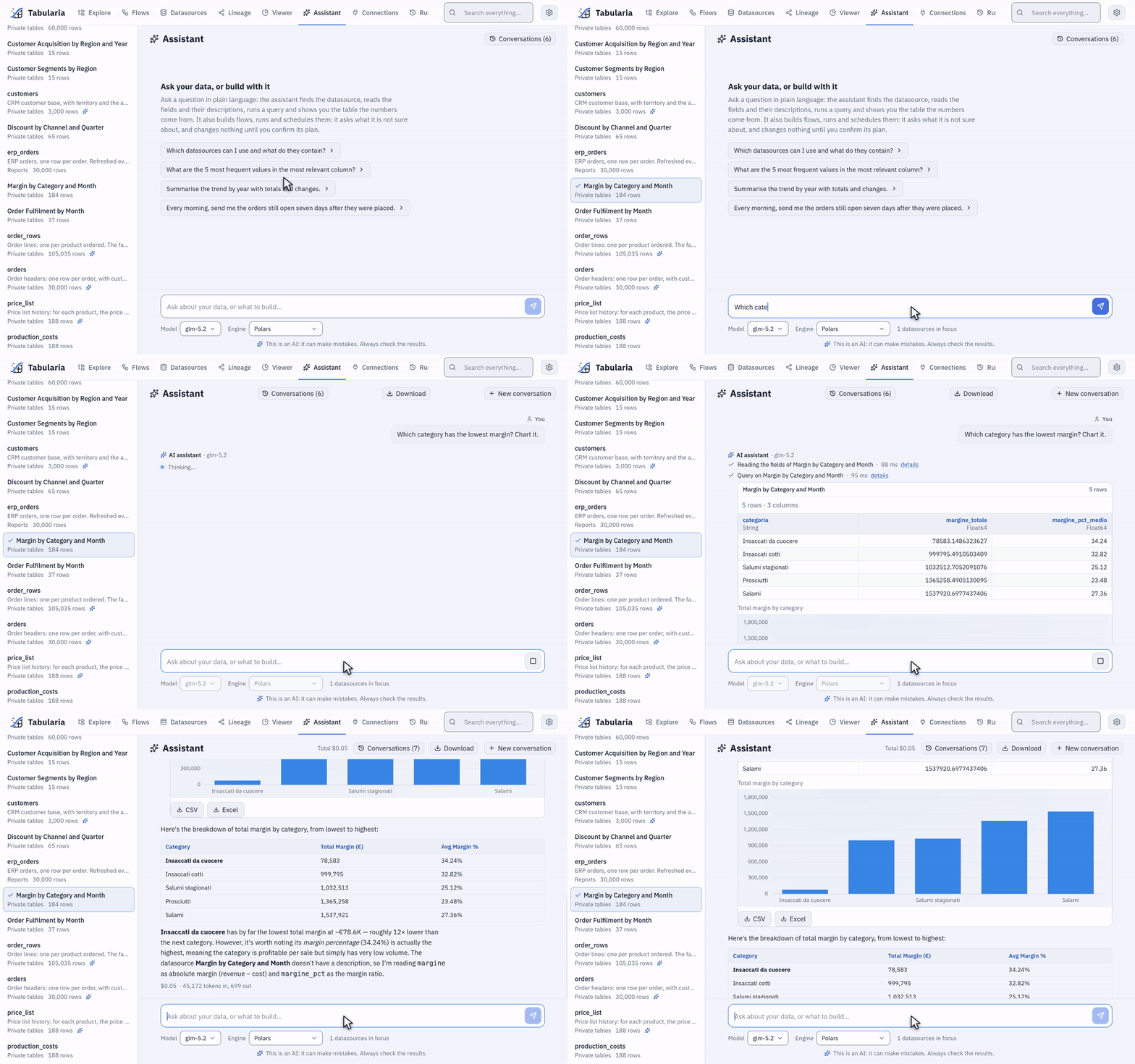
«Which category has the lowest margin? Chart it.» with «Margin by Category and Month» in focus: the steps it took, the chart, the table and a two-line answer.
At a glance
| Where | Assistant in the main menu |
| Reads | the datasources you can read (VIEW on their folder), never a connection directly |
| Does | lists and describes datasources, runs read-only SELECT queries, joins two datasources, draws charts, downloads a full result as CSV or Excel |
| Does not | write, delete, import, run flows, read a database live, see what you cannot see |
| Engine | the one you choose under the question, among those the administrator allows |
| Model | one the administrator enabled, chosen under the question |
| Needs | the AI configured by an administrator (AI in Tabularia) |
How it works
The assistant is a language model with three tools, and nothing else:
- List the datasources you can read: name, folder, row count and the first lines of the description their owners wrote. It searches by words of the question («orders», «margin») in names and descriptions.
- Describe a datasource: its description, its columns with their types and the field descriptions written by hand, the row count, and five sample rows.
- Query a datasource: one
SELECT … FROM self, run by the engine as the SQL step of a flow is, with the same checks. Optionally joined with a second datasource on key columns, and drawn as a bar, line, area, pie, donut or scatter chart.
While it works, the page names the phase («Scanning the catalog», «Reading the fields of orders», «Querying orders», «Writing the answer») and lists every step; show SQL opens the query of a step, and its result table sits under it. The answer's numbers come from those tables: check them there.
Descriptions make the difference. The model picks tables and columns from their
names and descriptions. A datasource with a description and every field described
shows «AI ready» in the Datasources tab; the side list of the Assistant page marks it
too, and shows how many fields are described for the others. Write them in the datasource's Field descriptions and
Datasource description: «Order state: evaso (fulfilled), in_lavorazione (in
progress), annullato (cancelled)» saves the model from guessing what stato holds.
Focus. The side list shows the datasources you can read. Select some (up to eight) and the conversation works on them, without searching the catalog first.
What the model sees
| Sent to the model | Not sent |
|---|---|
your question and the earlier messages of the conversation (up to AI__MAX_HISTORY_MESSAGES) | datasources you cannot read: to the model they do not exist |
| names, folders, row counts and descriptions of the datasources you can read | storage paths, buckets, credentials, connection details |
| columns, types and field descriptions of the ones it describes | the rows beyond the cap of each query |
| five sample rows of each datasource it describes | data of a connection that was never imported |
the rows each query returns, up to AI__MAX_RESULT_ROWS (200 by default), each text value cut at 300 characters | |
| today's date, the engine's SQL dialect, the interface language |
With metadata-only mode on, the rows above do not go: the model works from names, types, descriptions and row counts, says it cannot read the data, and answers with no figures and no tables. The opening dialog says so.
Otherwise rows of your data do reach the provider of the model you chose, named under the input: as many as the query returns, up to the cap. The default instructions tell the model to aggregate in SQL rather than fetch raw rows, and a well-asked question («the total per channel») sends a few aggregated lines, not the table. Choose the provider with that in mind, and keep personal data out of the datasources the assistant's users can read, or out of the question («Do not type personal or confidential data: your question, and the data the assistant reads to answer it, go to the provider of the model you choose», as the opening dialog says, with the names).
Where the queries run
On the engine chosen under the question: Polars, DuckDB, chDB, the external ClickHouse or BigQuery, as the administrator allows (engines). The engine reads the datasource's current data (its last import or publish), not the source database.
Every query passes two checks: the gateway accepts one statement that starts with
SELECT and reads FROM self, and the engine accepts only the datasource it was given
(self, and the second datasource of a join, resolved by the gateway under your
permissions). On the external ClickHouse the queries can also run as a dedicated
read-only account, which cannot read system, any table or url(): see
the AI user.
The complete result
The chat shows at most AI__MAX_RESULT_ROWS rows. CSV and Excel under a step's
table download all of them: the gateway reads the query again from the saved
conversation (the browser sends only the step's id), checks that you may still read
the datasource, and runs it on the normal export path, with its caps. Each download is
in the audit log (export.download, with the SQL).
Examples with the sample data
The sample data (the «Sample» folder) has a cured-meats company's orders, products, customers and sales network. The numbers below depend on the size generated; the steps are what to expect.
«Which sales channel brought in the most revenue in 2025?»
- «Scanning the catalog»: it finds
orders(one row per order, with the channel) andorder_rows(one row per product ordered, with quantity, price and discount). - «Reading the fields» of both:
canale,stato,data_ordineinorders;quantita,prezzo_unitario,sconto_pct,ordine_idinorder_rows, stored as text, as their descriptions say. - One query on
order_rowsjoined withorders(ordine_id=id):SELECT canale, round(sum(CAST(quantita AS DOUBLE) * CAST(prezzo_unitario AS DOUBLE) * (1 - CAST(sconto_pct AS DOUBLE) / 100)), 0) AS ricavo_netto FROM self WHERE EXTRACT(YEAR FROM data_ordine) = 2025 AND stato <> 'annullato' GROUP BY canale ORDER BY ricavo_netto DESC - A table of five rows (GDO, HoReCa, Grossista, Dettaglio, Gastronomia), a bar chart, and a short answer that names the first channel and its share of the total, and says that cancelled orders were left out and that the amounts are net of discount.
«Which depot cancels the most orders, and is it getting worse?»
SELECT deposito, EXTRACT(YEAR FROM data_ordine) AS anno,
       round(100.0 * sum(CASE WHEN stato = 'annullato' THEN 1 ELSE 0 END) / count(*), 1) AS annullati_pct
FROM self
GROUP BY deposito, anno
ORDER BY deposito, anno
A line chart per depot, and an answer along the lines of: «Napoli stands out: its share of cancelled orders grows every year. Modena is higher in 2025 only.» Asked to look closer, it runs a second query by month on Modena and places the cancellations between September and December 2025. The sample data was generated with exactly these two anomalies, so the answer can be checked.
«How many CRM activities per agent last month?» crm_activities has no field
descriptions on purpose. The assistant still answers, but it has to guess what tipo
and esito hold from their names and five sample rows; with descriptions it would not
need to. The side list shows the difference: orders carries the «AI ready» mark
(every field described), crm_activities no mark at all.
Asking it to build
The same page builds: a flow, its schedule, a refresh, the other objects its tools offer. Nothing changes until you confirm. An example on the sample data, as it went on the Docker Compose stack:
- Type «Build a datasource with the monthly net revenue per sales channel from the Sample orders and order lines, refreshed every morning.»
- The assistant searches the catalog, lists the folders where you may write and reads
the fields of
ordersandorder_rows. One thing it cannot decide for you comes back as a card of questions: Which orders should count toward net revenue?, with «Fulfilled only» marked Recommended, «Fulfilled + in progress», «All orders» and Other for an answer of your own.
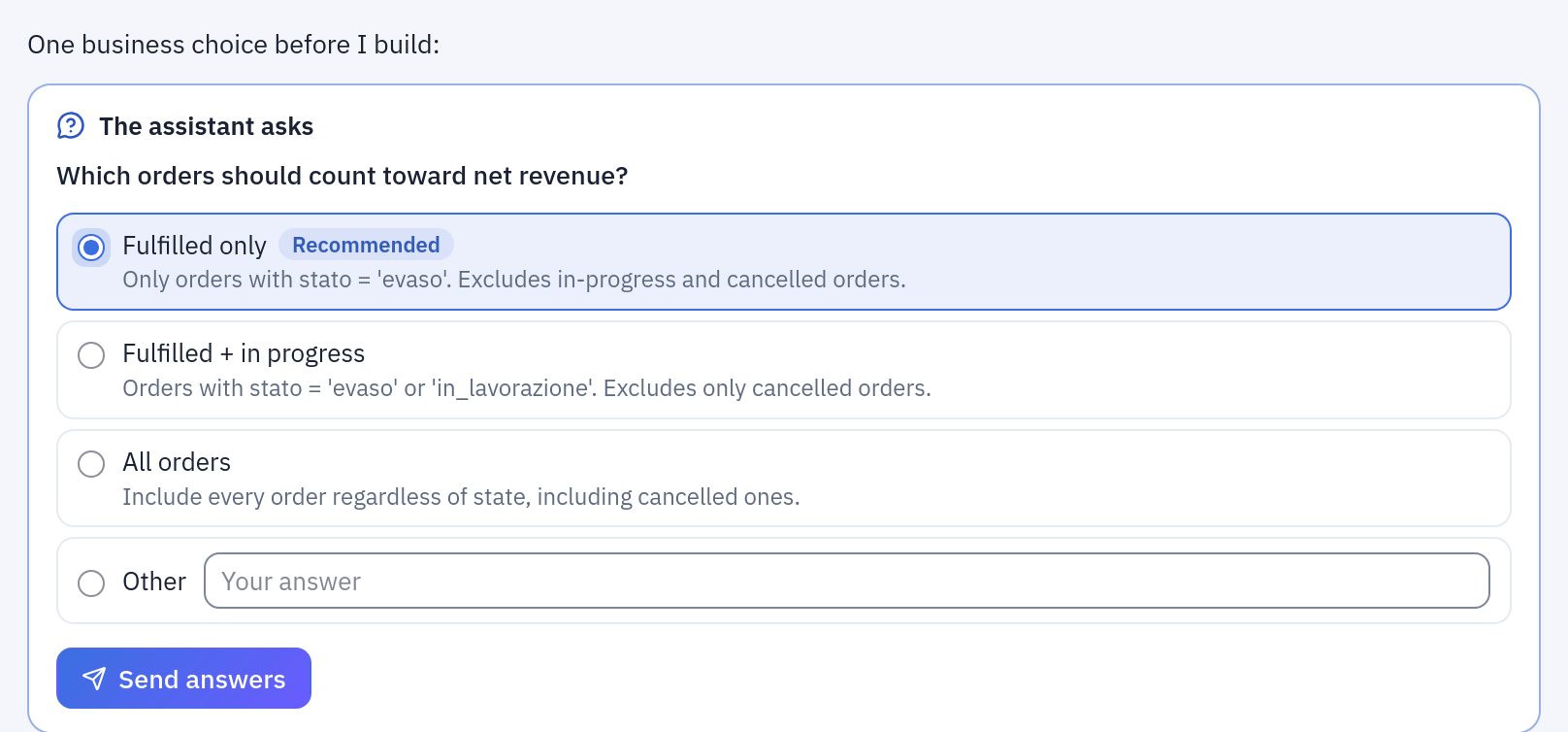
The question card: pick one choice (or write yours under Other), then Send answers.
- Pick «Fulfilled only» and Send answers. The answer is a plan: Create the flow
«Monthly net revenue per channel» in
Sample / Flowson Polars, with its steps (the two sources, a filterstato = evaso, the join on the order, the month and the net revenue as computed columns, the group by, the sort, the Output) and its first five rows; then Schedule the flow at 07:00 every day. The card says «Nothing has changed yet» and when the plan expires (30 minutes after its last change).
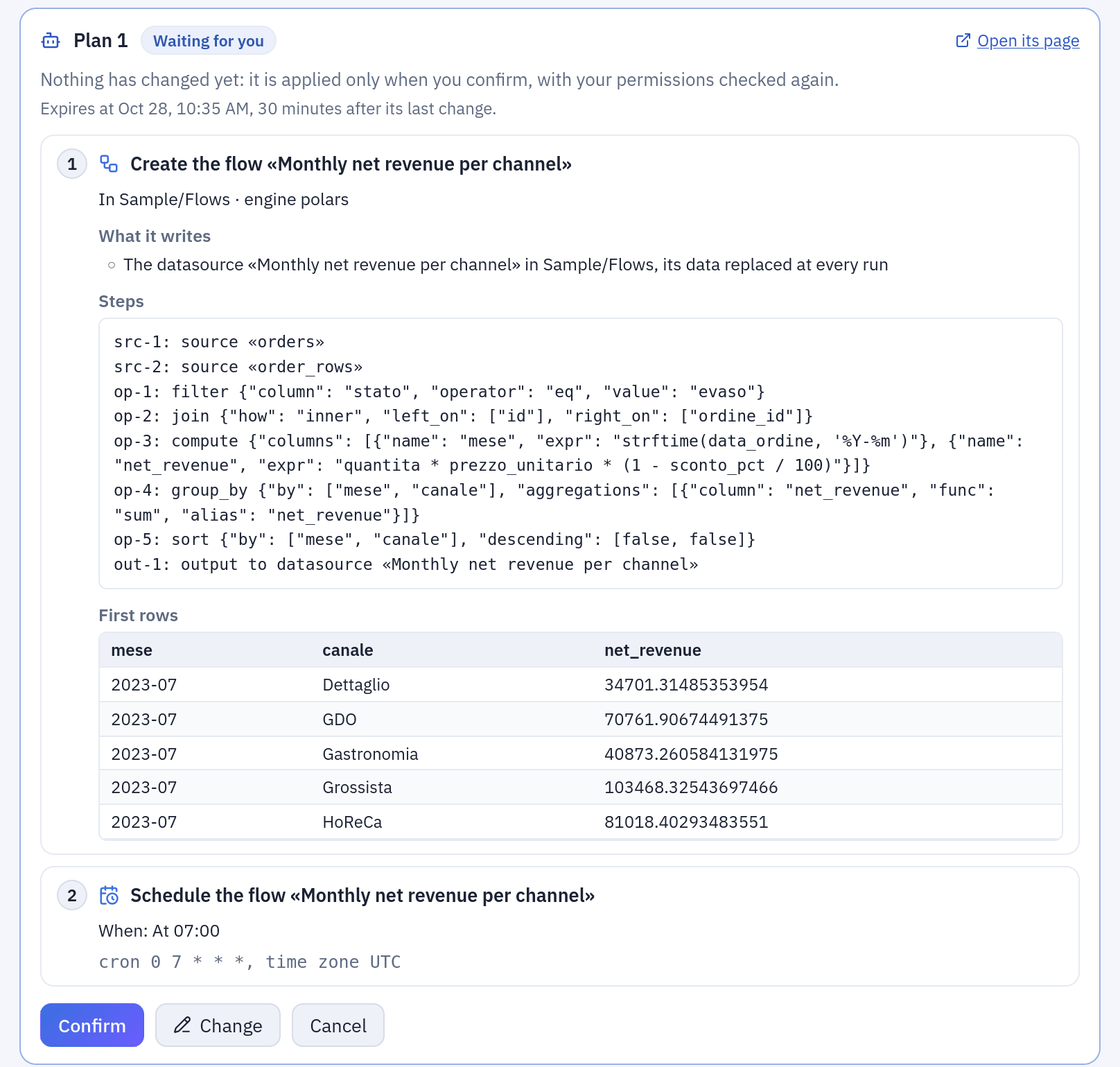
The plan card: what each action does, what it writes, the first rows it will produce, and Confirm, Change, Cancel.
- Confirm. Your permissions are checked again and the actions run in order: each
one shows Done with an Open link, here to the new flow in the editor.
Open its page shows the same plan at
/agent-plan, to come back to it later.
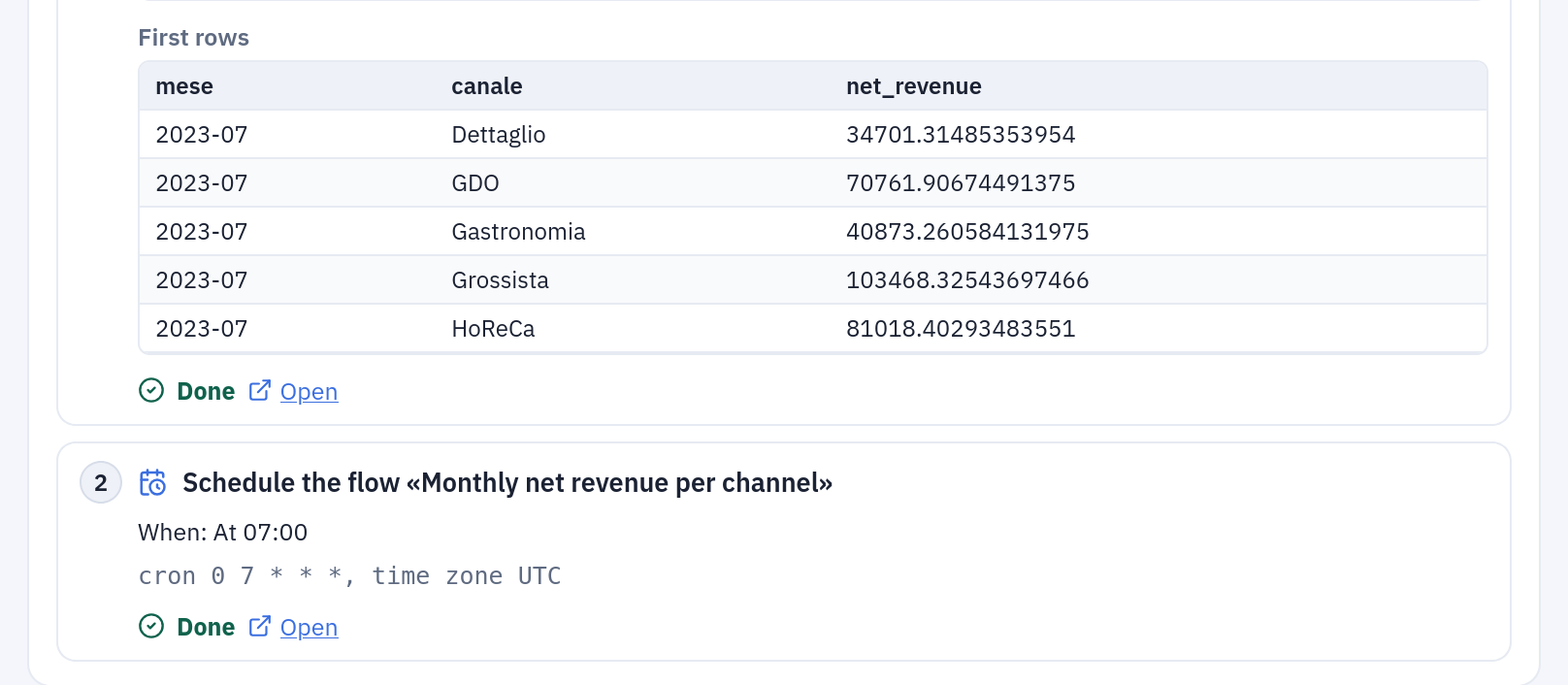
Applied: the flow exists and is scheduled; Open takes you to it.
Change asks the assistant to rework the plan with your remarks; Cancel drops it. Building needs what the same work needs by hand: EDIT on the folder of the flow, RUN to schedule it, CONNECT on a connection it reads (AI in Tabularia).
Permissions
- Anyone signed in can use the page, once an administrator has configured the AI and enabled at least one model.
- The assistant reads the datasources the person can read (VIEW on their folder, inherited), checked again at every tool call. A datasource outside that scope reads exactly like one that does not exist, also to the model.
- A datasource never imported (no data yet) is not listed.
- Observers can ask questions, but their conversations are not saved («history unavailable»), and they cannot download a step's full result.
- Every query is in the audit log (
ai.query), with the SQL, the model, the engine and the number of rows.
Telling people it is an AI
Before the first question, a dialog says «You are writing to an automated assistant»: the answers come from a model, there is no person on the other side, it can be wrong, it reads only what the account may read, and the question goes to the provider of the model chosen, whose name it gives. The chat stays locked until «I understand». The acceptance is kept in the browser, not in the account, so on a shared account every new browser asks again. Every answer is labelled «AI assistant» with the model that wrote it and its provider, the notice «This is an AI: it can make mistakes. Always check the results.» stays under the input, and a conversation downloaded as Markdown opens with the same notice. This is the transparency the EU AI Act (article 50) asks of a system people talk to.
Conversations
- Saved on the server, private to their author: nobody else, administrators included, can open them from the interface. They hold the questions, the answers, the SQL and the rows each query returned.
- Conversations on the page lists them (the latest
AI__MAX_CHATS_LISTED, 100 by default), with search by title; one reopens with its steps and tables and can be continued. The model names each one from its first question. - Under each answer: the tokens and the estimated cost, from the model's list price, not your provider's invoice; the conversation shows its total.
- Download saves a conversation as Markdown.
- A conversation untouched for
ORCHESTRATOR__AI_CHAT_RETENTION_DAYS(90 by default) is deleted, with its turns; all of a person's conversations go when the account is deleted. The spending ledger stays, without text.
Limits and good to know
- One
SELECTper query, readingFROM self, with no leadingWITH: subqueries go inFROM. At most two datasources in one query (one join). - Rows per query:
AI__MAX_RESULT_ROWS(200 by default, up to 2000), to the model and to the chat. - Model round-trips per question:
AI__MAX_REQUESTS(12). Per question, also a cost cap (AI__MAX_COST_PER_TURN_USD, $0.50) and an input-token cap; per day, the caps per person and per installation, when the administrator sets them. A cap reached says so. - A new question in the same conversation stops the query still running for the previous one.
- The assistant reads datasources only: not flows, saved views, scripts or connections. To ask about data still in a database, import it first.
- It can be wrong. The SQL and the table of every step are there to check.
Related
- AI in Tabularia: every use of the AI, configuration, costs
- The AI user on ClickHouse
- Preview and analysis
- Engines