Security and governance
How Tabularia decides who may see and do what, what it records, and how it keeps data quality and personal data in check. This page is the map, for whoever answers for an installation to the security team, the data owners or the data protection officer: one line per topic and the page that covers it.
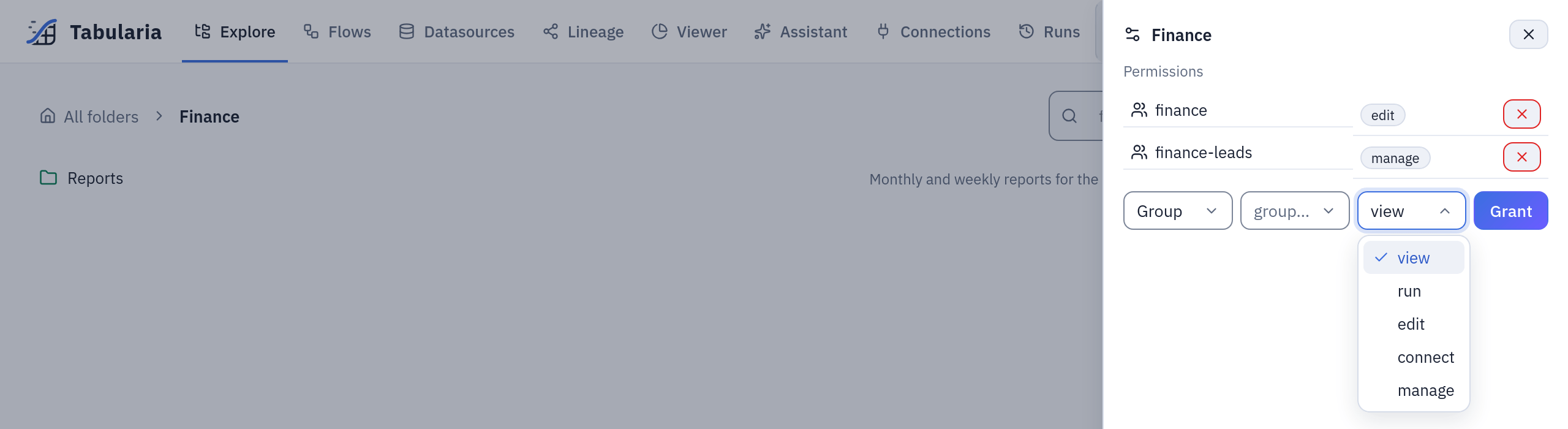
Permissions are granted on folders, to groups: Permissions.
Principles
- Everything lives in a folder, and the folder carries the permissions. Flows, datasources, connections, saved views, scripts and flow groups belong to a folder; a permission granted on a folder holds for everything below it. There are only grants, no deny rules.
- Nothing runs with more rights than a person has. A run, a preview, an export, a question to the assistant and an API token act with the rights of the person behind them. A schedule acts with the rights of whoever set it, checked again every time it fires.
- Credentials stay on the server. Connection secrets are encrypted at rest with the
installation's key (
SECURITY__FERNET_KEY) and never returned by the API; the gateway builds what a worker needs, never the browser. - Free SQL reads only what it was given. The SQL step of a flow, a SQL script and the assistant name tables the gateway resolved and checked, and nothing else.
- Every action that matters leaves a trace, and the trace outlives the account that made it. Personal data in that trace expires on its own.
The map
| Topic | In one line | Where |
|---|---|---|
| Permissions | Folders, users, groups, the five capabilities (VIEW, RUN, EDIT, CONNECT, MANAGE), administrators and observers, and what each common action needs | Permissions |
| Audit log | One append-only entry per sign-in, change, run, export and permission change, with who, what, when and from where | Audit log |
| Data contracts | Rules a datasource promises to keep; a blocking rule refuses new data and the datasource keeps serving the last good data | Data contracts |
| Single sign-on | Sign in with Keycloak, Microsoft Entra ID or another OpenID Connect provider; its groups become Tabularia groups | Single sign-on with Keycloak, group mapping, a Keycloak to try on a laptop |
| SIEM | Every audit entry forwarded to Splunk through the HTTP Event Collector, in order, none skipped | Audit log to Splunk |
| Sessions | One revocable session per browser or script, in an HttpOnly cookie; closed by signing out, from Your sessions, by an administrator, at a password change or when the account is disabled | Configuration: sign-in, sessions and API tokens |
| Service accounts and API tokens | Tokens with a read-only or read-and-write access level and an expiry, personal or of a service account, never more powerful than their account | Tabularia API |
| Free SQL, contained | The SQL step, SQL scripts and the assistant's queries may read only the tables the gateway resolved for them: an allowlist checked on the parsed query (sql_guard.py) on the engines that run on a server; DuckDB and Polars see only the tables they were handed | SQL scripts, a ClickHouse user for the assistant |
| Masking for observers | Observers read the administration panels with emails masked (a***@example.com), no IP addresses and no browser strings (masking.py) | Permissions |
| Retention | Audit entries kept forever or for AUDIT__RETENTION_MINUTES; client addresses emptied after AUDIT__IP_RETENTION_DAYS (90 by default); run logs emptied after ORCHESTRATOR__LOG_RETENTION_DAYS (30 by default); the assistant's conversations deleted after ORCHESTRATOR__AI_CHAT_RETENTION_DAYS (90 by default) | Audit log, configuration |
| Privacy notice | A notice shown at the top of every page, written by the administrator in Administration → Privacy, starting from a text that describes what the installation really collects | Audit log |
| The assistant's disclosure | Before the assistant can be used (the Assistant page, the flow and script assistants), a dialog that only «I understand» closes says that an AI model answers, that it can be wrong, that it reads only the datasources the account may read, and that the question goes to the provider of the model chosen, by name | AI: where it is used |
| A ClickHouse user for the AI | A second barrier on the external ClickHouse: the assistant's queries run as a read-only user that cannot read system or any table | A dedicated ClickHouse user |
| Users' code, isolated | Python, R and Docker images run in their own namespaces, with no token of the cluster's API, under a network policy that keeps them away from Tabularia's own pods and the cloud metadata addresses | Python and R: network policies, the Container node |
Who decides what
| Decision | Who |
|---|---|
| Users, groups, administrators, observers, service accounts | Administrators, in Administration |
| Top-level folders | Administrators |
| Permissions on a folder and below it | Whoever has MANAGE on the folder (administrators always) |
| Which engines may be chosen, which AI models may be used | Administrators |
| Which scripting environments and container registries a group may use | Administrators |
| A datasource's data contract | Whoever has EDIT on the datasource's folder |
| Where an SMTP connection may send | Whoever has CONNECT on its folder (the connection's allowed domains) |
Related
- Concepts: folders, flows, datasources and runs in a few lines.
- Connections: who may create and use each kind.
- Scheduling: schedules and the rights they run with.
- Configuration reference: every variable named on this page.