Writing data out
An Output node ends a flow and decides where its result goes: a datasource in Tabularia, a table of a database, a file on S3 or on an SFTP server, or an email with the result attached. This page lists the five destinations with an example each, on the sample data, and links to the connection each one needs.
At a glance
| Destination (as in the node) | Writes | Connection | Formats | Names with placeholders |
|---|---|---|---|---|
| Tabularia Datasource | a datasource in a folder, optionally copied to S3 | none (an S3 one for the copy) | Parquet in Tabularia's storage | the copy's path |
| Database table | a table, appended or replaced, then optional SQL | PostgreSQL, MySQL, MariaDB, ClickHouse, Trino, Oracle or SQL Server (Databases) | the database's types | no |
| File on S3 / object storage | one object, or a hive-partitioned dataset | S3 (S3) | Parquet, CSV | the key |
| SFTP server (file) | a file in a folder of the server | SFTP (SFTP) | CSV, Parquet, Excel | folder and file name |
| Email with attachment | an email with the result attached | SMTP (SMTP) | Excel (.xlsx), CSV | subject and attachment name |
A flow can have several Output nodes, each with its own destination: every Output is its own write, and the run of the flow reports each one.
How it works
The Output node takes the result of the chain before it, as computed by the flow's engine, and hands it to a worker, which writes it where the node says. The worker opens the connection with the credentials the gateway sends it, still encrypted, after checking that whoever runs the flow — you, or the author of the schedule — may use it.
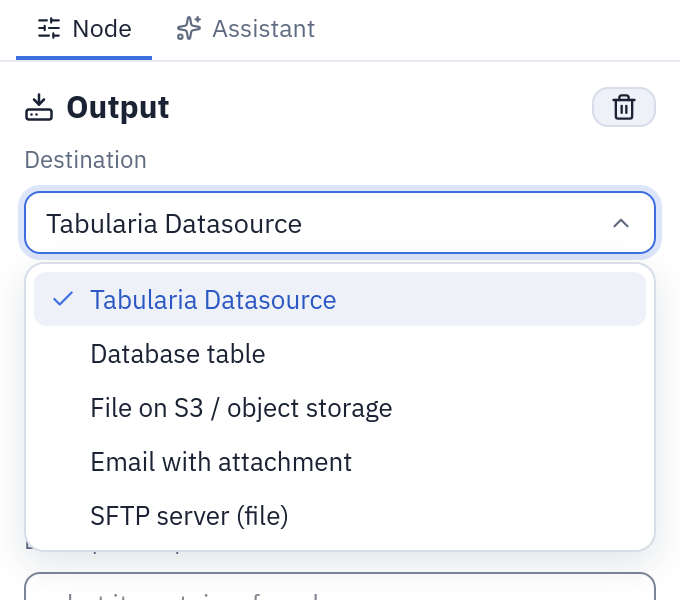
The five destinations of an Output node. The fields below the list change with the choice.
Names marked as templates above take the placeholder language and four names of the Outputs:
| Placeholder | Becomes |
|---|---|
{date} | 2026-10-27, in the node's time zone (UTC when empty) |
{datetime} | 2026-10-27_143005 |
{run_id} | the run's number, as in the run history |
{flow} | the flow's name, made safe for a file name |
and the whole grammar: {yesterday:yyyyMMdd}, {today:yyyy/MM}, {now:HHmm}. The panel
shows what each name resolves to while you type, and a run whose names cannot be resolved
is refused before it starts.
When a run ends, its entry in the history says what was written: the datasource, the table and its rows, the bucket and key, the SFTP path and size, or the recipients and the attachment.
A datasource
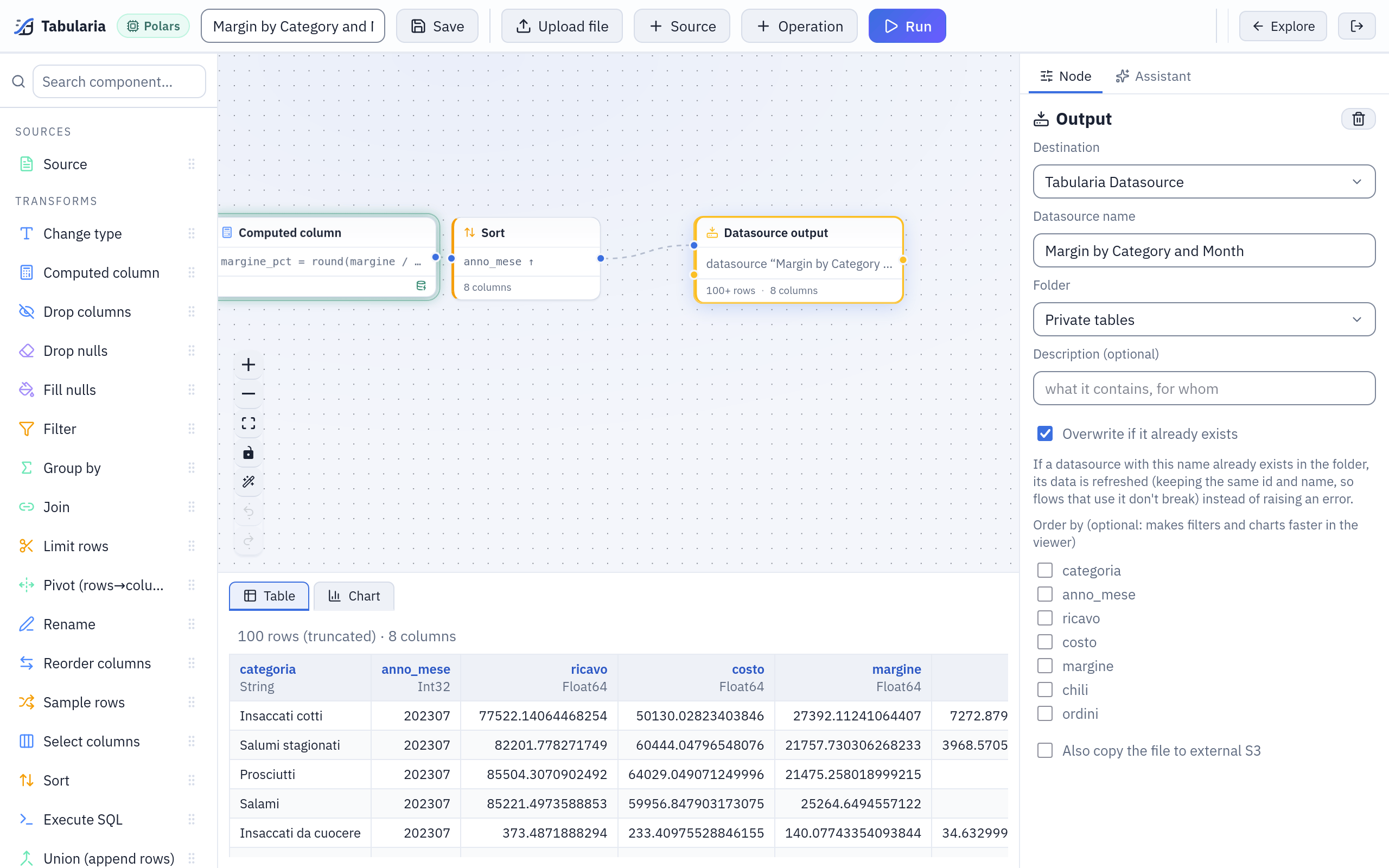
The Output node of «Margin by Category and Month»: the datasource of the same name in Sample / Private tables, overwritten at every run.
Tabularia Datasource publishes the result as a datasource that other flows, the viewer and the AI assistant can read.
| Field | |
|---|---|
| Datasource name, Folder | where it appears in Explore |
| Description | optional |
| Overwrite if it already exists | refresh the datasource of that name in that folder (same id, so the flows that read it keep working) instead of failing; only a datasource a flow produced can be overwritten |
| Order by | optional columns: the data is stored sorted by them, which makes the viewer's filters and charts faster |
| Also copy the file to external S3 | optional: an S3 connection, a bucket and a Path in the bucket; the copy is Parquet, and a failure of the copy is recorded without failing the run |
Example. The sample flow Top 20 Products by Revenue ends with an Output named
Top 20 Products by Revenue in Sample / Private tables, with Overwrite if it already
exists ticked: its schedule (30 5 * * *) refreshes it every morning at 05:30. Tick Also
copy the file to external S3, choose an S3 connection and the path
published/top20/{date}.parquet: every run also leaves a dated copy in the bucket.
A database table
Database table writes into a table of a PostgreSQL, MySQL, MariaDB, ClickHouse, Trino,
Oracle or SQL Server connection: Connection, Destination table (schema.table
supported), Write mode (Append (INSERT) or Replace (empty + INSERT)) and an
optional Post-insert SQL. The table is created at the first run with the flow's
columns; columns are matched by name. PostgreSQL, MySQL/MariaDB, Oracle and SQL Server
write in one transaction, ClickHouse through a staging table. The details, per database,
are on Databases.
Example. Add to the sample flow Margin by Category and Month an Output node:
Database table, a PostgreSQL connection whose user may create tables in reporting,
destination table reporting.margine_mensile, Replace, post-insert SQL
ANALYZE reporting.margine_mensile. Every run replaces the table's rows with the
month-by-month margins in one transaction: a reporting tool reading that table never sees
it half written.
A file on S3
File on S3 / object storage: S3 connection, Bucket (empty = the connection's
default), Key / path, Format (Parquet or CSV) and, optionally, Partition
by columns. Without partitions one object is written at the key, replacing the previous
one; with partitions a hive tree key/column=value/…, and the objects under the prefix
that the run did not write are removed. At most 1,000 partitions. See S3.
Example. The sample flow Cost to Serve by Channel runs every Monday. An Output
node with the key exports/cost_to_serve/{today:yyyy}/week_of_{start_of_week}.csv and
format CSV leaves one file per week, exports/cost_to_serve/2026/week_of_2026-10-26.csv,
for a partner who reads the bucket. With key lake/cost_to_serve, format Parquet and Partition by canale,
the same output becomes lake/cost_to_serve/canale=GDO/…, canale=HoReCa/…, one folder
per sales channel.
A file on an SFTP server
SFTP server (file): the SFTP connection, the folder (empty = the login folder), the file name, the format (CSV, Parquet or Excel (.xlsx)). The file is uploaded under a hidden temporary name and renamed onto the final one, so whoever polls the folder never reads half a file; an existing file with the same name is replaced. A dated folder is created when missing. See SFTP.
Example. The sample flow Agent Leaderboard ends in an Output: SFTP connection
exports-server, folder /outbox/{today:yyyy}, file name leaderboard_{date}, format
Excel. The first run of the year creates /outbox/2026; each run writes
leaderboard_2026-10-27.xlsx there.
An email with an attachment
Email with attachment: SMTP connection, Recipients, Cc, Subject, Message body (HTML when The body is HTML is ticked), Attachment name, Format (Excel (.xlsx) or CSV) and Stop the flow if the send fails (on by default; off, a failed send is recorded and the following steps go on). The attachment is made at every run, even with no rows. Every recipient must belong to the connection's allowed domains, or the run does not start. Send it to me runs the flow and sends the real attachment to your own address only, writing nothing anywhere. See SMTP.
Example. On Top 20 Products by Revenue: SMTP connection Company mail,
recipients sales@example.com, Cc controller@example.com, subject
Top 20 products, {yesterday:dd/MM/yyyy}, body The twenty products with the highest revenue, updated this morning., attachment name top20_{date}, Excel. Press Send it to
me first to see the file as the recipients will.
Permissions
| Destination | Besides RUN on the flow, you need |
|---|---|
| Tabularia Datasource | EDIT on the destination folder (and CONNECT on the S3 connection's folder for the copy) |
| Database table, S3, SFTP, Email | CONNECT on the connection's folder |
A scheduled run uses the rights of the schedule's author, checked again when it fires.
Limits and good to know
- SQL Server is written only where its optional driver is installed, as for reading (SQL Server).
- An email carries at most 15 MB of attachment; an Excel file holds at most 1,048,575 rows, by email or on SFTP.
- An S3 output deletes, under a partitioned prefix, what the run did not write; a
single-file S3 output and an SFTP output replace a file with the same name: use
{date}or{run_id}to keep one per run. - A Database table name is not a template: one table, written at every run.
- The workers open every connection: on Kubernetes with the network policy, the destinations' addresses must be allowed (Network).
- Data also leaves Tabularia through Pushmail cells of flow groups and through SQL scripts (a whole result exported as CSV or Excel).