SFTP: files on a server, in and out
An SFTP connection reaches any SSH server that offers SFTP (OpenSSH, a NAS, a managed SFTP service). It does two things:
- a datasource «SFTP folder» reads the files of a folder that match a glob, stacks them into one table and keeps it as a snapshot, refreshed by hand or on a schedule like every other database datasource;
- an Output node with destination SFTP server writes the result of a flow as a file in a folder of the server.
Like the other connections it lives in a folder and needs CONNECT on that folder to be created, tested and used. Any host may be reached, as for databases: CONNECT is the barrier, so give it to the people who may move data to and from that server. The other ways data comes in are listed in Sources.
The connection
| Field | Meaning |
|---|---|
| Host, port | The SSH server; the port defaults to 22. Host name or IP only, no sftp://. |
| Username | The SSH account. |
| Sign in with | Password, or Private key: a PEM or OpenSSH private key (Ed25519, ECDSA or RSA) with its passphrase if it has one. |
The password, or the private key together with its passphrase, is encrypted at rest
with the same Fernet key as every other connection secret (SECURITY__FERNET_KEY),
travels encrypted to the worker and is decrypted only to authenticate. The API never
returns it: has_password and has_private_key say whether one is stored. Only the
secret of the chosen method is offered to the server.
The host key: trust on first use
SSH has no certificate authority: what proves the server is the right one is its
host key. The connection keeps the key's type and SHA256 fingerprint, the one
ssh-keygen -lf /etc/ssh/ssh_host_ed25519_key.pub prints on the server.
Accepting a key takes two steps, and no credential is ever sent to a key that is not accepted:
- «Test connection» reads the key the server offers. If it is not the accepted
one — never accepted, or different — the connection is closed before any
password or key signature is sent, and the form shows the key (
ssh-ed25519 SHA256:…), with the previous one and a warning when it changed. Compare it with the fingerprint the server's administrator gives you. - «Accept this key and test» tests again naming that key: the credentials are
sent only if the server still offers exactly it. On a saved connection the key is
then stored, with a
connection.host_key_acceptline in the audit log (and the previous fingerprint); in the form of a new connection it is stored on save, by the same named test against the saved connection.
A test of a connection whose accepted key the server presents checks the credentials as usual. Every other connection — the file list of the datasource form, every import, every Output — checks the key before sending any credential. A connection never accepted is refused; a different key (of the same type or of another) is refused with «The host key of host:port has changed … run «Test connection» again to accept the new key», translated in the interface. Nothing was sent to the server. Changing the host or the port of a connection forgets the accepted key: another address is another server until a test says which key it has. Changing the host, the port or the user needs the password (or the private key) typed again: a stored secret never follows a connection to another server or account, and a test before saving only ever uses the secret typed in the form.
A server has one key per type (Ed25519, ECDSA, RSA). Once a key is accepted the client asks for that type, so an upgrade that changes which type is preferred does not read as a changed key; a server that no longer has a key of that type reads as a changed key, like any other.
Datasource «SFTP folder»
From a folder: New → Datasource from a database, choose the SFTP connection, then:
| Field | Meaning |
|---|---|
| Folder on the server | Absolute (/upload/vendite), or relative to the login folder; empty = the login folder. It must exist. |
| Files | A name or a glob: vendite_*.csv; * and ? within a name, ** for any subfolder (**/*.csv; links to folders are not followed). Case-sensitive. .. is refused, in the folder too. Check files lists what it takes. |
| Format | From each file's extension (.csv .txt .tsv, .parquet .pq, .xlsx .xlsm .xls, .ndjson .jsonl: a glob may mix them; any other extension refuses the import), or CSV, Parquet, Excel, NDJSON for every file. |
| CSV separator, encoding, header | The reading options of the file sources: one-character separator; UTF-8, UTF-8 with invalid bytes replaced, or Windows-1252; whether the first row is the header. |
| Excel sheet | Empty = the first sheet of the workbook, hidden or not. After «Check the files» the field becomes a list of the sheets of the first workbook found (one of 50 MB at most is downloaded for it), the hidden ones marked. |
| Time zone, variables, initial last refresh | Folder and files may hold placeholders — sales_{yesterday:yyyyMMdd}.csv, in/{day} — and the datasource's list and range variables (day = today-7 .. today step 1d). |
| Refresh | Snapshot (the table is rebuilt), or append by key: the rows whose key columns (_param_day, id, _file…) come again replace the old ones. |
Every file that matches is read at every refresh and the rows are stacked into one
table, united by column name (a column missing in a file is empty there, and the
difference is logged). Every row says the file it comes from in the column
_file — always, a single matching file too — as its path below the folder
(vendite_01.csv, or 2026/q1/vendite.csv with **), and _file_modified_at the
file's modification time (UTC). They are the last two columns, as on the SharePoint
datasource. Hidden files (.name) and Office lock files (~$name) are skipped.
The files are left on the server: the datasource only reads.
With placeholders or variables the folder and the files are expanded once per value
(see placeholders.md): every file is
read once, _param_<name> says the values on every row, a value without its file is
skipped and listed in the run, and no file at all across the values fails the refresh.
With a dated folder (in/{day}), _file is the path below the fixed part (in), and
a day whose folder does not exist is a value without a file; a fixed folder must
exist, as before.
The files must be machine readable, the same contract as SharePoint: the header in
the first row, one name per column, no name twice (case-insensitive), no _file or
_file_modified_at among them. A file with a title above the table, an empty column
name or a repeated one is refused, naming the file — fix it at the source.
The import reports its progress as the other imports do (file i of n, rows read, saving). Database datasource rules apply: snapshot swap at success, one refresh at a time, scheduled refresh, data contract, no sort keys (rows keep the files' order).
Caps
A glob gone wrong must not download a whole server. Engine settings (backend and workers), checked before anything is downloaded:
| Variable | Default | Meaning |
|---|---|---|
SFTP__MAX_FILE_BYTES | 536870912 (512 MB) | Size of one file. Every file is downloaded to the worker's /tmp and read in memory to be stacked, so it is also a memory bound. |
SFTP__MAX_FILES | 500 | Files read by one refresh. |
SFTP__MAX_TOTAL_BYTES | 2147483648 (2 GB) | All the matching files together. |
SFTP__TIMEOUT_SECONDS | 30 | Connection, SSH handshake, and every answer of the server after the login: a server that stops answering fails the import or the Output instead of holding a worker. |
A glob also stops after walking 2000 folders.
Output to an SFTP server
On an Output node choose the destination SFTP server (file), then the connection,
the folder (no ..; empty = the login folder), the file name, the format —
CSV, Parquet or Excel — and the node's time zone (empty = UTC).
Folder and file name are templates in the placeholder language, with four names of the Outputs:
| Placeholder | Becomes |
|---|---|
{date} | 2026-10-17 (in the node's zone, UTC by default, when the file is written) |
{datetime} | 2026-10-17_143005 |
{run_id} | the run's number, the one in the run history |
{flow} | the flow's name, with anything but letters, digits, ., - and _ turned into _ |
and the whole grammar on top: export_{yesterday:yyyyMMdd}.csv,
{flow}_{now:yyyy-MM-dd_HHmm}, /outbox/{today:yyyy}/{today:MM}. A name written
with the four names above before the language existed is written with the same bytes.
The form shows the resolved name while you type, and the run is refused before it
starts if a template cannot be resolved.
A folder without placeholders must exist; a dated folder is created the first
time (its missing levels). The format's extension is added when missing; a name that
ends in another data format's extension (report.parquet with format CSV) is refused,
as is a name with a folder in it — written in the name or put there by a value
({today:yyyy/MM} belongs in the folder).
The write is atomic for readers. The file is uploaded under a hidden temporary name
in the same folder (.name.<random>.tmp) and then renamed onto the final name with
the OpenSSH posix-rename extension, which replaces an existing file in one step;
whoever polls the folder never reads half a file. A server that says it does not
support that extension gets the plain SFTP rename after removing the old file: a
moment without the file, never half a file. Any other failure of the rename leaves
the existing file as it is. If anything fails, the temporary file is removed and the run fails
with the reason.
An existing file with the final name is replaced: use {date} or {run_id} to
keep one file per run. The run records what it wrote (host, path, bytes) in its
destination, shown when the run ends. CSV is streamed; Excel holds at most 1,048,575
rows. Scheduled runs and orchestrations use the same Output: nothing else to set up.
Example: the depots' daily sales files
Each depot drops a CSV a day on an SFTP server, in upload/depots:
sales_20261020.csv, sales_20261021.csv, … with the columns data, deposito,
canale, ordini, ricavo. The sales office wants them as one table, and the monthly
margin back on the same server.
- The connection. In a folder where you have CONNECT, New → New connection,
type SFTP (files): name
Depots exchange (SFTP), hostsftp.example.com, port2222(the server's; empty means 22), usertabularia, Sign in with Password and the password. - Test connection. The form shows the key the server offers,
ssh-ed25519 SHA256:…, and says that nothing has been sent yet. Compare the fingerprint with the one the server's administrator gives you (ssh-keygen -lf /etc/ssh/ssh_host_ed25519_key.pubon the server), then Accept this key and test: Connection works. Create.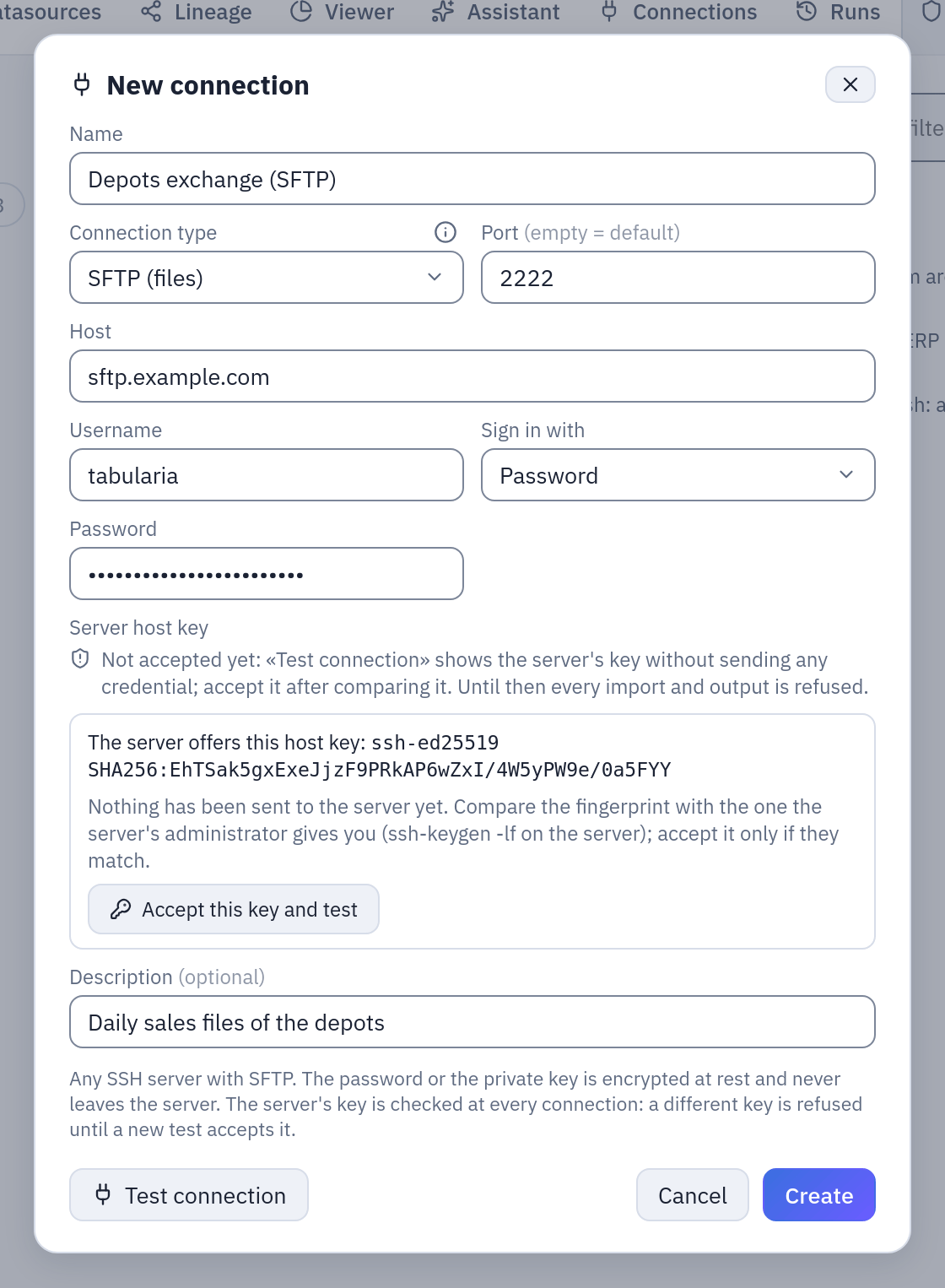
The first test reads the server's key and stops there: the password is sent only after you accept that key. - The datasource. In
Sample / Private tables, New → Datasource from a database, connectionDepots exchange (SFTP), namedepot_sales, Folder on the serverupload/depots, Filessales_*.csv, format from each file's extension. Check files lists the five files it will stack.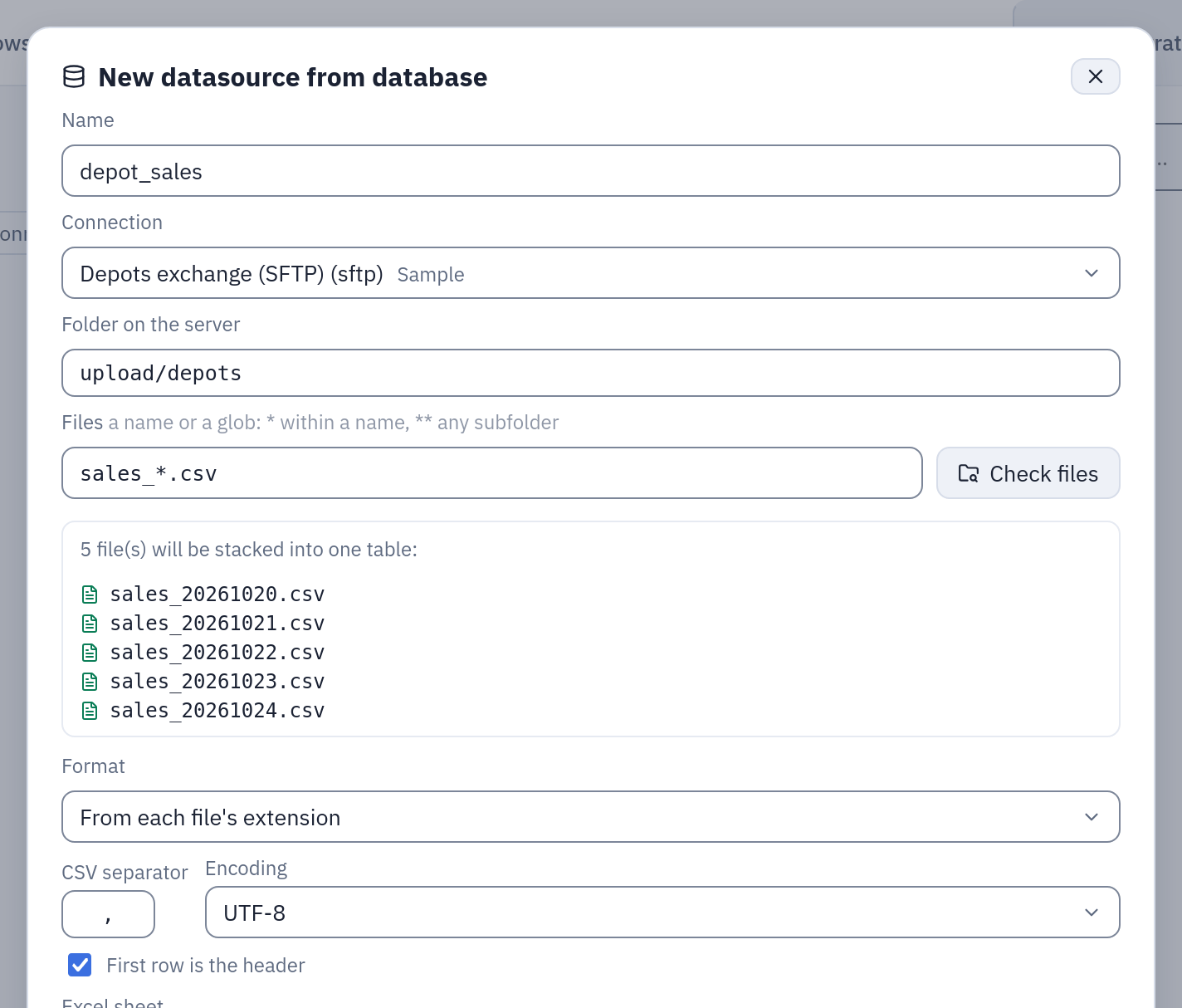
Check files: the glob takes five files, stacked into one table. - Create & import. The datasource has 125 rows and seven columns: the five of the
files, then
_file(sales_20261020.csv, …) and_file_modified_at. Schedule it (Schedule automatic refresh (cron),30 6 * * *): every morning it reads the files again, the new one included.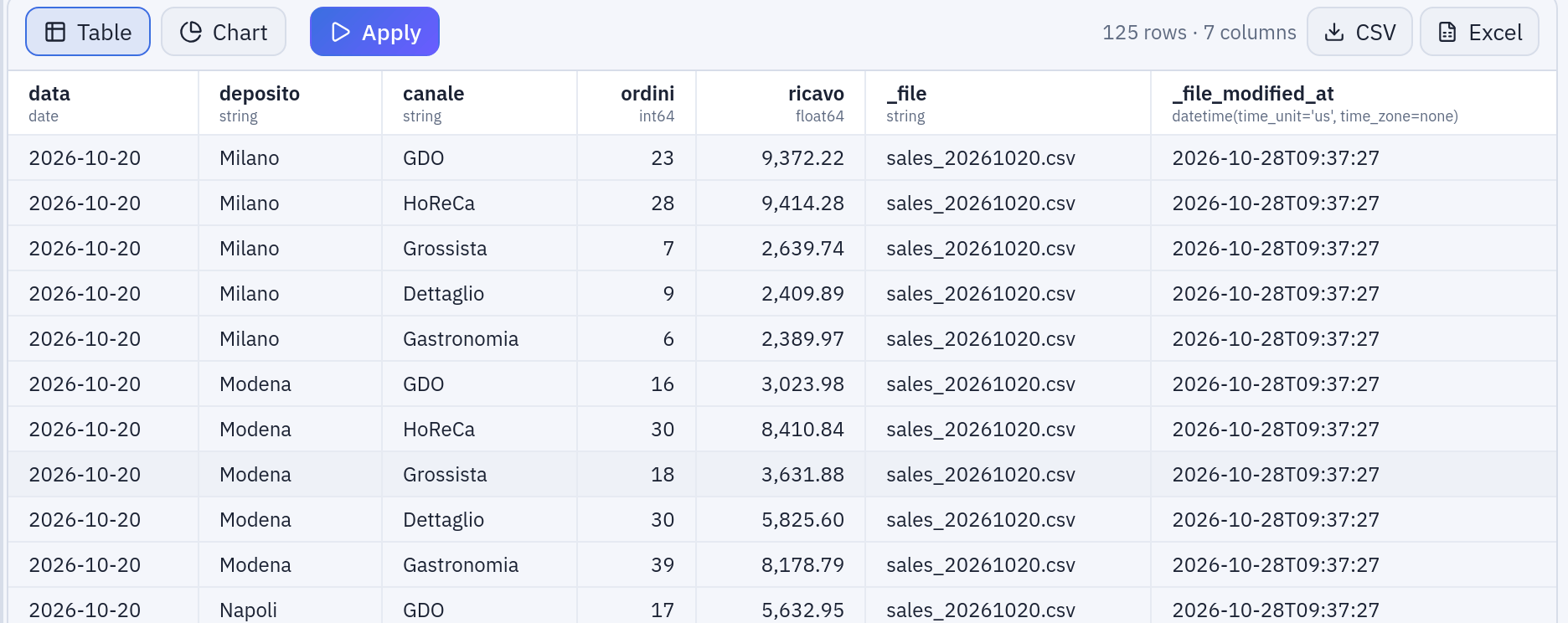
depot_salesin the Viewer: every row says which file it came from. - The way back. In the flow «Margin by Category and Month», an Output node with
destination SFTP server (file), the same connection, folder
outbox/{today:yyyy}/{today:MM}, file namemargin_{yesterday:yyyyMMdd}, format CSV, time zoneEurope/Rome. Under each field the form shows what a run would write today (outbox/2026/10,margin_20261027); the dated folder is created on the first run.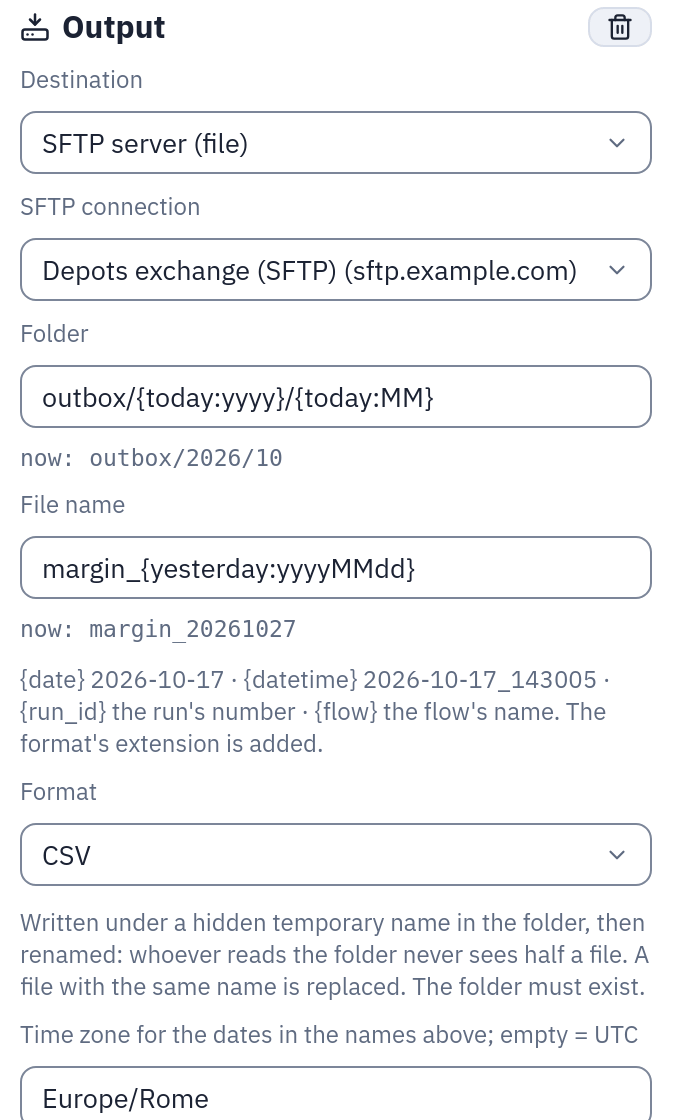
The Output's templates and what they give on 28 October 2026.
Lineage, dbt
OpenLineage: an SFTP refresh reads sftp://host:port + /folder/glob (the templates as written); an SFTP Output
is one dataset, sftp://host:port + /folder/<file-name template>, whatever file each
run writes — the file a run wrote is the dataset's version (datasetVersion facet). The dbt export turns an SFTP datasource
into a seed (like SharePoint) and an SFTP Output into a table model. The Lineage page
shows the file an Output writes.
Proofs
backend/tests/test_sftp.py runs against an SFTP server inside the test process
(backend/tests/fake_sftp.py, paramiko's server classes); the gateway's part is in
gateway/tests/test_sftp_*.py. Against a real OpenSSH server (a throwaway
lscr.io/linuxserver/openssh-server container on the stack's network):
e2e/sftp/engine_proofs.py (engine), e2e/sftp/api_proofs.py (the API end to end,
including a key change) and e2e/sftp/browser_forms.py (the three forms in Firefox).