Report functions
Every function a report can write in its expressions, family by family:
what it takes, what it gives, what it does with a missing value, and an example on the
sample data with the result it prints. The language itself (fields in brackets, texts
in double quotes, &, the operators) is in Reports: expressions.
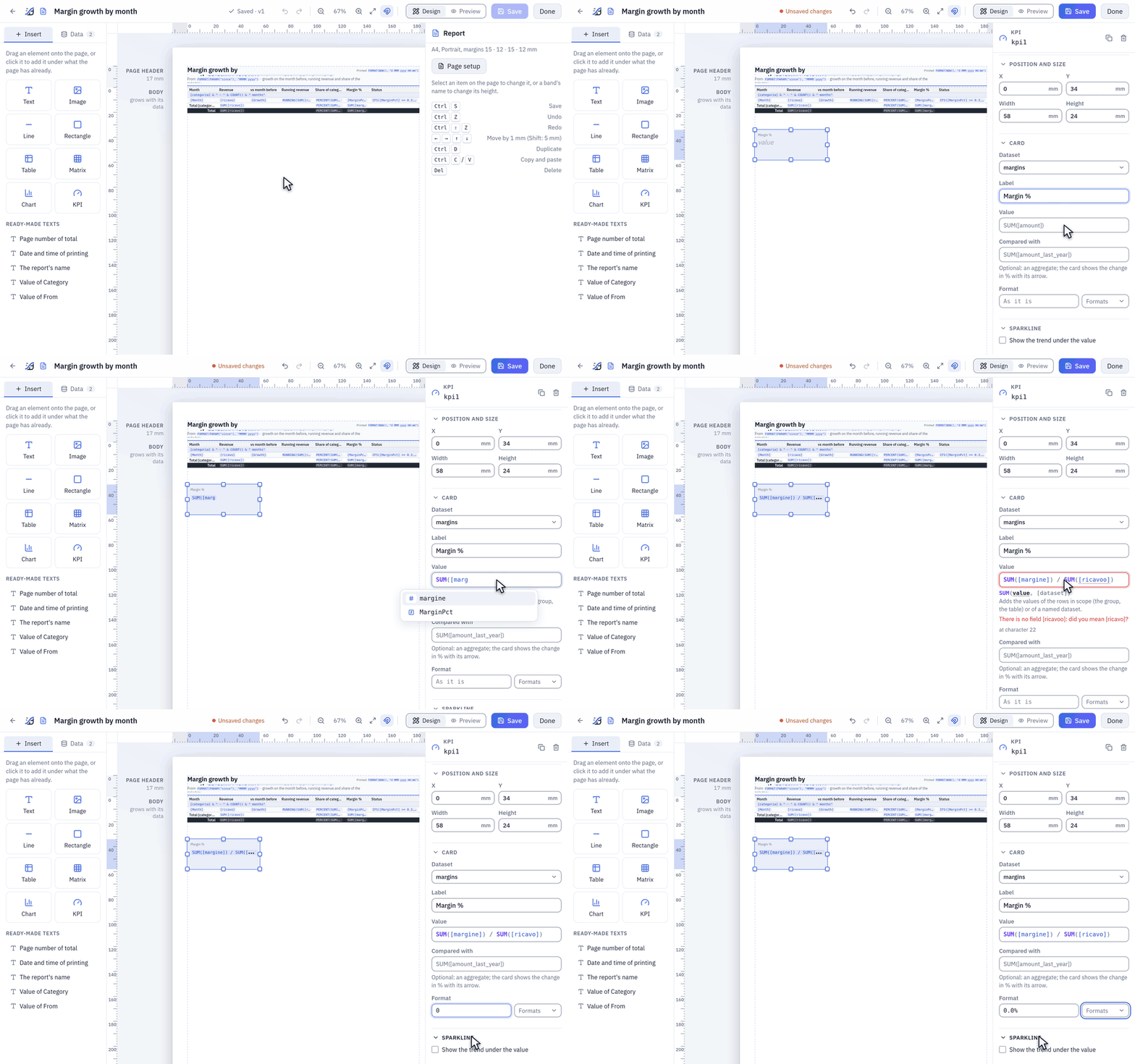
The expression editor: the first letters, or Ctrl+Space, list the functions with
their arguments and what they do; [ lists the dataset's fields with their types; the
line under the field shows the function the cursor is in, its current argument in bold.
A mistake is underlined, and the message says what to write instead.
The examples' data
Every example below was rendered on the sample data of a fresh installation (the «Sample» folder), in a report in English, with these datasets:
margins, SQL on the catalog with DuckDB: the first six months of 2025 of the datasource «Margin by Category and Month», 30 rows, five categories by six months:SELECT categoria, anno_mese, ricavo, costo, margine, margine_pct, ordini FROM "Margin by Category and Month" WHERE ({category} IS NULL OR categoria = {category}) AND anno_mese BETWEEN 202501 AND 202506 ORDER BY categoria, anno_mese
with two calculated fields:Name Expression MonthDATE(FLOOR([anno_mese] / 100), [anno_mese] - FLOOR([anno_mese] / 100) * 100, 1)202503becomes the date 1 March 2025MarginPctIF([ricavo] = 0, NULL, [margine] / [ricavo])the margin as a fraction, 0.307history, the same datasource with every month it has, from January 2024, in the same order, with the calculated fieldMonth: what the comparisons with the year before read:SELECT categoria, anno_mese, ricavo FROM "Margin by Category and Month" ORDER BY categoria, anno_mese.order, one order of the datasourceorders, placed on Saturday 1 July 2023:SELECT numero, data_ordine, canale, stato, deposito FROM orders WHERE numero = 'ORD-12902'.topandprices, the twenty best products and the price list, for a value from a price list.
The report has two parameters: category, a text, optional, its choices the categories
(none chosen unless an example says so), and since, a date, 2025-01-01.
margine_pct is a percentage as the sample flow writes it (30.75), MarginPct a
fraction (0.3075).
An expression goes in a Text that starts with =, or in any expression property (a
column's Value and Total, a KPI's Value…). In the tables, Gives is what
the report prints when the expression has no format of its own: a whole number with no
separators, other numbers with separators and up to two decimals, a date as d MMM yyyy,
true and false as Yes and No, NULL as nothing.
| Family | Functions |
|---|---|
| Aggregates and scope | SUM AVG MIN MAX COUNT COUNTDISTINCT FIRST LAST SUMIF COUNTIF PERCENT RUNNING ROWNUMBER |
| Other rows | PREVIOUS LOOKUP |
| Logic | IF IFS ISNULL COALESCE, and AND OR NOT |
| Maths | ROUND ABS FLOOR CEILING POWER |
| Text | UPPER LOWER TRIM LEN LEFT RIGHT MID REPLACE CONTAINS STARTSWITH TEXT CONCAT |
| Dates | DATE YEAR MONTH DAY WEEKDAY DATEADD DATEDIFF TODAY NOW |
| Report and page | PARAM REPORT PAGE PAGES |
| Formats | FORMAT and its patterns |
Names are written in capitals or not: sum([ricavo]) is SUM([ricavo]). Arguments in
brackets in the signatures are optional. Recipes put them together for a
real report, and When an expression is wrong lists what
the checks say.
Aggregates and scope
An aggregate works on a set of rows, and which rows depends on where it is written:
| Written in | Works on |
|---|---|
| a Text, a KPI, a Chart's series in the body | the rows of the item's dataset (a chart: those of each category along its axis) |
| a column's Total, in a group's total row | the rows of that group |
| a column's Total, in the grand total | all the table's rows (after Rows where) |
| a group's Label | the rows of that group |
| a matrix's Value of the cells | the rows that meet in the cell |
anywhere, with a dataset named last: SUM([ricavo], "margins") | the whole dataset; the only way in the page header and footer |
in a table, with a group named last: SUM([ricavo], "categoria") | the rows of that group, around the row or the total it is written in (a group by name) |
An aggregate cannot be written where the value of each row is wanted: a group's Group
by, the Order of the rows, a matrix's One column per value of, a chart's axis
and One series per value of, a sparkline's Along, the choices of a parameter.
An aggregate takes no other inside it: SUM([margine]) / SUM([ricavo]), not
SUM(SUM(...)). A field written where there is no current row (a group's total row, a
text) is the value of the first of its rows: in a text on margins, [categoria] gives
Insaccati cotti.
All aggregates leave NULLs out. On no rows, or only NULLs, COUNT gives 0 and the
others NULL.
| Written in | Aggregates, SUMIF, COUNTIF | With a group named | PREVIOUS | LOOKUP |
|---|---|---|---|---|
| a column's Value, a Rule | yes | every group of the table | yes, of a field: PREVIOUS([ricavo]) | yes |
| a column's Total | yes | the group it closes, and those around it | yes, with an aggregate, if the table has groups | yes |
| a group's Label | yes | that group, and those around it | yes | yes |
| a matrix's Value of the cells | yes | as in a Total: its total rows are cells too | no | yes |
| a Text, a KPI, Shown when | yes | no | no | yes |
| a Chart's series | yes | no | yes, along the axis, without Sort and Top | yes |
| Rows where | yes, on all the rows | no: the groups do not exist yet | no | yes |
| Group by, Order of the rows, a chart's axis | no | no | no | yes |
| a calculated field | yes, on the whole dataset | no | no | yes |
| the page header and footer | with a dataset named | no | no | with a dataset named |
| the choices of a parameter | no | no | no | no |
A group by name
The last argument of SUM, AVG, MIN, MAX, COUNT, COUNTDISTINCT, FIRST, LAST,
SUMIF and COUNTIF can name a group of the table, with the name of what it groups
by: a table grouped by [categoria] has the group categoria. A group by an expression
has no name until it is given one, in the group's Name in expressions: with
"Q" & CEILING(MONTH([Month]) / 3) named quarter, SUM([ricavo], "quarter") is the
quarter's total. On margins, grouped by [categoria] and by that quarter, sorted by
[anno_mese], on the row of March 2025 of Insaccati cotti:
| Expression | Gives |
|---|---|
SUM([ricavo], "categoria"), format #,##0 | 491,426, the six months of the category |
[ricavo] / SUM([ricavo], "categoria"), format 0.0% | 18.4%, the month's share of the category |
AVG([ricavo], "categoria"), format #,##0 | 81,904 |
MAX([ricavo], "categoria"), format #,##0 | 96,939, April |
MIN([ricavo], "quarter"), format #,##0 | 64,693, February, the smallest of the quarter |
COUNT("categoria") | 6 |
COUNTDISTINCT([categoria], "categoria") | 1 |
FIRST([Month], "categoria"), format MMM yyyy | Jan 2025 |
LAST([Month], "categoria"), format MMM yyyy | Jun 2025 |
On a row, SUM([ricavo]) with no name is the innermost group's total, not the row's: the
row's share is [ricavo] / SUM([ricavo], "categoria"), or
PERCENT(SUM([ricavo]), "categoria") (PERCENT). In a total,
SUM([ricavo]) / SUM([ricavo], "categoria") is that total's share: in the table above,
45.1% for the first quarter of Insaccati cotti, 54.9% for the second, 100.0% for the
category.
A group has to hold the place the expression is in, or the check says so:
- a row is inside all the table's groups;
- a Total is repeated at every level with a total row: it can name the group of the
outermost one and the groups around it.
SUM([ricavo], "quarter")in a Total is refused while the category has a total row, since that row is outside the quarter; - the grand total is in no group: there a total that names one prints nothing, so a share of the category can stand beside the sums in a table with a grand total. If the grand total is the table's only total, the check refuses the name;
- a group's Label sees that group and those around it;
- a matrix's cell reads the whole group, on every column:
SUM([ricavo]) / SUM([ricavo], "categoria")is the cell's share of its row; - Rows where comes before the groups: it cannot name any.
If a dataset of the report has the same name as the group, the check says that too: rename one of them, or give the group a name of its own. Two groups with the same name are told apart the same way.
SUM
SUM(value, [dataset or group]): the sum of a number over the rows. A text is refused when the
report is checked: «SUM adds numbers: a field of type text is here».
| Expression | Gives |
|---|---|
SUM([ricavo]) | 2,921,909.2 |
FORMAT(SUM([ricavo]), "€ #,##0") | € 2,921,909 |
FORMAT(SUM([ricavo], "margins"), "#,##0") in the page header | 2,921,909 |
FORMAT(SUM(IF([categoria] = "Salami", [ricavo], 0)), "#,##0") | 883,922: a sum with a condition, which SUMIF says in fewer words |
AVG
AVG(value, [dataset or group]): the average of a number; NULLs are left out of the count as well.
| Expression | Gives |
|---|---|
AVG([margine_pct]) | 26.62 |
ROUND(AVG([margine_pct]), 1) | 26.6 |
AVG([ordini]) as the Total of a column, format #,##0.0 | 422.2 in the total of Insaccati cotti |
The average of the percentages is not the margin percentage of the whole, which is
SUM([margine]) / SUM([ricavo]), 24.5% (margin percentage).
MIN, MAX
MIN(value, [dataset or group]), MAX(value, [dataset or group]): the smallest and the largest value.
They compare numbers, texts or dates, one type per column.
| Expression | Gives |
|---|---|
MIN([ricavo]) | 64.72 (Insaccati da cuocere, June 2025) |
MAX([ricavo]) | 215,195.65 (Prosciutti, April 2025) |
FORMAT(MIN([Month]), "MMMM yyyy") | January 2025 |
FORMAT(MAX([Month]), "MMMM yyyy") | June 2025 |
FORMAT(MAX([margine_pct]) / 100, "0.0%") | 34.2% |
COUNT
COUNT([value], [dataset or group]): with no argument, how many rows; with a value, how
many rows where it is not NULL. COUNT("margins") counts the rows of a named dataset, and
COUNT("categoria") those of a group.
| Expression | Gives |
|---|---|
COUNT() | 30 |
COUNT(IF([categoria] = "Salami", [ricavo])) | 6: IF with no third argument is NULL on the other rows |
COUNT("margins") in the page header | 30 |
[categoria] & " · " & COUNT() & " months" as a group's Label | Insaccati cotti · 6 months |
COUNTDISTINCT
COUNTDISTINCT(value, [dataset or group]): how many different values, NULL not counted.
| Expression | Gives |
|---|---|
COUNTDISTINCT([categoria]) | 5 |
the same with Category Prosciutti | 1 |
FIRST, LAST
FIRST(value, [dataset or group]), LAST(value, [dataset or group]): the value of the first and of the
last row that has one, in the order of the rows: the dataset's ORDER BY, or in a table
its Order of the rows.
| Expression | Gives |
|---|---|
FIRST([categoria]) | Insaccati cotti |
LAST([categoria]) | Salumi stagionati |
FIRST([Month]) as a column's Total, format MMM, rows sorted by [anno_mese] | Jan in every group's total |
SUMIF, COUNTIF
SUMIF(condition, value, [dataset or group]): the sum of the value over the rows where
the condition is true. COUNTIF(condition, [dataset or group]): how many rows those are.
A condition that is NULL does not count, like a false one, and neither does a NULL value.
They are SUM(IF(condition, value)) and COUNT(IF(condition, 1)), in fewer words and with
the same numbers. With no row that counts, COUNTIF gives 0 and SUMIF gives NULL, which
prints nothing: COALESCE(SUMIF(…), 0) for a zero. On margins:
| Expression | Gives |
|---|---|
SUMIF([anno_mese] <= 202503, [ricavo]) | 1,399,328.82, the first quarter |
SUMIF([categoria] = "Salami", [ricavo]) | 883,922.45 |
COUNTIF([ricavo] > 100000) | 16 |
COUNTIF([MarginPct] < 0.22) | 6, the months of Prosciutti |
COUNTIF([ricavo] > 1000000) | 0 |
SUMIF(YEAR([Month]) = 2024, [ricavo], "history") | 5,702,681.05, all of 2024 from another dataset |
COUNTIF(YEAR([Month]) = 2024, "history") | 59 |
SUMIF([anno_mese] <= 202503, [ricavo]) / SUM([ricavo]) as a Total, format 0.0% | 45.1% in the total of Insaccati cotti, 51.3% of Salami |
The condition is written on each row, in the dataset the aggregate reads. SUMIF([ricavo], [ricavo])
is refused, «SUMIF: the first argument is a condition», and so is SUMIF([ricavo] > 0, [categoria]),
«SUMIF adds numbers».
PERCENT
PERCENT(aggregate, [group]): the aggregate as a share of the same aggregate one level up.
In a row of a table, the row's share of its group (of the whole table when it has no
groups); in a group's total row, the group's share of the whole table; in the grand total,
100%. With a group named, the share of that group, whatever is between: PERCENT(SUM([ricavo]), "categoria"). It takes an aggregate: PERCENT([ricavo]) is refused, «PERCENT takes an
aggregate, as PERCENT(SUM(amount))». NULL when the level above adds up to zero.
On margins, a table grouped by [categoria], sorted by [anno_mese], with
PERCENT(SUM([ricavo])) as a column's Value and Total, format 0.0%:
| Row | Revenue | PERCENT(SUM([ricavo])) |
|---|---|---|
| Insaccati cotti, January 2025 | 66,648 | 13.6% of the category's six months |
| Insaccati cotti, March 2025 | 90,211 | 18.4% |
| Total Insaccati cotti | 491,426 | 16.8% of the whole |
| Total Prosciutti | 863,136 | 29.5% |
| Total Salami | 883,922 | 30.3% |
| Grand total | 2,921,909 | 100.0% |
With two levels, by [categoria] and by the quarter named quarter, the same column
without a name is the share of the level above, and with one the share of the category:
| Row | PERCENT(SUM([ricavo])) | PERCENT(SUM([ricavo]), "categoria") |
|---|---|---|
| Insaccati cotti, January 2025 | 30.1% of the quarter | 13.6% of the category |
| Total Q1 | 45.1% of the category | 45.1% |
| Total Insaccati cotti | 16.8% of the whole | 100.0% |
| Grand total | 100.0% | nothing: it is in no group |
RUNNING
RUNNING(aggregate): the aggregate from the first row of the group to the current one,
in the order the rows are shown: a running total that starts again with every group, or
runs over the whole table when it has none. It takes an aggregate of the group,
RUNNING(SUM([ricavo])); one of a named dataset is refused, and so is RUNNING in a
calculated field, which has no rows shown to run over: write it in a column. When a reader
sorts the table by another column in the viewer, the running total follows the new order.
| Month (Insaccati cotti) | Revenue | RUNNING(SUM([ricavo])) |
|---|---|---|
| January 2025 | 66,648 | 66,648 |
| February 2025 | 64,693 | 131,341 |
| March 2025 | 90,211 | 221,552 |
| June 2025 | 86,809 | 491,426, the group's total |
ROWNUMBER
ROWNUMBER(): the number of the row within its group, from 1. In the first group of the
table above it goes from 1 to 6, and starts from 1 again in Insaccati da cuocere. The
page header and footer have no rows: there it is refused. So it is in Rows where,
Group by, the Order of the rows and a matrix's One column per value of: there
the rows are being chosen and put in their order, and none has its number yet.
Other rows
PREVIOUS
PREVIOUS(value): the value on the row before, in what the table shows. It starts again
with every group: the first row of a group gives NULL, so January of a category is not
compared with December of the one before, and a NULL in a calculation prints nothing,
with no error. On margins, grouped by [categoria], sorted by [anno_mese]:
| Month (Insaccati cotti) | Revenue | PREVIOUS([ricavo]) | [ricavo] / PREVIOUS([ricavo]) - 1, format +0.0%;-0.0%;0.0% |
|---|---|---|---|
| January 2025 | 66,648 | nothing | nothing |
| February 2025 | 64,693 | 66,648 | -2.9% |
| March 2025 | 90,211 | 64,693 | +39.4% |
| April 2025 | 96,939 | 90,211 | +7.5% |
| May 2025 | 86,127 | 96,939 | -11.2% |
| June 2025 | 86,809 | 86,127 | +0.8% |
In a column's Total it takes an aggregate, and is the total of the group before at the same level, under the same parent: with the groups by month inside a category, the first month of each category has none. In the grand total it gives NULL.
| Total row | SUM([ricavo]) | PREVIOUS(SUM([ricavo])) | SUM([ricavo]) / PREVIOUS(SUM([ricavo])) - 1 |
|---|---|---|---|
| Insaccati cotti | 491,426 | nothing | nothing |
| Insaccati da cuocere | 9,218 | 491,426 | -98.1% |
| Prosciutti | 863,136 | 9,218 | +9263.9% |
| Salami | 883,922 | 863,136 | +2.4% |
| Salumi stagionati | 674,207 | 883,922 | -23.7% |
| Grand total | 2,921,909 | nothing | nothing |
What «before» means, in every case:
- Rows where applies first: a row the filter leaves out is not there, and the first row kept has nothing before it. For a January that compares with December all the same, see the month before the first.
- Order of the rows and the group's Order: the row above is the row above, and a group sorted from Z to A has the later group before it.
- A reader who sorts the table by a column in the viewer changes the order, and
PREVIOUSfollows it. A column that holdsPREVIOUSor names a group cannot itself be used to sort: its value depends on the order, so its header offers no click. - A closed group keeps its total and hides its rows: closing it changes no number. The total of the group after it still compares with it, and a row is only compared inside its own group.
- A table without Detail rows has its totals, and
PREVIOUSworks on them as above. - The PDF, the screen, Excel and the email are one calculation: they show the same numbers. In Excel the cell holds the value, not a formula.
PREVIOUS(PREVIOUS([ricavo])) goes two rows back, and PREVIOUS(RUNNING(SUM([ricavo])))
reads the running total on the row above. In a Rule, [ricavo] < PREVIOUS([ricavo])
colours the months that fall. Along a Chart's axis, PREVIOUS(SUM([ricavo])) is the
value of the category before it in the data's order, in each series; the options Sort
and Top choose the categories by their values, so with them it is refused.
It is refused where there is no row before: «PREVIOUS reads the row above among those a
table shows» in Rows where, Group by, the Order of the rows, a calculated field,
a text, a KPI, and in a matrix, whose rows are groups across columns. An aggregate takes no
PREVIOUS inside it, SUM(PREVIOUS([ricavo])); on a row an aggregate inside it is refused
too, since PREVIOUS(SUM([ricavo])) would be the same number on every row of the group.
LOOKUP
LOOKUP(key, key field, result, [dataset]): the result on the rows whose key field equals
the key. Without a dataset it reads the item's own. The key is an expression where
LOOKUP is written; the key field and the result are read on the rows of the dataset:
- a field in the result is the one of the first row with that key, in the dataset's
order, that is its SQL's
ORDER BY. Write one when the keys can repeat; - an aggregate in the result is worked out over all the rows with that key, or an
expression of them:
SUM([margine]) / SUM([ricavo]); - no row with the key, or a NULL key, gives NULL. A row whose key field is NULL equals nothing.
On margins, in a KPI:
| Expression | Gives |
|---|---|
LOOKUP(MAX([anno_mese]), [anno_mese], SUM([ricavo])) | 416,174.4, June 2025, the latest month |
LOOKUP(MAX([anno_mese]) - 100, [anno_mese], SUM([ricavo]), "history") | 382,666.83, June 2024 |
LOOKUP(202503, [anno_mese], COUNT()) | 5: five rows, one per category |
LOOKUP("Salami", [categoria], [ricavo]) | 150,824.34, the first row of Salami, January |
LOOKUP("Salami", [categoria], SUM([margine]) / SUM([ricavo])) | 0.25 |
ISNULL(LOOKUP("Speck", [categoria], [ricavo])) | Yes: no such category |
It reads the whole dataset: the Rows where of the table it is written in do not
apply, so a table of 2025 finds its 2024, as SUM([ricavo], "history") would.
Two values are equal when = says they are. A number equals a number of the same value,
1 and 1.0; a date equals a date-time at its midnight; texts are compared as written,
capitals and accents included. A text never equals a number: when the types of both are
known the check says so, «LOOKUP compares a number with a text», and the answer is to make
them one type, LOOKUP(TEXT([code]), [sku], [price], "prices"); when they are not yet
known, a key of another type finds nothing.
LOOKUP can go in a calculated field, in Rows where, in Group by, in the Order of
the rows and inside an aggregate, SUM([quantita] * LOOKUP([codice], [codice], [prezzo_listino], "prices")):
the results are worked out once per key and joined to the rows, never row by row. What it
reads is a dataset like any other: it counts towards what the report reads, it is read with
the rights of the person looking at the report, and over the rows a report reads it stops
the report and names the dataset.
Logic
A comparison (= <> < > <= >=) gives true, false, or NULL when either side is
NULL. Values of different types are not compared: [categoria] = 2025 is refused,
«Compares a text with a number: they are of different types». AND, OR and NOT join
conditions, one comparison at a time. Wherever a condition decides (IF, Rows
where, a rule, Shown when), NULL counts as false.
| Expression | Gives |
|---|---|
3 > 1 AND NOT (2 > 5) | Yes |
IF(NULL > 1, "true", "false or NULL") | false or NULL |
[ricavo] > 1 AND [ricavo] < 9 | a range, two comparisons joined; [ricavo] > 1 < 9 is refused |
IF
IF(condition, value if true, [value if false]): one value or the other; without the
third argument, NULL when the condition is not true. The first argument must be a
condition: IF([ricavo], 1, 0) is refused.
| Expression | Gives |
|---|---|
IF(SUM([margine]) / SUM([ricavo]) < 0.25, "Below target", "On target") | Below target (24.5%) |
IF([MarginPct] < 0.22, "Below", "OK") in a column | Below in the six months of Prosciutti (20.1% to 21.9%), OK in the others |
IF(1 > 2, "yes") | nothing (NULL) |
IF(ISNULL(PREVIOUS([ricavo])), "first month", FORMAT([ricavo] / PREVIOUS([ricavo]) - 1, "+0.0%;-0.0%")) in a column | first month in January, -2.9% in February for Insaccati cotti |
IFS
IFS(condition1, value1, condition2, value2, …, [else]): the value of the first true
condition. With an odd number of arguments the last is the value when none is true;
otherwise that is NULL. Thresholds read from the highest down:
| Expression | Gives |
|---|---|
IFS(AVG([margine_pct]) >= 30, "High", AVG([margine_pct]) >= 22, "Medium", "Low") | Medium (26.62) |
IFS([margine_pct] >= 30, "High", [margine_pct] >= 22, "Medium", "Low") in a column | High for Insaccati cotti, Medium for Salami, Low for Prosciutti |
ISNULL
ISNULL(value): true when the value is missing.
| Expression | Gives |
|---|---|
ISNULL(PARAM("category")) | Yes with no category chosen, No with Prosciutti |
ISNULL(PREVIOUS([ricavo])) in a column | Yes in January |
ISNULL(10 / 0) | Yes: a division by zero is NULL, never an error |
COALESCE
COALESCE(value1, value2, …): the first value that is not missing; NULL when none is.
| Expression | Gives |
|---|---|
COALESCE(PARAM("category"), "All categories") | All categories, or Prosciutti when it is chosen |
COALESCE(PREVIOUS([ricavo]), 0) in a column | 0 in January |
Maths
+ - * / work on numbers. NULL on either side gives NULL (ISNULL(NULL + 1) is
Yes), and a division by zero gives NULL. A text is refused: "Total: " + [ricavo]
says ««+» works on numbers, and this is a text: join texts with &». There is no ^ and
no %: write POWER(x, y), and a format such as 0%.
ROUND
ROUND(number, [decimals]): rounded half away from zero, to 0 decimals by default;
negative decimals round to tens, hundreds…
| Expression | Gives |
|---|---|
ROUND(2.5) | 3 |
ROUND(-2.5) | -3 |
ROUND(1234.5678, 2) | 1,234.57 |
ROUND(1234.5678, -2) | 1200 |
ROUND(SUM([margine]) / SUM([ricavo]) * 100, 1) | 24.5 |
Round to compute; to print, a format is enough: 0.0% writes 24.5% from 0.2453.
ABS, FLOOR, CEILING
ABS(number): the number without its sign. FLOOR(number): the whole number at or
below it. CEILING(number): the whole number at or above it.
| Expression | Gives |
|---|---|
ABS(-1500) | 1500 |
FLOOR(202503 / 100) | 2025: the year of a month code |
FLOOR(-2.5) | -3 |
CEILING(5 / 3) | 2 |
"Q" & CEILING(MONTH([Month]) / 3) & " " & YEAR([Month]) | Q1 2025 |
POWER
POWER(number, exponent): the number raised to the exponent; NULL when the result is not
a real number, or past what a number holds (about 10 to the 308th).
| Expression | Gives |
|---|---|
POWER(1.05, 3) | 1.16 (1.157625, printed with two decimals) |
POWER(9, 0.5) | 3 |
ISNULL(POWER(-8, 0.5)) | Yes |
Text
& joins values into a text, each written as the report writes it, NULL as nothing:
| Expression | Gives |
|---|---|
"Total " & "Salami" | Total Salami |
"Revenue: " & 1234567.891 | Revenue: 1,234,567.89 |
"[" & NULL & "]" | [] |
The text functions take a text: a number goes through TEXT() first (LEFT(202503, 4)
is refused, LEFT(TEXT(202503), 4) is 2025). A NULL argument gives NULL. Texts are
compared as written: capitals count.
| Function | Gives | Example | Gives |
|---|---|---|---|
UPPER(text) | the text in capitals | UPPER("Prosciutti") | PROSCIUTTI |
LOWER(text) | the text in lower case | LOWER("Salumi STAGIONATI") | salumi stagionati |
TRIM(text) | the text without spaces at its ends | "[" & TRIM(" Salami ") & "]" | [Salami] |
LEN(text) | how many characters | LEN("Prosciutti") | 10 |
LEFT(text, count) | the first characters | LEFT("Insaccati cotti", 9) | Insaccati |
RIGHT(text, count) | the last characters | RIGHT(TEXT(202503), 2) | 03 |
MID(text, start, count) | count characters from start, 1 the first | MID("ORD-12902", 5, 5) | 12902 |
REPLACE(text, old, new) | every old replaced by new; a result over a million characters stops the render | REPLACE("Insaccati cotti", "Insaccati", "Sausages,") | Sausages, cotti |
CONTAINS(text, part) | true when the text contains the part | CONTAINS("Insaccati da cuocere", "cuocere") | Yes |
CONTAINS("Prosciutti", "PROSC") | No | ||
STARTSWITH(text, start) | true when the text starts with it | STARTSWITH("Insaccati cotti", "Insaccati") | Yes |
TEXT
TEXT(value): the value as text, as the report prints it without a format, in the
report's language; NULL gives an empty text.
| Expression | In English | In Italian |
|---|---|---|
TEXT(1234.5) | 1,234.5 | 1.234,5 |
TEXT(202503) | 202503 | 202503 |
TEXT(DATE(2026, 3, 5)) | 5 Mar 2026 | 05/03/2026 |
TEXT(2 > 1) | Yes | Sì |
CONCAT
CONCAT(value1, value2, …): the values joined, as & joins them:
CONCAT("Q", CEILING(5 / 3), " ", 2025) gives Q2 2025.
Dates
A date plus or minus a number moves it by days; a date minus a date is the days between
them. *, / and a date plus a date are refused («use DATEADD and DATEDIFF»). A field
of type number is not a date: YEAR([anno_mese]) is refused; a month code becomes a date
with DATE, as the calculated field Month above does.
| Expression | Gives |
|---|---|
DATE(2025, 3, 1) + 30 | 31 Mar 2025 |
DATE(2025, 3, 1) - DATE(2025, 1, 1) | 59 |
{start_of_month} | the first day of this month: a date placeholder, in the report's time zone |
DATE
DATE(year, month, day): a date; NULL when it does not exist.
| Expression | Gives |
|---|---|
DATE(2025, 3, 1) | 1 Mar 2025 |
ISNULL(DATE(2025, 2, 30)) | Yes |
DATE(FLOOR(202503 / 100), 202503 - FLOOR(202503 / 100) * 100, 1) | 1 Mar 2025 |
YEAR, MONTH, DAY, WEEKDAY
YEAR(date), MONTH(date) from 1 to 12, DAY(date) of the month, WEEKDAY(date) from
1 (Monday) to 7 (Sunday). On the dataset order, placed on Saturday 1 July 2023:
| Expression | Gives |
|---|---|
YEAR([data_ordine]) | 2023 |
MONTH([data_ordine]) | 7 |
DAY([data_ordine]) | 1 |
WEEKDAY([data_ordine]) | 6 |
WEEKDAY([data_ordine]) >= 6 | Yes: a weekend |
[numero] & " · " & FORMAT([data_ordine], "EEEE d MMMM yyyy") | ORD-12902 · Saturday 1 July 2023 |
DATEADD
DATEADD(unit, count, date): the date moved by count units, "d" days, "w" weeks,
"m" months or "y" years; a negative count goes back. A month or a year that lands on
a day its month does not have ends on the month's last day. NULL when the count or the
date is.
| Expression | Gives |
|---|---|
DATEADD("m", 1, DATE(2025, 1, 31)) | 28 Feb 2025 |
DATEADD("y", 1, DATE(2024, 2, 29)) | 28 Feb 2025 |
DATEADD("w", 2, DATE(2025, 3, 1)) | 15 Mar 2025 |
DATEADD("d", -1, DATE(2025, 3, 1)) | 28 Feb 2025 |
DATEADD("d", -1, DATEADD("m", 1, DATE(2025, 2, 1))) | 28 Feb 2025: the last day of a month |
"vs " & FORMAT(DATEADD("m", -1, DATE(2025, 3, 1)), "MMMM yyyy") | vs February 2025 |
FORMAT(DATEADD("m", -1, [Month]), "MMM yy") in a column | Dec 24 in the January row |
DATEADD("month", 1, [Month]) | refused: the unit is "d", "w", "m" or "y" |
DATEDIFF
DATEDIFF(unit, start, end): how many whole units from start to end, negative when the
end comes first. A month counts once the same day of the month is reached.
| Expression | Gives |
|---|---|
DATEDIFF("d", DATE(2025, 1, 1), DATE(2025, 3, 1)) | 59 |
DATEDIFF("w", DATE(2025, 1, 1), DATE(2025, 3, 1)) | 8 |
DATEDIFF("m", DATE(2025, 1, 31), DATE(2025, 3, 30)) | 1 |
DATEDIFF("m", DATE(2025, 1, 31), DATE(2025, 3, 31)) | 2 |
DATEDIFF("y", DATE(2023, 7, 1), DATE(2026, 6, 30)) | 2 |
DATEDIFF("d", DATE(2025, 3, 1), DATE(2025, 1, 1)) | -59 |
DATEDIFF("m", [data_ordine], DATE(2025, 12, 31)) | 29, on the order of 1 July 2023 |
TODAY, NOW
TODAY(): today's date; NOW(): the date and time of the render; both in the report's
time zone (Page setup). Rendered on 28 October 2026 at 22:03, Europe/Rome:
| Expression | Gives |
|---|---|
FORMAT(TODAY(), "yyyy-MM-dd") | 2026-10-28 |
"Printed " & FORMAT(NOW(), "d MMM yyyy HH:mm") | Printed 28 Oct 2026 22:03 |
DATEDIFF("d", {today}, TODAY()) | 0: {today} is the same day |
DATEADD("d", -1, {start_of_month}) | 30 Sep 2026, the last day of the month before |
Report and page
PARAM
PARAM("name"): the value of a parameter, its name in quotes; NULL when an optional one
has no value. A parameter with Several values gives a list, and = and <> compare
a value with each of them. In an expression {category} is refused: that is how the SQL
writes a parameter.
| Expression | Gives |
|---|---|
"Monthly margin" & IF(ISNULL(PARAM("category")), "", " — " & PARAM("category")) | Monthly margin, or Monthly margin — Prosciutti |
"From " & FORMAT(PARAM("since"), "MMMM yyyy") | From January 2025 |
PARAM("categry") | refused: «There is no parameter «categry»: did you mean "category"?» |
REPORT
REPORT(): the report's name as it is now, so a rename changes it on every page:
UPPER(REPORT()) on «Monthly margin» gives MONTHLY MARGIN.
PAGE, PAGES
PAGE() and PAGES(): the number of the page and how many pages there are. They are
known only when the pages are laid out, so they go only in a Text, joined with &:
="Page " & PAGE() & " of " & PAGES() prints Page 1 of 4 on the first of four pages.
In a column, a KPI or an aggregate they are refused, and so is arithmetic on them
(PAGE() + 1).
Formats
FORMAT
FORMAT(value, pattern): a number or a date as text. NULL gives an empty text; a value
the pattern does not fit (a text, a date with a number's pattern) is written as with no
format. The pattern is checked with the report: "[Red]#,##0" and "abc" are refused,
saying why. The same patterns go in the Format of a text, a column, a chart or a KPI,
which keeps the value a number (in Excel too); FORMAT() is for a value inside a text.
| Expression | English | Italian | German | Spanish | French |
|---|---|---|---|---|---|
FORMAT(202401, "0") | 202401 | 202401 | 202401 | 202401 | 202401 |
FORMAT(10478825.4, "#,##0") | 10,478,825 | 10.478.825 | 10.478.825 | 10.478.825 | 10 478 825 |
FORMAT(1234.5, "#,##0.00") | 1,234.50 | 1.234,50 | 1.234,50 | 1234,50 | 1 234,50 |
FORMAT(0.2453, "0.0%") | 24.5% | 24,5% | 24,5% | 24,5% | 24,5% |
FORMAT(2569181, "€ #,##0") | € 2,569,181 | € 2.569.181 | € 2.569.181 | € 2.569.181 | € 2 569 181 |
FORMAT(1200, "#,##0 pcs") | 1,200 pcs | 1.200 pcs | 1.200 pcs | 1200 pcs | 1 200 pcs |
FORMAT(-1500, "#,##0;(#,##0)") | (1,500) | (1.500) | (1.500) | (1500) | (1 500) |
FORMAT(0, "#,##0;-#,##0;-") | - | - | - | - | - |
FORMAT(0.0512, "+0.0%;-0.0%;0%") | +5.1% | +5,1% | +5,1% | +5,1% | +5,1% |
FORMAT(7, "000") | 007 | 007 | 007 | 007 | 007 |
FORMAT(DATE(2026, 3, 5), "d MMM yyyy") | 5 Mar 2026 | 5 mar 2026 | 5 März 2026 | 5 mar 2026 | 5 mars 2026 |
FORMAT(DATE(2026, 3, 5), "MMMM yyyy") | March 2026 | marzo 2026 | März 2026 | marzo 2026 | mars 2026 |
FORMAT(DATE(2026, 3, 5), "EEEE d MMMM") | Thursday 5 March | giovedì 5 marzo | Donnerstag 5 März | jueves 5 marzo | jeudi 5 mars |
FORMAT(DATE(2026, 3, 5), "EEE d") | Thu 5 | gio 5 | Do. 5 | jue 5 | jeu. 5 |
FORMAT(DATE(2026, 3, 5), "MMM yy") | Mar 26 | mar 26 | März 26 | mar 26 | mars 26 |
FORMAT(DATE(2026, 3, 5), "yyyy-MM") | 2026-03 | 2026-03 | 2026-03 | 2026-03 | 2026-03 |
FORMAT(DATE(2026, 3, 5), "'Week of' d MMM") | Week of 5 Mar | Week of 5 mar | Week of 5 März | Week of 5 mar | Week of 5 mars |
The language is the report's (Page setup), not the reader's. Rounding is half away
from zero, on the decimal value as written: FORMAT(1.005, "0.00") gives 1.01, and
FORMAT(-0.004, "0.00") gives 0.00, without a minus. Every symbol of the patterns is
in Reports: formats.
Recipes
Margin percentage
As a total, the ratio of the sums, never the sum or the average of the ratios:
SUM([margine]) / SUM([ricavo]) format 0.0%
24.5% over the six months, 21.2% in the total of Prosciutti. Row by row, the
calculated field MarginPct: [margine] / [ricavo] alone would also give NULL on a
month with no revenue, since a division by zero is NULL; the IF says it on purpose.
Growth on the month before
A column in a table grouped by [categoria], sorted by [anno_mese]:
[ricavo] / PREVIOUS([ricavo]) - 1 format +0.0%;-0.0%;0.0%
It gives nothing in January, -2.9% in February and +39.4% in March for Insaccati cotti:
the first row of each category has no month before, and the NULL prints as nothing, with
no error. For the change between totals, as the Total of the column:
SUM([ricavo]) / PREVIOUS(SUM([ricavo])) - 1.
Rows where comes first, so the first month the table keeps has no month before. When it
should compare with the month the filter leaves out, ask the whole dataset: on history,
with Rows where YEAR([Month]) = 2025 AND MONTH([Month]) <= 6, the month before is found
by its key, here with the category inside it, since a month has one row per category:
[ricavo] / LOOKUP([categoria] & [Before], [categoria] & [anno_mese], [ricavo]) - 1
with the calculated field Before, YEAR(DATEADD("m", -1, [Month])) * 100 + MONTH(DATEADD("m", -1, [Month])):
January of Insaccati cotti gives -44.1% on the 119,264 of December 2024.
With SQL, LAG does the same in the dataset, and the growth is then a field of the row like
any other, which is the way when it has to be sorted by, filtered on or charted with a
Sort, as PREVIOUS cannot be:
SELECT * FROM (
  SELECT categoria, anno_mese, ricavo, costo, margine,
         LAG(ricavo) OVER (PARTITION BY categoria ORDER BY anno_mese) AS ricavo_prev
  FROM "Margin by Category and Month") AS m
WHERE anno_mese >= 202501
ORDER BY categoria, anno_mese
and [ricavo] / [ricavo_prev] - 1 in a calculated field. LAG written outside the subquery
runs after the WHERE, and the first month of the range has no month before.
For one number against another period, a KPI's Compared with needs neither: the card shows the change in percent with its arrow.
The share of a level you choose
A table grouped by [categoria] and by the quarter, "Q" & CEILING(MONTH([Month]) / 3)
named quarter, sorted by [anno_mese], with the column:
Value   PERCENT(SUM([ricavo]), "categoria")       format 0.0%
Total   PERCENT(SUM([ricavo]), "categoria")
Each month and each quarter is a share of its category, not of the quarter: January
13.6%, the first quarter 45.1%, the category 100.0%, and nothing in the grand total.
In the total rows SUM([ricavo]) / SUM([ricavo], "categoria") is the same number
(a group by name). The share of the level just above is
plain PERCENT.
The year before
The same month one year earlier, on history, with Rows whereYEAR([Month]) = 2025 AND MONTH([Month]) <= 6, grouped by [Month], without detail rows, as
the Total of two columns:
LOOKUP(DATEADD("y", -1, [Month]), [Month], SUM([ricavo]))
SUM([ricavo]) / LOOKUP(DATEADD("y", -1, [Month]), [Month], SUM([ricavo])) - 1
| Month | Revenue | Year before | Change |
|---|---|---|---|
| Jan 2025 | 454,816 | 429,437 | +5.9% |
| Feb 2025 | 392,970 | 315,245 | +24.7% |
| Mar 2025 | 551,543 | 406,810 | +35.6% |
| Apr 2025 | 627,418 | 511,886 | +22.6% |
| May 2025 | 478,988 | 470,593 | +1.8% |
| Jun 2025 | 416,174 | 382,667 | +8.8% |
The filter does not hide 2024 from LOOKUP, which reads the whole dataset. A month has one
key here, so SUM adds its five categories. DATEADD keeps the end of the month: 29
February 2024 and one year is 28 February 2025, and the months of a code such as 202503
need no date at all, [anno_mese] - 100 is the same month a year earlier.
Category by category the key holds both, in a table grouped by [categoria]:
LOOKUP([categoria] & ([anno_mese] - 100), [categoria] & [anno_mese], [ricavo])
which for Insaccati cotti gives 62,408 in January 2025 (the row has 66,648, so +6.8%)
and 54,765 in February (+18.1%). Without the category in the key the first row of that
month in the dataset would answer for all of them, the one of another category.
A value from a price list
The dataset prices has one row per product and date, the latest first, so that the first
row with a key is the price in force:
SELECT p.codice, l.prezzo_listino, l.valido_dal
FROM price_list l JOIN products p ON p.id = l.prodotto_id
ORDER BY p.codice, l.valido_dal DESC
In a table on top, SELECT codice, nome, ricavo, quantita FROM "Top 20 Products by Revenue":
LOOKUP([codice], [codice], [prezzo_listino], "prices")     the list price
[ricavo] / [quantita]                                      the price it was really sold at
| Product | Revenue | List price | Sold at | Against the list, [ricavo] / [quantita] / LOOKUP(…) - 1 |
|---|---|---|---|---|
| SKU0019 Culatello di Zibello DOP, counter cut | 750,618 | 53.42 | 45.77 | -14.3% |
| SKU0018 Culatello di Zibello DOP, half vacuum-packed | 745,775 | 51.90 | 44.45 | -14.4% |
| SKU0017 | 709,590 | 50.88 | 43.64 | -14.2% |
And the whole of it, inside an aggregate, as the Total of a column:
SUM([quantita] * LOOKUP([codice], [codice], [prezzo_listino], "prices")) gives 10,113,886,
what the twenty products would have made at their list price, against 8,656,855.
The sum of a period
SUMIF([anno_mese] <= 202503, [ricavo])              format #,##0
SUMIF([anno_mese] <= 202503, [ricavo]) / SUM([ricavo])    format 0.0%
In a KPI on margins, 1,399,329, the first quarter of the six months. As the Total of
two columns of a table grouped by [categoria], 221,552 and 45.1% for Insaccati cotti,
453,337 and 51.3% for Salami. SUM(IF([anno_mese] <= 202503, [ricavo])) gives the very
same numbers.
Labels with FORMAT
A text that mixes words and numbers formats each number:
="Revenue " & FORMAT(SUM([ricavo]), "€ #,##0") & " · margin " & FORMAT(SUM([margine]) / SUM([ricavo]), "0.0%")
gives Revenue € 2,921,909 · margin 24.5%. A number joined with & and no FORMAT
keeps up to two decimals (Revenue: 1,234,567.89).
The share of the category
A column with PERCENT(SUM([ricavo])) as Value and Total, format 0.0%, in a
table grouped by [categoria]: each month's share of its category, and in the total row
the category's share of the whole (PERCENT).
A running total
A column RUNNING(SUM([ricavo])) in a table sorted by [anno_mese] and grouped by
category: the revenue from the first month of the category to this one
(RUNNING). With no group, it runs over the whole table.
Thresholds
A Rule colours cells: on the column Margin %, when [MarginPct] < 0.22, red and
bold. A column with a word: IFS([MarginPct] >= 0.3, "High", [MarginPct] >= 0.22, "On target", "Below target"). A text that appears only when it matters: on the dataset
margins, Shown when SUM([margine]) / SUM([ricavo]) < 0.25; at 24.5% it is shown.
Dates in titles
="Monthly margin" & IF(ISNULL(PARAM("category")), "", " — " & PARAM("category"))
="From " & FORMAT(PARAM("since"), "MMMM yyyy") & " to " & FORMAT(DATEADD("d", -1, {start_of_month}), "d MMMM yyyy")
The first gives Monthly margin — Prosciutti when a category is chosen; the second, on
28 October 2026, From January 2025 to 30 September 2026.
When an expression is wrong
The editor checks while you type and underlines the part that is wrong; the server checks the whole report against the datasets' fields (Refresh fields) after a pause and at every save, which lists what it refuses with the character where the mistake is. Some of the messages:
| Written | The message |
|---|---|
SUM([ricavo]) / SUM([ricavoo]) | There is no field ricavoo of the dataset «margins»: did you mean ricavo? |
ricavo * 2 | Unknown name «ricavo»: fields are written in brackets, ricavo, and functions with their parentheses, RICAVO(…) |
ROUNDD([ricavo], 2) | Unknown function ROUNDD: did you mean ROUND? |
[ricavo] != 0 | «!=» is not part of the language: write <> for «not equal» |
'Salami' | «'» is not part of the language: texts go in double quotes: "text" |
[ricavo] ^ 2 | «^» is not part of the language: use POWER(x, y) |
"Total: " + [ricavo] | «+» works on numbers, and this is a text: join texts with & |
SUM([categoria]) | SUM adds numbers: a field of type text is here |
SUM(SUM([ricavo])) | SUM inside another aggregate: write one at a time |
ROWNUMBER() <= 10 as Rows where | ROWNUMBER() is the row's place among those the table shows: it is not known yet where they are chosen, sorted or grouped |
RUNNING(SUM([ricavo])) in a calculated field | RUNNING goes over the rows a table shows: write it in a column of the table, not in a calculated field |
RUNNING([ricavo]) | RUNNING takes an aggregate of the group, as RUNNING(SUM(amount)) |
PREVIOUS([ricavo]) in a calculated field, Rows where, a text or a KPI | PREVIOUS reads the row above among those a table shows: write it in a column of the table or in its total |
PREVIOUS(SUM([ricavo])) in a column's Value | On a row an aggregate is the same for every row of the group: write PREVIOUS(amount) here, and PREVIOUS(SUM(amount)) in the column's total |
SUM(PREVIOUS([ricavo])) | PREVIOUS inside an aggregate: an aggregate works on its rows in no order; write the aggregate inside it, as PREVIOUS(SUM(amount)) |
PREVIOUS(SUM([ricavo])) in a matrix | A matrix has no row above in the rows it reads: PREVIOUS goes in the columns of a table |
PREVIOUS(SUM([ricavo])) in a chart with Sort or Top | PREVIOUS follows a chart's axis in the order of the data: not with its option «sort» or «top» |
SUM([ricavo], "mese") where there is no such group | There is no dataset or group «mese» |
SUM([ricavo], "year") on a group by YEAR([Month]) with no name | There is no dataset or group «year». A group by an expression has no name until you give it one |
SUM([ricavo], "categoria") with a dataset of that name | «categoria» is both a dataset and a group of this table: rename the dataset, or give the group a name of its own |
SUM([ricavo], "quarter") in a Total with a total row for the category | The total of the group «categoria» is outside the group «quarter»: a total reads the group it closes and those around it. Name one of those, or switch that total off |
[ricavo] > SUM([ricavo], "categoria") as Rows where | The rows are chosen before the groups are made: the group «categoria» has no rows yet in «Rows where» |
PERCENT(SUM([ricavo], "categoria")) | Write the group after the aggregate: PERCENT(SUM(x), "categoria") |
PERCENT(SUM([ricavo]), "margins") | PERCENT takes a group of the table, and «margins» is none |
SUMIF([ricavo], [ricavo]) | SUMIF: the first argument is a condition — SUMIF(condition, value): a field of type number is here |
LOOKUP([ricavo], [categoria], [costo]) | LOOKUP compares a number with a text: they are of different types, and would never be equal. Make them one type, as TEXT(code) |
LOOKUP([categoria], [categoria], [ricavo], "margin") | There is no dataset «margin»: did you mean "margins"? |
LOOKUP([a], SUM([b]), [c]) | SUM: an aggregate cannot be written here (the value of each row is wanted) |
LOOKUP([a], [b], SUM([c], "margins")) | An aggregate in LOOKUP works on the rows with the key: it names no dataset or group |
LOOKUP(1, [a], [b]) in the page header | LOOKUP here names its dataset: LOOKUP(key, key field, result, "dataset") |
MID("abc", 1) | MID takes 3 arguments, 2 given: MID(text, start, count) |
IF([ricavo] > 0, "yes" | IF( is not closed: add «)» after its arguments, separated by commas |
SUM([ricavo], "margin") | There is no dataset «margin»: did you mean "margins"? |
{category} | {category} is a parameter: in an expression write PARAM("category") |
FORMAT([ricavo], "[Red]#,##0") | «Red» is not part of a format: a colour goes in a column's rule (Excel writes negatives in red by itself), and text in double quotes |
SUM([ricavo]) in the page header | SUM in the page header or footer names its dataset: SUM(x, "orders") |
[ricavo] as Rows where | A condition is wanted here (true or false), as amount > 0: this is a number |
SUM([ricavo]) as Group by | SUM: an aggregate cannot be written here (the value of each row is wanted) |
Related
- Pixel-perfect reports: the designer, datasets and parameters, tables, charts, the viewer and the Reports tab
- Date placeholders:
{today},{start_of_month-1m}and the others - SQL scripts: the SQL a dataset can read