AI in Tabularia
Tabularia can use a language model in five places: a chat that answers questions on the datasources, an assistant that builds flows in the editor, one that writes Python and R scripts, the naming of conversations, and the descriptions and SQL translations of the dbt export. All of it is optional, off until an administrator adds a model provider, and limited to the models the administrator enables. This page says, for each use, what goes to the model and what does not, and how to configure, cap and audit it.
At a glance
| Providers | any number: Anthropic, through its own SDK, and any endpoint that speaks the OpenAI chat-completions protocol, with tool calls, and lists its models at GET /models |
| Who talks to them | the gateway only; the engine and the workers never call a provider |
| On | when a provider is added in Administration → AI models, or AI__BASE_URL and AI__SECRET_KEY are set, and at least one model is enabled |
| Models | chosen by the administrator from each provider's catalog; none enabled by default |
| Instructions | six system prompts, editable in Administration → AI models → Agent instructions |
| Costs | estimated per answer; caps per answer, per person per day, per installation per day |
| Audit | every query on data, every provider changed, every model enabled or disabled, every instruction changed |
| Sending no data | metadata-only mode: two switches, one for these uses and one for MCP |
Where the AI is used
| Use | Where | Sends to the model | Never sends |
|---|---|---|---|
| Data assistant | Assistant page (Ask your data) | the question and the conversation; names, folders, row counts and descriptions of the datasources the person can read; columns, types and field descriptions; 5 sample rows of each datasource it describes; the rows its queries return, up to AI__MAX_RESULT_ROWS (200), text cut at 300 characters; when it builds, what the flow assistant gets (the first rows of every step) and the names, types and folders of the connections the person may use | datasources the person cannot read; storage paths and credentials; a connection's address, user or secret |
| Flow assistant | flow editor, right panel, Assistant tab | the request; the flow on the canvas (its nodes and their settings) and the selected node; the same catalogue tools as the data assistant (sample rows included); the first 5 rows of every step it adds or changes, and up to 30 rows when it previews a node | data the person cannot read; the flow's saved versions |
| Script assistant | Script node and saved script editor, Assistant (Kubernetes only) | the request; the code; the environment's language, version and packages; the names of the variables the script finds; names and types of its inputs' columns; after a failed run, only the error of its log (the Python traceback, the R error) | any row of data; the values of variables; what the script printed |
| Conversation titles | data assistant | the first question of a conversation (up to 1,000 characters), once | anything else |
| dbt descriptions | the dbt export dialog, when ticked (dbt export) | each flow's structure (sources, steps with their settings cut at 300 characters, outputs); the columns without a description, with their type and up to 3 sample values of up to 40 characters each | full rows; columns that already have a description |
| dbt SQL translations | the dbt export, when a query does not translate to the target dialect | the query (up to 20,000 characters), the two dialects and the output columns; on a second attempt, why the engine rejected the first | data |
| AI comments | a dashboard or a report, on an AI comment element | the instruction of whoever built it; the title and the numbers of the KPIs, charts and tables it reads, as the screen writes them, with a table's groups and totals and a matrix's page. Never a row: a table's detail rows and a scatter that is not aggregated stay out | anything else: it has no tool to query with |
The SQL script editor has no assistant.
The script assistant sees no data. Its tools cannot read a datasource. When it
fixes a failed run, Tabularia extracts from the log only what the interpreter writes for
an error (the frames and the exception line of the last Python traceback; the last R
Error… line, rlang's ! lines, Calls: and Execution halted) and drops everything
the script printed, even lines shaped like errors. The error message itself may quote a
value, as errors do («could not convert 'abc'»). Without such an error, the model is
told the exit code only. The editor says so under the input: «The model gets the code,
the names and types of the columns and the error of a failed run: never a row of data.»
The data and flow assistants do send rows. As many as a query or a preview returns, within the caps above, to the provider of the model the person chose. Pick the providers accordingly, and keep personal data out of the datasources whose readers use the assistant, or turn on metadata-only mode.
What the assistants can change. The assistant of the Assistant page changes nothing by itself: what it builds — flows, their runs and schedules, and the other objects its tools offer — becomes a plan that the person reads in a card under the answer and applies with its «Confirm» button (or on the plan's page); the assistant has no way to confirm it, and the person's permissions are checked again when it is applied. The flow assistant changes only the canvas in the browser: what it built comes back as one Undo step, and it never saves, runs or schedules the flow. The script assistant proposes whole files that the person applies or discards; it never saves or runs the script.
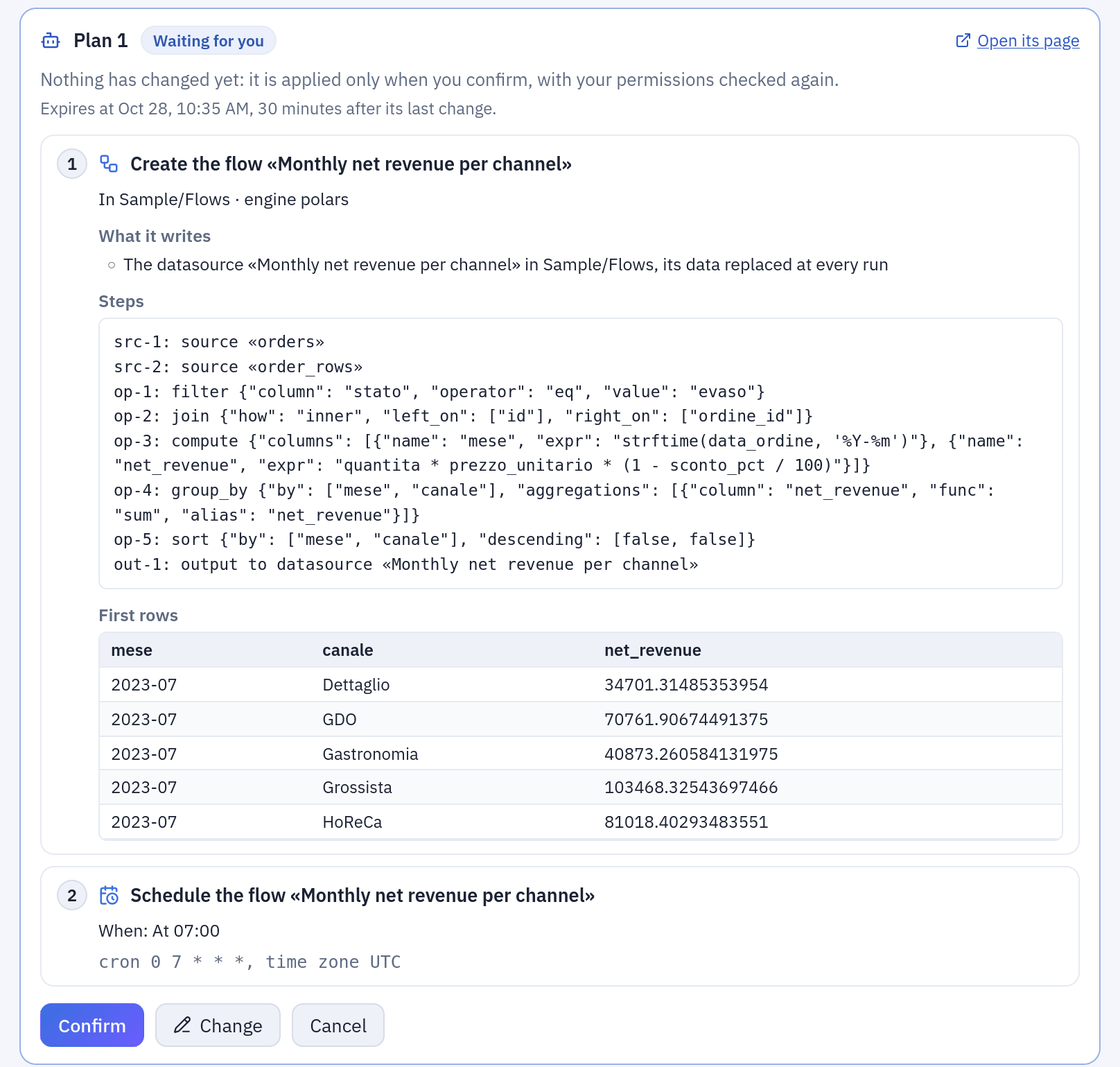
A plan waiting for Confirm on the Assistant page: nothing has changed yet (the example).
Metadata-only mode
With this mode on, no value of a row of data goes to a model. There are two switches, both off by default and both changed live in Administration → Settings, with a line in the audit log; every gateway replica applies a change within 10 seconds:
| Variable | Covers | Whose model |
|---|---|---|
AI__METADATA_ONLY | the chat, the flow assistant, the script assistant, the dbt export, the AI comments | those configured in Tabularia, whichever the provider |
MCP__METADATA_ONLY | the MCP server | the client's, outside the administrator's control |
Administration → AI models shows the state of both.
| Goes to the model | Does not |
|---|---|
| names of datasources, folders, columns, flows, connections, tables and files | sample rows, query results, previews |
| types, row counts, the descriptions people wrote | aggregates and charts: a total is a value of the data |
| the structure of flows, flow groups, SQL scripts and notebooks, with their schedules | the text of errors of the engine, of runs and of connections: could not convert 'abc' quotes one |
| the SQL saved in a script or a datasource | a refresh's notes (the values it did not find; their count goes) |
| for the script assistant, the code and the exit code of a failed run | for the script assistant, the error of a failed run |
The barrier is in the tools, not in a prompt, so no agent's instructions
can open it. Each tool declares whether it returns values of the data: those that do are not
offered, and calling one over MCP anyway is refused; those that hold both, such as
describe_datasource, leave the data out. Here is what changes for each use:
- Chat: the dialog at the start says the mode is on, and asks to be read again when an administrator changes the mode. The model is told it cannot read data, so it says so instead of inventing figures. It can still explain what a datasource holds from its descriptions, write SQL for the person to run, and build. There are no result tables under its answers. A plan's card still shows the person the first rows: they never go to the model, nor does whether the query of a planned SQL script fails.
- Flow assistant: it adds and changes steps without any preview, neither rows nor columns nor the preview's error come back (the columns of a pivot are values, and whether a step fails can be made to depend on one). The person checks the result on the canvas.
- Script assistant: it loses the help on a failed run: the editor says so, and the person describes the problem in their own words.
- dbt export: columns are described from their name and type. Descriptions already written from sample values before the mode came on stay in the project: they are not sent again.
- AI comments: a total is a value, so nothing is sent and no number is read for one: the element says it is off, in a PDF, an image or an email too, which go out all the same, and what was written before the mode came on is not shown.
- Conversations: the turns of a conversation made outside the mode stop going to the model, whole (a tool's result, the SQL the model wrote after reading it, what it answered, the choices of a card), so the model does not remember them, and says so. The person still reads them on the page and can still download a past result. Turns made in the mode go back as usual. Turning the mode off sends everything back again.
- A turn in progress when the mode comes on stops before its next request to the model, with a message saying so. One begun in the mode stays in it to its end.
What stays visible
The mode keeps the values of your rows from the model. It cannot keep from it what people wrote into the structure, which is what the model needs in order to work on it:
- constants in the settings of a flow:
country = 'IT'in a filter, a value in afill_null, the literals of a computed column; - constants in SQL: a saved script, the query of a datasource, a post-SQL;
- the text of descriptions, of a note on the canvas, of a Pushmail or an email Output (subject, body, recipients), the parameters saved with a report in a flow group, the names of the variables of a script;
- whatever the person types in the conversation;
- names that are values: the column a pivot made out of a value and published in a datasource, a file called after a customer, a table named after a client.
If those hold something confidential, the mode does not protect it.
It does not close every side door either, and these are decisions, not oversights:
- Row counts and the state of a run go, on purpose. A flow that filters on a guessed value, or fails only when a value is there, and is run after the person confirms its plan, will show how many rows it wrote and whether it failed.
MCP__METADATA_ONLYcovers/mcp. An API token also works on the rest of Tabularia's API, where it reads what its owner may read. A client that hands its model a generic HTTP tool and the token is outside this barrier: give MCP clients a token only through their MCP configuration, and a service account with only the folders it needs.- A page opened before an administrator changes the mode keeps showing the old state until it is reloaded. The gateway applies the mode in force, whatever the page says.
Permissions of each use
| Use | Who |
|---|---|
| Data assistant | anyone signed in; it reads what the person can read (VIEW) and builds only where they may (EDIT, RUN, CONNECT), checked at every call and again when a plan is applied. Observers can ask, reading only, but their conversations are not saved |
| Flow assistant | EDIT on the flow's folder (any signed-in person on a flow not saved yet); not observers |
| Script assistant | the use of the script's environment; not observers |
| dbt export with AI | whoever may export the flow (dbt export) |
| Add and change providers, enable models, change the instructions | administrators; observers read them, without the providers' addresses or keys |
Telling people it is an AI
The three assistants open with the same dialog, «You are writing to an automated assistant», and stay locked until «I understand». It names the providers of the models on offer, by the name the administrator gave them, and asks again when that list changes. Every answer is labelled «AI assistant» with its model and its provider; under the input, the provider of the model chosen («Your messages, and what the assistant reads for them, go to …») and «This is an AI: it can make mistakes. Always check the results.» A downloaded conversation opens with the same notice. The acceptance lives in the browser, so every new browser, or a shared account on another machine, asks again. Details: Ask your data.
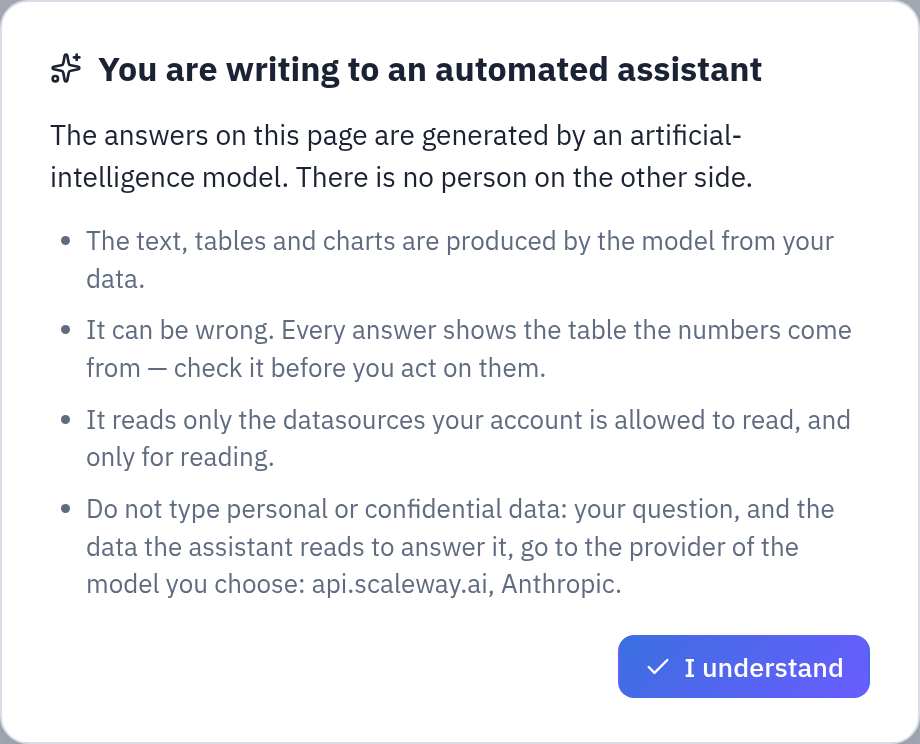
The notice every assistant opens with, until «I understand».
Configuration
The providers
Administration → AI models → AI providers lists them. An administrator adds one with
a name, a type, an address and an API key, tests it, turns it off or removes it. The name is
what people read as who gets their data. The key is encrypted with SECURITY__FERNET_KEY
and never comes back, not in the page, the log, the audit or an error: an empty field keeps
it. A new address needs the key typed again, so a saved key cannot be sent elsewhere. Every
change goes to the audit log, without the key.
| Type | Address | Models come from |
|---|---|---|
| Anthropic | empty, for https://api.anthropic.com | the Models API, through Anthropic's SDK |
| OpenAI-compatible | the endpoint, ending in /v1, hosted or inside your network | GET {address}/models |
Data leaves your network only if the address is outside it. An OpenAI-compatible endpoint must also answer chat completions with tool calls, which is how the assistants use their tools.
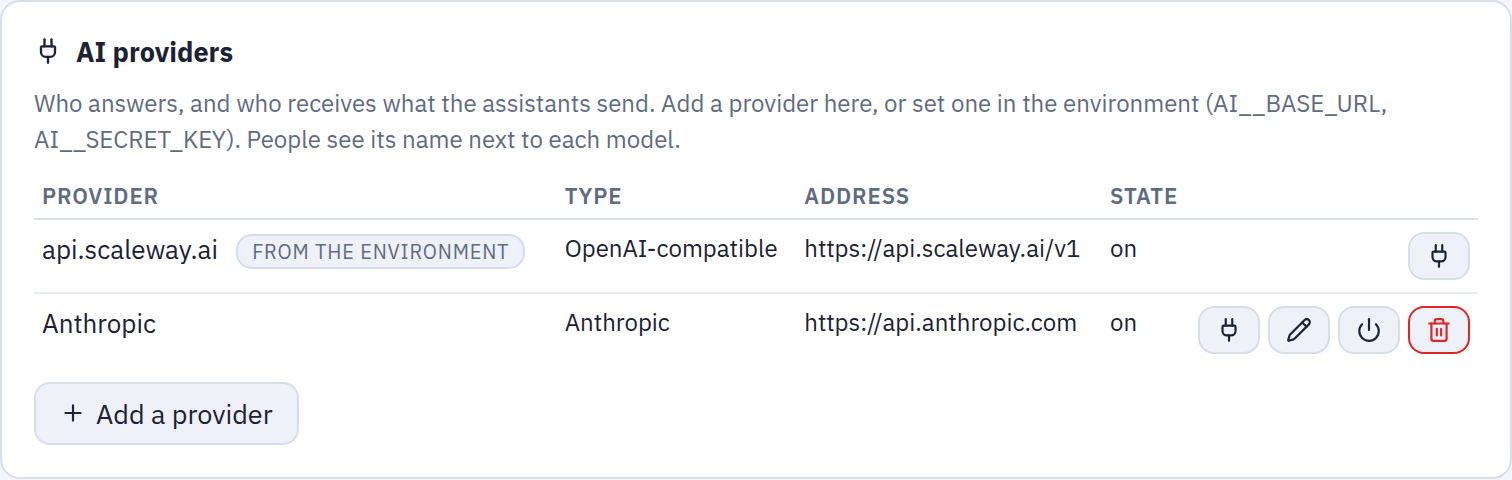
Administration → AI models: the providers. Only the environment's cannot be changed here.
A provider from the environment stays what it always was, and appears in the list as «from the environment», named after its host; it is changed where it is set:
| Variable | Helm value | |
|---|---|---|
AI__BASE_URL | ai.baseUrl | an OpenAI-compatible endpoint, ending in /v1 |
AI__SECRET_KEY | secrets.aiSecretKey | its API key |
AI__ACCESS_KEY | ai.accessKey | the key's identifier, informational only |
AI__DEFAULT_MODEL | ai.defaultModel | offered first in the pickers, and used by the dbt export, when enabled |
On Kubernetes, ai.enabled: true renders these variables; the chart refuses to render
without ai.baseUrl and the secret. The full list, with the caps below, is in
Configuration.
Turning a provider off, or removing it. Its models can no longer be chosen, and a request for one is refused with the reason. Its conversations stay readable, and go on with another model: the page says the next message goes to the model selected. Turned on again, its models are back as they were. Removed, its key and its enabled models are gone; the panel says first how many conversations and models depend on it.
Anthropic. Tabularia sends no sampling settings and no thinking, and never forces a tool
call: today's models refuse them. Effort is set to medium on the models that take it (low
for the titles), max_tokens to 32,000, and prompt caching is on for the assistants' turns.
Thinking blocks go back untouched. When the conversation before them has changed (the date,
the plans, the datasources in focus are in the system prompt) the API refuses them, and
Tabularia repeats the request asking it to drop them: the person sees nothing, and the refused
request costs nothing. A history cut by AI__MAX_HISTORY_MESSAGES is cut between turns, and
goes without thinking blocks. A conversation can change model, and provider, at any question:
the new one gets the earlier messages, not the other model's reasoning. When a model declines
to answer, the person is told, and what it had written is discarded. Server-side fallbacks to
another model are not on.
The models
Administration → AI models lists each provider's catalog; one that does not answer says
so without hiding the others. Nothing is enabled by default: every message is billed by the
provider, so an administrator enables each model people may choose. Embedding, audio and
reranker models are listed but cannot be enabled. A model the provider stops offering stays
in the list, marked «no longer offered», so it can be disabled. The same name on two providers
is two models, and the pickers show each model with its provider. The dbt export uses
AI__DEFAULT_MODEL when it is enabled, otherwise the first enabled model. That setting holds
a model's name, for instance claude-opus-5-5: with the same name on two providers, the
environment's wins, then the provider added first.
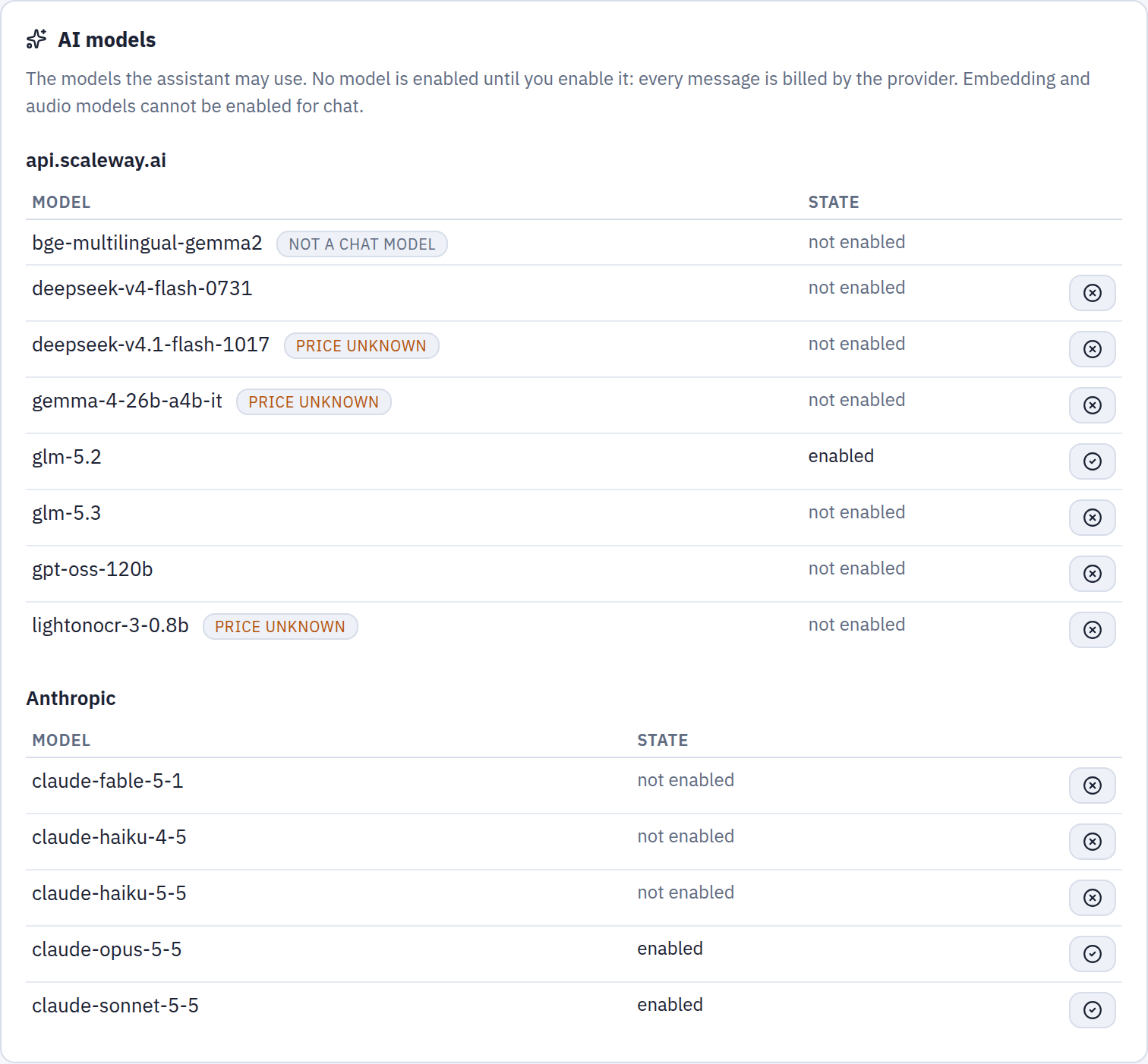
Administration → AI models: the catalog of each provider; only the enabled models can be picked.
Costs and caps
Under each answer the page shows the tokens and an estimated cost, computed from the model's public list price as published with the AI library: an estimate, not your provider's invoice, with cached input at its own rates. A dash means the model could not be priced, which is not zero.
| Variable | Default | Caps |
|---|---|---|
AI__MAX_REQUESTS | 12 | model round-trips per question of the data assistant |
AI__MAX_FLOW_REQUESTS | 30 | the same for the assistants that build: the flow assistant, and the Assistant page for whoever may make changes |
AI__MAX_COST_PER_TURN_USD | 0.5 | dollars per question |
AI__MAX_INPUT_TOKENS_PER_TURN | 400000 | input tokens per question |
AI__MAX_COST_PER_DAY_USD | 0 (none) | dollars per person per day |
AI__MAX_COST_PER_DAY_TOTAL_USD | 0 (none) | dollars for the whole installation per day |
AI__MAX_RESULT_ROWS | 200 | rows of a data assistant query, to the model and to the chat |
AI__MAX_HISTORY_MESSAGES | 60 | past messages replayed to the model at each question (metadata-only mode: only those of turns made in it) |
AI__DBT_EXPORT_TIMEOUT_SECONDS | 180 | seconds for all the AI calls of one dbt export |
The daily caps are checked before a question is sent; once reached, the person (or everyone, for the installation's cap) is told to try again the next day. The dbt export's calls count in the same ledger and stop at the same caps. A model with no known price, marked «price unknown» in the panel, is not free for the caps: they count it at $4 in and $20 out per million tokens, whatever it really costs. Set both daily caps wherever people you do not know can sign in. All of these can also be changed in Administration → Settings, without a restart.
The agents' instructions
Administration → AI models → Agent instructions shows the system prompt of each of the seven agents:
| Agent | Purpose |
|---|---|
| Data assistant | the chat on the Assistant page |
| Flow assistant | builds and changes steps in the flow editor |
| Script assistant | writes and fixes Python or R in the script editor |
| Conversation titles | names every new conversation |
| dbt export descriptions | writes the descriptions of flows and columns in the dbt project |
| dbt export SQL translations | translates the queries the engine does not convert |
| AI comments | writes the comment on the numbers of a dashboard or a report |
An administrator can rewrite a text (up to 20,000 characters) or restore the default. A change applies from the next request, on every gateway replica, and goes to the audit log. Texts the AI already wrote for a version of a flow in a dbt export stay: the new text applies to later versions.
What the administrator writes is only the agent's text. At every request Tabularia adds a context that cannot be edited, shown in the panel with example values: today's date, the engine's SQL dialect and the row cap, the flow or the script being edited, the dialects of a translation, and last, the language: the answer is written in the language of the person's interface (English, Italian, French, German or Spanish), whatever the language of the question, the data or the instructions. The dbt descriptions get no context and are written in English, as the rest of the dbt project, unless the instructions say otherwise.
Conversations
The conversations of the three assistants are saved in Tabularia's database, private to
their author, and hold what was sent and returned, rows included. One untouched for
ORCHESTRATOR__AI_CHAT_RETENTION_DAYS (90 by default) is deleted; all of a person's go
with their account. Observers' conversations are never saved. The flow assistant's
conversation reopens with its flow.
Turning it off
- Entirely: leave
AI__BASE_URLorAI__SECRET_KEYempty (on Helm,ai.enabled: false), and add no provider. The Assistant page says «Assistant not configured», the editors show no Assistant tab, and the dbt export offers no AI (it can still reuse the texts kept for a flow version). - For now: disable every model in Administration → AI models. The Assistant page says «No model enabled»; nothing is sent.
- One use: there is no switch per use or per group. Restricting what the data assistant can read is done with folder permissions, as for everything else.
- Only the data: metadata-only mode keeps the assistants on, with no value of a row going to the model.
Audit
| Event | When |
|---|---|
ai.query | every query of the data assistant and every preview of the flow assistant, with the SQL, the model and its provider, the engine and the rows returned |
export.download | a full result downloaded from a conversation, with the SQL |
ai.provider_create, ai.provider_update, ai.provider_delete | a provider added, changed (which fields, whether the key changed; never the key) or removed |
ai.model_enable, ai.model_disable | a model enabled or disabled, with its provider |
ai.prompt_update, ai.prompt_reset | an agent's instructions changed or restored |
The dbt export's own audit entry names the AI models that wrote its texts (dbt export).
Example: turning it on
From the panel: Administration → AI models → Add a provider: a name, the type, the API
key, Test, Save. Enable a model in the list below it (claude-opus-5-5, for instance).
Docker Compose, in infrastructure/.env:
AI__BASE_URL=https://api.scaleway.ai/v1
AI__SECRET_KEY=<your API key>
AI__DEFAULT_MODEL=gpt-oss-120b
AI__MAX_COST_PER_DAY_USD=2
AI__MAX_COST_PER_DAY_TOTAL_USD=50
Then docker compose up -d again, from infrastructure/: the gateway restarts with
the new settings.
Helm, in your values:
ai:
  enabled: true
  baseUrl: https://api.scaleway.ai/v1
  defaultModel: gpt-oss-120b
  maxCostPerDayUsd: 2
  maxCostPerDayTotalUsd: 50
secrets:
  aiSecretKey: ""   # or AI__SECRET_KEY in the Secret named by existingSecret
Then, as an administrator:
- Administration → AI models: enable
gpt-oss-120b(and any other model people may pick). - Optionally, Agent instructions → Data assistant: add a line such as «Amounts are in euros, net of VAT. The fiscal year starts on 1 April.» and Save.
- Open Assistant, accept the notice and ask «Which datasources can I use and what do they contain?».
- On the external ClickHouse, give the assistant its own read-only account: the AI user.